Introduction
This manual provides essential instructions for the safe and efficient operation of your Technical Pro STAGE28 Dual 8" Rechargeable LED Bluetooth Speaker. Please read this manual thoroughly before using the product and retain it for future reference.
Пакеттин мазмуну
Пакетте бардык буюмдар бар экенин текшериңиз:
- Technical Pro STAGE28 Speaker Unit
- Зымсыз колдук микрофон
- Speaker Stand (Tripod)
- Кубаттоочу кабель (DC5V)
- Көрсөтмө (бул документ)
Жайгашуу
1. Динамикти кубаттоо
Before initial use, fully charge the speaker's built-in rechargeable battery. Connect the provided charging cable to the DC5V IN port on the rear panel of the speaker and to a suitable power source. The charging status indicator will show when the unit is charging.

Image: Rear control panel detail, highlighting the DC5V IN port.
2. Спикер стендди чогултуу
Unfold the tripod legs of the speaker stand. Adjust the height to your preference and secure it using the locking mechanism. Place the STAGE28 speaker securely onto the top pole of the stand.

Image: The included speaker tripod stand.
3. Microphone Preparation
Ensure the wireless handheld microphone has fresh batteries installed. The microphone can be stored in the dedicated compartment on the rear of the speaker when not in use.
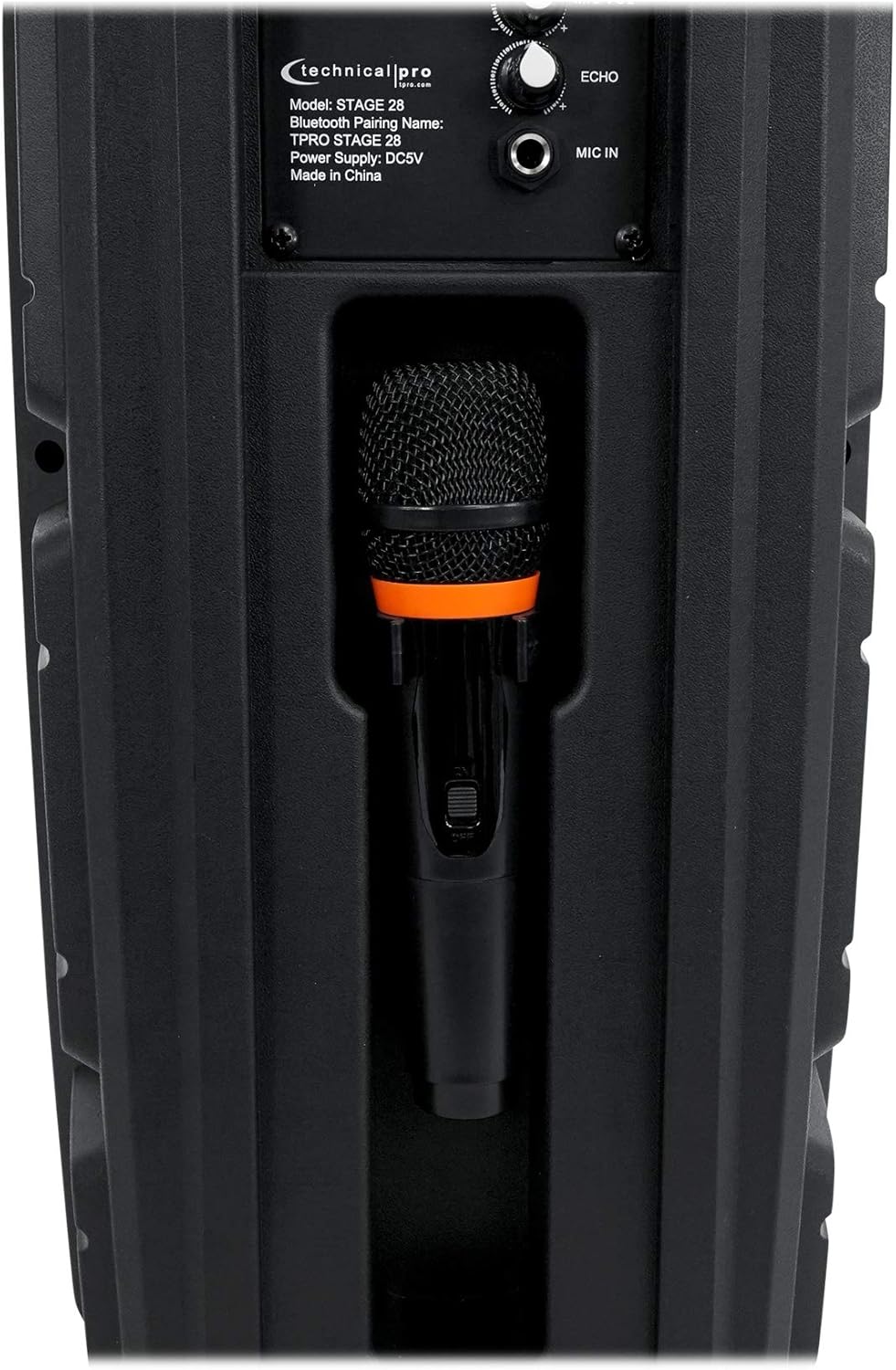
Image: Microphone storage compartment on the speaker's rear.
Иштөө нускамалары
1. Күйгүзүү/өчүрүү жана үндү көзөмөлдөө
айлантыңыз POWER/VOLUME knob clockwise to turn the speaker on and increase the master volume. Rotate counter-clockwise to decrease volume and turn off the speaker.

Image: Full rear panel of the speaker with controls.
2. Bluetooth Жупташтыруу
- Turn on the speaker. The display will show "BLUE" indicating Bluetooth mode.
- Аудио түзмөгүңүздө (смартфон, планшет ж.б.) Bluetooth функциясын иштетиңиз.
- Издөө жеткиликтүү түзмөктөрдү тандап, "TPRO STAGE 28" тизмеден.
- Once paired, the speaker will emit a confirmation tone.
- Bluetooth диапазону болжол менен 9 метрди түзөт.
3. Чыныгы зымсыз стерео (TWS) функциясы
To connect two STAGE28 speakers for TWS stereo sound:
- Ensure both STAGE28 speakers are powered on and in Bluetooth mode.
- On one of the speakers (this will be the primary unit), press and hold the TWS button. The speaker will search for another STAGE28 unit.
- Once connected, both speakers will play audio in stereo from a single Bluetooth source.
4. USB/TF картасын ойнотуу
Insert a USB flash drive or TF (microSD) card (up to 64GB) containing .mp3 audio fileтиешелүүлүгүнө жараша USB or TF port. The speaker will automatically switch to USB/TF mode and begin playback. Use the Мурунку/Кийинки тректерди өтүү үчүн баскычтар.
5. FM радиосунун иштеши
басыңыз РЕЖИМ/ЖАРЫК button to cycle through input modes until "FM" appears on the display. Press and hold the Ойнотуу/Тыныгуу button to auto-scan and save available FM stations. Use the Мурунку/Кийинки Сакталган станциялардын ортосунда которулуу үчүн баскычтарды басыңыз.
6. Aux киргизүү
Connect an external audio device using a 1/8" (3.5mm) audio cable to the AUX input port. Press the РЕЖИМ/ЖАРЫК AUX режимин тандоо үчүн баскычты басыңыз.
7. Микрофонду колдонуу
Plug the wireless microphone receiver (if applicable) or a wired microphone into the MIC IN 1/4" input. Adjust the microphone volume using the MIC VOL knob and add echo effect with the ECHO баскыч.
8. Жарык диоддору
The speaker features LED lights on its woofers. Press the РЕЖИМ/ЖАРЫК button briefly to toggle the LED lights on or off, or to change light modes.

Сүрөт: алдыңкы view of the speaker with LED lights active.
Техникалык тейлөө
- Тазалоо: Динамиктин сыртын тазалоо үчүн жумшак, кургак чүпүрөктү колдонуңуз. Абразивдүү тазалагычтарды же эриткичтерди колдонбоңуз.
- Батареяга кам көрүү: To prolong battery life, avoid fully discharging the battery frequently. Recharge the speaker regularly, even if not in use for extended periods. Store in a cool, dry place.
- Сактагыч: When storing the speaker, ensure it is turned off and disconnected from power. Keep it in a dry environment away from extreme temperatures.
Проблемаларды чечүү
| Көйгөй | Мүмкүн себеп | Чечим |
|---|---|---|
| Динамик күйбөйт. | Battery is discharged. Power/Volume knob is off. | Charge the speaker. Rotate the POWER/VOLUME knob clockwise to turn on. |
| Динамиктен үн жок. | Volume is too low. Incorrect input mode selected. Audio source not playing. | Increase master volume. Ensure correct input mode (Bluetooth, USB, AUX, FM). Check audio source device. |
| Bluetooth түзмөгү жупташа албайт. | Speaker not in Bluetooth mode. Device too far. Previously paired device connected. | Ensure speaker is in Bluetooth mode ("BLUE" on display). Move device closer (within 30 ft). Disconnect from other devices. |
| Микрофон иштебей жатат. | Microphone not connected. MIC VOL knob is low. Microphone batteries are dead. | Ensure microphone is properly connected to MIC IN. Increase MIC VOL. Replace microphone batteries. |
Техникалык шарттар
| Модел: | STAGE28 |
| Чоку күчү: | 1000 Ватт |
| Вуферлер: | Dual 8" LED Woofers |
| Твиттер: | Piezo Horn Tweeter |
| Батарея: | Камтылган кайра заряддалуучу |
| Киргизүүлөр: | Bluetooth, USB, TF Card, FM Radio, Aux (1/8"), Microphone (1/4") |
| USB/TF Card Max Size: | 64 ГБ |
| Колдоого алынган Аудио Files: | .mp3 |
| Bluetooth версиясы: | v2.0 with EDR |
| Bluetooth диапазону: | 30 Фут (9 метр) |
| Жыштык жообу: | 50Гц-20кГц |
| Импеданс: | 4 Ом |
| Сезимталдуулук: | 95 ±2dB (1W@1M) |
| Продукциянын өлчөмдөрү (H x W x D): | 22" x 9.5" x 7.5" (55.9 см x 24.1 см x 19.1 см) |
| Продукт Салмагы: | 8.5 фунт (3.86 кг) |
| Электр камсыздоо: | DC5V |
Кепилдик жана колдоо
For warranty information and technical support, please refer to the documentation provided at the point of purchase or contact the retailer/manufacturer directly. Keep your proof of purchase for warranty claims.


