1. Киришүү
The SINOTIMER TM919B is a 30A 7-day programmable electronic timer switch designed for automatic control of various electrical equipment. It allows you to set specific ON/OFF times over a 24-hour or 7-day cycle, providing convenience and energy efficiency for applications such as streetlights, lamps, water heaters, air conditioners, and more.
Негизги өзгөчөлүктөрү:
- Ideal for household use in DB Boards.
- Жогорку кубаттуулук: 5000 Ватт / 30 Amps.
- Flexible programming: 24 Hours / 7 Days a Week Programmable.
- Убакыт катасын автоматтык түрдө оңдоо: жумасына +/- 30 секунд.
- Multiple programs: Repeat programs with 16 ON/OFF settings.
- Manual ON/OFF control.
2. Продукт бүтүп калдыview
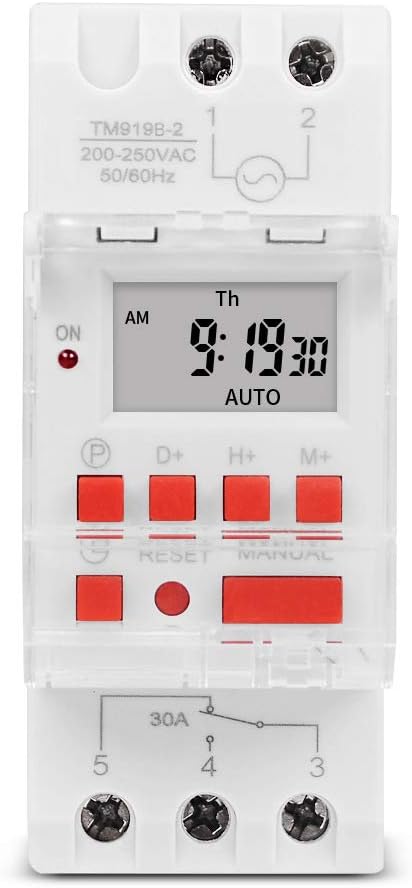
Сүрөт 1: Алдыңкы view of the TM919B timer switch, displaying the LCD screen with time and day, and the array of control buttons including P, D+, H+, M+, RESET, and MANUAL.

2-сүрөт: Бурчтуу view of the TM919B timer switch, showing its side profile and the clear protective cover over the buttons.

3-сүрөт: Каптал view of the TM919B timer switch, detailing the wiring terminals (L, N, 1, 2, 3, 4, 5) and product specifications like voltage жана учурдагы рейтингдер.
3. Техникалык шарттар
| Параметр | Нарк |
|---|---|
| Температура диапазону | -20°Cден +50°Cге чейин |
| Operating Voltage (Ui) | 110V |
| Энергияны керектөө | 4.5 VA (MAX) |
| Дисплей | LCD |
| Байланышты которуу | 1 алмаштыргыч |
| Программалар | Күнүнө же жумасына 16 күйгүзүү/өчүрүү жөндөөсү |
| Гистерезис | Күнүнө 2 секунд (25°C температурада) |
| Минималдуу интервал | 1 мүнөт |
| Кубаттуулугу | 30A 250V AC |
| Караңгыдан өчүрүлгөн эс тутум | 60 күн |
| Таймер диапазону | 1 мүнөттөн 168 саатка чейин |
| Орточо ката | 1 second/24 hours (at 25°C) |
| Элемент Салмагы | 5.3 ounces (0.2kg) |
| Пакеттин өлчөмдөрү | 3.95 x 3.2 x 2 дюйм |
| Screen Size | 1.5 дюйм |
4. Орнотуу жана зымдар
The TM919B timer switch is designed for DIN rail mounting, making it suitable for integration into electrical distribution boards. Ensure all power is disconnected before attempting installation.
Зымдар диаграммасы:

Figure 4: Wiring diagram for the TM919B. Terminals 1 and 2 are for power input (L and N). Terminals 3, 4, and 5 are for the output, typically used for NO (Normally Open) and NC (Normally Closed) connections to control the load.
- Кубат киргизүү: Connect the live (L) and neutral (N) wires to terminals 1 and 2 respectively. Ensure the voltage matches the timer's specification (110V for this model).
- Туташуу жүктөө: The timer has a single changeover switch.
- Terminal 3: Normally Closed (NC) contact.
- Terminal 4: Common (COM) contact.
- Terminal 5: Normally Open (NO) contact.
- Connect your load (e.g., lamp, motor) between the common terminal (4) and either the NO (5) or NC (3) terminal, depending on whether you want the load to be ON or OFF when the timer is in its default state.
- Securely fasten all wires to prevent loose connections.
- Once wiring is complete, restore power and proceed with programming.
5. Operating Instructions and Programming
The TM919B timer allows for up to 16 ON/OFF programs. Follow these steps to set the current time and program the timer.
Баскыч функциялары:
- P (Программа): Программалоо режимине кирет.
- D+ (Күн): Аптанын күнүн тууралайт.
- H+ (Саат): Саатты тууралайт.
- M+ (мүнөт): Мүнөттү тууралайт.
- КАЛТЫРУУ: Resets all settings to factory defaults. Use a pointed object to press.
- КОЛ: КҮЙҮК, АВТОМАТТЫК жана ӨЧҮРҮҮ режимдеринин ортосунда которуштурат.
Учурдагы убакытты орнотуу:
- басыңыз D+ аптанын учурдагы күнүн коюу үчүн баскыч.
- басыңыз H+ учурдагы саатты коюу үчүн баскыч.
- басыңыз M+ учурдагы мүнөттү коюу үчүн баскыч.
- The time will automatically save after a few seconds of inactivity.
Programming ON/OFF Times (Up to 16 Programs):
- басыңыз P button once. The display will show "1 ON". This is for setting the first ON time.
- Басыңыз H+ жана M+ to set the desired hour and minute for the first ON event.
- Басыңыз D+ to select the days of the week for this program. Options include: every day, specific days (e.g., MO-FR, MO-SA, SA-SU), or individual days. If you want the same setting every day, you do not need to press D+.
- басыңыз P button again. The display will show "1 OFF". This is for setting the first OFF time.
- Басыңыз H+ жана M+ to set the desired hour and minute for the first OFF event.
- Басыңыз D+ again if you need to specify different days for the OFF event, or leave it if it matches the ON event's days.
- Repeat steps 1-6 for programs 2 through 16 (e.g., "2 ON", "2 OFF", etc.).
- Бардык керектүү программаларды орноткондон кийин, баскычын басыңыз КОЛ button repeatedly until "AUTO" is displayed. This ensures the timer operates according to your programmed schedule.
Кол менен башкаруу:
басыңыз КОЛ иштөө режимдерин которуу үчүн баскычты басыңыз:
- КҮЙҮК: The output is continuously ON, overriding programmed settings.
- ӨЧҮК: The output is continuously OFF, overriding programmed settings.
- АВТО: The timer operates according to the programmed ON/OFF schedules. Ensure the timer is in AUTO mode for automatic operation.
6. Техникалык тейлөө
The TM919B timer switch requires minimal maintenance. Keep the device clean and free from dust. Do not expose it to excessive moisture or extreme temperatures. If the display becomes dim or unresponsive, check the power supply. The internal battery provides backup for settings during power outag60 күнгө чейин жарактуу.
7. Кыйынчылыктарды
| Көйгөй | Мүмкүн себеп | Чечим |
|---|---|---|
| Таймер программаланган убакта КҮЙГҮЛҮП/ӨЧҮРҮЛБӨЙТ. | Not in AUTO mode; incorrect programming; power issue. | Press MANUAL until "AUTO" is displayed. Review programming steps carefully. Check power supply to the timer. |
| Дисплей бош же күңүрт. | No power supply; internal battery low (unlikely for display). | Check power connections. Ensure the timer is receiving power. |
| Cannot set time or programs. | Buttons unresponsive; unit frozen. | Press the RESET button using a pointed object. This will clear all settings, so you will need to reprogram. |
| Load not switching. | Incorrect wiring; faulty load; timer output issue. | Verify wiring according to the diagram. Test the load independently. If issues persist, contact support. |
8. Кепилдик жана колдоо
This SINOTIMER product is covered by a standard manufacturer's warranty against defects in materials and workmanship. For warranty claims or technical support, please contact your retailer or the manufacturer directly. Keep your purchase receipt as proof of purchase.
For further assistance, visit the official SINOTIMER store: Amazon'догу SINOTIMER дүкөнү


