Introduction
The MediaCom HD Porto MCI Karaoke Player is a lightweight multimedia player designed to enhance your singing experience. It allows you to sing along to your favorite song recordings and easily showcase your talent. This unit is equipped with various connectivity options and comes preloaded with a vast song collection, making it ideal for personal use or duet performances with family and friends.
Коопсуздук маалыматы
- Аппаратты иштетүүдөн мурун бардык нускамаларды окуп чыгыңыз.
- Аппаратты суудан жана нымдан алыс кармаңыз.
- Ашыкча температурага же түз күндүн нуруна дуушар кылбаңыз.
- Берилген кубат адаптерин гана колдонуңуз.
- Аппаратты өзүңүз ачууга же оңдоого аракет кылбаңыз. Квалификациялуу тейлөө кызматкерлерине кайрылыңыз.
- Иштеп жаткан учурда блоктун айланасын туура желдетүүнү камсыз кылыңыз.
Пакеттин мазмуну
Пакетте бардык буюмдар бар экенин текшериңиз:
- MediaCom HD Porto MCI Karaoke Player Unit
- Wired Microphone (MediaCom MCI 380J with 8-meter cable)
- Алыстан башкаруу
- Кубаттуу адаптер
- HDMI кабели
- AV кабели (RCA)
- 64GB microSD Card (preloaded with songs)
- Song List Book

Figure 1: Complete package contents of the MediaCom HD Porto MCI Karaoke Player.
Жайгашуу
- Сыналгыга/Дисплейге туташуу:
Use the provided HDMI cable to connect the HDMI OUT port on the karaoke player to an HDMI IN port on your TV or display. Alternatively, use the AV cable to connect the AV OUT ports on the player to the corresponding AV IN ports on your TV.
- Connect Microphone(s):
Plug the wired microphone into one of the microphone input jacks on the front or back of the karaoke player. The unit supports two wired or wireless microphones.

Figure 2: The included MediaCom wired microphone.
- microSD картасын салыңыз:
Ensure the 64GB microSD card is properly inserted into the designated slot on the player. This card contains the preloaded song collection.
- Туташуу кубаты:
Connect the power adapter to the DC IN port on the karaoke player, then plug the adapter into a power outlet.
- Күйгүзүү:
Press the power button on the unit or the remote control to turn on the karaoke player.
Иштөө нускамалары
Негизги ойнотуу
- Once powered on, the main menu will appear on your TV screen.
- Меню параметрлери боюнча чабыттоо үчүн пульттун жебе баскычтарын колдонуңуз.
- Select "Song List" to browse the available songs.
- Press "OK" to select a song and begin playback.
Ыр издөө
The player offers flexible song search options:
- By Singer Name: Navigate to the search function and input the singer's name.
- By Keyword: Enter specific words from the song title or lyrics.
- By Title: Search directly by the song title.
- Using Songbook: Refer to the physical song list book (Vol-11) for song codes and titles, then input the code using the remote control's numeric pad.
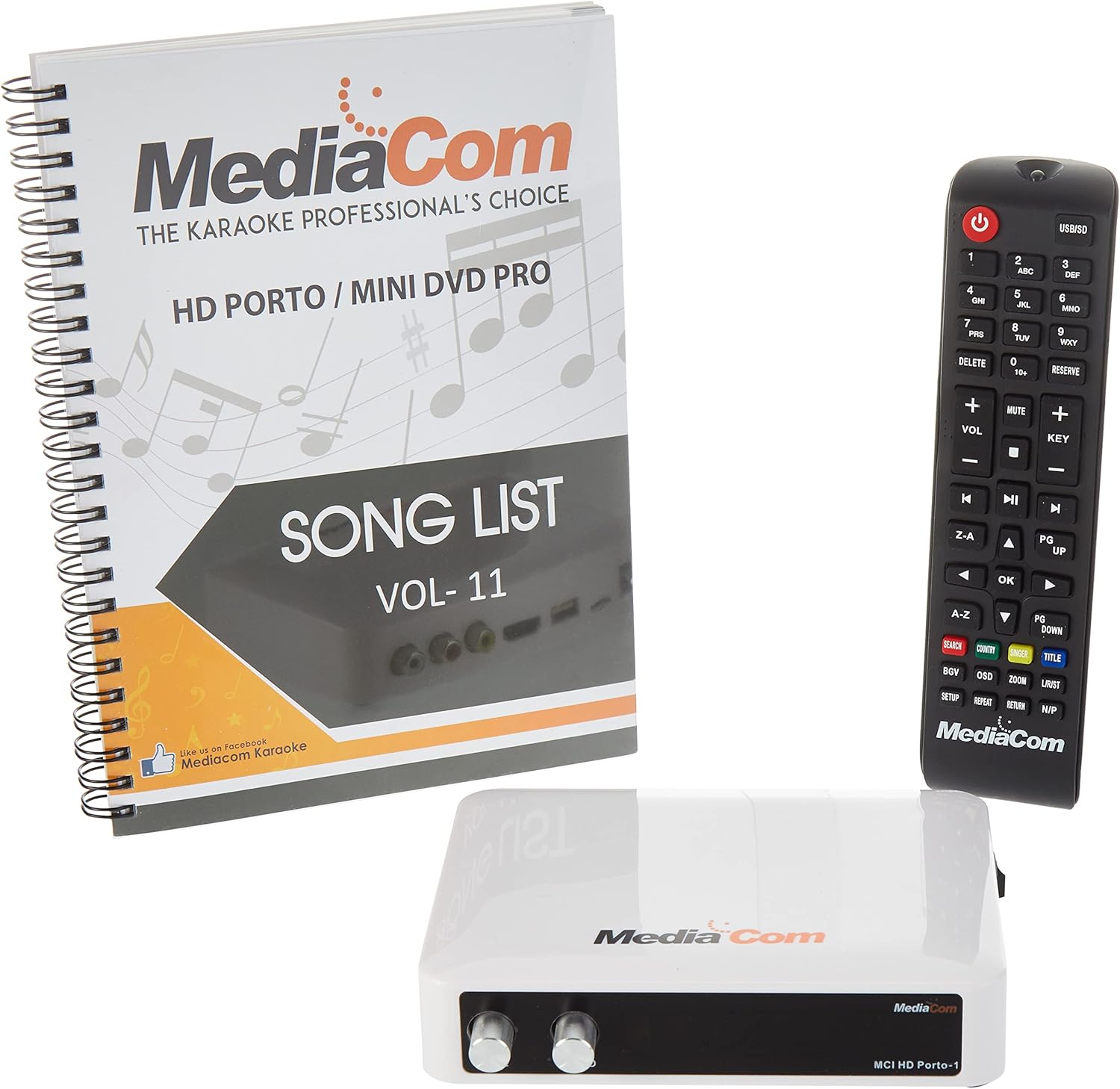
Figure 3: The karaoke player unit, remote control, and song list book for easy navigation.
Микрофонду колдонуу
- Adjust the microphone volume using the dedicated volume knobs on the player unit or the VOL+/- buttons on the remote.
- The player supports duet singing with two microphones (wired or wireless).
Алыстан башкаруу функциялары
The remote control provides full control over the player's functions, including power, volume, song selection, search, and playback controls (play, pause, stop, skip).
Техникалык тейлөө
- Тазалоо: Түзмөктү жумшак, кургак чүпүрөк менен сүртүңүз. Суюк тазалоочу каражаттарды же абразивдүү химиялык заттарды колдонбоңуз.
- Сактагыч: When not in use for extended periods, store the player in a cool, dry place, away from direct sunlight and dust.
- MicroSD картасы: Handle the microSD card carefully. Avoid touching the gold contacts.
Проблемаларды чечүү
| Көйгөй | Мүмкүн себеп | Чечим |
|---|---|---|
| Күч жок | Кубат адаптери туташкан эмес; розетка туура эмес. | Кубат адаптери ишенимдүү туташтырылганын жана иштеген розеткага сайылганын текшериңиз. |
| No sound/video output | HDMI/AV cable loose or incorrect input selected on TV. | Check cable connections. Select the correct HDMI/AV input on your TV. |
| Микрофон иштебей жатат | Microphone not plugged in; Microphone volume too low. | Ensure microphone is fully plugged into the correct jack. Increase microphone volume. |
| Cannot find songs | microSD card not inserted or corrupted. | Ensure microSD card is properly inserted. If issues persist, try reinserting or checking the card on a computer. |
Техникалык шарттар
| Өзгөчөлүк | Деталь |
|---|---|
| Элемент Салмагы | 1.94 килограмм |
| Продукциянын өлчөмдөрү | 14 x 12 x 35 см; 1.94 килограмм |
| Модель номери | HDP-Corded Mic |
| Түс | Кара |
| Туташтыргыч түрү | Composite, HDMI |
| Батарея түрү | Alkaline (for remote, not specified if included) |
| Power Source | Электр зымдары |
| Биринчи жеткиликтүү күн | 4-ноябрь, 2020-жыл |
Кепилдик жана колдоо
Specific warranty details and direct support contact information are not provided within this manual. For warranty claims, technical support, or service inquiries, please refer to the documentation included with your purchase or contact MediaCom customer service through their official webсайт же ыйгарым укуктуу дистрибьюторлор.
You may also visit the product page on Amazon for additional information: Amazon продукт бети


