Introduction
The Amazon Fire TV Stick 4K Max is a powerful streaming device designed to transform your television into a smart entertainment hub. It offers vibrant 4K Ultra HD streaming, supports next-generation Wi-Fi 6 for smoother performance, and comes with an Alexa Voice Remote for intuitive control. This manual provides essential information for setting up, operating, and maintaining your device.
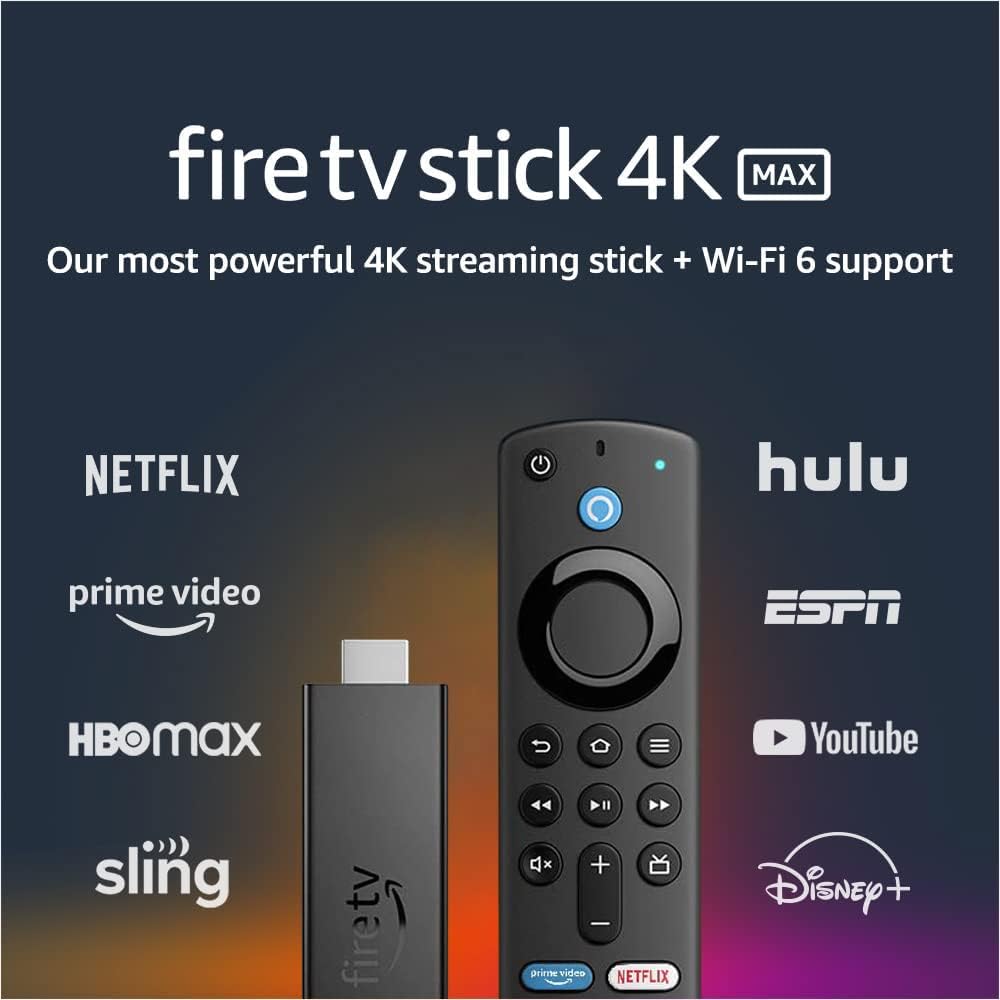
Image: The Fire TV Stick 4K Max and its Alexa Voice Remote, surrounded by logos of popular streaming services like Netflix, Prime Video, Hulu, and Disney+.
Кутуда эмне бар
Сиздин пакетте бардык компоненттер бар экенин текшериңиз:
- Fire TV Stick 4K Max
- Alexa Voice Remote (3-Муун)
- USB cable and power adapter
- HDMI extender cable for Fire TV Stick 4K Max
- 2 AAA батарейка
- Quick Start Guide

Image: A flat lay of all items included in the Fire TV Stick 4K Max package: the Fire TV Stick, Alexa Voice Remote, USB cable, power adapter, HDMI extender, and two AAA batteries.
Жайгашуу
- Fire TV Stickти туташтырыңыз: Plug the Fire TV Stick 4K Max directly into an available HDMI port on your television. If space is limited, use the included HDMI extender cable.
- Түзмөктү иштетүү: Connect the USB cable to the Fire TV Stick and the power adapter, then plug the adapter into a wall outlet.
- Батареяларды пультка салыңыз: Open the battery compartment on the back of the Alexa Voice Remote and insert the two included AAA batteries, observing the correct polarity.
- Пультту жупташтыруу: Once the Fire TV Stick powers on, follow the on-screen instructions to pair your Alexa Voice Remote. Typically, you press and hold the Home button for about 10 seconds until the remote pairs.
- Wi-Fi'га туташуу: Select your Wi-Fi network from the list and enter your password. For optimal performance, connect to a Wi-Fi 6 compatible router if available.
- Кирүү: Amazon аккаунтуңуз менен кириңиз. Эгер сизде аккаунт жок болсо, сизден аккаунт түзүү суралат.
- Толук орнотуу: Follow any remaining on-screen prompts to customize settings, download essential apps, and complete the initial setup.

Image: The Fire TV Stick 4K Max streaming device and its accompanying Alexa Voice Remote, shown side-by-side.
Иштөө нускамалары
Негизги навигация
- Use the circular navigation pad on the Alexa Voice Remote to move through menus and select items.
- Башкы бет баскычы (үйдүн сүрөтчөсү) сизди Fire TV'нин негизги башкы экранына кайтарат.
- Артка баскычы (arrow icon) мурунку экранга кайтып келет.
- Меню баскычы (үч горизонталдуу сызык) контексттик варианттарды сунуштайт.
Аткаруу жана өзгөчөлүктөр
The Fire TV Stick 4K Max is designed for powerful and smooth streaming, especially with Wi-Fi 6 networks.

Image: The Alexa Voice Remote resting on a couch, with text emphasizing smoother 4K streaming with next-gen Wi-Fi 6.
Alexa үн пультун колдонуу
The Alexa Voice Remote allows for voice commands and direct control of your TV and soundbar.
- Үн менен башкаруу: Alexa баскычын басып, кармап туруңуз (blue circle with Alexa logo) and speak your command. You can search for movies, launch apps, check weather, or control smart home devices.
- Алдын ала коюлган баскычтар: Quickly access popular streaming services like Netflix, Prime Video, Disney+, and Hulu using the dedicated preset buttons.
- Сыналгы башкаруулары: Use the Power button to turn your TV on/off and the Volume Up/Down buttons to adjust audio.

Image: The Alexa Voice Remote on a table, with a speech bubble above a TV screen showing the command "Alexa, play 'Obi-Wan Kenobi' on Disney+."
Агылган мазмун
- Access a vast library of movies and TV episodes from various streaming services. Subscription fees may apply for certain services.
- Enjoy live TV, news, and sports through supported apps.
- The device supports 4K Ultra HD with Dolby Vision, HDR, HDR10+, and immersive Dolby Atmos audio for a cinematic experience.

Image: A collage of logos from various streaming services, including Apple TV, Prime Video, HBO Max, Disney+, and YouTube, indicating the wide range of content available.
Smart Home интеграциясы
- View live camera feeds from compatible smart home cameras directly on your TV using Live View Сүрөттөгү сүрөт.
- Ask Alexa to control smart home devices like lights or thermostats.

Image: A television screen showing a main video of a person exercising, with a smaller picture-in-picture window displaying a live feed from a front door camera.
Техникалык тейлөө
- Тазалоо: Use a soft, dry, lint-free cloth to clean the device and remote. Do not use liquid cleaners or aerosols.
- Программалык камсыздоо жаңыртуулары: The Fire TV Stick 4K Max receives automatic software security updates. Ensure your device is connected to the internet to receive these updates.
- Сактагычты башкаруу: The device has 8 GB of storage. Periodically check and manage your installed apps to free up space if needed, which can improve performance.
- Power Cycle: If you experience issues, try unplugging the power adapter from the wall outlet for a few seconds and then plugging it back in.
Проблемаларды чечүү
| Маселе | Мүмкүн чечим |
|---|---|
| No power/No display |
|
| Алыстан жооп бербей жатат |
|
| Буферлөө же агымдын сапаты начар |
|
| Колдонмолордун бузулушу же жай иштеши |
|
Техникалык шарттар
| Өзгөчөлүк | Деталь |
|---|---|
| Түзмөктүн өлчөмдөрү (корпус) | 99 мм x 30 мм x 14 мм |
| Device Dimensions (with connector) | 108 мм x 30 мм x 14 мм |
| Аппараттын салмагы | 48.4 г |
| Процессор | Quad-core 1.8GHz MT8696 |
| GPU | IMG GE9215, 750MHz |
| Ички сактагыч | 8 ГБ |
| Wi-Fi туташуусу | MT7921LS. Supports 802.11a/b/g/n/ac/ax (Wi-Fi 6) networks. |
| Bluetooth | Bluetooth 5.0 + LE |
| Үн колдоо | Yes, with Alexa Voice Remote (included) or free Fire TV app |
| Инфракызыл түзмөктү башкаруу | Controls Fire TV Stick 4K Max and certain TV/soundbar functions (power, volume) |
| Cloud Storage | Amazonдон сатылып алынган санариптик контент үчүн акысыз |
| Порттар | HDMI ARC output, micro USB (power only) |
| Аудио колдоо | Dolby Atmos, 7.1 айлана-чөйрө үнү, 2 каналдуу стерео, HDMI аудио 5.1ге чейин өтөт |
| 4K колдоо | Requires compatible Ultra HD TV. Services and availability may vary. |
| Мазмун форматтары колдоого алынат | Video: Dolby Vision, HDR 10, HDR10+, HLG, H.265, H.264, VP9, AV1. Audio: AAC-LC, AC3, eAC3, FLAC, MP3, PCM/Wave, Vorbis, Dolby Atmos. Photo: JPEG, PNG, GIF, BMP. |
| Чыгуу резолюциясы колдоого алынат | 2160p, 1080p жана 720p, секундасына 60 кадрга чейин |
| Системалык талаптар | High-definition television with HDMI input, high-speed internet connection via Wi-Fi. Wi-Fi 6 router needed for Wi-Fi 6 support. |
| TV шайкештиги | 4K UHD TVs with HDMI (2160p @ 24/25/30/50/60 Hz, HDCP 2.2) or HDTVs with HDMI (1080p or 720p @ 50/60 Hz). |
| Атайын мүмкүнчүлүктөр | ҮнView screen reader, closed captioning, Bluetooth headphone support. |
| Программалык камсыздоонун коопсуздук жаңыртуулары | Guaranteed until at least four years after last purchase availability. |
| Remote Dimensions | 38 мм x 142 мм x 16 мм |
| Пульттун салмагы (батареясыз) | 43.4 г |
| Алыскы Батарейкалар | 2 AAA (кошулган) |
| Remote Technology | Bluetooth |
| Remote Compatibility | Fire TV Stick (3-муундагы), Fire TV Stick 4K, Fire TV Stick 4K Max |
Кепилдик жана колдоо
Сиздин Amazon Fire TV Stick 4K Max менен келет 1 жылдык чектелген кепилдик жана тейлөө. Extended warranty options (2-year and 3-year) are available for purchase separately for U.S. customers.
For detailed warranty terms and conditions, please refer to the official Amazon Fire TV terms of use. For further assistance or technical support, visit the Amazon support webсайтка же кардарларды тейлөөгө кайрылыңыз.


