Introduction
This manual provides comprehensive instructions for the assembly, operation, and maintenance of your FLEXISPOT EN2 Electric Height Adjustable Standing Desk. Please read this manual thoroughly before use to ensure proper function and longevity of your product.
The FLEXISPOT EN2 features a whole-piece bamboo desktop, a removable power outlet with USB ports, a 6-button digital controller with 4 memory presets, and a durable steel frame designed for a stable and productive workspace.
Коопсуздук маалыматы
- Maximum weight capacity: 176 pounds (80 kg). Do not exceed this limit.
- Assembly requires an electric drill (not included). Exercise caution during assembly.
- Үстөлдү иштетүүдөн мурун бардык туташуулар коопсуз экенин текшериңиз.
- Иш учурунда балдарды жана үй жаныбарларын столдон алыс кармаңыз.
- Avoid contact with water or abrasive materials during cleaning.
Орнотуу жана чогултуу
Your FLEXISPOT EN2 desk will arrive in two separate packages, which may be shipped separately. Assembly is required and is recommended for two people to facilitate handling of components. An electric drill is necessary for proper setup, but is not included.
Компоненттер бүттүview

Figure 1: ашыкview of FLEXISPOT EN2 desk components. This image displays the various parts included for assembly, such as the desktop, leg frames, and hardware.
Кабель башкаруу
The desk includes a cable management device to help organize cords, contributing to a tidy workspace. Fasteners and Velcro straps are provided to secure cables neatly under the desktop.

Figure 2: Illustration of effective cable management. The "Before" section shows disorganized cables, while the "After" section demonstrates how the integrated cable management system tidies them.
Ассамблея видеосу
Video 1: Flexispot Standing Desk - Embrace a Healthier Lifestyle. This official video demonstrates the desk's features and includes brief segments on assembly and operation.
Иштөө нускамалары
Көп функциялуу контроллер
The desk is equipped with a 6-button digital controller for easy height adjustment and memory preset functions. The controller features an LED display showing the current height.

3-сүрөт: Детальдуу view of the multifunctional controller. It shows the LED display, up/down arrows, and four programmable height setting buttons.
Бийиктигин тууралоо
- колдонуу Өйдө (^) жана Төмөн (v) arrows to manually adjust the desk height.
- The motorized system adjusts smoothly from 28.1 inches (71.4 cm) to 45.7 inches (116.1 cm).
- Мотор 50 дБден аз жыштыкта тынч иштейт.
Memory Presets
The controller allows you to save up to 4 preferred height settings for quick transitions between sitting and standing positions.
- Өйдө/төмөн жебелер менен үстөлдү каалаган бийиктикке тууралаңыз.
- басыңыз "М" баскычы. LED дисплей күйөт.
- Номерленген алдын ала коюлган баскычтардын бирин басыңыз (1, 2, 3 же 4) while the display is flashing to save the current height to that preset.
- Сакталган бийиктикти кайра чакырып алуу үчүн жөн гана тиешелүү номерленген алдын ала коюлган баскычты басыңыз.
Removable Desktop Power Outlet
The desktop includes a removable power outlet with 3 AC outlets and 2 USB charging ports (5V/2A). This can be clipped to the back or side of your desk for convenient access.

Figure 4: The removable desktop power outlet, featuring 3 AC outlets (125V/12A) and 2 USB ports (5V/2A) for charging devices.
Кагылышууга каршы система
The desk is equipped with a smart anti-collision system. If the desk encounters an obstruction during height adjustment, it will stop and reverse slightly to prevent damage.
Техникалык тейлөө
- Dust regularly with a dry cloth to keep the desktop clean.
- Avoid contact with water or abrasive cleaning materials to prevent damage to the bamboo surface.
- Мезгил-мезгили менен бардык бурамалар менен байланыштарды текшерип туруңуз, алар бекем жана бекем бойдон калууда.
Проблемаларды чечүү
If you encounter any issues with your FLEXISPOT EN2 desk, please refer to the following general advice:
- Стол кыймылдабай жатат: Check all power connections and ensure the power outlet is functioning. Verify that the control panel is properly connected.
- Кыймыл бирдей эмес: Үстөлдүн тегиз жерге коюлганын текшериңиз. Буттун бардык компоненттери бекем бекитилгенин текшериңиз.
- Дисплейдеги ката коддору: Consult the full troubleshooting guide available on the FLEXISPOT website or contact customer support for specific error code interpretations.
For further assistance, please contact FLEXISPOT customer support.
Техникалык шарттар
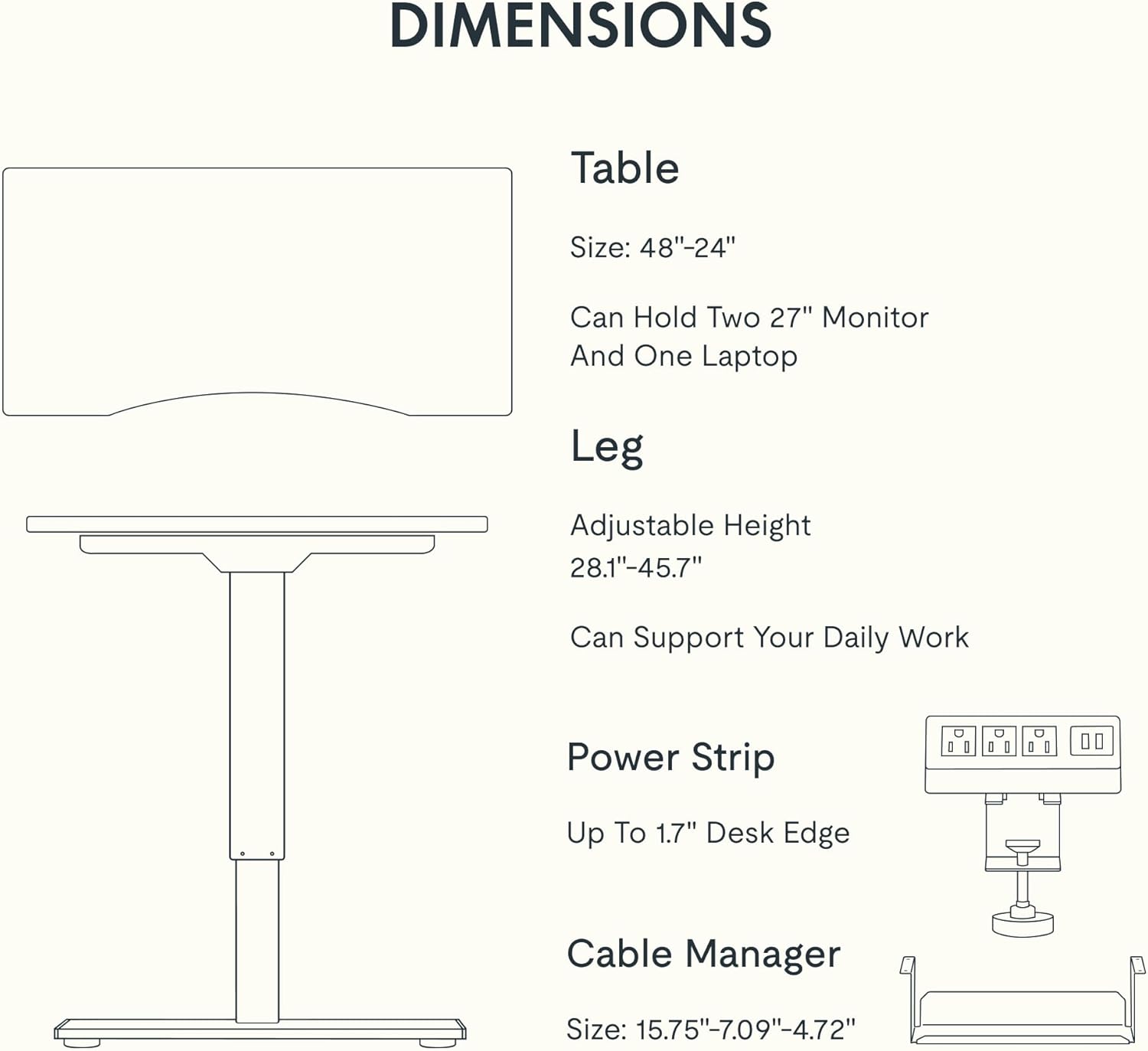
Figure 5: Dimensional specifications of the FLEXISPOT EN2 desk. This diagram illustrates the table size, adjustable height range, and dimensions of the power strip and cable manager.
| Өзгөчөлүк | Деталь |
|---|---|
| Бренд | FLEXISPOT |
| Модель номери | EN2 |
| Иш столунун материалы | Whole-Piece Bamboo |
| Frame Material | Эритме болот |
| Продукциянын өлчөмдөрү (D x W x Y) | 24"D x 48"W x 28"H (61cm D x 122cm W x 71cm H) |
| Жөнгө салынуучу бийиктик диапазону | 28.1" - 45.7" (71.4см - 116.1см) |
| Максималдуу Салмак сыйымдуулугу | 176 фунт (80 кг) |
| Мотор ызы-чуунун деңгээли | 50 дБден аз |
| Электр розеткасы | 3 AC Outlets (125V/12A), 2 USB Charging Ports (5V/2A) |
| Ассамблея талап кылынат | Yes (Recommended 2 people, electric drill not included) |
Кепилдик жана колдоо
FLEXISPOT provides the following warranty for your EN2 standing desk:
- 5 жылдык кепилдик: рамкаларды, моторлорду жана башка механикалык түзүлүштөрдү камтыйт.
- 2 жылдык кепилдик: Контроллерлерди, өчүргүчтөрдү жана электрониканы камтыйт.
For customer support, warranty claims, or additional product information, please visit the official FLEXISPOT webсайтка же кардарларды тейлөө бөлүмүнө кайрылыңыз. Сиз да зыярат кылсаңыз болот Amazonдагы FLEXISPOT дүкөнү.


