1. Киришүү
The Gecko in.k800 Electronic Keypad is designed to provide an advanced and intuitive user interface for controlling your spa's functions. Featuring a bright, full-color display and a 10-button layout, this keypad offers seamless navigation and control for Gecko's X and Y series control systems.
Негизги өзгөчөлүктөр төмөнкүлөрдү камтыйт:
- Full-color interface for clear and efficient user control.
- Menu-driven interface to configure and manage all spa functions and connected accessories.
- 10-key layout for dynamic navigation and enhanced user experience.
- Compatibility with Gecko's X and Y series control systems.

2. Орнотуу жана орнотуу
This section outlines the general steps for setting up and installing your Gecko in.k800 Electronic Keypad. For detailed wiring and system-specific instructions, please refer to your spa's main control system manual or consult a qualified technician.
2.1 Камтылган компоненттер
Сиздин пакетте төмөнкү элементтер болушу керек:
- Gecko in.k800 Keypad
- Колдонуучунун колдонмосу (бул документ)
2.2 Шайкештик
The in.k800 keypad is compatible with Gecko's X and Y series control systems.
2.3 Орнотуу кадамдары
- Ensure the spa's power supply is disconnected before beginning installation.
- Carefully remove the existing keypad (if applicable) or prepare the mounting location for the new in.k800 keypad.
- Connect the keypad cable to the designated port on your Gecko X or Y series control system. Ensure the connection is secure and watertight.
- Mount the in.k800 keypad in the desired location, ensuring it is securely fastened and sealed to prevent water ingress.
- Once installed, restore power to the spa. The keypad should power on and display the initial setup screen or home interface.

3. Иштөө нускамалары
The in.k800 keypad features a user-friendly, menu-driven interface. This section provides an overview of the keypad's buttons and display elements.
3.1 Баскычтоптун жайгашуусу
The keypad consists of 10 physical buttons and a central color display. Refer to Figure 2 for the button identification.
- Орнотуулар баскычы: Typically used to access the main settings menu.
- Режим баскычы: Used to cycle through different operating modes or functions.
- Өйдө/төмөн жебелер: Used for navigation within menus and adjusting values (e.g., temperature).
- Light/Key 6: Controls spa lighting or serves as a programmable function key.
- 1-5 баскычтары: Functions for these keys may vary depending on your system's configuration.
- Selection Lights: Indicate active selections or modes.
3.2 Дисплей интерфейси
The full-color display provides real-time information and allows for intuitive menu navigation. Refer to Figure 3 for an explanation of the display elements.
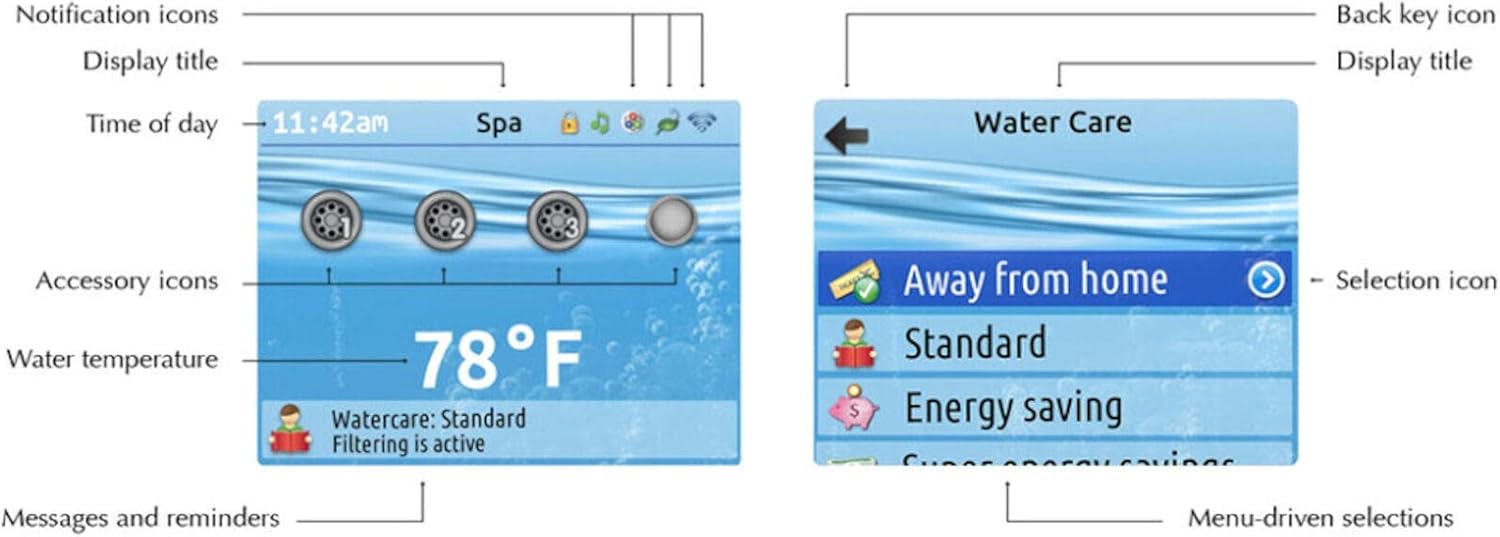
- Notification Icons: Display system alerts or status indicators.
- Дисплейдин аталышы: Shows the current menu or screen name (e.g., "Spa", "Water Care").
- күндүн убактысы: Учурдагы убакытты көрсөтөт.
- Accessory Icons: Represent active accessories (e.g., jets, blower).
- Суунун температурасы: Shows the current spa water temperature.
- Messages and Reminders: Provides important system messages or maintenance reminders (e.g., "Watercare: Standard Filtering is active").
- Back Key Icon: Мурунку экранга же менюга кайтуу үчүн колдонулат.
- Selection Icon: Highlights the currently selected menu item.
- Menu-driven Selections: List of options available for selection (e.g., "Away from home", "Standard", "Energy saving").
3.3 Негизги навигация
To navigate the in.k800 interface:
- колдонуу Up жана Төмөн жебе баскычтары менен меню параметрлерин жылдырыңыз.
- Борбордук баскычты басыңыз Тандоо button (often indicated by a dot or circle) to confirm a selection or enter a submenu.
- колдонуу Back Key Icon (usually an arrow pointing left) to return to the previous screen.
- The Орнотуулар button provides access to advanced configurations.
4. Техникалык тейлөө
Proper maintenance ensures the longevity and optimal performance of your in.k800 keypad.
4.1 Тазалоо
- Gently wipe the keypad surface and display with a soft, damp кездеме.
- Avoid using abrasive cleaners, solvents, or harsh chemicals, as these can damage the display and keypad finish.
- Ensure no water enters the keypad housing during cleaning.
4.2 Коргоо
- To prevent sun damage and prolong the life of the display, consider using a protective cover for your spa, especially if the keypad is frequently exposed to direct sunlight.
5. Кыйынчылыктарды
This section provides basic troubleshooting steps for common issues. If the problem persists, contact Gecko customer support or a qualified spa technician.
| Көйгөй | Мүмкүн себеп | Чечим |
|---|---|---|
| Keypad display is blank | No power to the spa or keypad; Loose connection | Check spa's main power supply. Ensure keypad cable is securely connected to the control system. |
| Баскычтар жооп бербейт | Keypad malfunction; Water ingress | Ensure keypad surface is dry. If problem persists, contact support. |
| Температураны туура эмес окуу | Sensor issue; System calibration needed | Consult your spa's control system manual for sensor troubleshooting or recalibration. |
6. Техникалык шарттар
Technical specifications for the Gecko in.k800 Electronic Keypad:
- Модель номери:
- in.k800 (0607-008030)
- Продукциянын өлчөмдөрү:
- 8.75 x 4.25 x 2.5 дюйм
- Өндүрүүчү:
- Gecko
- Шайкеш түзмөктөр:
- Gecko's X and Y series control systems
- Баскычтоптун сүрөттөмөсү:
- Specialized Input Device with 10-Key Layout and Color Display
- Стиль:
- Заманбап
- Камтылган компоненттер:
- Keypad, User Guide
- Кубат булагы:
- Пассивдүү
- Баскычтардын саны:
- 10
- Биринчи жеткиликтүү болгон күнү:
- 5-ноябрь, 2020-жыл
7. Кепилдик жана колдоо
For warranty information, please refer to the documentation provided with your spa control system or contact Gecko directly. For technical support or service inquiries, please visit the official Gecko webсайтка же ыйгарым укуктуу дилериңизге кайрылыңыз.
You can find more information about Gecko products at the Gecko Store on Amazon.


