Introduction
This manual provides essential information for the safe and effective use of your ProForm City L6 Folding Treadmill. Please read all instructions carefully before operating the equipment. Retain this manual for future reference.

Image: The ProForm City L6 Folding Treadmill, showcasing its compact design and console.
Маанилүү коопсуздук маалыматы
To reduce the risk of serious injury, read all important precautions and instructions in this manual before using the treadmill. ProForm assumes no responsibility for personal injury or property damage sustained by or through the use of this product.
- Кандайдыр бир көнүгүү программасын баштаардан мурун доктурга кайрылыңыз.
- Балдарды жана үй жаныбарларын чуркоо жолунан алыс кармаңыз.
- Чуркоо жолун тегиз жерге коюңуз, анын артында кеминде 2 метр (6.5 фут) жана эки тарабында 0.5 метр (1.6 фут) бош орун калтырыңыз.
- Тийиштүү көнүгүү кийимин жана спорттук бут кийимди кийиңиз.
- Электр шнуры же сайгычы бузулуп калса, чуркоо жолун иштетпеңиз.
- Always hold the handrails when starting or stopping the treadmill.
- Do not exceed the maximum user weight capacity of 250 pounds (113 kg).
Жайгашуу
Пакеттен чыгаруу жана жайгаштыруу
Carefully remove all components from the packaging. Place the treadmill on a flat, stable surface. Ensure adequate clearance around the unit for safe operation and maintenance.
Assembly (Folding Mechanism)
The ProForm City L6 features a SpaceSaver Design for compact storage. To prepare for use, carefully unfold the treadmill deck until it locks into place. To fold for storage, lift the deck until it secures in the upright position.
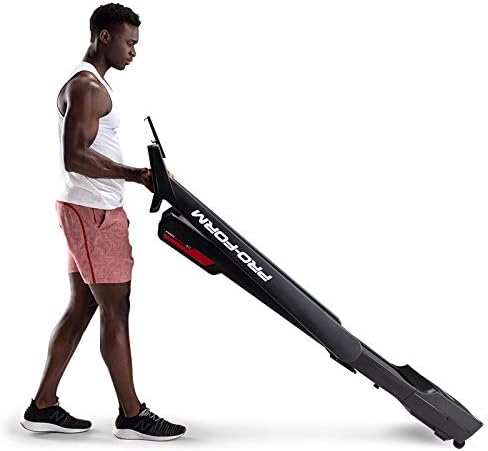
Image: A user demonstrating the folding mechanism of the ProForm City L6 Treadmill for compact storage.
Power Connection
Connect the power cord to a grounded outlet. Ensure the safety key is properly inserted into the console before attempting to power on the treadmill.
iFIT Activation
Your treadmill includes a 30-day iFIT membership. To activate, download the iFIT app on your tablet or smartphone. Connect your device to the treadmill via Bluetooth. Follow the on-screen instructions in the iFIT app to set up your account and access workouts.

Image: The treadmill console with a tablet mounted, showing the iFIT application interface.
Иштөө нускамалары
Treadmill баштоо
- Ensure the safety key is in place.
- Бутуңузду каптал рельстерге коюп, чуркоо тилкесинин куруна кадам таштаңыз.
- басыңыз START баскычын басыңыз. Кур жай ылдамдыкта кыймылдай баштайт.
- Gradually increase speed using the SPEED + buttons or Digital QuickSpeed controls.

Image: A user engaged in a running workout on the ProForm City L6 Treadmill.
Ылдамдыкты жөндөө
колдонуу SPEED + жана ЫЛДАМ - buttons on the console to adjust the treadmill's speed. The treadmill offers speeds from 0 to 8 MPH. For iFIT workouts, the trainer may automatically adjust your speed.
Stopping the Treadmill
басыңыз ТОКТОТ button to gradually slow down and stop the treadmill belt. For an emergency stop, pull the safety key from the console.
Дисплейди колдонуу
The 5-inch high-contrast display shows your workout metrics, including distance, speed, estimated calorie burn, and time. When connected to iFIT, enhanced metrics are available through the app.
Техникалык тейлөө
Тазалоо
Regularly clean the treadmill with a damp cloth and mild soap. Avoid using abrasive cleaners or solvents. Wipe down the console and handrails after each use to remove sweat and debris.
Belt Care
Inspect the walking belt periodically for wear and tear. Ensure the belt is properly centered and tensioned. Refer to the full product manual (if available from manufacturer) for detailed instructions on belt adjustment and lubrication, if required.
Жалпы текшерүү
Check all bolts and nuts for tightness regularly. Replace any worn components immediately. Unplug the treadmill before performing any maintenance or cleaning.
Проблемаларды чечүү
| Көйгөй | Мүмкүн себеп | Чечим |
|---|---|---|
| Чуркоо тилкеси күйбөйт. | Power cord not plugged in; safety key not inserted; circuit breaker tripped. | Электр шнурунун бекем сайылганын текшериңиз. Коопсуздук ачкычын толугу менен киргизиңиз. Үйдөгү автоматтык өчүргүчтү текшериңиз. |
| Басуу куру тайып кетет же тартынып калат. | Курдун тартылуусу өтө бош; курду майлоо керек. | Adjust belt tension (refer to manufacturer's detailed guide). Lubricate belt if necessary (use approved silicone lubricant). |
| Консоль дисплейи бош же туруксуз. | Кабелдин байланышы бошоп калган; электр кубатынын көйгөйү. | Check all cable connections to the console. Unplug and re-plug the treadmill. |
If you encounter issues not listed here, or if solutions do not resolve the problem, contact customer support.
Техникалык шарттар
- Модел: PFTL28820
- Бренд: ProForm
- Продукциянын өлчөмдөрү: 30.48 x 81.28 x 187.96 см (12 x 32 x 74 дюйм)
- Элемент Салмагы: 65.77 кг (145 фунт)
- Максималдуу Колдонуучу Салмагы: 250 фунт (113 кг)
- Ылдамдык диапазону: 0-8 MPH Digital QuickSpeed Controls
- Протектордук кур: 18" x 47"
- Дисплей: 5-inch High-Contrast LCD
- Мотордун күчү: 2 HP
- Өзгөчөлүктөр: SpaceSaver Design (Foldable), iFIT Bluetooth Connectivity
- Кубат булагы: Электр зымдары

Image: The ProForm City L6 Treadmill with its physical dimensions indicated.
Кепилдик
The ProForm City L6 Folding Treadmill is protected by the following warranties:
- кадр: 10 жылдык чектелген кепилдик
- Бөлүктөр жана эмгек: 1 жылдык чектелген кепилдик
This warranty applies to the original owner and is valid only in the country where the product was purchased. For full warranty terms and conditions, please refer to the warranty card included with your product or visit the official ProForm webсайт.
Колдоо
For technical assistance, parts inquiries, or warranty claims, please contact ProForm Customer Service. Have your model number (PFTL28820) and serial number ready when contacting support.
Visit the official ProForm website for additional resources, FAQs, and contact information: www.proform.com


