Introduction
Сатып алганыңыз үчүн рахматasing the GLOBE Electric Celestia 2-Light Wall Sconce. This modern glam fixture, featuring a matte brass finish and frosted glass globe shades, is designed to provide a warm and inviting glow to your living space. This manual provides detailed instructions for safe installation, operation, and maintenance to ensure optimal performance and longevity of your product.
Маанилүү коопсуздук маалыматы
ЭСКЕРТҮҮ: Электр шок коркунучу. Орнотуудан же тейлөөдөн мурун сактагычтан же автоматтык өчүргүчтөн электр кубатын өчүрүңүз.
- Орнотууну баштоодон мурун бардык нускамаларды кылдат окуп чыгыңыз.
- Ensure the electrical supply is disconnected at the main circuit breaker or fuse box before installation.
- Бардык электр байланыштары жергиликтүү кодекстерге, буйруктарга же Улуттук электр кодексине (NEC) ылайык болушу керек. Эгер сиз электр зымдарын туура туташтырууну билбесеңиз, квалификациялуу электриктин кызматын алыңыз.
- Көрсөтүлгөн кубаттуулуктагы лампаларды гана колдонуңузtage and type (2x E26/Medium Base 60W Max Bulbs).
- Максималдуу ваттан ашпаңызtage.
- Handle glass shades with care.
- Таңгактоочу материалдарды балдардан алыс кармаңыз.
Пакеттин мазмуну
Орнотууну баштоодон мурун бардык компоненттер бар экендигин текшериңиз:
- Wall Sconce fixture (1)
- Frosted Glass Shade (2)
- Mounting Hardware Kit (screws, wire nuts, mounting plate)
- Нускама баракчасы (бул колдонмо)
Продукт спецификациялары
| Өзгөчөлүк | Деталь |
|---|---|
| Бренд | ГЛОБ |
| Модель аты | Celestia |
| Бөлүмдүн номери | 51726 |
| UPC | 058219517260 |
| Түс | Celestia (Gold) |
| Материал | Металл |
| Жарык берүүчү форма | Шалка |
| Продукциянын өлчөмдөрү | 19.5"L x 7"W x 6.25"H |
| Элемент Салмагы | 3.3 фунт |
| Ички/тышкы колдонуу | Indoor |
| Power Source | Электр зымдары |
| Орнотуу түрү | Жарым флюш орнотуу |
| Өзгөчө өзгөчөлүк | Dimmable |
| Жарык булагы түрү | E26/Medium Base (Compatible with LED, Incandescent, Halogen) |
| Көлөкө материалы | Айнек |
| Жарык булактарынын саны | 2 |
| Тtage | 120 вольт |
| Ватtage | 60 watts (Max per bulb) |
| Лампанын базасы | E26 |
| Controller Type | Push Button |
| Сууга туруктуулук деңгээли | Сууга чыдамдуу эмес |
| Ассамблея талап кылынат | Жок |
Орнотуу жана орнотуу
Follow these steps carefully to install your Celestia Wall Sconce. It is recommended to have a second person assist during installation.
Керектүү куралдар (камтылган эмес):
- Бурагыч (Phillips жана Flathead)
- Wire Strippers
- Электр лентасы
- Коопсуздук көз айнек
- Шаты (зарыл болсо)
Орнотуу кадамдары:
1. Орнотууга даярданыңыз:
Before starting, ensure the power to the circuit you are working on is turned off at the circuit breaker or fuse box. Clear the work area and gather all necessary tools and components.
2. Орнотуу пластинасын бекитүү:
Secure the mounting plate to the electrical junction box in the wall using the provided screws. Ensure the plate is firmly attached and level.

Сүрөт: Жакын план view of the sconce's mounting bracket, showing the central rod and connection points, indicating where it attaches to the wall.
3. Make Electrical Connections:
Carefully connect the electrical wires. Connect the black wire from the fixture to the black (hot) wire from the junction box using a wire nut. Connect the white wire from the fixture to the white (neutral) wire from the junction box using a wire nut. Connect the ground wire from the fixture to the ground wire from the junction box (or to the green ground screw on the mounting plate). Ensure all connections are secure and covered with wire nuts and electrical tape if necessary.
4. Арматураны орнотуу:
Арматураны бекитүүчү пластина менен кылдаттык менен тегиздеп, берилген бурамалар менен бекитиңиз. Арматура дубалга тегиз жана туруктуу экенин текшериңиз.

Image: The Celestia 2-Light Wall Sconce, showcasing its matte brass finish and two frosted glass globe shades, ready for installation.
5. Install Glass Shades and Bulbs:
Gently attach the frosted glass shades to the fixture. Insert two E26/Medium Base 60W Max bulbs (sold separately) into the sockets. Compatible with LED, Incandescent, and Halogen bulbs. Dimmable LED or Incandescent bulbs are recommended for dimming functionality.

Сүрөт: деталдуу view of one of the frosted glass shades and the bulb socket, illustrating how bulbs are inserted.
6. Кубатты калыбына келтирүү:
Once installation is complete and all connections are secure, restore power at the circuit breaker or fuse box. Test the light fixture to ensure proper operation.
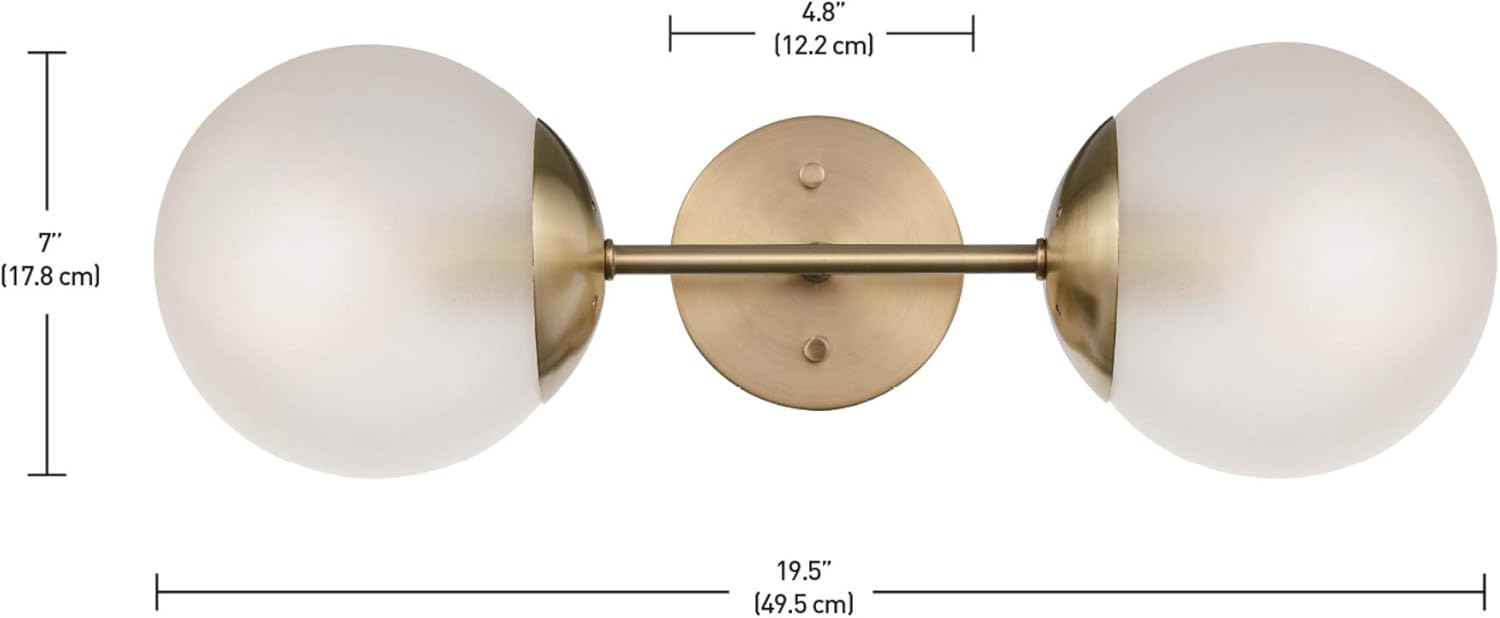
Image: Dimensional drawing of the Celestia Wall Sconce, indicating its length (19.5 inches), height (7 inches), and depth (6.25 inches).
Иштөө нускамалары
The GLOBE Electric Celestia Wall Sconce is designed for simple operation once installed.
- Күйгүзүү/өчүрүү: Control the light fixture using your standard wall switch connected to the circuit.
- Караңгылоо функциясы: If you have installed dimmable LED or Incandescent bulbs and connected the fixture to a compatible dimmer switch (sold separately), you can adjust the light intensity by operating the dimmer switch.
- Ар тараптуу жайгаштыруу: This fixture can be mounted horizontally or vertically to suit your aesthetic and lighting needs.
Кароо жана тейлөө
Regular maintenance will help preserve the appearance and functionality of your wall sconce.
- Тазалоо: To clean the fixture, ensure power is off. Wipe the metal parts with a soft, dry cloth. For the glass shades, use a soft cloth dampened with a mild glass cleaner. Avoid abrasive cleaners or solvents that may damage the finish.
- Лампаны алмаштыруу: Always turn off power at the circuit breaker before replacing bulbs. Allow bulbs to cool completely before handling. Replace bulbs with the same type and wattage (E26/Medium Base, 60W Max).
- Текшерүү: Мезгил-мезгили менен бардык туташууларды жана монтаждоо жабдыктарын текшерип туруңуз.
Проблемаларды чечүү
If you encounter issues with your wall sconce, refer to the following common problems and solutions:
| Көйгөй | Мүмкүн себеп | Чечим |
|---|---|---|
| Жарык күйбөйт. | Шайманга күч жок. Лампочка бош же күйүп кеткен. Туура эмес зым. | Check circuit breaker/fuse. Ensure wall switch is on. Лампочканы бекемдеңиз же алмаштырыңыз. Verify wiring connections are secure and correct (refer to Installation Steps). |
| Жарык жылтылдайт. | Бош лампа. Шайкеш келбеген диммерди которгуч/лампа. Бошогон зымдар байланышы. | Лампаны бекемдөө. Ensure dimmer switch and bulbs are compatible for dimming. Зымдарды байланыштарды текшериңиз. |
| Fixture is unstable after installation. | Mounting screws not tightened. Mounting plate not secure. | Бардык бекитүүчү бурамалар толугу менен бекемделгенин текшериңиз. Verify mounting plate is securely attached to the junction box. |
| Айнек көлөкө бош. | Көлөкө туура эмес камсыздалган. | Gently re-secure the glass shade according to installation instructions. |
If problems persist, consult a qualified electrician or contact GLOBE Electric customer support.
Кепилдик жана колдоо
As per the product information, there is no specific warranty description provided for this product. For any product inquiries, technical assistance, or support, please contact GLOBE Electric customer service directly through their official webпродукт сатылып алынган сайт же сатуучу.
For more information about GLOBE Electric products, visit: www.globe-electric.com


