1. Продукт бүтүп калдыview
The SONOFF MINI R2 is a compact Wi-Fi Smart Switch designed to transform traditional switches into smart ones, enabling remote control and automation of your home appliances. Its small size allows for easy installation within standard junction boxes.

Key features include APP remote control, time scheduling, voice control compatibility with Amazon Alexa and Google Home, LAN control, and a customizable power-on state. The device also supports smart scenes and DIY mode for advanced users.

2. Коопсуздук маалыматы
Always ensure the main power supply is turned off before performing any electrical work. Installation should be carried out by a qualified electrician if you are not familiar with electrical wiring. Do not exceed the maximum load rating of the device.
- Орнотуудан же тейлөөдөн мурун электр энергиясын өчүрүңүз.
- Ensure proper wiring connections (Live, Neutral, Load).
- дда орнотпоңузamp чөйрөлөр.
- Балдар жетпеген жерде сактаңыз.
The MINIR2 features an improved internal antenna for enhanced safety and performance, having passed 2KV surge tests and ANATEL certification.

3. Орнотуу жана орнотуу
3.1 Электр зымдары боюнча нускамалар
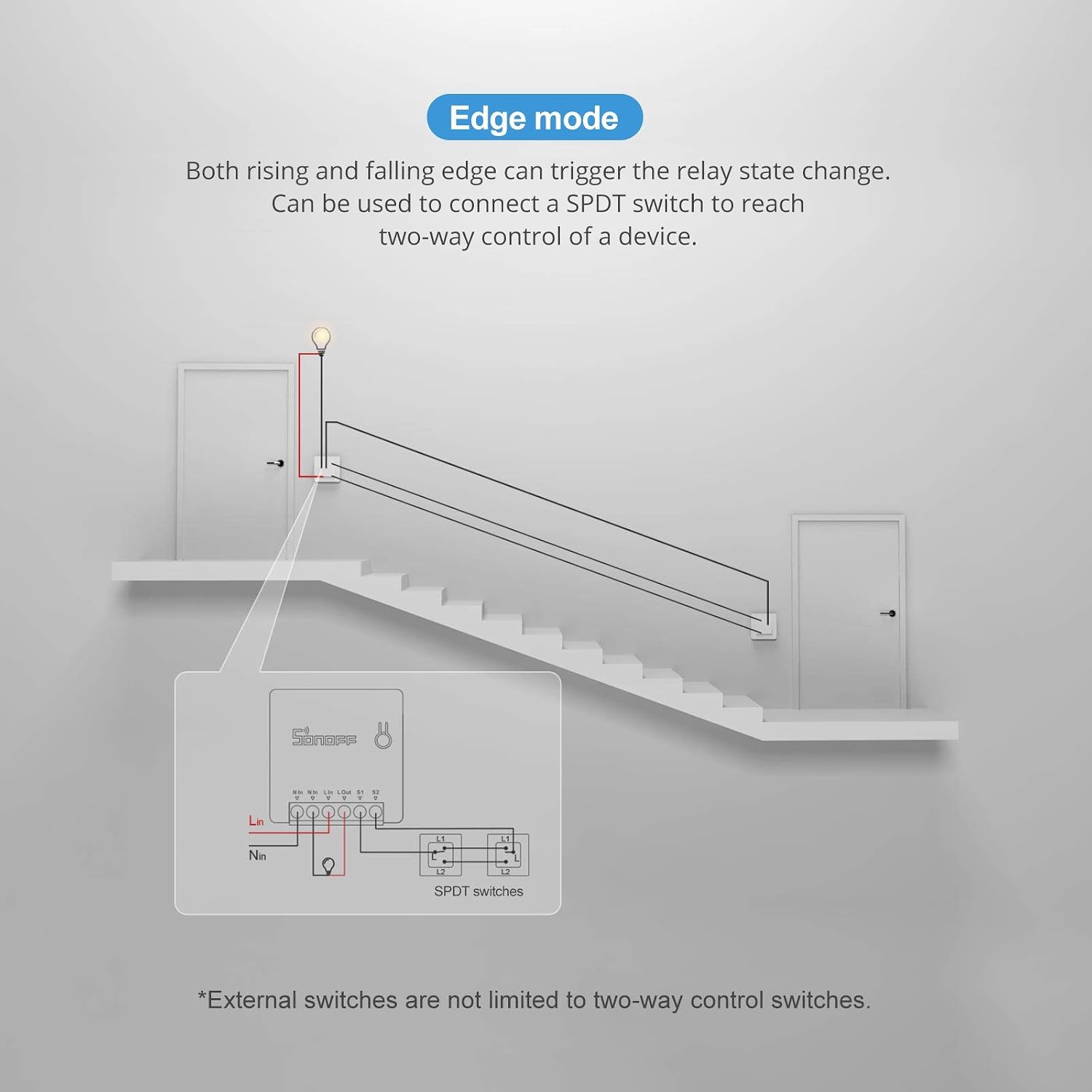
The SONOFF MINI R2 supports various wiring configurations, including connection with external switches like SPDT switches and NC/NO push-button switches. It is recommended to install the front side of the MINIR2 outside of metal junction boxes to ensure optimal Wi-Fi signal.

The device can be integrated with existing wall switches to maintain manual control alongside smart functionality.

3.2 Advanced Wiring Modes
The MINIR2 supports different modes for advanced control:
- Edge режими: Both rising and falling edges can trigger the relay state change. This mode is ideal for connecting a SPDT switch to achieve two-way control of a device.
- Импульс режими: Falling edge triggers the relay to reverse in level jumping. This mode is ideal for push-button switches that are triggered once after being pressed and automatically bounce back.

- Кийинки режим: This mode allows the light to follow the ON/OFF direction of the wall switch, even if the physical switch state does not correspond to the light's state. It can also connect dry contact sensors.

3.3 Колдонмолорду жупташтыруу
Download the eWeLink app from your smartphone's app store (iOS/Android). Follow the in-app instructions to pair your SONOFF MINI R2 device. Ensure your Wi-Fi network is 2.4GHz.
4. Иштөө нускамалары
4.1 APP Control
Control your connected appliances from anywhere using the eWeLink app. You can turn devices on/off, set schedules, and create smart scenes.

4.2 Үн менен башкаруу
The SONOFF MINI R2 is compatible with Amazon Alexa and Google Home Assistant, allowing for hands-free control of your devices using voice commands.

4.3 Акылдуу көрүнүштөр жана графиктер
Create intelligent scenes within the eWeLink app to automate your devices. You can set timers, countdowns, and loop timers to automatically switch devices on/off, optimizing energy consumption.
4.4 DIY Mode
For advanced users, the DIY mode allows utilization of the REST API to connect the MINI R2 with your existing home automation system, offering greater customization and integration possibilities.

5. Техникалык тейлөө
To ensure optimal performance and longevity of your SONOFF MINI R2, follow these maintenance guidelines:
- Тазалоо: Gently wipe the device with a dry, soft cloth. Do not use liquid cleaners or aerosols.
- Курчап турган чөйрө: Түзмөктүн кургак жерде, күн нуру түз тийген жерлерден жана өтө жогорку температурадан алыс орнотулганын текшериңиз.
- Программалык камсыздоонун жаңыртуулары: Regularly check for and install firmware updates via the eWeLink app to benefit from new features and security enhancements.
6. Кыйынчылыктарды
If you encounter issues with your SONOFF MINI R2, refer to the following common problems and solutions:
| Көйгөй | Мүмкүн себеп | Чечим |
|---|---|---|
| Колдонмодо түзмөк оффлайн | Weak Wi-Fi signal, router issues, incorrect Wi-Fi password. | Ensure device is within Wi-Fi range. Restart router. Re-pair device if Wi-Fi password changed. |
| Үн башкаруу иштебейт | Device offline, incorrect voice command, linking issue with Alexa/Google Home. | Check device status in eWeLink app. Use correct commands. Relink eWeLink skill/service in Alexa/Google Home app. |
| Device not responding to physical switch | Incorrect wiring for external switch, switch type not configured correctly in app. | Verify wiring according to diagrams. Adjust switch type setting (e.g., pulse mode, edge mode) in eWeLink app. |
| Device frequently disconnects from Wi-Fi | Interference, distance from router, too many devices on network. | Relocate router or device. Reduce Wi-Fi interference. Consider a Wi-Fi extender. |
For further assistance, please refer to the official SONOFF support resources.
7. Техникалык шарттар
Detailed technical specifications for the SONOFF MINI R2:
| Спецификация | Нарк |
|---|---|
| Модел | MINIR2 |
| Киргизүү | AC 100-240V 50 / 60Hz 10A Max |
| Чыгуу | AC 100-240V 50 / 60Hz 10A Max |
| Wi-Fi | IEEE 802.11 b / g / n 2.4GHz |
| Материал | PC V0 |
| Өлчөмдөрү (LxWxH) | 42.6 x 42.6 x 20 мм |
| Номиналдуу ток | 10 Ampere |
| Operating Voltage | 240 вольт |
| Ватtage | 1100 ватт |
| Recommended Max. Wire Gauge | 2.5мм² |
8. Кепилдик жана колдоо
SONOFF өнүмдөрү, адатта, чектелген кепилдик менен келет. Сураныч, өнүмүңүзгө кошо берилген кепилдик картасын караңыз же расмий SONOFF дүкөнүнө баш багыңыз. webдеталдуу кепилдик шарттары жана шарттары үчүн сайт.
For technical support, troubleshooting assistance, or product inquiries, please contact SONOFF customer service through their official website or the eWeLink app support section. Keep your purchase receipt for warranty claims.


