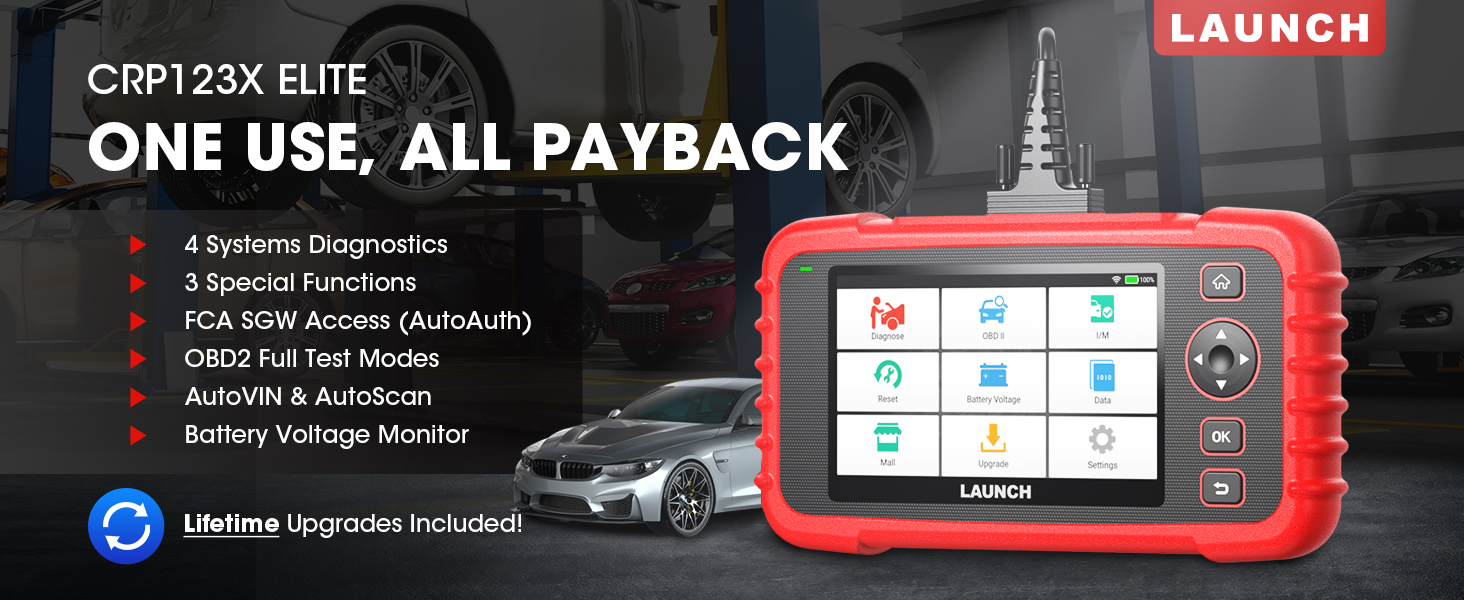
The LAUNCH CRP123X Elite is an advanced OBD2 diagnostic scan tool designed for comprehensive vehicle system analysis. It offers a wide range of functions including 4-system diagnostics (Engine, Transmission, ABS, SRS), 3 special reset services (Oil Reset, Electronic Throttle Relearn, Steering Angle Sensor Calibration), full OBD2 functions, AutoVIN technology, and lifetime free software updates via Wi-Fi. This manual provides detailed instructions for setting up, operating, and maintaining your CRP123X Elite scanner.
2. Негизги өзгөчөлүктөрү
Өмүр бою акысыз программалык камсыздоо жаңыртуулары: Ensures compatibility with future vehicles and systems, updated wirelessly via Wi-Fi.
3 Hottest Special Functions: Includes Oil Reset, Electronic Throttle Relearn (ETC Reset), and Steering Angle Sensor Calibration (SAS Reset).
4-Системалык диагностика: Comprehensive diagnostics for Engine, Anti-lock Braking System (ABS), Supplemental Restraint System (SRS), and Transmission Control Module (TCM). Read and clear DTCs, view live data, and read ECU information.
Унаанын кеңири чөйрөсү: Supports over 72 car brands across US, EU, and Asia, including 2018+ FCA SGW (AutoAuth required).
AutoVIN жана AutoScan: Automatically identifies vehicle information and quickly scans all modules in all systems for 2006+ vehicles.
All 10 OBD2 Test Modes: Supports all standard OBD2 functions for basic car issue diagnosis, including reading/clearing codes, live data, freeze frame, I/M readiness, O2 sensor test, EVAP system test, on-board monitor test, component test, and vehicle information retrieval.
Real-Time Voltage Монитор: Displays dynamic graphic representation of the car's battery voltage.
4-in-1 Graphic Live Data: Allows merging up to 4 PIDs data on one screen for easier analysis.
Диагностикалык отчетту бөлүшүү: Save and share diagnostic reports for further analysis or record-keeping.
Колдонуучуга ыңгайлуу дизайн: Features a 5-inch HD touchscreen, Android 7.0 OS, 16GB memory, and anti-slip, shock-resistant casing.
3. Пакеттин мазмуну
Пакетиңизде бардык буюмдар бар экенин текшериңиз:
LAUNCH CRP123X Elite Scanner (Red unit with 5-inch touchscreen)
DC 5V Charging Cable (USB cable)
OBD2 Cable (DB-15 diagnostic connector)
Carrying Bag (Black zippered case)
User Manual (Printed document)
Figure 3.1: LAUNCH CRP123X Elite Package Contents. This image displays the main scanner unit, a USB charging cable, an OBD2 diagnostic cable, a black carrying bag, and the printed user manual.
4. Орнотуу колдонмосу
4.1 Баштапкы күйгүзүү жана заряддоо
Before first use, ensure the device is fully charged. Connect the provided DC 5V Charging Cable to the scanner's charging port and a suitable USB power adapter (not included) or computer USB port. The device will power on automatically or can be powered on by pressing the power button.
Figure 4.1: Scanner Ports and Buttons. This image highlights the 5V charging port, the DB-15 diagnostic connector, and the power button on the top side of the scanner.
4.2 Wi-Fi туташуусу
From the main menu, tap on "Settings".
"Wi-Fi" тандап, аны күйгүзүңүз.
Тизмеден каалаган Wi-Fi тармагын тандап, суралса, сырсөздү киргизиңиз.
Туташкандан кийин абал тилкесинде Wi-Fi сөлөкөтү пайда болот.
4.3 Программалык камсыздоону баштапкы жаңыртуу
It is recommended to perform a software update after connecting to Wi-Fi to ensure you have the latest vehicle coverage and functions.
From the main menu, tap on "Upgrade".
The system will check for available updates. Select all necessary updates and tap "Download".
Allow the updates to complete. The device may restart during this process.
Figure 4.2: One-Click Wi-Fi Update. This image illustrates the simple process of updating the scanner's software via a Wi-Fi connection, highlighting its ease of use compared to other methods.
5. Иштөө нускамалары
5.1 Унаага туташуу
Locate the vehicle's OBD2 port, usually under the dashboard on the driver's side. Connect the provided OBD2 cable to the scanner and then to the vehicle's OBD2 port. Turn the vehicle's ignition to the "ON" position (engine off or running, depending on the test).
Figure 5.1: Scanner Connected to Vehicle. This image shows the LAUNCH CRP123X Elite scanner connected to a vehicle's diagnostic port, ready for operation.
5.2 System Diagnostics (Engine, ABS, SRS, Transmission)
The CRP123X Elite can diagnose four core vehicle systems:
Кыймылдаткыч системасы: Read and clear engine fault codes, view live data streams, and check engine light status.
Антиблокировкалык тормоз системасы (ABS): Diagnose ABS issues, read and clear ABS fault codes, and view ABS sensor data.
Кошумча чектөө системасы (SRS/коопсуздук жаздыкчасы): Read and clear airbag fault codes. Note: Crash data cannot be cleared from memory even with a new airbag.
Transmission Control Module (TCM): Diagnose transmission problems, read and clear transmission fault codes, and view transmission live data.
To perform a system diagnostic:
From the main menu, tap "Diagnose".
Select the vehicle make and model. The AutoVIN feature (for 2006+ vehicles) can automatically detect this.
Choose the system you wish to diagnose (e.g., "Engine", "ABS").
"Коддорду окуу" дегенди тандаңыз view Diagnostic Trouble Codes (DTCs) or "Clear Codes" to erase them.
тандоо "View Data Stream" to monitor real-time sensor data.
Figure 5.2: 4 Systems Diagnostic Overview. This image visually explains the diagnostic capabilities for Engine, Transmission, SRS, and ABS systems, including reading/clearing codes and viewing data streams.Video 5.1: LAUNCH Code Reader - CRP123X OBD2 Scanner for Engine Transmission ABS SRS. This video demonstrates the diagnostic capabilities of the CRP123X scanner across engine, transmission, ABS, and SRS systems, showing how to read and clear codes and view жандуу маалыматтар.
5.3 Reset Functions (Oil, ETC, SAS)
The scanner supports three common reset services:
Майды калыбына келтирүү: Resets the oil life reminder after an oil change or maintenance service.
Электрондук дроссельди кайра үйрөнүү (ETC баштапкы абалга келтирүү): Relearns the electronic throttle body for optimal engine performance and smooth idle.
Steering Angle Sensor Calibration (SAS Reset): Calibrates the steering angle sensor after alignment or component replacement.
To perform a reset function:
From the main menu, tap "Reset".
Select the desired reset function (e.g., "Oil Reset").
Процедураны аяктоо үчүн экрандагы көрсөтмөлөрдү аткарыңыз.
Figure 5.3: 3 Hottest Reset Functions. This image illustrates the three primary reset functions: Oil Reset, Electronic Throttle Control (ETC) Reset, and Steering Angle Sensor (SAS) Reset, which are crucial for vehicle maintenance.
5.4 All 10 OBD2 Test Modes
The CRP123X Elite supports all 10 modes of OBD2 testing, providing comprehensive diagnostic capabilities for emissions-related issues and general vehicle health:
Окуу коддору: Учурдагы, күтүлүп жаткан жана туруктуу Диагностикалык Кыйынчылык Коддорун (DTC) көрсөтөт.
Коддорду тазалоо: Clears DTCs from the vehicle's computer and turns off the Malfunction Indicator Lamp (МИЛ).
Live Data Stream: Текст же график форматында унаанын сенсорлорунан реалдуу убакыттагы маалыматтарды көрсөтөт.
Кадр дайындарын тоңдуруп коюу: Эмиссияга байланыштуу ката пайда болгон учурда иштөө шарттарынын сүрөтүн көрсөтөт.
O2 сенсор тести: Retrieves and displays O2 sensor monitoring test results.
Борттогу монитор тести: Үзгүлтүксүз көзөмөлгө алынбаган эмиссияга байланыштуу электр өткөргүч компоненттери жана системалары үчүн сыноо натыйжаларын чыгарат.
EVAP системасы сыноо: Буулануучу эмиссияны көзөмөлдөө системасын сыноодон өткөрөт.
Компоненттик тест: Унаанын EVAP тутумунун агып кетүүсүн текшерүүнү баштоого мүмкүндүк берет.
Унаа жөнүндө маалымат: Унаанын идентификациялык номерин (VIN), калибрлөө IDсин (CID) жана калибрлөөнү текшерүү номерин (CVN) алат.
Figure 5.4: Complete OBD2 Test Modes. This image displays icons and brief descriptions for each of the 10 OBD2 test modes, including Read Codes, Erase Codes, Live Data Stream, Freeze Frame, I/M Readiness, On-Board Monitor Test, O2 Sensor Test, EVAP System Test, Vehicle Information, and DTC Library.
5.5 Live Data Stream & Recording
The scanner can display live sensor data in various formats. You can select up to four data parameters to view simultaneously in a graphical format for easier comparison and analysis.
From the main menu, tap "Data".
Select "Live Data" and choose the parameters you wish to monitor.
Tap the "Record" icon to begin recording the data for later review.
Figure 5.5: 4-in-1 Live Data Stream. This image shows the scanner's ability to display multiple live data parameters simultaneously in a graphical format, along with options for data recording and playback.
5.6 Диагностикалык отчет
After completing a diagnostic session, you can generate and save a diagnostic report. This report can be printed via PC or emailed for record-keeping or sharing with a mechanic.
After a scan, navigate to "Data" and then "Diagnostic Report".
Сенин колуңдан келет view, playback, or share the report via email (requires Wi-Fi connection).
Figure 5.6: Diagnostic Report Generation and Sharing. This image highlights the scanner's capability to generate detailed diagnostic reports and offers options to print them via PC or share them electronically.
5.7 Real-Time Voltage Монитор
The scanner includes a feature to monitor the vehicle's battery voltage in real-time, displayed graphically.
From the main menu, tap "Battery Voltagе".
Реалдуу убакыттагы көлөмдү байкаңызtage readings and dynamic graphic.
Figure 5.7: Real-Time Voltage Monitor. This image demonstrates the scanner's ability to display the vehicle's battery voltage in real-time, including a dynamic graphical representation.
6. Техникалык тейлөө
Тазалоо: жумшак колдонуу, damp Сканердин сыртын тазалоо үчүн кездеме колдонуңуз. Абразивдүү тазалоочу каражаттарды же эриткичтерди колдонбоңуз.
Сактагыч: Store the device in its carrying bag in a dry, cool place away from direct sunlight and extreme temperatures.
Программалык камсыздоо жаңыртуулары: Regularly connect the device to Wi-Fi and perform software updates to ensure optimal performance and access to the latest vehicle data and features.
Батареяга кам көрүү: Батареянын иштөө мөөнөтүн сактоо үчүн, көп колдонулбаса да, түзмөктү үзгүлтүксүз кубаттап туруңуз. Батареянын узак убакыт бою толугу менен зарядын жоготпоңуз.
7. Кыйынчылыктарды
Көйгөй
Мүмкүн себеп
Чечим
Түзмөк күйбөйт.
Low battery; faulty connection.
Charge the device fully. Ensure OBD2 cable is securely connected to vehicle and scanner.
Унаа менен байланыш катасы.
Loose connection; vehicle not OBD2 compliant; ignition off; blown fuse in vehicle.
Check all connections. Verify vehicle is OBD2 compliant (1996 and newer for US). Turn ignition ON. Check vehicle's fuse for the OBD2 port.
Экран катып калат же түзмөк жооп бербей жатат.
Software glitch; temporary system error.
Press and hold the power button to force a restart. If issue persists, perform a factory reset (data will be lost).
Wi-Fi'га туташпай жатат.
Туура эмес сырсөз; диапазондон тышкары; тармак маселеси.
For further assistance, please contact LAUNCH customer support.
8. Техникалык шарттар
Өзгөчөлүк
Деталь
Модель номери
launch crp123x
Операция системасы
Android 7.0
Дисплей
5-inch HD Touch Screen (LCD touch screen)
Эс
16 ГБ ROM, 2 ГБ оперативдик эс тутум
CPU
1.5 ГГц
Байланыш
Wi-Fi
Продукциянын өлчөмдөрү
10.24 x 3.15 x 7.48 дюйм (7.48"L x 3.15"W x 10.24"H)
Салмагы
2.36 фунт
Тил
English (and 9 other languages)
Биринчи жеткиликтүү күн
16-ноябрь, 2020-жыл
Figure 8.1: Feature Comparison. This table compares the specifications of the CRP123X with other models, emphasizing its advantages in reset functions, wider coverage, Android OS, screen size, battery, memory, Wi-Fi update, AutoVIN, touchscreen, vehicle coverage, languages, system diagnosis, code search, online feedback, and battery voltage тест.Figure 8.2: Wide Car Compatibility & Language Options. This image illustrates the extensive vehicle compatibility of the scanner, covering American, European, and Asian car brands, along with the availability of 10 language options.
9. Кепилдик жана колдоо
LAUNCH stands behind the quality of the CRP123X Elite scanner with an extended 5-year product quality backup. Enjoy free lifetime software updates to ensure compatibility with future vehicles and systems.
For technical assistance or any inquiries, please contact LAUNCH Support:
Акысыз номер: 1-888-756-2936
Иштөө сааттары: Дүйшөмбү - Жума, саат 9:00 - 6:00 (EST)
Электрондук почта: Tech_Launchoriginal@outlook.com
LAUNCH also offers a 30-day money-back policy.
Figure 9.1: 24/7/365 Service & Multi-Language Menu. This image highlights the comprehensive customer support offered by LAUNCH, including one-on-one technical assistance, 100% original LAUNCH products, 5-year quality backup, and lifetime update included, along with support for multiple languages.
Тектеш документтер - CRP123X Elite
CRP123X OBD2 сканерин ишке киргизүү: сатып алуудан мурун негизги маалымат LAUNCH CRP123X OBD2 сканер колдонуучулары үчүн шайкештик, жаңыртуулар, кепилдик, колдонуу боюнча кеңештер жана камтылган аксессуарларды камтыган 10 маанилүү пунктту камтыган маанилүү колдонмо. Продукциянын функциялары, колдоо жана кайтаруу саясаты жөнүндө билип алыңыз.
CReader VII+ жаңыртуу процессин ишке киргизиңиз TF картасын же USB кабелин колдонуу менен LAUNCH CReader VII+ автомобиль диагностикалык скандоочу куралын кантип жаңыртуу боюнча этап-этабы менен колдонмо. Программаны жүктөө, орнотуу жана каттоо нускамаларын камтыйт.
LAUNCH Creader Professional 123i колдонуучусунун колдонмосу - толук колдонмо LAUNCH Creader Professional 123i автоунаа диагностикалык куралынын функцияларын жана иштешин изилдеңиз. Бул колдонуучу колдонмосунда унааны диагностикалоо, системаны текшерүү, жаңыртуулар жана жөндөөлөр боюнча кеңири көрсөтмөлөр берилген.