1. Киришүү
This manual provides detailed instructions for the installation, operation, and maintenance of your Foscam SD2 2MP PTZ Wi-Fi Dome IP Camera. Please read this manual thoroughly before using the product to ensure proper setup and functionality. Keep this manual for future reference.
2. Коопсуздук маалыматы
Продукциянын бузулушун же өзүңүзгө же башкаларга жаракат келтирбөө үчүн төмөнкү коопсуздук чараларын сактаңыз:
- электр менен жабдууну камсыз кылуу voltage камеранын талаптарына дал келет (12V).
- Камераны өтө жогорку температурага, нымдуулукка же түз күн нуруна дуушар кылбаңыз.
- Камераны күчтүү электромагниттик талаалардын жанына коюудан качыңыз.
- Камераны ажыратууга же өзгөртүүгө аракет кылбаңыз. Бардык тейлөөлөрдү квалификациялуу кызматкерлерге тапшырыңыз.
- Камераны жана анын аксессуарларын балдар жетпеген жерде сактаңыз.
- Use only Foscam-approved accessories.
3. Пакеттин мазмуну
Пакетиңизде бардык буюмдар бар экенин текшериңиз:
- Foscam SD2 IP Camera
- Кубаттуу адаптер
- Монтаждоо кронштейндери жана буроолор
- Ethernet Cable (for initial setup or wired connection)
- Ыкчам орнотуу колдонмосу
4. Продукт бүтүп калдыview
The Foscam SD2 is a 2-megapixel PTZ (Pan-Tilt-Zoom) Wi-Fi dome IP camera designed for comprehensive surveillance. It features 4x optical zoom, a 118° wide viewing angle, and advanced human detection capabilities.
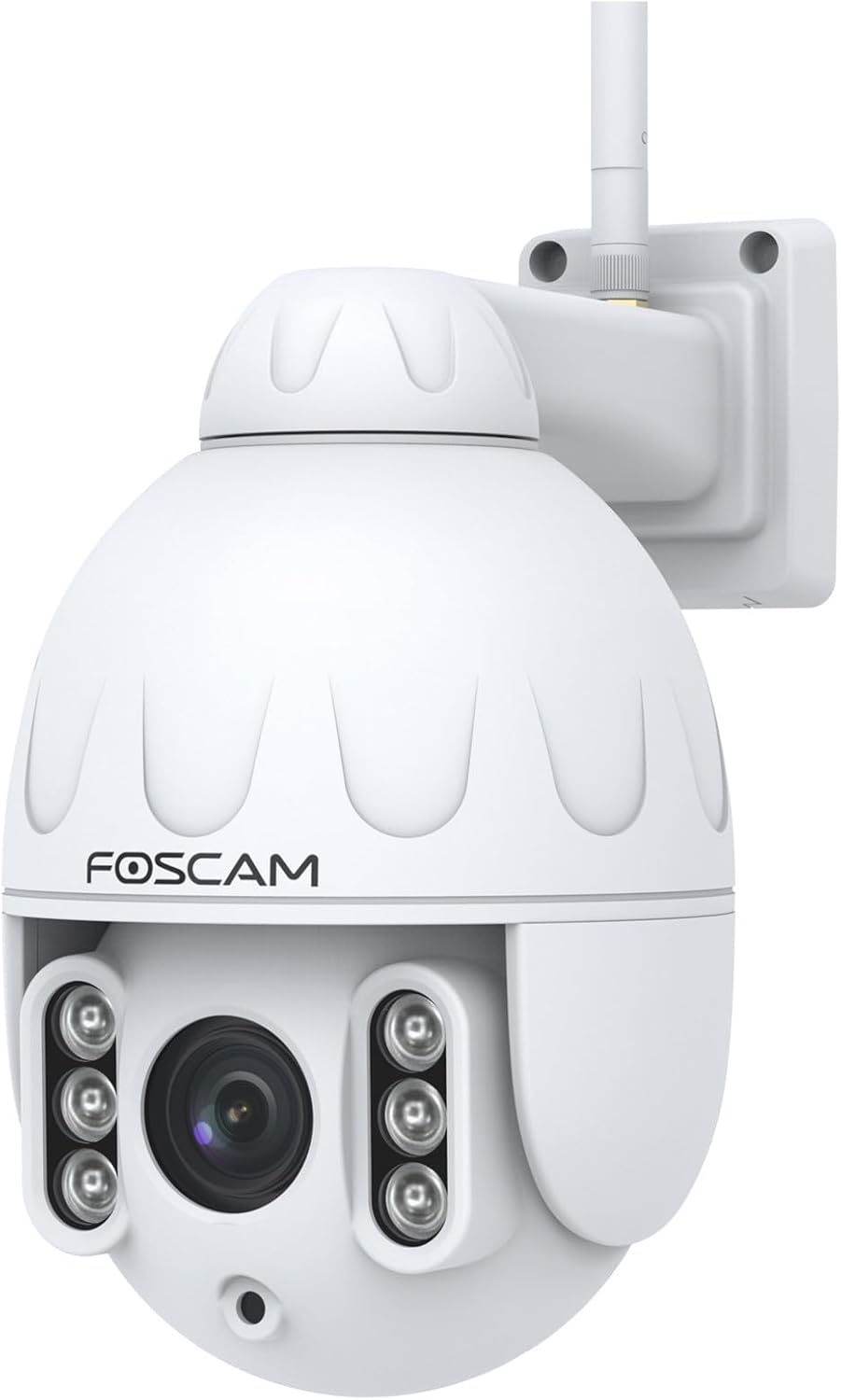
Сүрөт 4.1: Алдыңкы view of the Foscam SD2 PTZ Dome IP Camera. This image shows the camera's main lens, infrared LEDs, and the Foscam logo on its white dome housing.

4.2-сүрөт: Каптал view of the Foscam SD2 camera, illustrating the integrated mounting arm for wall installation. The antenna for Wi-Fi connectivity is visible at the top.

4.3-сүрөт: Арткы view of the Foscam SD2 camera, showing the power and Ethernet cable connections. These cables are essential for providing power and network access to the device.
5. Орнотуу
5.1 Физикалык орнотуу
The Foscam SD2 camera is designed for both indoor and outdoor use and can be wall-mounted.
- Жайгашкан жерди тандаңыз: Каалаган нерсени камсыз кылган ылайыктуу жерди тандаңыз viewing angle and is within range of your Wi-Fi network or an Ethernet connection. Ensure the mounting surface is sturdy enough to support the camera.
- Кронштейнди орнотуу: Use the provided mounting bracket as a template to mark drill holes on the wall. Drill the holes, insert wall anchors if necessary, and secure the bracket with the screws.
- Камераны тиркөө: Securely attach the camera to the mounted bracket.
- Туташуу кубаты: Кубат адаптерин камерага туташтырыңыз жана аны розеткага сайыңыз.

Figure 5.1: The Foscam SD2 camera shown mounted on an exterior white wall, demonstrating a typical installation scenario. The camera's antenna is visible, indicating Wi-Fi connectivity.
5.2 Тармактык туташуу
The Foscam SD2 supports dual-band Wi-Fi (2.4GHz/5GHz) or a wired Ethernet connection.
- Зымдуу туташуу (кошумча): Connect an Ethernet cable from your router to the camera's Ethernet port.
- Wi-Fi туташуусу: For wireless setup, proceed to install the Foscam app.
5.3 Колдонмолорду орнотуу жана баштапкы орнотуу
To configure and control your camera, download the Foscam app on your smartphone or tablet.
- Колдонмону жүктөп алыңыз: Издөө "Foscam" in the App Store (iOS) or Google Play Store (Android) and install the official Foscam app.
- Каттоо эсебин түзүү: Колдонмону ачып, жаңы Foscam аккаунтун түзүү же эгер сизде мурунтан эле бар болсо, кирүү үчүн экрандагы көрсөтмөлөрдү аткарыңыз.
- Камера кошуу: Tap the "+" icon to add a new device. Follow the in-app wizard to connect your camera to your Wi-Fi network. This typically involves scanning a QR code on the camera or manually entering its details.
- Толук орнотуу: Once connected, you can name your camera and adjust initial settings.
6. Иштөө нускамалары
6.1 Remote Access and Live View
Access your camera's live feed and controls from anywhere using the Foscam app or web интерфейс.
- Foscam колдонмосу: Open the Foscam app, select your camera from the device list, and tap to view түз агым.
- Web Interface/Foscam VMS: For PC access, open a web browser and navigate to the camera's IP address or use the Foscam VMS software.
6.2 PTZ Control and Optical Zoom
The SD2 camera offers Pan, Tilt, and Zoom functionalities.
- Панорама/Тилт: Түз эфирде view, swipe your finger across the screen (or use directional controls in the app/web interface) to pan (rotate horizontally up to 350°) and tilt the camera.
- Оптикалык масштаб: Use the zoom controls within the app or web interface to activate the 4x optical zoom, allowing you to magnify specific areas without losing image quality.
6.3 Smart Motion Detection (Human Detection)
The camera features intelligent motion detection that distinguishes human shapes from other objects, reducing false alarms.
- Аныктоого уруксат берүү: Navigate to the camera settings in the Foscam app. Locate the "Alarm" or "Detection" section.
- Configure Human Detection: Enable "Human Detection" and adjust sensitivity levels as needed.
- Эскертмелерди орнотуу: Configure push notifications to receive alerts on your smartphone when human motion is detected.
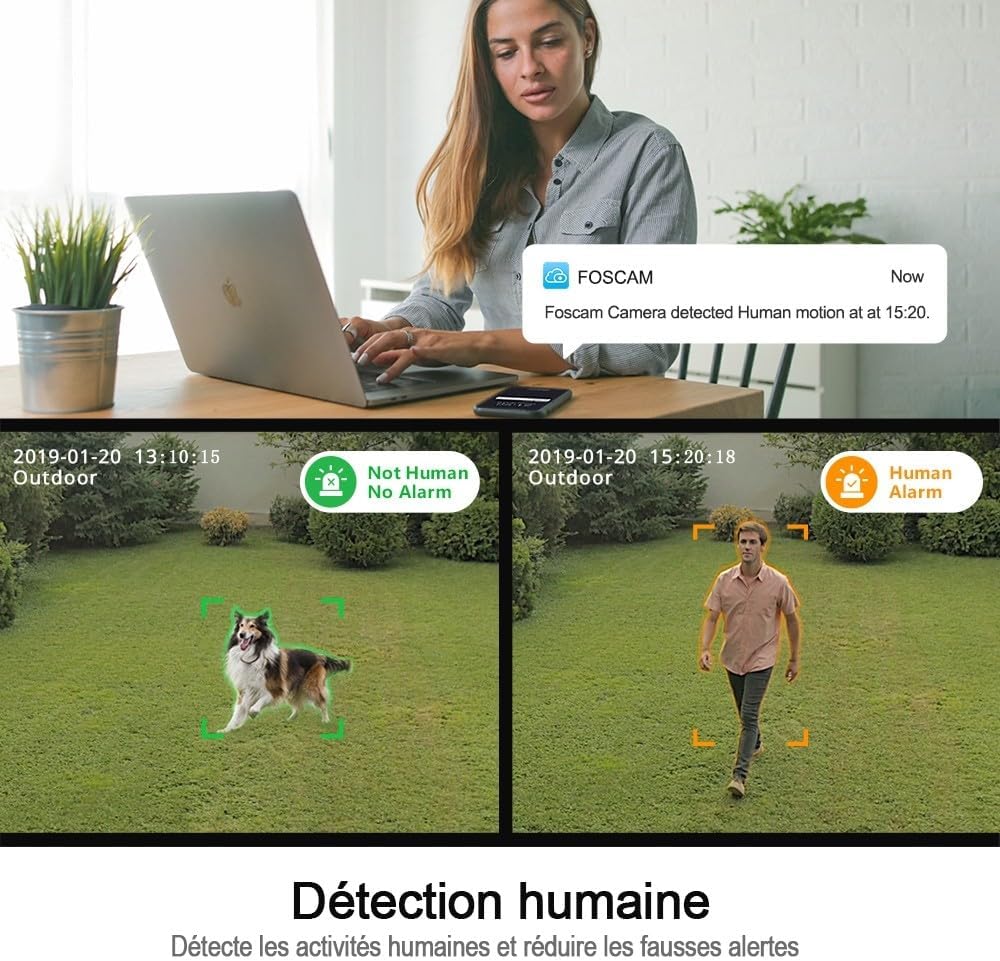
Figure 6.1: An illustration of the Foscam SD2's human detection feature. The image displays two scenarios: one where a dog is detected but not flagged as human, and another where a person is detected and triggers a human alarm, demonstrating the camera's ability to differentiate subjects.
6.4 Үн менен башкаруунун интеграциясы
The Foscam SD2 is compatible with Amazon Alexa and Google Assistant for convenient voice control.
- Каттоо эсептерин байланыштыруу: In your Alexa or Google Home app, search for the Foscam skill/action and link your Foscam account.
- Түзмөктөрдү табуу: Allow the assistant to discover your camera.
- Үн буйруктары: Use commands like "Alexa, show me the [camera name]" or "Hey Google, show [camera name] on [display device]" to view шайкеш келген акылдуу дисплейлердеги түз эфир.

Figure 6.2: This image demonstrates the Foscam SD2's compatibility with voice assistants like Google Assistant and Amazon Alexa. A smart display shows the camera's live feed, controlled by voice commands from a smart speaker.
6.5 Сактоо параметрлери
The camera supports multiple storage methods for recorded footage.
- Foscam Cloud Storage: Subscribe to Foscam Cloud for secure off-site storage of your recordings.
- SD карта сактагычы: Insert a microSD card (up to 128GB, sold separately) into the camera's SD card slot for local storage.
7. Техникалык тейлөө
Regular maintenance ensures optimal performance and longevity of your Foscam SD2 camera.
- Тазалоо: Камера линзасын жана корпусун жумшак, кургак чүпүрөк менен акырын сүртүңүз. Катуу химиялык заттарды же абразивдүү тазалоочу каражаттарды колдонбоңуз.
- Программалык камсыздоонун жаңыртуулары: Periodically check for and install firmware updates via the Foscam app to ensure your camera has the latest features and security enhancements.
- Тармакты текшерүү: Ensure your Wi-Fi signal is strong and stable, especially for outdoor installations.
8. Кыйынчылыктарды
If you encounter issues with your Foscam SD2 camera, refer to the following common solutions:
- Камера оффлайн: Check power connection, Wi-Fi signal strength, and router status. Restart the camera and your router.
- Live жок View: Ensure your internet connection is active. Check app permissions and camera settings.
- Сүрөттүн сапаты начар: Clean the camera lens. Ensure adequate lighting. Check network bandwidth.
- Жалган кыймыл эскертүүлөрү: Adjust motion detection sensitivity in the app. Ensure human detection is enabled if desired.
- Wi-Fi'га туташуу мүмкүн эмес: Verify correct Wi-Fi password. Ensure camera is within router range. Try connecting to the 2.4GHz band if experiencing issues with 5GHz.
9. Техникалык шарттар
| Модель номери | SD2 |
| Бренд | Foscam |
| Байланыш технологиясы | Зымсыз (Wi-Fi 2.4 ГГц/5 ГГц) |
| Өзгөчөлүктөр | Night Vision, PTZ (Pan-Tilt-Zoom), 4x Optical Zoom, Human Detection, Voice Control (Alexa/Google Assistant), IP66 Weatherproof |
| Резолюция | 2 Megapixels (1920 x 1080 pixels) |
| Viewбурч | 118° |
| Пан айлануу | 350° |
| Күч | 12 вольт, 24 ватт |
| Материал | Акрил |
| Өлчөмдөрү (L x W x Y) | 10 x 5 x 1.27 см |
| Салмагы | 1 килограмм |
| Сактагыч параметрлери | Foscam Cloud, MicroSD Card (up to 128GB) |
| Видеону кысуу | H.264 |
10. Кепилдик
The Foscam SD2 camera comes with a 2 жылдык өндүрүүчүнүн кепилдиги. This warranty covers defects in materials and workmanship under normal use. Please retain your proof of purchase for warranty claims. The warranty does not cover damage caused by misuse, accidents, unauthorized modifications, or natural disasters.
11. Колдоо
For technical assistance, troubleshooting, or further information, please visit the official Foscam support website or contact their customer service. Refer to the Foscam webэң заманбап байланыш маалыматы жана колдоо булактары үчүн сайт.
Онлайн ресурстар: www.foscam.com


