Introduction
This manual provides detailed instructions for the safe and effective use of your Dolphin SP-807RBT Bluetooth Karaoke Speaker. Please read this manual thoroughly before operating the device and retain it for future reference.

Сүрөт: алдыңкы view of the Dolphin SP-807RBT Bluetooth Karaoke Speaker, showing the main speaker unit with a blue illuminated ring and an included microphone resting in front.
Кутуда эмне бар
Кутудан чыгаргандан кийин, төмөнкү нерселердин бардыгы камтылганын текшериңиз:
- Dolphin SP-807RBT Bluetooth Karaoke Speaker
- Микрофон
- Алыстан башкаруу
- 9V кубаттуу адаптер
- Колдонуучунун Колдонмосу (бул документ)

Image: The Dolphin SP-807RBT speaker shown with its included remote control and microphone, illustrating the main components of the package.
Продукт өзгөчөлүктөрү
- PA Functionality: This portable PA system allows simultaneous karaoke and music playback. Connect a microphone and play music from a mobile device, AUX, or USB drive.
- Динамикалык LED жарыктары: The integrated lights on the speaker synchronize with the music's beat, changing colors to create a visual display.
- Жогорку сапаттагы аудио: Equipped with an 8-inch woofer and a horn tweeter for clear sound and strong bass.
- Wavesync Technology: Enables wireless pairing of two SP-807RBT speakers for a stereo setup (additional speaker sold separately).
- Бир нече конфигурациялар: Can be used as a standalone floor speaker or mounted on a speaker stand (stand sold separately).
- Узак мөөнөттүү батарея: Features a built-in 7200 mAh battery providing over 7 hours of music playback. Full charge achieved in approximately 4 hours.

Image: Close-up of the Dolphin SP-807RBT speaker's front grille, highlighting the sound-activated LED lights in blue, with smaller insets showing red, blue, and yellow light variations.
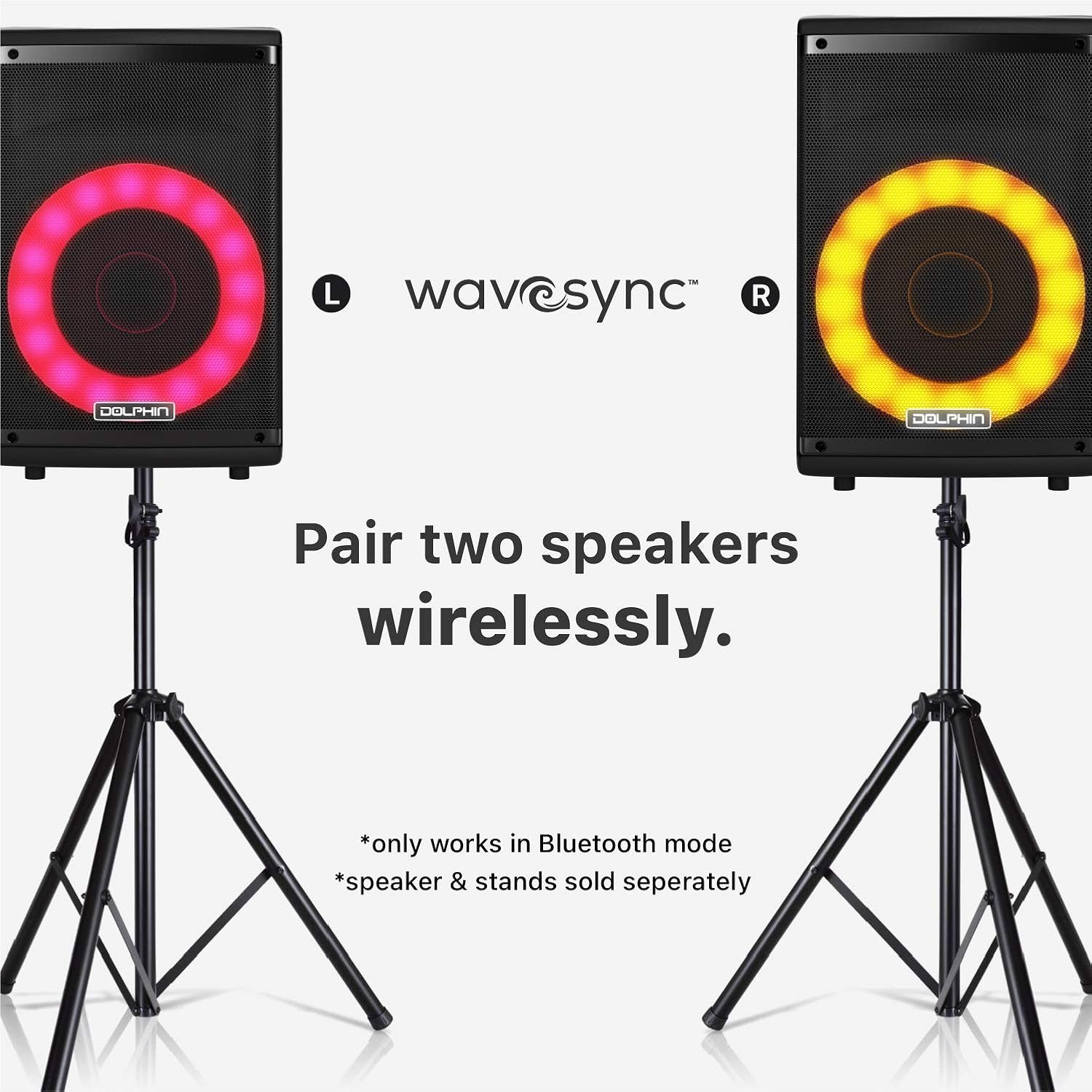
Image: Two Dolphin SP-807RBT speakers, each on a separate stand, illustrating the wireless pairing capability using Wavesync Technology for a stereo sound experience.
Жайгашуу
1. Динамикти кубаттоо
Before first use, fully charge the speaker. Connect the included 9V power adapter to the DC IN port on the speaker and plug it into a power outlet. The charging indicator light will illuminate. A full charge takes approximately 4 hours.
2. Күйгүзүү / Өчүрүү
табыңыз КҮЧ switch on the control panel. Flip the switch to the ON position to power on the speaker. Flip it to ӨЧҮРҮҮ өчүрүү үчүн.
3. Алгачкы жайгаштыруу
The speaker can be placed on a flat surface or mounted on a compatible speaker stand (sold separately). Ensure stable placement to prevent tipping.

Image: The Dolphin SP-807RBT speaker mounted on a stand, positioned next to a human silhouette to illustrate its approximate height and scale when in use.
Иштөө нускамалары
1. Control Panel Overview
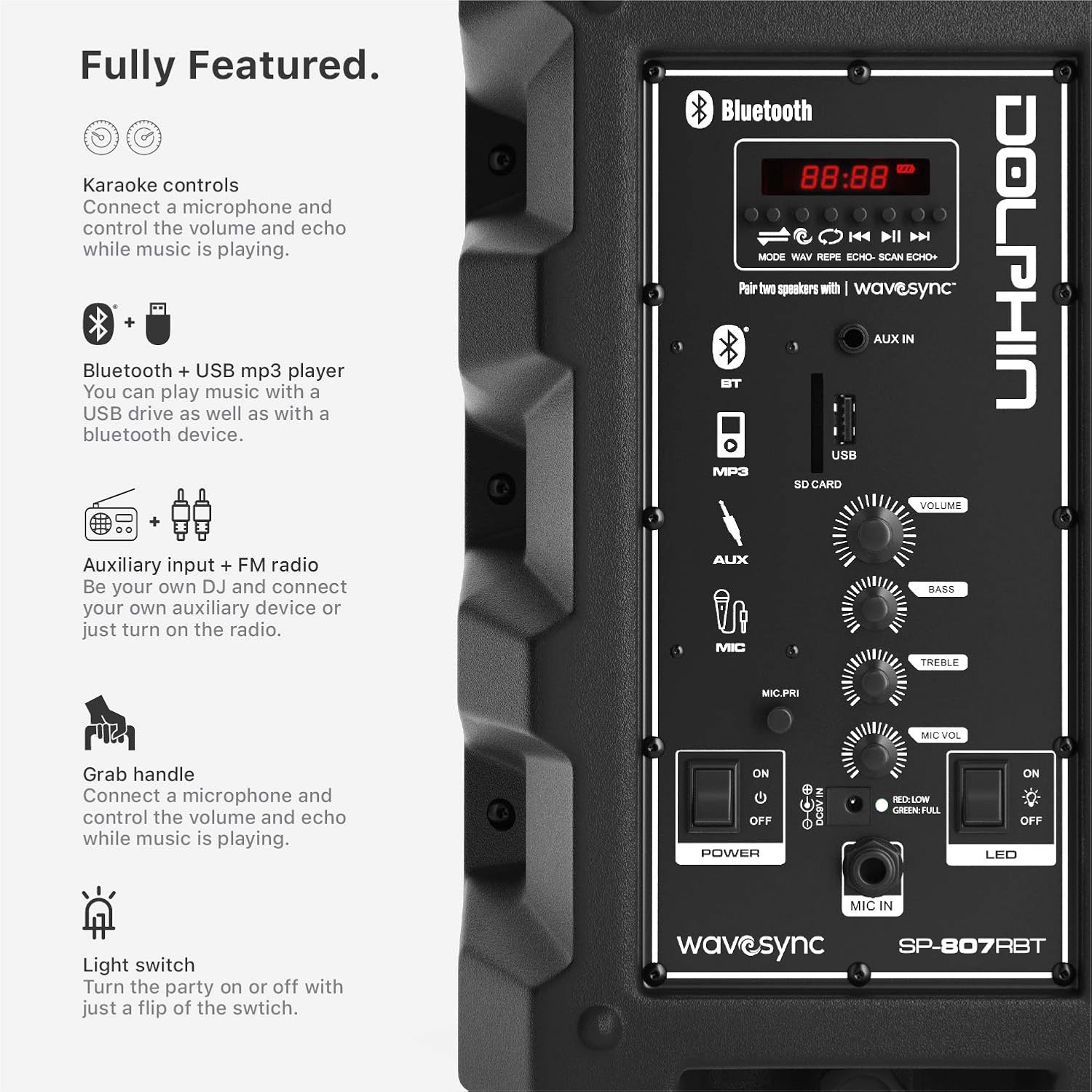
Сүрөт: деталдуу view of the Dolphin SP-807RBT speaker's control panel, showing various inputs (Bluetooth, AUX, USB, SD Card), volume, bass, treble controls, and power/LED switches.
- Дисплей экраны: Shows current mode, track number, and other information.
- Режим баскычы: Киргизүү режимдери (Bluetooth, AUX, USB, FM радио) аркылуу циклдерди алмаштырат.
- Ойнотуу/тындыруу баскычы: Медианы ойнотууну көзөмөлдөйт.
- Мурунку/Кийинки баскычтары: Тректерди же радиостанцияларды багыт алат.
- Үн баскычы: Динамиктин жалпы үнүн тууралайт.
- Бас/жогорку баскычтар: Adjusts audio equalization.
- Микрофондун үн баскычы: Микрофондун киргизүү үнүн тууралайт.
- Mic Echo Knob: Adjusts echo effect for microphone.
- LED которуу: Turns the dynamic LED lights on or off.
2. Bluetooth туташуусу
- Динамикти иштетүү.
- басыңыз РЕЖИМ button until "Bluetooth" or "BT" appears on the display. The speaker will enter pairing mode, indicated by a flashing Bluetooth icon.
- Мобилдик түзмөгүңүздө Bluetooth иштетип, жеткиликтүү түзмөктөрдү издеңиз.
- Тизмеден "Dolphin SP-807RBT" тандаңыз.
- Once connected, the Bluetooth icon on the speaker's display will stop flashing, and a confirmation tone may sound.
3. AUX киргизүү
Тышкы аудио аспапты (мисалы, смартфон, MP3 ойноткуч) туташтырыңыз AUX IN 3.5 мм аудио кабелин колдонуп, портко туташтырыңыз. Басыңыз РЕЖИМ button until "AUX" is selected.
4. USB Drive Playback
MP3 аудиосу бар USB флэш-дискти салыңыз fileс ичине USB port. The speaker will automatically switch to USB mode and begin playing. If not, press the РЕЖИМ USB тандоо үчүн баскычты басыңыз.
5. Microphone Usage (Karaoke Function)
Connect the included microphone to the MIC IN port. Adjust the MIC VOL knob to control the microphone's volume and the MIC ECHO knob for echo effects. You can sing along to music playing via Bluetooth, AUX, or USB.
6. Динамикалык LED чырактары
To activate or deactivate the sound-activated LED lights, use the LED башкаруу панелин күйгүзүңүз.
7. Wavesync Technology (Wireless Stereo Pairing)
To pair two Dolphin SP-807RBT speakers wirelessly for a stereo experience (only in Bluetooth mode):
- Эки динамик тең күйгүзүлүп, Bluetooth режиминде экенин текшериңиз.
- Бир динамикте (бул негизги спикер болот) басып, кармап туруңуз WAVESYNC button (if available, or refer to specific pairing instructions on the control panel image). The speakers will attempt to connect to each other.
- Once successfully paired, a confirmation sound will be heard, and the primary speaker will control both units.
- Мобилдик түзмөгүңүздү 2-кадамда сүрөттөлгөндөй Bluetooth аркылуу негизги динамикке туташтырыңыз.
Note: Wavesync pairing is only supported in Bluetooth mode. Additional speakers and stands are sold separately.
Техникалык тейлөө
- Тазалоо: Динамиктин сыртын тазалоо үчүн жумшак, кургак чүпүрөктү колдонуңуз. Абразивдүү тазалоочу каражаттарды, момдорду же эриткичтерди колдонбоңуз.
- Сактагыч: Узак мөөнөткө колдонулбаганда, динамикти күн тийбеген жана өтө температурадан алыс, салкын, кургак жерде сактаңыз.
- Батареяга кам көрүү: To prolong battery life, avoid fully discharging the battery frequently. Recharge the speaker regularly, even if not in use, to maintain battery health. If storing for a long time, charge it to about 50% every few months.
- Вентиляция: Динамиктин ысып кетишинин алдын алуу үчүн желдетүү тешиктери бүтөлүп калбаганын текшериңиз.
Проблемаларды чечүү
| Көйгөй | Мүмкүн себеп | Чечим |
|---|---|---|
| Динамик күйбөйт. | Батарея түгөнүп калды; Кубат өчүргүч өчүрүлгөн. | Charge the speaker using the provided adapter. Ensure the POWER switch is in the ON position. |
| Динамиктен үн жок. | Үн өтө төмөн; Туура эмес киргизүү режими тандалган; Түзмөк туура туташкан эмес. | Increase the speaker's volume. Press the MODE button to select the correct input. Reconnect your device (Bluetooth, AUX, USB). |
| Bluetooth түзмөгү жупташа албайт. | Динамик жупташтыруу режиминде эмес; Аппарат өтө алыс; Интерференция. | Ensure speaker is in Bluetooth pairing mode. Move device closer to speaker. Avoid strong electromagnetic interference. Try forgetting the device on your phone and re-pairing. |
| Микрофон иштебей жатат. | Microphone not connected; Mic volume too low. | Ensure microphone is securely plugged into the MIC IN port. Increase the MIC VOL knob. |
| Wavesync pairing fails. | Динамиктер Bluetooth режиминде эмес; Туура эмес жупташтыруу процедурасы. | Ensure both speakers are in Bluetooth mode. Follow the Wavesync pairing instructions carefully, ensuring one speaker is designated as primary. |
Техникалык шарттар
| Өзгөчөлүк | Деталь |
|---|---|
| Модель номери | SP-807RBT |
| Бренд | Дельфин |
| Монтаж түрү | Кабат туруктуу |
| Power Source | Батарея менен иштейт |
| Туташтыргыч түрү | Көмөкчү |
| Элемент Салмагы | 9.68 фунт (4.4 килограмм) |
| Каналдардын саны | 2 |
| Аудио киргизүү | Bluetooth, AUX, USB drive, Microphone |
| Сунушталган Колдонуулар | Музыка |
| Импеданс | 4 Ом |
| UPC | 850006218554 |
| Продукциянын өлчөмдөрү (L x W x Y) | 9.7 x 11 x 17.9 дюйм |
| Батарея түрү | 1 литий-иондук батарейка (кошулган) |
| Батарея ойнотуу убактысы | 7 сааттан ашык |
| Батареяны заряддоо убактысы | Болжол менен 4 саат |
| Байланыш технологиясы | Bluetooth, USB |
| Түс | Black or Gray |
| Шайкеш түзмөктөр | iPhone, Android, Bluetooth, AUX, iPod, Zune |
Кепилдик жана колдоо
Кепилдик маалымат
Dolphin products are designed for reliability and performance. For specific warranty terms and conditions, please refer to the warranty card included with your product or visit the official Dolphin webсайт. Кепилдик дооматтар үчүн сатып алганыңыздын далилин сактаңыз.
Кардарларды колдоо
If you encounter any issues not covered in the troubleshooting section or require further assistance, please contact Dolphin customer support. Contact information can typically be found on the product packaging, the official Dolphin webсайты же сатуучу аркылуу.
Эң акыркы колдоо ресурстары үчүн, төмөнкү дарекке кириңиз Dolphin Brand Store on Amazon.
Маанилүү коопсуздук маалыматы
- Динамикти сууга же ашыкча нымдуулукка дуушар кылбаңыз.
- Динамикти өз алдынча ажыратууга же оңдоого аракет кылбаңыз. Бардык тейлөөлөрдү квалификациялуу кызматкерлерге тапшырыңыз.
- Динамикти жылуулук булактарынан, тике күн нурларынан жана күйүүчү материалдардан алыс кармаңыз.
- Продукция менен кошо берилген кубат адаптерин гана колдонуңуз.
- Угуу жөндөмүнө зыян келтирбөө үчүн катуу үн менен көпкө угуудан алыс болуңуз.


