Introduction
Сатып алганыңыз үчүн рахматasing the DBPOWER RD828 Native 1080P WiFi Projector. This manual provides essential information for setting up, operating, maintaining, and troubleshooting your projector. Please read it thoroughly before use to ensure optimal performance and longevity of your device.
The DBPOWER RD828 projector delivers a Full HD 1080P native resolution experience with advanced features like 4-point keystone correction, wireless screen mirroring, and direct USB file playback, making it suitable for various home entertainment and business presentation needs.
Жайгашуу
1. Пакеттен чыгаруу жана компоненттер
Таңгактан бардык компоненттерди этияттык менен алып салыңыз. Таңгактын курамында төмөнкүлөр болушу керек:
- DBPOWER RD828 Projector
- Алыстан башкаруу
- HDMI кабели
- Audio/Video (AV) Adapter Cable
- Электр кабели
- Колдонуучунун Колдонмосу (бул документ)
- Quick Start Guide

Figure 1: DBPOWER RD828 Projector and included accessories.
The projector comes in a convenient travel case, which can also function as a backpack for easy portability.

Figure 2: The DBPOWER RD828 Projector packaged in its travel case.
2. Физикалык бүтүрүүview
Familiarize yourself with the projector's ports and controls:
- Алдыңкы: Projection lens with removable lens cap, IR receiver.
- Жогорку: Control panel with power, OK, navigation (up, down, left, right), and input selection buttons. The top surface features a fabric material.
- Артка: Power input, 2x USB ports, Headphone jack, AV input, 2x HDMI ports, Speaker grille.
- Тараптар: Ventilation grilles, removable air filter on one side.
- Төмөнкү: Four rubber feet (removable for ceiling mounting), adjustable front foot for tilt adjustment, mounting points for ceiling installation.

3-сүрөт: Арткы view of the projector displaying its various input and output ports.

4-сүрөт: Жогорку view of the projector with its integrated control panel.
3. Жайгаштыруу жана электр энергиясына туташуу
- Place the projector on a stable, flat surface or mount it to a ceiling. Ensure adequate ventilation around the device.
- Кубат кабелин проектордун кубат киргизүү булагына, андан кийин розеткага туташтырыңыз.
- Аппаратты иштетүү үчүн проектордун же пульттун кубат баскычын басыңыз.
Иштөө нускамалары
1. Initial Setup and Focus Adjustment
Upon first power-on, the projector will display the home screen. Adjust the focus using the +/- buttons on the remote control until the image is clear.
2. Киргизүү булагын тандоо
The home screen provides shortcuts for various input sources:
- HDMI 1 / HDMI 2: Түзмөктөрдү HDMI кабели аркылуу туташтыруу үчүн (мисалы, ноутбуктар, оюн консолдору, телевизор таякчалары).
- OF: For connecting older devices using the included AV adapter cable.
- iOS Cast / Miracast: iOS жана Android түзмөктөрүнөн зымсыз экранды чагылдыруу үчүн.
- Film / Music / Photo / Office Suite: USB дисктен түз медиа файлдарды ойнотуу үчүн.

Figure 5: The main interface of the projector, showing various input options and media categories.
3. Wireless Screen Mirroring (WiFi Sync)
The RD828 supports wireless screen mirroring for iOS and Android devices. Ensure your device and the projector are connected to the same Wi-Fi network.
- iOS түзмөктөрү үчүн: Select "iOS Cast" on the projector. On your iOS device, open Control Center and tap "Screen Mirroring." Select the projector from the list.
- Android түзмөктөрү үчүн: Select "Miracast" on the projector. On your Android device, open the settings menu, access display settings or screen mirroring, and select the projector.

Figure 6: Step-by-step guide for connecting iOS and Android devices via wireless screen mirroring.
4. Keystone Correction and Zoom Function
The projector features 4-point keystone correction and a digital zoom function to adjust the image shape and size.
- 4-Point Keystone Correction: This advanced feature allows you to adjust each of the four corners of the projected image independently, correcting distorted images when the projector is not perfectly aligned with the screen. Access this setting via the "Projection Setting" menu.
- Digital Zoom: Use the zoom function to shrink the image size up to 50% using the remote control without physically moving the projector.

Figure 7: Visual representation of 4-point keystone correction and the digital zoom feature.
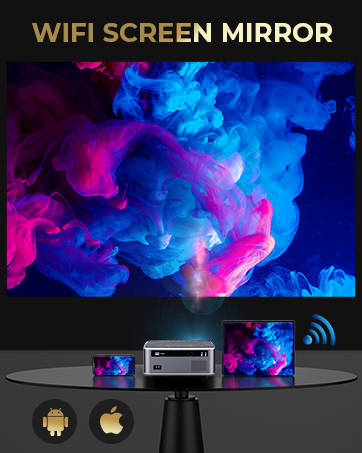
Figure 8: Illustrates how digital keystone correction can be applied from different projector positions (rear, front, ceiling/wall).
5. USB Playback and Office Suite
The DBPOWER RD828 is capable of playing Microsoft Office (Word, Excel, PowerPoint) and Adobe PDF files directly from a USB stick, eliminating the need for a connected computer for presentations.

Figure 9: The projector displaying a business presentation directly from a USB drive.
6. Аудио чыгаруу
The projector includes dual built-in stereo speakers. For enhanced audio experience, you can connect external speakers or a soundbar via the headphone jack or a Bluetooth adapter (not included).

Figure 10: Illustration of the projector's built-in dual stereo speakers.
Техникалык тейлөө
1. Линзаны тазалоо
Use a soft, lint-free cloth specifically designed for optical lenses to clean the projector lens. Avoid abrasive materials or harsh chemicals that could scratch the lens.
2. Аба чыпкасын тазалоо
Regularly clean the air filter to prevent dust buildup, which can affect performance and lamp life. The air filter is located on the side of the projector and can be removed for cleaning.
3. Лamp Жашоо
The DBPOWER RD828 projector utilizes an LED light source designed for a long lifespan of up to 100,000 hours, minimizing the need for frequent lamp алмаштыруу.

Figure 11: Visual representation of the projector's extended lamp жашоо.
4. Системанын жаңыртуулары
The projector supports both local and online system upgrade methods. Check for updates periodically to ensure your device has the latest features and performance improvements. Access system updates via the "System Update" option in the settings menu.
Проблемаларды чечүү
| Көйгөй | Мүмкүн себеп | Чечим |
|---|---|---|
| Сүрөт же бурмаланган сүрөт жок | Incorrect focus, keystone distortion, incorrect input source, loose cable connection. | Adjust focus using remote. Use 4-point keystone correction. Select correct input source. Check HDMI/AV cable connections. |
| Үн жок | Volume too low, muted, external speakers not connected properly, audio format not supported. | Increase volume. Unmute. Ensure external speakers are connected correctly or use built-in speakers. Check audio format compatibility. |
| Пульт иштебей жатат | Low battery, IR receiver blocked, out of range. | Replace batteries. Ensure no obstructions between remote and projector's IR receiver. Operate within effective range. |
| Overheating or automatic shutdown | Blocked ventilation, excessive use in hot environment. | Ensure ventilation grilles are clear. Operate in a well-ventilated area. Allow projector to cool down. |
| Зымсыз күзгүлөө көйгөйлөрү | Network connectivity issues, device compatibility. | Ensure both devices are on the same Wi-Fi network. Restart Wi-Fi router. Check device compatibility with Miracast/iOS Cast. |
Техникалык шарттар
| Өзгөчөлүк | Деталь |
|---|---|
| Модель номери | RD828 |
| Native Resolution | 1920 x 1080P Full HD |
| Жарыктык | 20000 Lumens / 500 ANSI |
| Контраст катышы | 10000:1 |
| Lamp Жашоо | 100,000 саатка чейин |
| Проекциянын өлчөмү | 50" - 300" (Adjustable) |
| Keystone Correction | 4-пункттуу негизги ташты оңдоо |
| Zoom функциясы | Digital Zoom (-50%) |
| Байланыш | 2x HDMI, 2x USB, AV, Headphone Jack, 5G/2.4G WiFi |
| Аудио | Dual Built-in Stereo Speakers |
| Продукциянын өлчөмдөрү | 10.2 x 9 x 4.3 дюйм |
| Элемент Салмагы | 7.15 фунт |

Figure 12: Illustrates the adjustable projection screen sizes from 50 to 300 inches based on projection distance.
Кепилдик жана колдоо
DBPOWER offers a 3-YEAR warranty for the RD828 projector. Professional customer service and lifetime technical support are available to assist you with any issues or questions.
For support, please refer to the contact information provided in your Quick Start Guide or visit the official DBPOWER webсайт.

Figure 13: DBPOWER company logo.


