1. Киришүү
This manual provides comprehensive instructions for the installation, operation, and maintenance of your EMOS H3010 Video Intercom System. Please read this manual carefully before using the product to ensure proper function and safety. Keep this manual for future reference.
The EMOS H3010 is a hands-free video intercom system featuring a 7-inch color LCD monitor and a Full HD outdoor camera with night vision. It supports image and video recording to a memory card (not included) and allows for connection of additional surveillance cameras.
2. Продукт бүтүп калдыview
The EMOS H3010 system includes a wall-mountable 7-inch monitor and a robust outdoor door camera. It is designed for clear communication and enhanced security at your entrance.

Figure 2.1: EMOS H3010 Video Intercom System components, including the outdoor camera unit and the indoor 7-inch monitor.
Негизги өзгөчөлүктөрү:
- 7-inch (18 cm) Color LCD Monitor: Ачык үчүн viewзыяратчыларды кабыл алуу.
- Full HD 1080p Camera: High-quality image transmission in all lighting conditions.
- Түнкү көрүнүш: Infrared filter ensures clear visibility in low light or darkness.
- Кең бурчтуу объектив: 120° viewтолук камтуу үчүн бурч.
- Бышык сырткы блок: Vandal-resistant and waterproof with IP44 rating.
- Snapshot and Video Recording: Ability to capture photos and videos to an SD card (not included).
- Домофон функциясы: Эки тараптуу аудио байланыш.
- Кыймылды аныктоо: Records activity even when you are away.
- Door/Gate Control: Compatible with electric door openers.
- Ыңгайлаштырылуучу обондор: 10 pre-set melodies with adjustable volume, plus option to add your own.

Figure 2.2: ашыкview of EMOS H3010 advanced features, including Full HD resolution, video guard, snapshot, 120-degree wide angle, and door/gate control.
Камтылган компоненттер:
- 1 x 7-inch Monitor Unit
- 1 x Camera Unit (Outdoor)
- 1 х кубат адаптери
- 1 x Mounting Accessories Set (screws, wall plugs)
- Wiring harnesses for connections
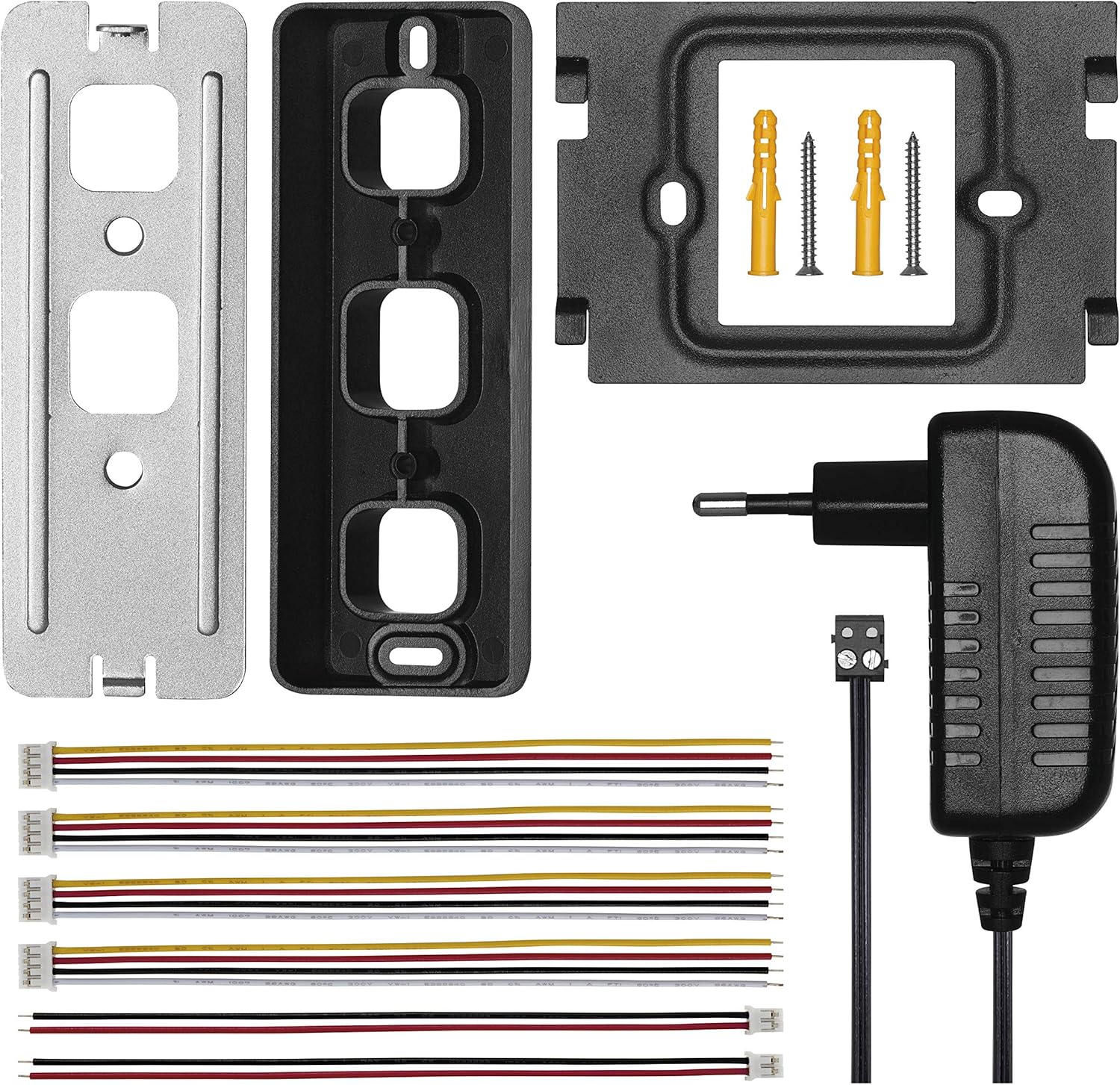
Figure 2.3: All components included in the EMOS H3010 package, showing the mounting plates, power adapter, and various connection cables.
3. Орнотуу жана орнотуу
Proper installation is crucial for the optimal performance of your video intercom system. It is recommended to have this system installed by a qualified technician.
3.1 Зымдарга талаптар
For installation, an FTP cable (e.g., CAT5, CAT6) or a SYKFY cable (5 x 2 x 0.5) is required. These cables are not included with the product.
3.2 Mounting the Outdoor Camera Unit
- Choose a suitable location near your entrance, ensuring clear visibility and protection from direct impact.
- Mount the camera unit at an appropriate height (typically 1.5 to 1.6 meters from the ground) to capture visitors' faces clearly.
- Secure the mounting bracket to the wall using the provided screws and wall plugs.
- Connect the necessary wiring to the camera unit as per the wiring diagram (refer to Figure 3.1).
- Камера блогун орнотуу кронштейнине бекитиңиз.

Figure 3.0: The EMOS H3010 outdoor camera unit is designed to withstand various weather conditions, as shown here during rain, thanks to its IP44 rating.
3.3 Ички монитор блогун орнотуу
- Select a convenient indoor location, such as a hallway or living room, where the monitor is easily accessible.
- Secure the monitor's mounting bracket to the wall.
- Connect the wiring from the outdoor unit and power adapter to the monitor unit (refer to Figure 3.1).
- Attach the monitor unit to its mounting bracket.
3.4 Электр өткөргүч схемасы

Figure 3.1: Detailed wiring connections for the EMOS H3010 indoor monitor and outdoor camera unit. This diagram shows ports for power, video, audio, and door lock control.
Note: The specific wiring for door lock control (ND/LOCK) and additional cameras (CAM1, CAM2) are indicated on the diagram. Ensure all connections are secure and correctly matched.
4. Иштөө нускамалары
Once installed, the EMOS H3010 system is designed for user-friendly operation.
4.1 Негизги операция
- Чалууга жооп берүү: When a visitor presses the doorbell button, the monitor will ring and display the camera feed. Press the "Answer" button on the monitor to communicate.
- ViewТүз эфирде: Press the "Monitor" button to view каалаган убакта сырткы камерадан түз эфир.
- Домофон функциясы: If multiple monitors are installed, you can use the intercom function to communicate between them.
- эшикти бошотуу: Press the "Unlock" button on the monitor to open an electric door lock (if connected).

Figure 4.1: A user interacting with the EMOS H3010 monitor, demonstrating the clear graphical menu and touch controls.
4.2 Өркүндөтүлгөн функциялар
- Snapshot and Recording: The system can record photos and videos to an SD card (not supplied). This can be done manually or automatically via motion detection.
- Кыймылды аныктоо: Enable motion detection in the settings to automatically record when movement is detected near the outdoor camera. This ensures you are aware of activity even when you are not home.
- Меню навигациясы: The monitor features a clear graphical menu. Use the touch controls or physical buttons (if present) to navigate settings, review recordings, and customize preferences.
- Мелодия тандоо: Choose from 10 pre-installed melodies or upload your own custom ringtone. Adjust the volume to your preference.
For detailed menu options and settings, refer to the on-screen menu of your device. The menu is available in multiple languages, including German.
5. Техникалык тейлөө
To ensure the longevity and optimal performance of your EMOS H3010 Video Intercom System, follow these maintenance guidelines:
- Тазалоо: Use a soft, dry cloth to clean the monitor screen and camera lens. Do not use abrasive cleaners or solvents, as they may damage the surfaces.
- Сырткы блок: Periodically check the outdoor camera unit for any obstructions (e.g., dirt, spiderwebs) that might block the camera's view or microphone. Clean as necessary.
- Зымдар: Ensure all wiring connections remain secure. Avoid pulling or stressing the cables.
- Программалык камсыздоо жаңыртуулары: Өндүрүүчүнү текшериңиз webсистемаңыз үчүн бардык жеткиликтүү микропрограммаларды жаңыртуу үчүн сайтка мезгил-мезгили менен кириңиз.
- SD карта: If using an SD card for recording, ensure it is formatted correctly and has sufficient free space. Replace the card if it becomes corrupted or full.
6. Кыйынчылыктарды
If you encounter issues with your EMOS H3010 system, refer to the following common problems and solutions:
| Көйгөй | Мүмкүн себеп | Чечим |
|---|---|---|
| Монитордо сүрөт жок. |
|
|
| Домофон учурунда үн чыкпайт. |
|
|
| Эшиктин кулпусу ачылбай жатат. |
|
|
| Poor night vision. |
|
|
If the problem persists after attempting these solutions, please contact EMOS customer support.
7. Техникалык шарттар
| Өзгөчөлүк | Деталь |
|---|---|
| Бренд | EMOS |
| Модель номери | H3010 |
| Монитор Дисплей | 7 дюймдук түстүү LCD |
| Камеранын чечилиши | Full HD 1080p (2 Megapixels) |
| Камера Viewбурч | 120° кең бурч |
| Түнкү көрүнүш | Infrared Filter (AHD technology) |
| Сырткы блокту коргоо | IP44 (Суу өткөрбөйт) |
| Power Type | AC (өзгөрмө ток) |
| Продукциянын өлчөмдөрү (монитор) | 17.5 x 12.5 x 2 см |
| Product Dimensions (Camera) | 13.5 x 5 x 2.5 см |
| Жалпы салмагы | 980 грамм |
| Түс | White (Monitor), Black (Camera) |
| Сактагыч | SD Card slot for recording (SD card not included) |
| Origin | Кытай |
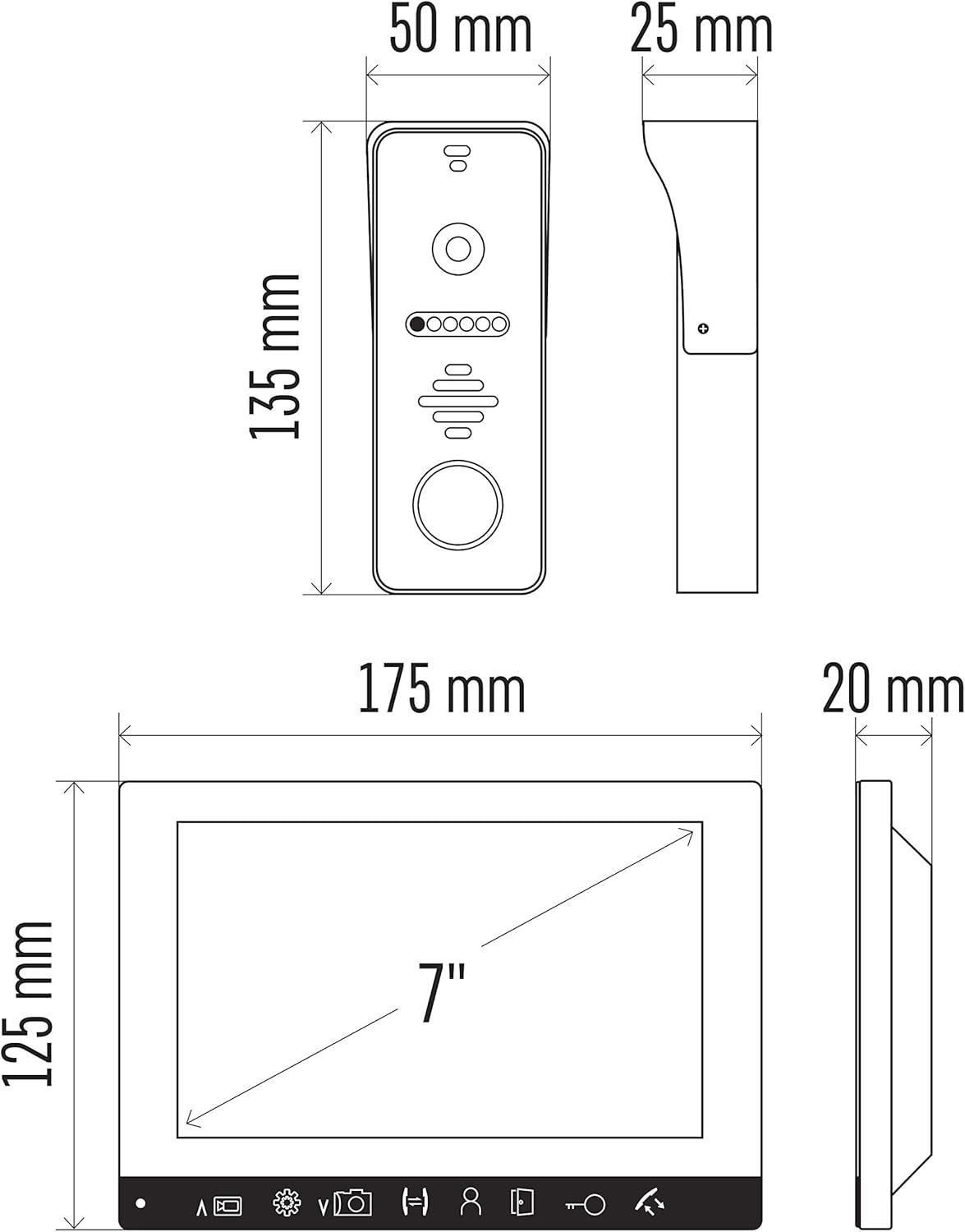
Figure 7.1: Dimensional drawing of the EMOS H3010 outdoor camera unit and indoor monitor, showing key measurements in millimeters and inches.
8. Кепилдик жана колдоо
For warranty information and technical support, please refer to the documentation provided with your purchase or visit the official EMOS webсайт. Запастык бөлүктөрдүн бар экендиги жөнүндө маалымат берилген эмес.
While the product manual may be available in German, please note that French language support for the manual is not guaranteed. For installation queries, an FAQ document might be available in the "Product Guides and Documents" section on the product detail page.


