1. Киришүү
This manual provides comprehensive instructions for the setup, operation, and maintenance of your Acctim Karminski Digital Crescendo Alarm Clock. Please read this manual thoroughly before using the device to ensure proper function and longevity.
2. Продукциянын өзгөчөлүктөрү
- Luminous reflection display for reduced glare.
- Crescendo alarm with adjustable volume.
- Touch-activated snooze and backlight function.
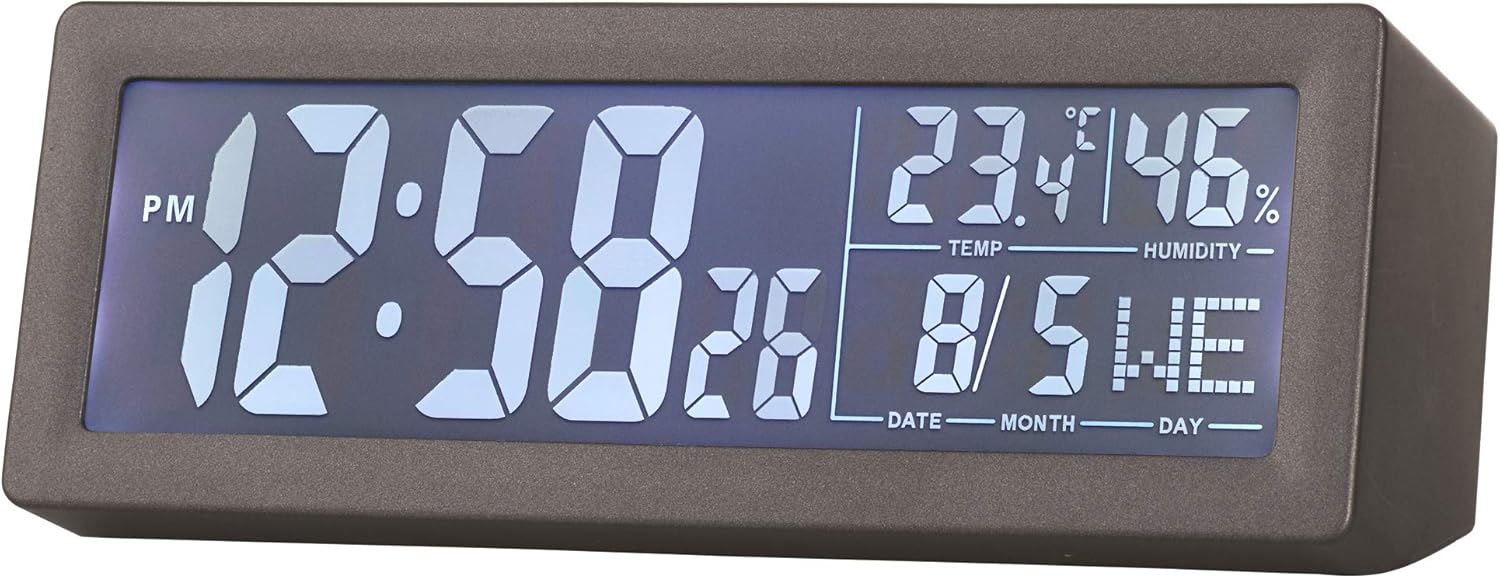
- LCD screen displaying time, date, day, temperature, and humidity.
- Компакттуу жана заманбап дизайн.
3. Пакеттин мазмуну
- Acctim Karminski Digital Crescendo Alarm Clock (Model 16007)
- Колдонуучунун Колдонмосу (бул документ)
Эскертүү: 2 х AA батарейкалары иштөө үчүн талап кылынат жана пакетке кирбейт.
4. Башкаруу жана дисплей
4.1 Алдыңкы дисплей
The front LCD screen displays the current time, AM/PM indicator, seconds, temperature, humidity, date, and day of the week.

4.2 Rear Controls
The rear panel houses all control buttons and the battery compartment.

- SET баскычы: Used to enter and confirm settings for time, date, and alarm.
- Alarm Button (Bell Icon): Ойготкучту коюу жана иштетүү/өчүрүү үчүн колдонулат.
- DOWN Button (V): Орнотуу учурунда маанилерди азайтуу үчүн колдонулат.
- UP Button (^): Орнотуу учурунда маанилерди көбөйтүү үчүн колдонулат.
- SNZ Button: Snooze function, also activates the backlight.
- VOLUME баскычы: Adjusts the alarm volume.
5. Батареяны орнотуу
- Locate the battery compartment cover on the rear of the clock.
- Капкакты жылдырыңыз.
- Бөлүмдүн ичинде көрсөтүлгөндөй, туура полярдуулукту (+ жана -) текшерип, 2 жаңы AA батарейкасын салыңыз.
- Батарея бөлүкчөсүнүн капкагын бекем орнотуңуз.
The clock will power on and display default settings or the last saved settings.
6. Баштапкы орнотуу: Убакытты жана датаны коюу
- басып, кармап туруңуз SET убакыт дисплейи күйүп-өчө баштаганга чейин баскычын болжол менен 3 секунд басып туруңуз.
- колдонуу ЖОГОРУ (^) or DOWN (V) саатты тууралоо үчүн баскычтар.
- басыңыз SET Саатты ырастоо жана мүнөт жөндөөсүнө өтүү үчүн баскычын басыңыз.
- колдонуу ЖОГОРУ (^) or DOWN (V) мүнөттөрдү тууралоо үчүн баскычтар.
- басыңыз SET button to confirm minutes and proceed to year setting.
- Repeat the process using ЖОГОРУ (^) or DOWN (V) жана SET to set the year, month, and day.
- Күндү койгондон кийин, баскычын басыңыз SET орнотуу режиминен чыгуу үчүн акыркы жолу.
7. Ойготкучту орнотуу
- басып, кармап туруңуз Alarm Button (Bell Icon) for approximately 3 seconds until the alarm time display starts flashing.
- колдонуу ЖОГОРУ (^) or DOWN (V) ойготкуч саатын тууралоо үчүн баскычтар.
- басыңыз Ойготкуч баскычы саатты ырастап, мүнөт коюуга өтүү үчүн басыңыз.
- колдонуу ЖОГОРУ (^) or DOWN (V) ойготкуч мүнөттөрдү тууралоо үчүн баскычтар.
- басыңыз Ойготкуч баскычы one last time to confirm the alarm time and exit the setting mode.
- Ойготкучту иштетүү же өчүрүү үчүн, баскычын кыскача басыңыз Ойготкуч баскычы. An alarm icon will appear on the display when the alarm is active.
8. Using the Alarm and Snooze Function
- When the alarm sounds, it will begin with a soft tone and gradually increase in volume (Crescendo alarm).
- To activate the snooze function, briefly touch the top of the clock or press the АРОСА button. The alarm will pause for a few minutes and then sound again.
- Ойготкучту толугу менен өчүрүү үчүн, баскычтан башка каалаган баскычты басыңыз АРОСА баскычын басыңыз. Ойготкуч эртеси күнгө баштапкы абалга келтирилет.
9. Сигнализациянын үнүн жөндөө
The alarm volume can be adjusted using the VOLUME knob located on the rear of the clock. Rotate the knob clockwise to increase volume and counter-clockwise to decrease volume.
10. Дисплейдин арткы жарыгы
To temporarily illuminate the display, briefly touch the top of the clock or press the АРОСА button. The blue backlight will activate for a few seconds.
11. Техникалык тейлөө
- Тазалоо: Саатты жумшак, кургак чүпүрөк менен сүртүңүз. Абразивдүү тазалагычтарды же эриткичтерди колдонбоңуз.
- Батареяны алмаштыруу: Replace batteries when the display becomes dim or functions become erratic. Always replace both batteries at the same time with new AA batteries.
- Сактагыч: Саатты узак убакытка сактасаңыз, агып кетпеш үчүн батарейкаларды алып салыңыз.
12. Кыйынчылыктарды
- Дисплей бош же күңүрт: Check battery installation. Replace with new AA batteries.
- Ойготкуч угулбайт: Ensure the alarm is activated (alarm icon visible on display). Check alarm time setting. Adjust alarm volume.
- Туура эмес убакыт/дата: Re-enter time and date settings as per Section 6.
- Inaccurate temperature/humidity: Ensure the clock is placed in a location with good air circulation, away from direct heat sources or extreme cold. Allow time for readings to stabilize after initial setup or relocation.
13. Техникалык шарттар
| Бренд | Acctim |
| Модель номери | 16007 |
| Өлчөмдөрү (L x W x Y) | 14.7 x 3.81 x 5.5 см |
| Салмагы | 500 г |
| Дисплей түрү | Санарип LCD |
| Power Source | 2 x AA батарейкалар (киргизилген эмес) |
| Өзгөчөлүктөр | Crescendo Alarm, Snooze, Backlight, Date, Day, Temperature, Humidity |
14. Кепилдик жана колдоо
Information regarding specific warranty terms and customer support contacts for the Acctim Karminski Digital Crescendo Alarm Clock is not provided in the product details. Please refer to the retailer or manufacturer's official webкепилдиктин чоо-жайы жана колдоо параметрлери үчүн сайт.


