1. Киришүү
This manual provides comprehensive instructions for the setup, operation, and maintenance of your eufy Eufycam 2 Pro Wireless Smart Security Camera System. Please read this manual thoroughly before using the product to ensure proper functionality and safety.
The eufy Eufycam 2 Pro system offers 2K resolution, two-way communication, and IP67 weather protection, designed for reliable home security monitoring.
2. Пакеттин мазмуну
Төмөндө тизмеленген нерселердин баары пакетиңизде бар экенин текшериңиз:
- eufy HomeBase (Main Unit)
- eufyCam 2 Pro Cameras (2 units)
- Mounting Kits (for 2 cameras)
- AC Power Adapter for HomeBase
- Ethernet кабели
- Micro-USB Charging Cable for Cameras
- Quick Start Guide

Figure 2.1: The eufy Eufycam 2 Pro system, including the HomeBase and two wireless cameras.
3. Продукт бүтүп калдыview
3.1. Негизги өзгөчөлүктөрү
- 2K токтому: Так жана деталдуу видеону тартыңызtage.
- Wireless & Wire-Free: Татаал зымдарсыз оңой орнотуу.
- 365 күндүк батареянын иштөө мөөнөтү: Extended operation on a single charge.
- IP67 аба ырайы: Designed to withstand various outdoor conditions.
- Өркүндөтүлгөн түнкү көрүнүш: Enhanced visibility in low-light environments.
- Эки тараптуу аудио: Communicate directly through the camera.
- Жергиликтүү сактагыч: 16GB eMMC storage on HomeBase, no monthly fees.
- Акылдуу интеграция: Compatible with Apple HomeKit.

Figure 3.1: Visual comparison demonstrating the clarity of 2K resolution provided by the eufyCam 2 Pro.

Figure 3.2: An illustration of the enhanced visibility offered by the eufyCam 2 Pro's advanced night vision capabilities.

Figure 3.3: The eufyCam 2 Pro camera operating in rainy conditions, highlighting its IP67 weather resistance.
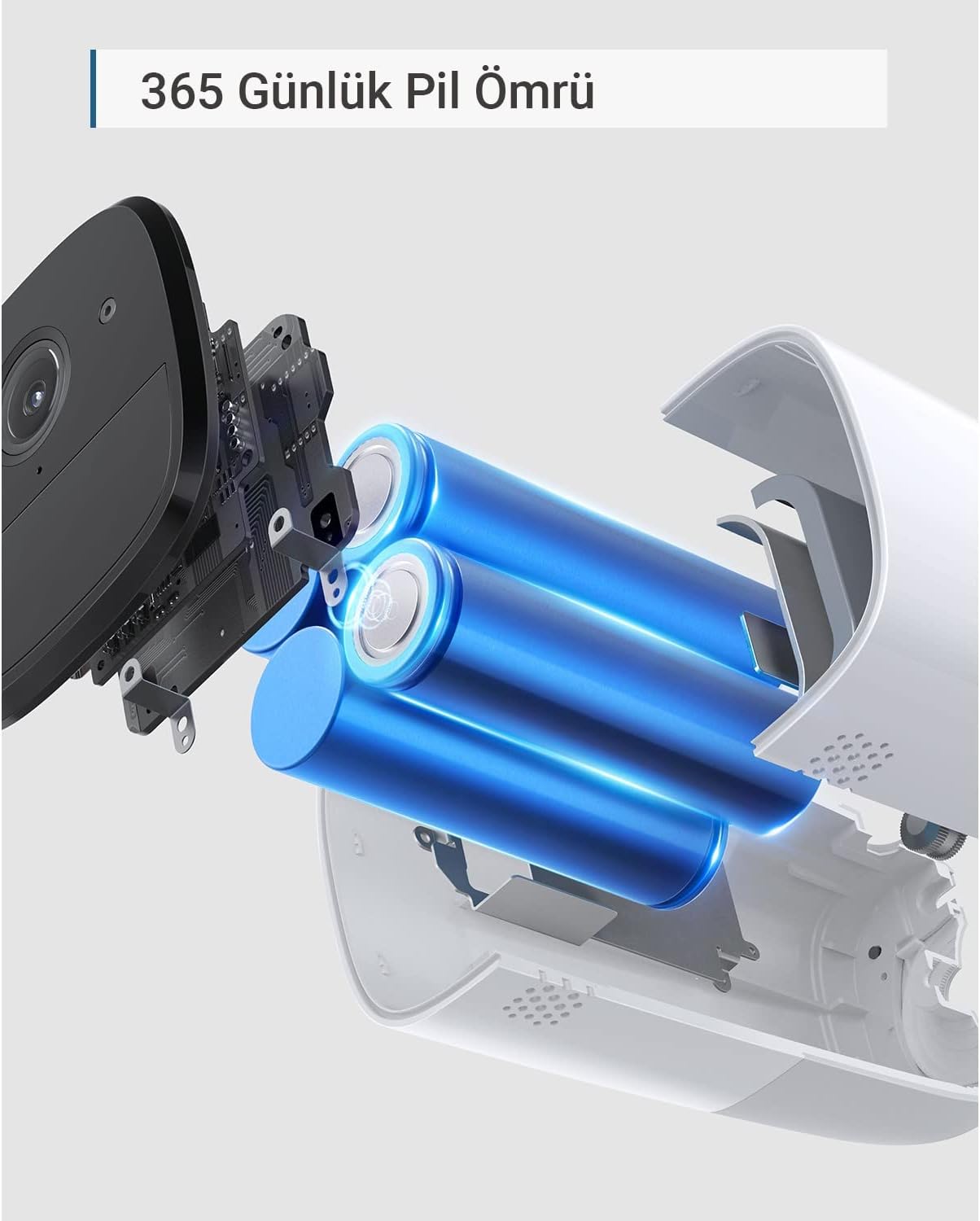
Figure 3.4: An internal diagram of the eufyCam 2 Pro, illustrating its long-lasting battery components.
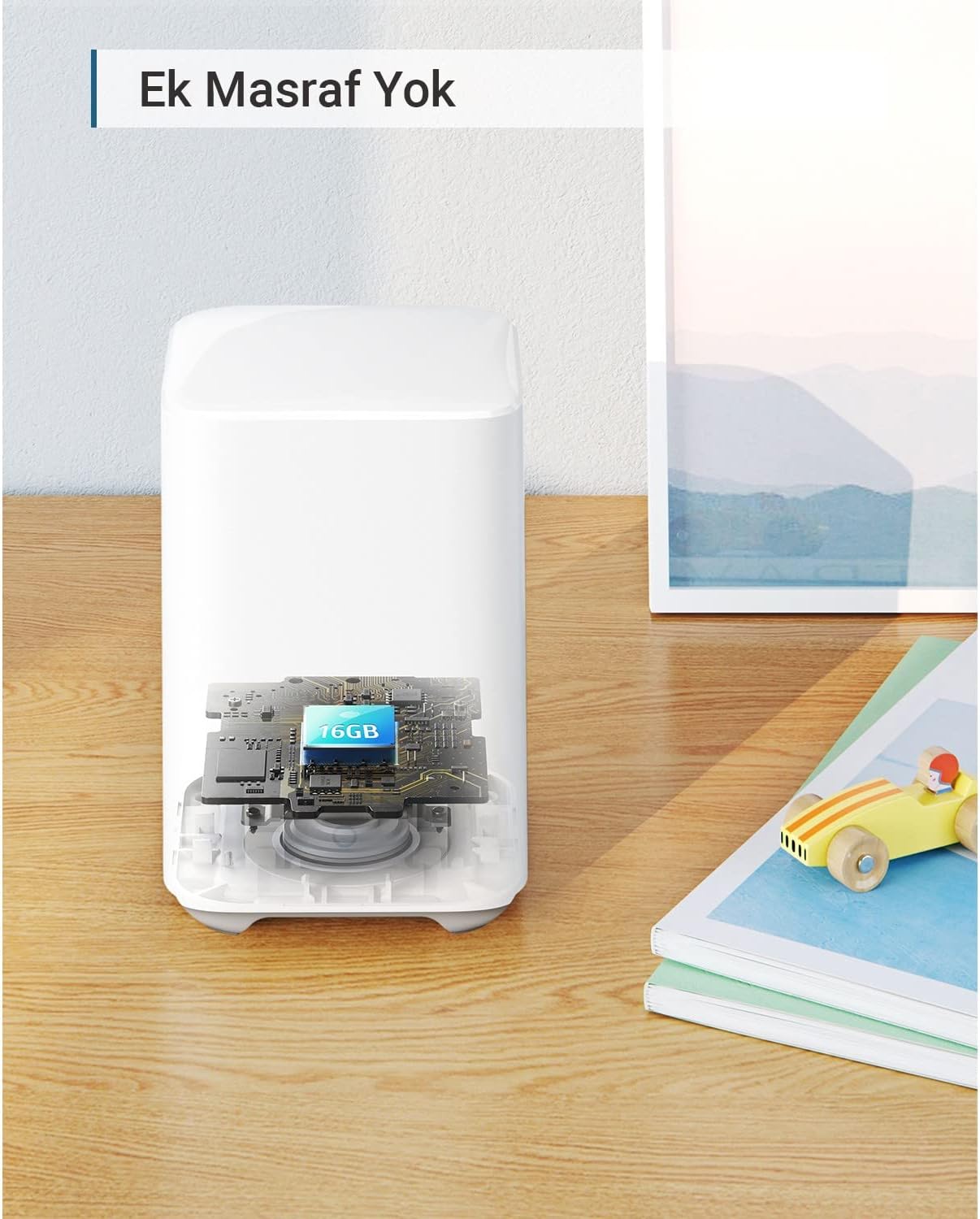
3.5-сүрөт: Кесилген жер view of the eufy HomeBase, indicating the integrated 16GB eMMC local storage.
4. Орнотуу колдонмосу
4.1. Charging the Cameras
Before initial use, fully charge both eufyCam 2 Pro cameras using the provided Micro-USB charging cable and a standard USB power adapter (not included). The LED indicator on the camera will show charging status.
4.2. HomeBase Setup
- Connect the HomeBase to your router using the supplied Ethernet cable.
- Plug the AC power adapter into the HomeBase and a power outlet.
- Wait for the HomeBase LED indicator to turn solid blue, indicating it is ready for pairing.
4.3. eufy Security App Installation
Download the eufy Security app from the App Store (iOS) or Google Play (Android). Create an account or log in if you already have one.
4.4. Pairing Cameras with HomeBase
- Open the eufy Security app and tap "Add Device".
- Select "eufyCam 2 Pro" from the list of devices.
- Follow the on-screen instructions to pair each camera. This typically involves pressing the SYNC button on the camera until it beeps.
4.5. Камераны орнотуу
Choose a suitable location for your cameras, ensuring good Wi-Fi signal and an unobstructed view. Use the provided mounting kits to securely attach the cameras to a wall or ceiling. The cameras are designed for outdoor use with IP67 protection.
5. Иштөө нускамалары
5.1. Using the eufy Security App
The eufy Security app is the primary interface for managing your camera system. From the app, you can:
- View жаша фооtagсиздин камераларыңыздан.
- Жазылган окуяларга кирүү.
- Кыймылды аныктоо сезгичтигин жана зоналарын тууралаңыз.
- Enable/disable two-way audio.
- Configure notification settings.
- Батареянын деңгээлин текшериңиз.

Figure 5.1: A user interacting with the eufy Security system, demonstrating live feed access and smart home integration.
5.2. Түз эфир View жана Жаздыруу
Tap on a camera in the app to view its live feed. The system automatically records events triggered by motion detection. These recordings are stored locally on the HomeBase and can be reviewколдонмо аркылуу ed.
5.3. Эки тараптуу аудио
Use the microphone icon in the live view to speak through the camera's speaker. This feature allows for direct communication with individuals near the camera.
5.4. Motion Detection
Configure motion detection settings within the app to receive alerts and record footage when activity is detected. You can customize detection zones and sensitivity to minimize false alarms.
5.5. Түнкү көрүнүш
The eufyCam 2 Pro automatically switches to night vision mode in low-light conditions, providing clear black-and-white footage.
6. Техникалык тейлөө
6.1. Батареяны башкаруу
The eufyCam 2 Pro cameras feature a long-lasting battery. Monitor battery levels through the eufy Security app. Recharge cameras when the battery level is low using the provided Micro-USB cable. Full charge typically takes several hours.
6.1. Тазалоо
Мезгил-мезгили менен камеранын линзасын жана корпусун жумшак, гamp cloth to ensure optimal image quality and prevent debris buildup. Do not use harsh chemicals or abrasive cleaners.
6.3. Микропрограмманы жаңыртуу
eufy regularly releases firmware updates to improve performance and add new features. Ensure your HomeBase and cameras are connected to the internet to receive automatic updates. You can check for updates manually in the eufy Security app settings.
7. Кыйынчылыктарды
- Camera not connecting to HomeBase: Ensure HomeBase is powered on and connected to the internet. Move camera closer to HomeBase during pairing. Reset camera by pressing the SYNC button for 10 seconds.
- Видеонун сапаты начар: Check Wi-Fi signal strength in the camera's location. Clean the camera lens. Ensure there are no obstructions.
- Кыймылды аныктоо иштебей жатат: Verify motion detection is enabled in the app. Adjust sensitivity settings. Ensure detection zones are correctly configured.
- Батарейканын кыска мөөнөтү: Reduce the number of motion events or live view sessions. Ensure the camera is fully charged. Extreme temperatures can affect battery performance.
- Билдирмелер жок: Check app notification settings and phone's system notification settings for the eufy Security app.
8. Техникалык шарттар
| Өзгөчөлүк | Деталь |
|---|---|
| Модель номери | T88513D1 |
| Video Resolution | 2K (1440p) |
| Байланыш | Wi-Fi, Ethernet (HomeBase) |
| Power Source | Corded Electric (HomeBase), Battery (Cameras) |
| Батареянын иштөө мөөнөтү | Up to 365 days (eufyCam 2 Pro) |
| Аба ырайына каршылык | IP67 |
| Түнкү көрүнүш | Ооба |
| Эки тараптуу аудио | Ооба |
| Жергиликтүү сактагыч | 16GB eMMC (HomeBase) |
| Иштөө температурасы | -20°Cден 50°Cге чейин (-4°Fтен 122°Fге чейин) |
| Өлчөмдөрү (Камера) | Болжол менен 10.7 x 5.7 x 5.7 см (4.2 x 2.2 x 2.2 дюйм) |
| Dimensions (HomeBase) | Болжол менен 13 x 8.5 x 8.5 см (5.1 x 3.3 x 3.3 дюйм) |
| Салмагы (Камера) | Болжол менен 360г (0.79 фунт) |
| Weight (HomeBase) | Болжол менен 340г (0.75 фунт) |
9. Кепилдик жана колдоо
9.1. Кепилдик маалыматы
eufy products typically come with a limited warranty. Please refer to the warranty card included in your package or visit the official eufy website for the most current and detailed warranty information specific to your region and product model. Keep your purchase receipt as proof of purchase for warranty claims.
9.2. Кардарларды колдоо кызматы
For technical assistance, troubleshooting, or general inquiries, please contact eufy customer support:
- Webсайт: Visit www.eufylife.com for FAQs, support articles, and contact options.
- Электрондук почта: Refer to your product packaging or the eufy website for regional email support addresses.
- Телефон: Refer to your product packaging or the eufy webаймактык телефон колдоо номерлери үчүн сайт.
When contacting support, please have your product model number (T88513D1) and purchase information ready.


