1. Киришүү
This manual provides comprehensive instructions for the One For All URC4912 Sony TV Replacement Remote Control. Designed to function identically to your original Sony TV remote, the URC4912 offers immediate compatibility with all Sony TV models (LCD, LED, Plasma) without requiring any setup. It also includes a learning feature for personalized customization of functions.
2. Орнотуу
2.1 Батареяларды орнотуу
URC4912 пультуна эки AA батарейкасы керек (кошулмага кирбейт). Аларды орнотуу үчүн төмөнкү кадамдарды аткарыңыз:
- Пульттун артындагы батарея бөлүкчөсүнүн капкагын табыңыз.
- Капкакты ылдый жылдырыңыз же аны ачуу үчүн бекиткичти басыңыз.
- Оң (+) жана терс (-) терминалдары бөлүмдүн ичиндеги белгилер менен туура дал келишин камсыз кылып, эки АА батарейканы салыңыз.
- Батарея бөлүкчөсүнүн капкагын бекем чыккыча ордуна жылдырыңыз.
Эскертүү: Ар дайым жаңы батареяларды колдонуңуз жана эски батареяларды жоопкерчилик менен жок кылыңыз.
2.2 Initial Setup (No Configuration Required)
The One For All URC4912 remote control is pre-programmed for all Sony televisions. No setup or programming is required. Simply insert the batteries, and the remote is ready for immediate use with your Sony TV.
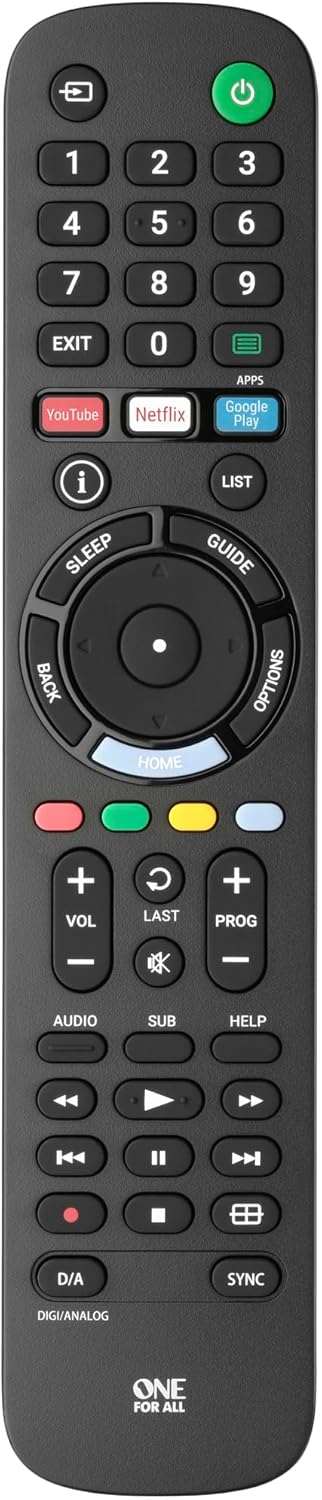
Сүрөт 1: Алдыңкы view of the One For All URC4912 remote control. This image displays the remote's layout, including number buttons, navigation pad, volume and channel controls, and dedicated app buttons for services like YouTube and Netflix.
3. Пультту иштетүү
3.1 Негизги функциялар
The URC4912 remote provides all standard functions found on an original Sony TV remote:
- Кубат баскычы: Телевизорду күйгүзөт же өчүрөт.
- Сан баскычтары (0-9): Түз канал тандоо үчүн.
- Үндү жогорулатуу/төмөндөтүү (+/-): Телевизордун үнүн тууралайт.
- Channel Up/Down (PROG +/-): Телеканалдарды өзгөртөт.
- Үнсүз баскычы: Телевизордун үнүн басат.
- Навигация панели (Өйдө, Төмөн, Солго, Оңго, ОК): Менюда навигация жана тандоо үчүн.
- Артка баскычы: Мурунку экранга же менюга кайтат.
- Үй баскычы: Сыналгынын негизги башкы экранына же акылдуу сыналгы интерфейсине кирет.
3.2 Specific Sony Functions
This remote supports common Sony-specific functions, including:
- Театр: Activates or deactivates Theatre mode.
- i-Manual: Accesses the TV's electronic instruction manual.
- Параметрлер: Displays context-sensitive options for the current screen.
3.3 Окуу өзгөчөлүгү
The URC4912 remote includes a learning feature, allowing you to copy functions directly from your original remote control. This is useful for any specific functions not pre-programmed or for personalizing button assignments.
- Place the URC4912 remote and your original remote on a flat surface, facing each other, with their IR emitters approximately 1-2 inches apart.
- On the URC4912, press and hold the ЖАЙГАШУУ button (if available, or refer to the full manual for specific button combination to enter learning mode) until the LED indicator blinks twice and then stays lit.
- Press the button on the URC4912 that you wish to program. The LED will blink rapidly.
- On your original remote, press and hold the corresponding function button until the URC4912's LED blinks twice to confirm successful learning.
- Repeat steps 3 and 4 for any other buttons you wish to program.
- Окуу режиминен чыгуу үчүн басыңыз ЖАЙГАШУУ кайра баскычын. LED өчөт.
Note: If the LED shows a long blink, the learning was unsuccessful. Try again, ensuring both remotes are stable and the original remote's batteries are fresh.

Сүрөт 2: Бурчтуу view of the One For All URC4912 remote control, highlighting its ergonomic design and button placement for easy access to various functions.
4. Техникалык тейлөө
Алыстан башкаруу пультуңуздун узак мөөнөттүү иштешин жана оптималдуу иштешин камсыз кылуу үчүн:
- Тазалоо: Wipe the remote with a soft, dry cloth. Do not use abrasive cleaners or liquids.
- Батареяны алмаштыруу: Replace batteries when the remote's response becomes sluggish or the LED indicator (if present) signals low power. Always replace both batteries simultaneously.
- Сактагыч: Пультту кургак жерде, күн нуру түз тийген жерлерден жана өтө жогорку температурадан алыс сактаңыз.
5. Кыйынчылыктарды
| Көйгөй | Чечим |
|---|---|
| Пульт жооп бербейт. |
|
| Кээ бир баскычтар иштебейт. |
|
| Learning feature fails. |
|
6. Техникалык шарттар
| Бренд | Бир Бардыгы үчүн |
| Модел | URC4912 |
| Шайкеш түзмөктөр | Television (All Sony TV types: LCD, LED, Plasma) |
| Өзгөчөлүктөр | Infrared, Learning Function |
| Элементтердин саны | 1 |
| Батарея түрү | 2 x AA батарейкалар (киргизилген эмес) |
| Продукциянын өлчөмдөрү | 19.5 x 4.4 x 2.5 см |
| Элемент Салмагы | 100 г |
7. Кепилдик маалыматы
For detailed warranty information regarding your One For All URC4912 remote control, please refer to the official One For All webсайт же сатып алууда камтылган кепилдик картасы. Кепилдиктин шарттары жана шарттары аймакка жараша өзгөрүшү мүмкүн.
8. Колдоо
Should you require further assistance, technical support, or have questions not covered in this manual, please visit the official One For All support website or contact their customer service. You can often find FAQs, additional guides, and contact information on their brand page:


