1. Киришүү
The JBL Clip 4 is a compact and durable portable Bluetooth speaker designed for on-the-go audio. Featuring an integrated carabiner, IP67 waterproof and dustproof rating, and up to 10 hours of playtime, it delivers clear sound for various environments. This manual provides essential information for setting up, operating, and maintaining your speaker.
2. Коопсуздук маалыматы
Before using this product, please read all safety information carefully. Keep this manual for future reference. Do not expose the speaker to extreme temperatures or attempt to disassemble it. Ensure the USB-C port cover is securely closed when using the speaker near water to maintain its waterproof rating.
3. Пакеттин мазмуну
Пакетиңизде бардык буюмдар бар экенин текшериңиз:
- 1 x JBL Clip 4 Portable Bluetooth Speaker
- 1 x Type-Cден Type-A кубаттоочу кабели
- 1 x Quick Start Guide
- 1 x Коопсуздук баракчасы
- 1 x Кепилдик картасы
4. Продукт бүтүп калдыview
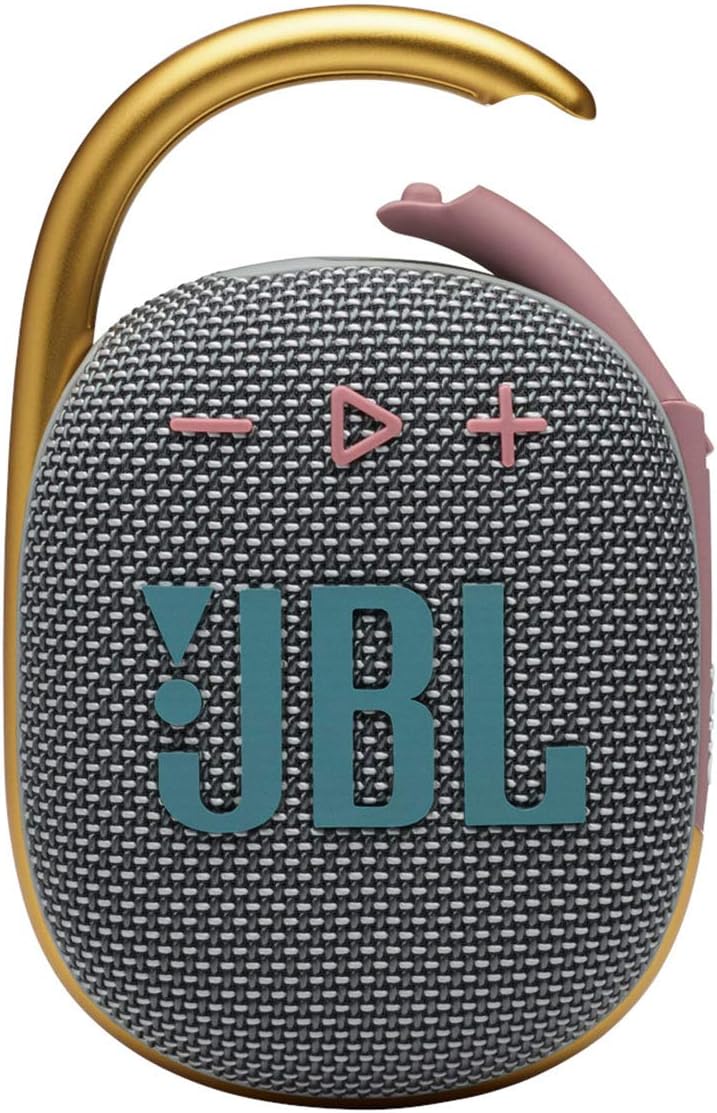
Familiarize yourself with the main components and controls of your JBL Clip 4 speaker.

Башкаруу каражаттары жана көрсөткүчтөр:
- Кубат баскычы: Located on the side, press to turn the speaker On/Off.
- Bluetooth баскычы: Located on the side, press to enter Bluetooth pairing mode.
- Үн баскычтары (+/-): Located on the front, press to adjust audio volume.
- Ойнотуу/тындыруу баскычы: Located on the front, press to play or pause audio. Double-press to skip track.
- Integrated Carabiner: Allows for easy attachment to bags, belts, or other loops.

Порттор:
- USB-C заряддоо порту: Located on the bottom, used for charging the speaker. Ensure the cover is sealed when not charging.
5. Орнотуу
5.1. Динамикти кубаттоо
- Open the protective cover of the USB-C charging port located on the bottom of the speaker.
- Connect the provided Type-C to Type-A charging cable to the speaker's USB-C port.
- Кабелдин экинчи учун туура келген USB кубат адаптерине туташтырыңыз (кошумча эмес).
- The LED indicator will show charging status. Once fully charged, the LED will turn off.
- Close the USB-C port cover firmly to ensure waterproof and dustproof integrity.
A full charge provides up to 10 hours of playtime, depending on volume level and audio content.
5.2. Bluetooth Жупташтыруу
- Turn on the JBL Clip 4 by pressing the Power button.
- Press the Bluetooth button on the side of the speaker. The LED indicator will flash, indicating it is in pairing mode.
- On your smartphone or tablet, go to the Bluetooth settings and select "JBL Clip 4" from the list of available devices.
- Once connected, the LED indicator will turn solid, and you will hear an audible confirmation.
6. Иштөө нускамалары
6.1. Күйгүзүү/өчүрүү
- Press the Power button once to turn the speaker ON.
- Press and hold the Power button for a few seconds to turn the speaker OFF.
6.2. Аудио ойнотуу
- Ойнотуу/тындыруу: Play/Pause баскычын бир жолу басыңыз.
- Өткөрүп жиберүү: Double-press the Play/Pause button to skip to the next track.
- Үндү көзөмөлдөө: Press the '+' button to increase volume, and the '-' button to decrease volume.
6.3. Чалууларды башкаруу
The JBL Clip 4 features a noise and echo-canceling speakerphone for clear calls.
- Чалууга жооп берүү/аяктоо: Play/Pause баскычын бир жолу басыңыз.
- Чакырууну четке кагуу: Play/Pause баскычын 2 секунд басып туруңуз.
6.4. Using the Integrated Carabiner
The redesigned integrated carabiner allows for versatile attachment options.
- Simply open the carabiner clip and attach it to your backpack, belt loop, bike, or any other secure point.
- Ensure the carabiner is fully closed after attachment to prevent accidental detachment.
6.5. Waterproof and Dustproof Use (IP67)
The JBL Clip 4 is IP67 rated, meaning it is fully waterproof and dustproof.
- It can be submerged in water up to 1 meter (3.3 feet) for up to 30 minutes.
- Ал чаңдын киришинен корголгон.
- Always ensure the USB-C port cover is completely sealed before exposing the speaker to water or dust.
- Сууга түшкөндөн кийин, кубаттоодон мурун динамикти жакшылап кургатыңыз.

7. Техникалык тейлөө
- Тазалоо: жумшак колдонуу, damp Динамикти тазалоо үчүн чүпүрөк колдонуңуз. Катуу химиялык заттарды же абразивдүү материалдарды колдонбоңуз.
- Сактагыч: Колдонулбаган учурда динамикти салкын, кургак жерде сактаңыз. Түз күн нуруна же өтө жогорку температурага көпкө дуушар болбоңуз.
- Батареяга кам көрүү: To prolong battery life, fully charge the speaker at least once every three months.
8. Кыйынчылыктарды
| Маселе | Мүмкүн чечим |
|---|---|
| Динамик күйбөйт | Батарея заряддалганын текшериңиз. USB-C кабели аркылуу кубат булагына туташуу. |
| Динамиктен үн жок | Check volume levels on both the speaker and your connected device. Ensure the speaker is properly paired via Bluetooth. |
| Bluetooth аркылуу жупташтыруу мүмкүн эмес | Ensure the speaker is in pairing mode (flashing LED). Turn off and on Bluetooth on your device. Move closer to the speaker (within 10 meters). |
| Үн сапаты начар | Move the speaker closer to your device. Ensure there are no obstructions between the speaker and the device. Check for interference from other wireless devices. |
9. Техникалык шарттар
| Өзгөчөлүк | Деталь |
|---|---|
| Модель аты | JBL CLIP 4 - Grey |
| Өлчөмдөр (D x W x H) | 1.8" x 3.4" x 5.3" |
| Элемент Салмагы | 8.5 унция |
| Power Source | Батарея менен иштейт (1 литий полимердик батарейка камтылган) |
| Динамиктин максималдуу чыгаруу күчү | 5 Ватт |
| Frequency Response | 110 Гц |
| Ызы-чуунун катышы | 85 дБ |
| Зымсыз байланыш технологиясы | Bluetooth 5.1 |
| Bluetooth диапазону | 10 метр |
| Оюн убактысы | 10 саатка чейин |
| Сууга туруктуулук деңгээли | IP67 (Суу жана чаң өткөрбөйт) |
| Материал | Fabric & Rubberized ABS |
| Түс | Боз |
| UPC | 050036378246 |

10. Кепилдик жана колдоо
The JBL Clip 4 comes with a limited warranty. Please refer to the included Warranty Card for detailed terms and conditions. For product support, technical assistance, or warranty claims, please visit the official JBL webсайтка же кардарларды тейлөөгө кайрылыңыз.
Расмий JBL Webсайт: www.jbl.com


