1. Киришүү
Thank you for choosing the MARVO KG934 RGB Mechanical Gaming Keyboard. This manual provides detailed instructions for setting up, operating, maintaining, and troubleshooting your new keyboard. The KG934 features durable blue mechanical switches, customizable RGB backlighting, and a compact tenkeyless (TKL) design for an enhanced gaming and typing experience.

Сүрөт: жогорудан төмөнгө view of the MARVO KG934 RGB Mechanical Gaming Keyboard, showcasing its compact layout and illuminated keys.
2. Орнотуу
- Пакеттен чыгаруу: Баскычтопту таңгагынан кылдаттык менен чыгарып алыңыз.
- Байланыш: Connect the USB 2.0 cable from the keyboard to an available USB port on your computer.
- Драйверди орнотуу: The keyboard is plug-and-play. Your operating system (Windows 7 or newer) will automatically detect and install the necessary drivers. No additional software installation is typically required for basic functionality.
- Жайгашкан жери: Position the keyboard comfortably on your desk. The frameless and TKL design allows for more desk space.
3. Иштөө нускамалары
3.1 Негизги функциялар
The MARVO KG934 functions as a standard QWERTY keyboard. All keys are active upon connection. The N-key rollover anti-ghosting feature ensures that every keystroke is registered accurately, even when multiple keys are pressed simultaneously, which is beneficial for fast-paced gaming.
3.2 Функция баскычтарынын айкалышы (Fn ачкычы)
The Fn key (Function key) allows access to secondary functions printed on certain keys. Press and hold the Fn баскычын басып, андан кийин каалаган функция баскычын басыңыз.
- Fn + F1-F4: Media Player controls (e.g., Play/Pause, Stop, Previous Track, Next Track).
- Fn + F5-F8: Volume controls (e.g., Mute, Volume Down, Volume Up).
- Fn + F9-F12: Additional media or system functions (specific functions may vary slightly based on OS).
- Fn + Win Key: Оюн учурунда кокусунан басылып калбашы үчүн Windows баскычын кулпулайт/ачат.
- Fn + Жебе баскычтары: Adjusts lighting effects (e.g., brightness, speed, direction).
- Fn + INS/HOME/PGUP/DEL/END/PGDN: Cycles through various preset RGB lighting modes.
- Fn + PRTSC/SCRLK/PAUSE: Activates specific lighting effects or modes.
- Fn + 1-5: Activates custom lighting profiles (if programmable via software, refer to MARVO webпрограммалык камсыздоонун жеткиликтүүлүгү жөнүндө маалымат алуу үчүн сайт).

Сүрөт: бурчтуу view of the MARVO KG934 keyboard, highlighting the key layout and design.
4. Жарыктандыруу режимдери
The KG934 features individual RGB backlighting with multiple selectable lighting schemes. You can customize the visual experience directly from the keyboard.
- Өзгөртүү режимдери: Колдонуу Fn + INS/БАШКЫ БЕТ/PGUP/ӨЧҮРҮҮ/АЯКТОО/PGDN to cycle through various pre-programmed lighting effects.
- Жарыктыкты жөндөө: Колдонуу Fn + Өйдө жебе жарыктыгын жогорулатуу жана Fn + Төмөн жебе жарыктыгын азайтуу үчүн.
- Adjusting Speed/Direction: Колдонуу Fn + Сол жебе жана Fn + Оңго жебе to adjust the speed or direction of dynamic lighting effects.

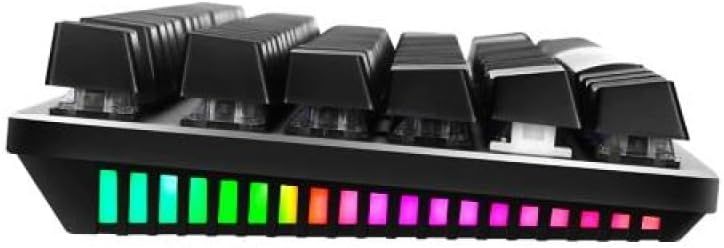
Сүрөт: каптал view of the MARVO KG934, illustrating the raised key design and the vibrant RGB lighting along the keyboard's edge.
5. Техникалык тейлөө
Туура тейлөө клавиатураңыздын узак иштөөсүн жана иштешин камсыз кылат.
- Тазалоо: Use a soft, dry cloth to wipe the surface of the keyboard. For dust between keys, use compressed air. For stubborn dirt, a slightly damp клавиатурага суюктук кирбеши үчүн жумшак самын менен кездеме колдонсо болот.
- Клавиатураны алып салуу: If necessary, keycaps can be carefully removed for deeper cleaning using a keycap puller (not included). Be gentle to avoid damaging the switches.
- Суюктуктардан алыс болуңуз: Клавиатурага суюктук төкпөңүз. Эгерде суюктук төгүлүп кетсе, клавиатураны дароо сууруп, кайра туташтыруудан мурун толугу менен кургатыңыз.
- Сактагыч: Клавиатураны күн нурунан жана экстремалдык температурадан алыс, салкын, кургак жерде сактаңыз.

Image: The MARVO KG934 keyboard with several keycaps removed, showing the underlying mechanical switches, useful for cleaning or switch inspection.
6. Кыйынчылыктарды
- Баскычтоп жооп бербейт:
- USB кабели клавиатурага жана компьютерге бекем туташып турганын текшериңиз.
- Баскычтопту башка USB портуна туташтырууга аракет кылыңыз.
- Компьютерге тиешелүү маселени болтурбоо үчүн баскычтопту башка компьютерде сынап көрүңүз.
- Lights Not Working or Incorrect:
- Check if the brightness is turned down (use Fn + Өйдө жебе).
- Колдонуу менен ар кандай жарык режимдери аркылуу айланыңыз Fn + INS/БАШКЫ БЕТ/PGUP/ӨЧҮРҮҮ/АЯКТОО/PGDN.
- Эч бир программа клавиатуранын жарык орнотууларын жокко чыгарбасын текшериңиз.
- Катталбаган ачкычтар:
- Clean around the affected key to ensure no debris is obstructing the switch.
- If a specific key consistently fails, it might indicate a faulty switch.
7. Техникалык шарттар
| Бренд | MARVO |
| Модел | KG934 |
| Которуу түрү | Blue Mechanical Switches (Tactile with audible click) |
| Которуу рейтинги | Over 50 million keystrokes |
| Негизги маршрут | 3.8 ± 0.3 мм |
| Интерфейс | USB 2.0 |
| Кабелдин узундугу | 1.5 метр |
| OS колдоо | Windows 7 же жаңыраак |
| Дизайн | Frameless and TKL Compact Design, Raised Key Design |
| Арткы жарык | Individual RGB Backlight with Multiple Selectable Lighting Schemes |
| Anti-Ghosting | N-ачкыч Rollover |
| баскычтардын саны | 89 |
Сүрөт: жакын план view of the mechanical switches on the MARVO KG934 keyboard, illustrating their construction.
8. Кепилдик жана колдоо
The MARVO KG934 RGB Mechanical Gaming Keyboard comes with a manufacturer's warranty of 1 жыл сатып алынган күндөн тартып. Бул кепилдик нормалдуу колдонуудагы өндүрүш кемчиликтерин камтыйт.
For technical support, warranty claims, or further assistance, please contact your retailer or visit the official MARVO website for contact information and support resources. Please retain your proof of purchase for warranty validation.


