Introduction
This manual provides detailed instructions for the safe and effective operation of the AOPUTTRIVER AP-7200APP Professional True-RMS Clamp Meter. This device is designed for measuring AC/DC current, AC/DC voltage, resistance, capacitance, continuity, and temperature, and features non-contact voltage (NCV) detection and Bluetooth connectivity for mobile app integration.
Коопсуздук маалыматы
Always adhere to safety precautions when using electrical testing equipment. This device complies with IEC 61010-1, CAT III 600V safety standards and features double insulation for enhanced protection.
- Ар бир өлчөө диапазону үчүн көрсөтүлгөн максималдуу киргизүү маанилеринен ашпаңыз.
- Ток чынжырлары менен иштөөдө өтө этият болуңуз.
- Ensure the test leads are in good condition and properly connected before use.
- Эгерде эсептегич бузулуп калгандай көрүнсө же бузук болсо, аны иштетпеңиз.asing ачык.
- Refer to local and national safety codes for proper electrical work procedures.
Пакеттин мазмуну
Төмөндө тизмеленген нерселердин баары пакетиңизге камтылганын текшериңиз:
- AOPUTTRIVER AP-7200APP Clamp Метр
- Температура проба
- Test Leads (Red/Black)
- Batteries (AAA type, typically 2)
- Instruction Manual

Image: Contents of the AP-7200APP package, including the clamp meter, temperature probe, test leads, batteries, and instruction manual.
Продукт бүттүview
Familiarize yourself with the components of the AP-7200APP Clamp Метр:

Image: Labeled diagram of the AP-7200APP Clamp Meter, highlighting its main components and controls.
- Clamp Жаактар: Opens 26mm to enclose conductors for current measurement.
- Jaw-opening Handle: Клапанды ачуу жана жабуу үчүн колдонулатamp жаак.
- NCV аныктоо аймагы: Located at the top, used for non-contact voltage аныктоо.
- Lamp Жарык: Illuminates the measurement area. Press the "HOLD" key for over 2 seconds to activate.
- Айлануучу которгуч: Өлчөө функцияларын жана диапазондорун тандайт.
- LCD дисплей: 6000 counts display, showing measurement values and function symbols.
- HOLD баскычы: Freezes the current display reading. Press for >2 seconds to activate backlight.
- SEL Key: Used to change measurement modes within a function (e.g., AC/DC, Diode/Continuity/Capacitance).
- МАКС/МИН баскычы: Records maximum and minimum measured values. Press for >2 seconds to exit.
- Hz/Кызмат баскычы: Жыштыкты же жумуш циклин өлчөөнү тандайт.
- REL ачкычы: Салыштырмалуу өлчөө режимин иштетет.
- COM киргизүү уясы: Common terminal for test leads and temperature probe.
- VΩHz°C°F Input Jack: Том үчүн киргизүү терминалыtage, каршылыкты, жыштыкты, сыйымдуулукту жана температураны өлчөө.
Жайгашуу
1. Батареяны орнотуу
The meter requires two AAA batteries. Open the battery compartment cover on the back of the device, insert the batteries according to the polarity indicators, and securely close the cover. A low battery indicator will appear on the LCD when replacement is needed.
2. Bluetooth Connection (AiLink App)
The AP-7200APP can connect to a mobile device via Bluetooth for remote monitoring and data analysis. The effective control distance is approximately 10-15 meters.
- Колдонмону жүктөп алыңыз: Scan the QR code provided in the manual or search for "AiLink" in the Google Play Store (for Android) or Apple App Store (for iOS). Download and install the application. You can also download it from aicare.net.cn/app/ailink/download/.
- Колдонмону ачуу: Launch the AiLink application on your mobile phone.
- Түзмөккө туташуу: Within the app, press the "ADD" or "Connect" button to search for nearby devices. Select the "Clamp Meter" from the list to establish a connection.
- Монитор маалыматтары: Once connected, the app will display real-time measurement data from the clamp meter. You can analyze and save this data.

Image: Visual guide for Bluetooth connection and app usage, showing the AiLink app interface.
Иштөө нускамалары
Before any measurement, ensure the rotary switch is set to the OFF position when not in use.
1. Өзгөрмө/Туруктуу Токту Өлчөө (Clamp)
- Айлантуу которгучту 60A~ or 400A~ position for AC current, or 60A= or 400A= туруктуу ток үчүн.
- Press the jaw-opening handle to open the clamp жаак.
- Бир өткөргүчтү cl менен кошуңузamp jaws. Ensure the conductor is centered within the jaws for accurate readings.
- ЖК дисплейдеги учурдагы маанини окуңуз.
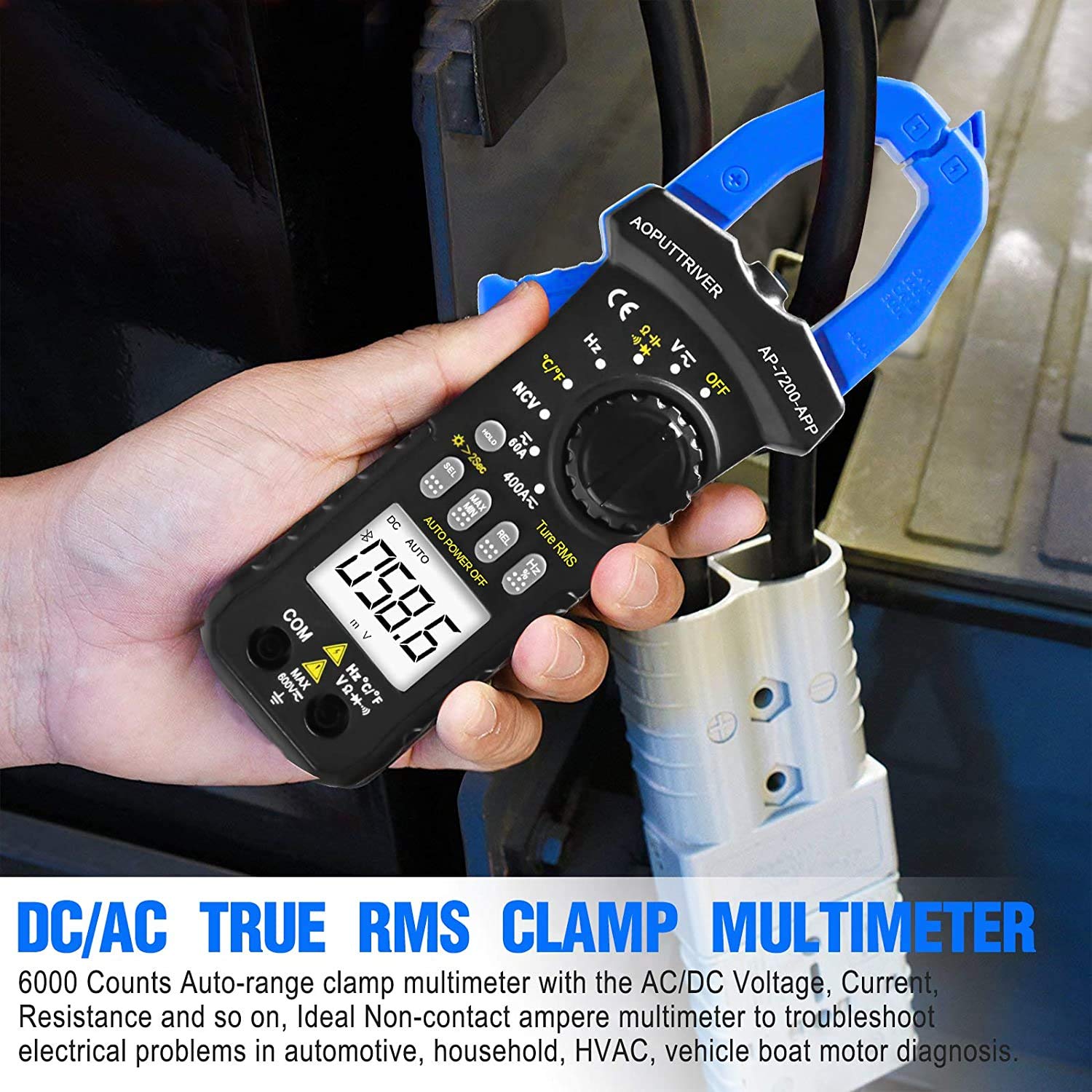
Image: Demonstrating current measurement using the clamp jaws on an electrical cable.
2. AC/DC Voltage Өлчөө
- Insert the red test lead into the VΩHz°C°F jack and the black test lead into the COM jack.
- Айлантуу которгучту V~ (AC томtagд) же V= (DC Voltagд) кызмат орду.
- Сыноо өткөргүчтөрүн текшерилип жаткан схемага же компонентке параллелдүү туташтырыңыз.
- Томду окуңузtage дисплейдеги e мааниси.
3. Resistance, Capacitance, Continuity, Diode Measurement
- Insert the red test lead into the VΩHz°C°F jack and the black test lead into the COM jack.
- Айлантуу которгучту Ω позиция.
- басыңыз СЕЛ key to cycle through Resistance (Ω), Continuity (buzzer icon), Diode (diode icon), and Capacitance (F) modes.
- Connect the test leads to the component. For resistance and capacitance, ensure the component is de-energized.
- Read the measurement on the LCD. For continuity, a beep indicates a continuous circuit.
4. Контактсыз томtage (NCV) аныктоо
- Айлантуу которгучту NCV позиция.
- Place the NCV detection area (top of the clamp jaws) near the conductor or outlet to be tested.
- Эгерде AC voltage ≥ 90V RMS is detected, the lamp light will illuminate, and an audible alarm will sound.

Image: Demonstrations of temperature measurement, NCV detection, continuity testing, and current measurement.
5. Температураны өлчөө
- Insert the temperature probe into the VΩHz°C°F and COM jacks, observing polarity.
- Айлантуу которгучту ° C / ° F позиция.
- Температуралык зонддун учун температурасы өлчөнө турган объекттин үстүнө же жанына кой.
- Read the temperature value on the LCD display. Press the СЕЛ key to switch between Celsius (°C) and Fahrenheit (°F).

Image: Temperature measurement using the included probe, with display examples in Celsius and Fahrenheit.
6. Арткы жарык функциясы
To activate the backlight for improved visibility in dim environments, press and hold the БЕРҮҮ key for more than 2 seconds. Press and hold again for 2 seconds to turn it off.

Сүрөт: The clamp meter's backlight feature in action, enhancing readability in low-light conditions.
Техникалык тейлөө
1. Тазалоо
Счетчиктин сasing жарнама мененamp cloth and mild detergent. Do not use abrasives or solvents. Ensure the meter is completely dry before storage or use.
2. Батареяны алмаштыруу
When the low battery indicator appears on the display, replace the batteries promptly to ensure accurate measurements. Refer to the "Battery Installation" section for instructions.
3. Сактоо
If the meter is not used for an extended period, remove the batteries to prevent leakage. Store the device in a cool, dry place, away from direct sunlight and extreme temperatures.
Проблемаларды чечүү
| Көйгөй | Мүмкүн себеп | Чечим |
|---|---|---|
| Эсептегич күйбөйт. | Өлүк же туура эмес орнотулган батарейкалар. | Батареянын полярдуулугун текшерүү; батареяларды алмаштыруу. |
| Туура эмес окуулар. | Туура эмес функция тандалды; сыноо кабелинин туташуусу начар; тышкы тоскоолдук. | Verify rotary switch setting; ensure secure test lead connection; move away from strong electromagnetic fields. |
| Bluetooth байланышы ишке ашпай калды. | Meter too far from phone; Bluetooth off on phone; app not installed correctly. | Ensure meter is within 10-15m range; enable Bluetooth on phone; reinstall AiLink app. |
| NCV detection not working. | Not in NCV mode; voltage босогодон төмөн. | Set rotary switch to NCV; ensure voltage is ≥ 90V AC RMS. |
Техникалык шарттар
| Өзгөчөлүк | Спецификация |
|---|---|
| Модель номери | AP-7200APP |
| Дисплей | 6000 саны LCD |
| AC Voltage Диапазон | 6V ~ 600V |
| DC Voltage Диапазон | 600мВ ~ 600В |
| AC ток диапазону | 60A ~ 400A |
| DC ток диапазону | 60A ~ 400A |
| Каршылык диапазону | 600Ω ~ 60MΩ |
| Кубаттуулук диапазону | 6nF ~ 60mF (Inferred from 6000 counts and common multimeter ranges) |
| Температура диапазону | -20°C ~ 1000°C |
| NCV Detection Threshold | ≥ 90V AC RMS |
| Коопсуздук стандарты | IEC 61010-1, CAT III 600V |
| Power Source | Батарея менен иштейт |
| Өлчөмдөр | 207 x 75 x 37 мм |
| Элемент Салмагы | 390 грамм |
| Bluetooth диапазону | 10-15м (болжол менен) |
Кепилдик жана колдоо
AOPUTTRIVER камсыз кылат 48 айлык продукт кепилдик for the AP-7200APP Clamp Meter. For any product issues or technical assistance, please contact our customer service. We offer 7/24 кардарларды колдоо to resolve your concerns promptly.
Contact information can typically be found on the product packaging or the official AOPUTTRIVER webсайт.


