1. Киришүү
This instruction manual provides detailed guidance for the installation, operation, and maintenance of your Beghelli Dom-e Wi-Fi Full HD Pan/Tilt Surveillance Camera. Please read this manual thoroughly before using the product to ensure proper functionality and safety. Keep this manual for future reference.

Figure 1: Beghelli Dom-e Wi-Fi Full HD Pan/Tilt Surveillance Camera.
2. Продукт бүтүп калдыview
The Beghelli Dom-e Wi-Fi Camera is a versatile surveillance device designed for indoor use, offering Full HD 1080p resolution and comprehensive monitoring capabilities. It integrates seamlessly into your smart home system via the Dom-e Beghelli application.
Негизги өзгөчөлүктөрү:
- Full HD 1080p токтому: Так жана деталдуу видео foo камсыз кылатtage.
- Панорама жана жантайтуу функциясы: Motorized rotation of 355° horizontally and 85° vertically, controllable via the app.
- Түнкү көрүнүш: Equipped with IR LEDs for clear visibility up to 10 meters in low-light conditions.
- Кыймылды аныктоо: Sends real-time push notifications to your smartphone upon detecting movement, including specific person detection.
- Автоматтык түрдө көзөмөлдөө: The "Tracking" function enables the camera to automatically follow moving subjects.
- Эки тараптуу аудио: Built-in microphone and speaker allow for hands-free communication.
- Ийкемдүү жаздыруу параметрлери: Record directly to your smartphone, to a MicroSD card (up to 128GB, not included), or via optional cloud storage.
- Wi-Fi туташуусу: Connects to your home Wi-Fi network (2.4 GHz).
- Маалыматтарды шифрлөө: Ensures the security of your video data.
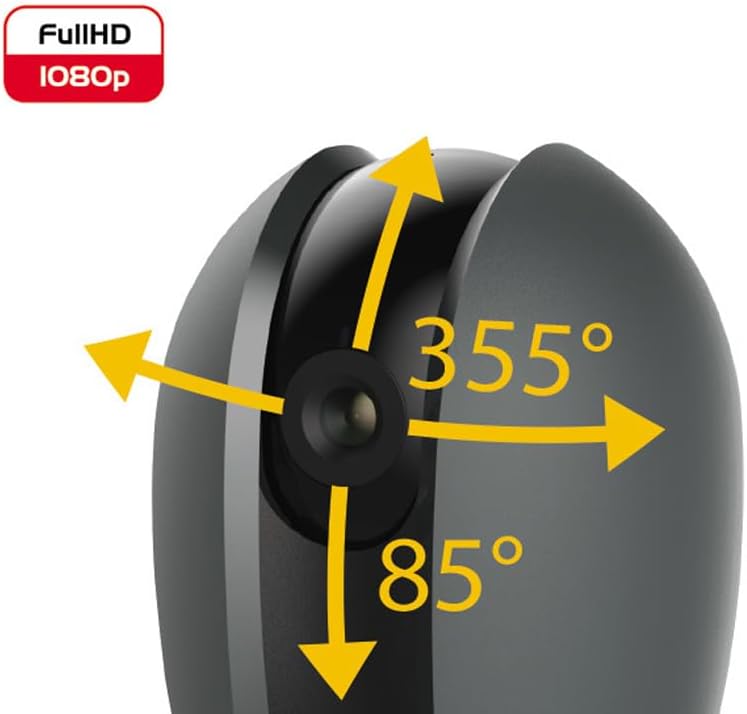
Figure 2: Camera's pan and tilt capabilities.
3. Пакеттин мазмуну
Пакетте бардык буюмдар бар экенин текшериңиз:
- Beghelli Dom-e Wi-Fi Full HD Pan/Tilt Surveillance Camera
- USB Power Adapter (230V – DC 5V/1A)
- Mounting accessories (if included, not explicitly listed but implied by "wall or ceiling installation")
- Көрсөтмө (бул документ)

Figure 3: Product packaging for the Beghelli Dom-e Camera.
4. Орнотуу
4.1 Камераны кубаттоо
- Connect the provided USB power adapter to the camera's power input.
- Plug the adapter into a standard 230V power outlet. The camera will power on and initiate its startup sequence.
4.2 Mobile Application Installation
The Beghelli Dom-e camera is controlled via the dedicated "Dom-e Beghelli" mobile application.
- Download the "Dom-e Beghelli" app from the Apple App Store (for iOS 8.0 or later) or Google Play Store (for Android 4.2 or later).
- Тиркемени смартфонуңузга же планшетиңизге орнотуңуз.
- Жаңы аккаунтка катталыңыз же сизде мурунтан эле бар болсо кириңиз.
4.3 Connecting to Wi-Fi and Pairing
Ensure your Wi-Fi network is 2.4 GHz (IEEE802.11 b/g/n). The camera does not support 5 GHz networks.
- Open the Dom-e Beghelli app and follow the on-screen instructions to add a new device.
- Select the Beghelli Dom-e camera from the list of available devices.
- Enter your Wi-Fi network name (SSID) and password when prompted.
- The app will guide you through the pairing process, which typically involves scanning a QR code displayed on your phone with the camera, or listening for an audio prompt.
- Once successfully paired, the camera's status indicator will change, and you will see the live feed in the app.

Figure 4: Simplified setup steps via the Dom-e Beghelli app.
4.4 Камераны орнотуу
Камераны дубалга же шыпка орнотууга болот. Каалаган жерди тандаңыз viewбурчтуу жана Wi-Fi тармагыңыздын жана розеткаңыздын диапазонунда.
- Mark the drilling points on the desired surface using the mounting template (if provided).
- Тешиктерди бургула жана зарыл болсо, дубал тыгындарын салгыла.
- Secure the mounting bracket (if provided) to the surface.
- Камераны монтаждоо кронштейнине бекитиңиз.
- Adjust the camera's angle manually or via the app after installation.
5. Иштөө нускамалары
5.1 Live View жана панорамалоо/кыйшайтуу башкаруусу
- Open the Dom-e Beghelli app and select your camera to view жандуу тоют.
- Use the directional controls within the app to pan the camera horizontally (355°) and tilt it vertically (85°) to adjust the viewаймак.
5.2 Кыймылды аныктоо жана эскертмелер
- Кыймылды аныктоону иштетүү үчүн колдонмодогу камера жөндөөлөрүнө өтүңүз.
- Configure sensitivity levels and detection zones as needed.
- Кыймыл аныкталганда смартфонуңузга эскертмелерди алуу үчүн push эскертмелерин иштетиңиз.
- The camera also features person detection for more accurate alerts.
5.3 Эки тараптуу аудио
- Ал эми viewing the live feed, tap the microphone icon in the app to speak through the camera's speaker.
- The camera's built-in microphone will capture audio from the monitored area, allowing you to listen in.
5.4 Жазуу жана сактоо
- MicroSD картасына жаздыруу: Insert a MicroSD card (up to 128GB, not included) into the camera's slot for continuous recording or event-triggered recording.
- Smartphone Recording: You can manually record video clips directly to your smartphone while viewтүз эфирди көрүү.
- Булуттагы сактагыч: An optional cloud storage service is available via subscription for off-site video backup. Refer to the app for details.
- Пландаштырылган жаздыруу: Set up specific times for the camera to record automatically through the app settings.
5.5 Түнкү көрүнүш
The camera automatically switches to night vision mode in low-light conditions, utilizing its IR LEDs to provide clear black-and-white footag10 метрге чейин.
6. Mobile Application (Dom-e Beghelli App)
The Dom-e Beghelli app is the central control interface for your camera and other compatible smart home devices. It allows for:
- Remote control of camera pan and tilt.
- Access to live video feed and recorded footage.
- Configuration of motion detection, notifications, and recording schedules.
- Эки тараптуу аудио байланыш.
- Integration with other Dom-e smart home devices (e.g., alarms, smart plugs, lighting).
- Voice control compatibility with Google Assistant and Amazon Alexa (if associated with a compatible smartphone).

Figure 5: The Dom-e Beghelli app interface for camera control.
7. Техникалык шарттар
| Өзгөчөлүк | Спецификация |
|---|---|
| Модель номери | 60021 |
| Резолюция | Толук HD 1080p (2 мегапиксел) |
| Сенсор | CMOS 1/2.9" |
| Объектив | 3.6 mm / f2.0 / 105° |
| Жабык ылдамдыгы | 1/25 - 1/100,000 sec |
| Пан айлануу | 355 ° Горизонталдуу |
| Айлануу | 85 ° Vertical |
| Түнкү көрүү диапазону | 10 метрге чейин (ИК LED жарыктары) |
| Аудио | Two-way, hands-free (in/out) |
| Сактагыч | MicroSD card up to 128GB (not included), Smartphone, Cloud (optional subscription) |
| Wi-Fi стандарты | IEEE802.11 b/g/n (2.4 GHz) |
| Frequency Band | 2.4 ГГц - 2.4835 ГГц |
| Power Input | 230V – DC 5V/1A (USB adapter included) |
| Максималдуу энергия керектөө | 4.5 Вт |
| Өлчөмдөрү (L x W x Y) | 63 x 58 x 96 mm (Product description) / 7 x 7 x 11 cm (Specifications) |
| Салмагы | 330 грамм |
| Материал | Пластик |
| Операциялык системанын шайкештиги | Apple iPhone iOS 8.0 or later / Android 4.2 or later |
| Сунушталган колдонуу | Ички коопсуздук |
Note: Some dimensions may vary slightly between product description and specifications list.
8. Техникалык тейлөө
8.1 Тазалоо
- Тазалоодон мурун камеранын өчүрүлгөнүн жана розеткадан суурулганын текшериңиз.
- Камеранын корпусун сүртүү үчүн жумшак, кургак чүпүрөктү колдонуңуз.
- For the lens, use a specialized lens cleaning cloth to avoid scratches.
- Суюк тазалоочу каражаттарды, аэрозолдорду же абразивдүү эриткичтерди колдонбоңуз.
8.2 Программалык камсыздоо жаңыртуулары
Periodically check the Dom-e Beghelli app for firmware updates. Keeping your camera's firmware updated ensures optimal performance, security, and access to new features.
9. Кыйынчылыктарды
| Көйгөй | Чечим |
|---|---|
| Камера күйбөй жатат | Ensure the USB power adapter is securely connected to the camera and a working power outlet. Verify the outlet has power. |
| Wi-Fi'га туташуу мүмкүн эмес |
|
| Жандуу видео түрмөгү жок |
|
| Кыймылды аныктоо иштебей жатат |
|
| Cannot reconnect after Wi-Fi password change | If your Wi-Fi password changes, you will likely need to reset the camera and re-pair it with the app using the new Wi-Fi credentials. Refer to the app for device reset instructions. |
10. Кепилдик жана колдоо
For warranty information and technical support, please refer to the documentation provided with your purchase or contact Beghelli customer service directly. You can typically find contact details on the Beghelli official website or within the Dom-e Beghelli application.
Manufacturer: Beghelli
Модель: 60021


