1. Киришүү
Thank you for choosing the Tribesigns Computer Desk. This manual provides essential information for the safe assembly, proper use, and effective maintenance of your new desk. Designed for functionality and style, this desk offers a spacious work surface, an integrated monitor stand, and convenient storage solutions to enhance your workspace.
The Tribesigns Computer Desk is constructed with a robust metal frame and durable wooden panels, ensuring stability and longevity. Its industrial design complements various interior styles, making it a versatile addition to your home or office.

An overview of the Tribesigns computer desk, showcasing its spacious desktop, integrated monitor stand, and side storage shelves, complete with a computer setup.

The Tribesigns computer desk positioned in a corner of a room, demonstrating its L-shaped configuration and how it fits into a modern home office environment with dual monitors.
2. Коопсуздук маалыматы
- Always assemble the desk on a soft, clean surface to prevent scratches or damage to the components.
- Колдонуудан мурун бардык бурамалар жана бекиткичтер бекем бекемделгенин текшериңиз. Мезгил-мезгили менен текшерип, зарыл болсо, кайра бекемдөө.
- Кичинекей тетиктерди жана таңгактоочу материалдарды муунуп калуу коркунучун болтурбоо үчүн балдардан жана үй жаныбарларынан алыс кармаңыз.
- Do not overload the desk or shelves beyond their weight capacity. Refer to the specifications section for details.
- Партага туруудан же чыгуудан качыңыз.
- Use the desk on a level surface to prevent wobbling and instability.
- Two people are recommended for assembly to ensure safety and ease of installation.
3. Пакеттин мазмуну
Сураныч, монтаждоону баштоодон мурун төмөндө келтирилген компоненттердин бардыгы бар экендигин текшериңиз. Эгерде кандайдыр бир бөлүктөрү жок же бузулуп калса, кардарларды колдоо менен байланышыңыз.
- Desktop Panels (Main, Monitor Stand, Side Shelves)
- Metal Frame Components (Legs, Support Bars)
- CPU Stand Grid
- Чогултуу жабдыктары (бурамалар, болттор, алты бурчтуу ачкыч)
- Instruction Manual
4. Орнотуу жана монтаждоо нускамалары
Follow these steps carefully to assemble your Tribesigns Computer Desk. It is recommended to have a second person assist with assembly.
- Бөлүктөрдү таңгактан чыгаруу жана аныктоо: Carefully remove all components from the packaging. Lay them out on a soft, clean surface. Refer to the parts list in your included manual to identify each piece.
- Негизги кадрды чогултуу: Attach the metal legs to the main desktop support bars using the provided screws. Do not fully tighten screws at this stage.
- Иш такта панелдерин тиркөө: Secure the main desktop panel to the assembled frame. Ensure proper alignment before proceeding.
- Монитор стендин орнотуу: Attach the monitor stand panel to its designated support frame and then to the main desktop.
- Assemble Side Storage Unit: Connect the metal frame for the side storage shelves. Attach the wooden shelf panels to this frame.
- Integrate Side Unit: Connect the assembled side storage unit to the main desk frame.
- Install CPU Stand: Place the CPU stand grid into its designated slot within the side storage unit.
- Акыркы бекемдөө: Once all components are correctly aligned and loosely assembled, gradually tighten all screws and bolts using the provided Allen wrench. Ensure the desk is stable and level.
Эскертүү: If you encounter any difficulties, re-check the instruction manual included in your package or contact customer support.
5. Иштөө нускамалары
The Tribesigns Computer Desk is designed for optimal functionality and ergonomic comfort. Here are some tips for effective use:
- Ergonomic Monitor Placement: Utilize the integrated monitor stand to elevate your screen to an ergonomic height. This helps maintain a healthy posture, reducing strain on your neck and eyes.
- Уюшкан сактоо: The side shelves provide convenient storage for books, documents, office supplies, or decorative items. Keep your workspace tidy and efficient.
- CPU стенди: The dedicated CPU stand keeps your computer tower off the floor, protecting it from dust and improving airflow.
- Кең иш тактасы: The large desktop accommodates your computer, keyboard, mouse, and other accessories, providing ample space for work or study.

An illustration comparing incorrect and correct ergonomic postures at a desk, highlighting the benefit of the integrated monitor stand for maintaining a healthy neck and back alignment.
6. Техникалык тейлөө
Proper care will ensure the longevity and appearance of your Tribesigns Computer Desk.
- Тазалоо: Беттерди жумшак менен сүртүңүз, гamp кездеме. Өжөр тактар үчүн жумшак, абразивдүү эмес тазалоочу каражатты колдонуңуз. Каптоого зыян келтириши мүмкүн болгон катуу химиялык заттардан алыс болуңуз.
- Суу каршылык: The desk features a water-resistant surface, making it easy to clean spills. However, promptly wipe up any liquids to prevent potential damage.
- Аппараттык камсыздоону текшерүү: Periodically inspect all screws and connections. Re-tighten any loose hardware to maintain stability.
- Түздөн-түз күндүн нурунан качуу: Prolonged exposure to direct sunlight can cause fading or warping of the wooden panels.
- Бетти коргоо: Use coasters for drinks and mouse pads to protect the desktop surface from scratches and heat.

Close-up images demonstrating the waterproof surface of the desk and the robust 2.5cm heavy-duty metal frame, emphasizing durability and ease of maintenance.
7. Кыйынчылыктарды
Эгер үстөлүңүздө кандайдыр бир көйгөйгө туш болсоңуз, төмөнкү жалпы көйгөйлөрдү жана чечимдерди караңыз:
- Үстөл солкулдап турат:
- Бардык бурамалар жана болттор толугу менен бекемделгенин текшериңиз.
- Verify that the desk is placed on a level surface. Adjust floor glides if available.
- Check that all frame components are correctly aligned according to the assembly instructions.
- Чогултуу учурунда тетиктер бир калыпка келбей калат:
- Loosen all screws slightly, adjust the components to align, then re-tighten.
- Double-check that you are using the correct parts for each step as indicated in the manual. Some parts may look similar but have subtle differences.
- Ensure components are oriented correctly (e.g., holes facing the right direction).
- Жок же бузулган бөлүктөр:
- Бардык таңгактоочу материалдарды кылдаттык менен текшериңиз. Кээде майда бөлүктөр көз жаздымда калышы мүмкүн.
- Contact Tribesigns customer support immediately with details of the missing or damaged part, including the part number from the manual.
8. Техникалык шарттар
| Өзгөчөлүк | Деталь |
|---|---|
| Бренд | Tribesigns |
| Модел | Computer Desk 140x50x91cm |
| Өлчөмдөрү (L x W x Y) | 140 см x 50 см x 91 см (55.1" x 19.7" x 35.8") |
| Салмагы | 20.4 килограмм (45 фунт) |
| Материал | Wood (Top), Alloy Steel (Frame) |
| Түс | Vintage Brown |
| Дизайн | Computer Desk with Monitor Stand and Storage |
| Өзгөчө өзгөчөлүк | Compact, Water-resistant Surface |
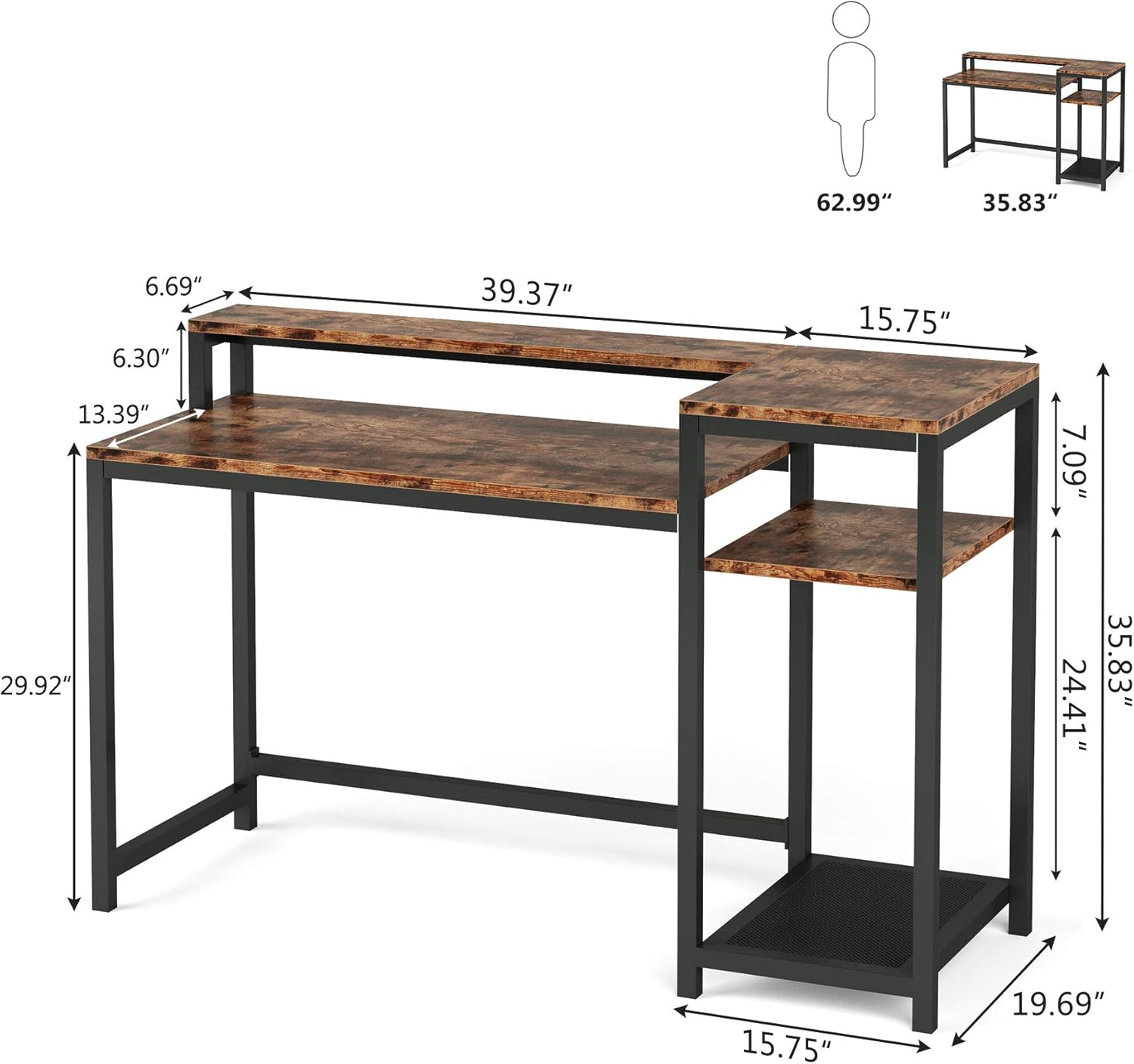
A detailed diagram illustrating the precise measurements of the Tribesigns computer desk, including the main desktop, monitor stand, and side storage unit, in inches.
9. Кепилдик жана колдоо
Tribesigns is committed to providing high-quality products and customer satisfaction. For any questions, concerns, or assistance with your Tribesigns Computer Desk, please contact our customer support team.
Please retain your purchase receipt for warranty purposes. Specific warranty details may vary; refer to the documentation provided at the time of purchase or contact Tribesigns directly for more information.
Байланыш маалыматы: Сураныч, Tribesigns расмий сайтында көрсөтүлгөн байланыш маалыматтарын караңыз website or your purchase platform for the most up-to-date customer service information.


