Introduction
Сатып алганыңыз үчүн рахматasing the Veho TA-9 Universal In-Car Smartphone Holder. This manual provides detailed instructions for the setup, operation, and maintenance of your device. Please read this manual thoroughly before use to ensure proper functionality and safety.
Пакеттин мазмуну
- Veho TA-9 Smartphone Cradle
- Windscreen Suction Cup Mount
- Air Vent Fixing Mount
- User Manual
Продукт бүттүview

Figure 1: Veho TA-9 smartphone cradle with its adjustable arms extended, ready to hold a device.

Figure 2: Veho TA-9 smartphone cradle with its adjustable arms retracted, showing its compact form.
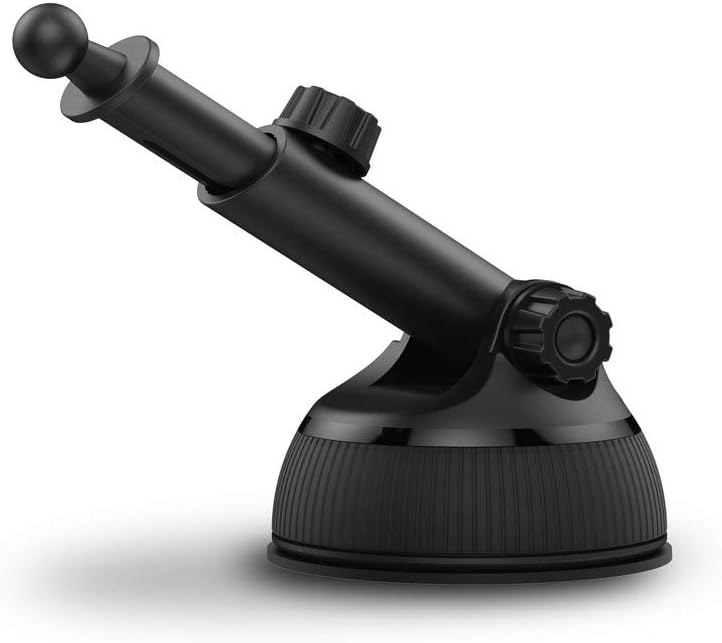
Figure 3: The windscreen suction cup mount, featuring a strong suction base and an adjustable arm with a ball joint for flexible positioning.

Figure 4: The air vent fixing mount, designed to securely attach the cradle to most vehicle air vents.
Орнотуу нускамалары
Attaching the Cradle to a Mount
Both the windscreen suction cup mount and the air vent mount connect to the cradle via a ball joint mechanism. To attach:
- Unscrew the collar nut from the mount's ball joint.
- Place the collar nut over the ball joint on the back of the cradle.
- Push the ball joint firmly into the socket on the back of the cradle until it clicks into place.
- Tighten the collar nut to secure the cradle to the mount.
Windscreen Suction Cup Mount Installation

Figure 5: The Veho TA-9 cradle securely attached to the windscreen suction cup mount, ready for installation.
- Choose a clean, smooth, and flat surface on your windscreen or dashboard. Ensure it does not obstruct your view же коопсуздук жаздыкчаларына тоскоол болот.
- Clean the chosen surface thoroughly to remove any dust or grease.
- Press the suction cup firmly against the surface.
- Push down the lever on the suction cup base to create a vacuum seal and secure the mount.
- Adjust the angle of the cradle using the adjustable arm and ball joint for optimal viewing.
Air Vent Fixing Mount Installation
Figure 6: The Veho TA-9 cradle attached to the air vent mount, demonstrating its compact profile орнотулганда.
- Locate a suitable air vent in your vehicle. Ensure the vent blades are sturdy enough to support the weight of your device and the mount.
- Gently push the prongs of the air vent mount into the air vent blades.
- Ensure the mount is securely seated and does not wobble.
- Adjust the angle of the cradle using the ball joint for optimal viewing.
Иштөө нускамалары
Inserting Your Smartphone

Figure 7: A smartphone securely held within the Veho TA-9 cradle, demonstrating its adjustable grip.
- Gently pull open the adjustable arms of the cradle.
- Place your smartphone into the cradle, ensuring it rests on the bottom support.
- Release the arms slowly so they securely grip your smartphone. The cradle is compatible with smartphones ranging from 43mm to 93mm in width.
- Ensure the phone is firmly held before driving.
Тууралоо Viewбурч
The Veho TA-9 features a 360° rotatable ball joint, allowing you to adjust your smartphone to any desired viewing angle (portrait or landscape). Loosen the collar nut slightly, adjust the angle, and then tighten the collar nut to lock it in place.
Техникалык тейлөө
- Тазалоо: Wipe the cradle and mounts with a soft, damp кездеме. Абразивдүү тазалагычтарды же эриткичтерди колдонбоңуз.
- Сорулгазы: If the suction cup loses its grip, rinse it with warm water and let it air dry. This can restore its adhesive properties.
- Сактагыч: When not in use, store the holder in a cool, dry place away from direct sunlight and extreme temperatures.
Проблемаларды чечүү
| Көйгөй | Мүмкүн себеп | Чечим |
|---|---|---|
| Соргуч чөйчөк жабышпай жатат. | Surface is dirty or not smooth; suction cup is dirty or dry. | Clean the mounting surface and the suction cup. Rinse the suction cup with warm water and let it air dry. Ensure the lever is fully engaged. |
| Cradle wobbles on mount. | Collar nut is loose. | Tighten the collar nut securely. |
| Smartphone does not fit. | Smartphone width is outside the compatible range. | Ensure your smartphone's width is between 43mm and 93mm. |
Техникалык шарттар
| Өзгөчөлүк | Деталь |
|---|---|
| Модель номери | VAA-015-TA9 |
| Шайкеш келген смартфондун туурасы | 43мм (мин)дан 93ммге чейин (макс) |
| Айлануу | 360° |
| Монтаждоо параметрлери | Windscreen Suction Cup, Air Vent |
| Түс | Кара |
| Элемент Салмагы | 310 г |
| Пакеттин өлчөмдөрү | 23.6 x 16.7 x 7.7 см |
Кепилдик жана колдоо
Veho products are designed to meet high quality standards. For warranty information and technical support, please refer to the warranty card included with your product or visit the official Veho webсайт. Кепилдик дооматтар үчүн сатып алганыңыздын далилин сактаңыз.
Webсайт: www.veho-world.com


