Introduction
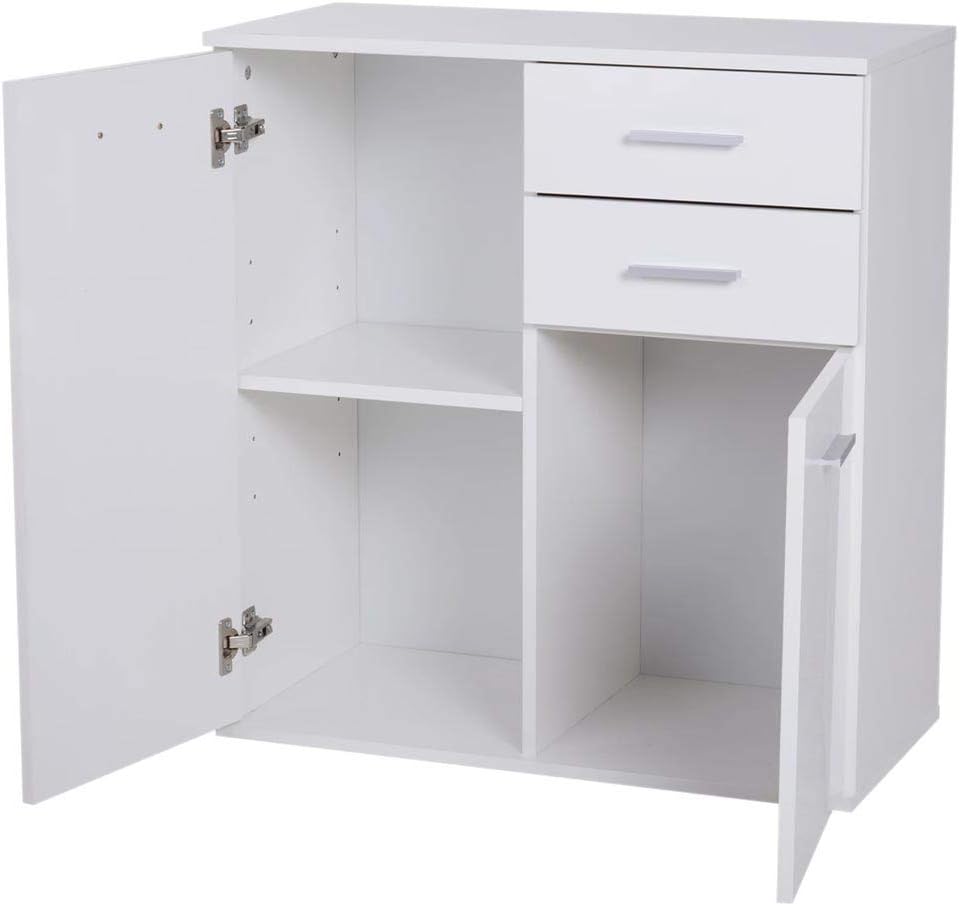
This manual provides essential information for the safe and efficient assembly, operation, and maintenance of your BAKAJI Madia Cabinet. Please read these instructions carefully before beginning assembly or use, and retain them for future reference. The BAKAJI Madia Cabinet is a versatile storage unit designed for various indoor spaces such as kitchens, bathrooms, or offices, featuring two drawers and two doors with internal shelving.
Орнотуу жана чогултуу
Assembly of the BAKAJI Madia Cabinet is required. Ensure you have all components and tools before starting. A Phillips head screwdriver and a hammer (for dowels and back panel nails) are typically needed.
Пакеттин мазмуну:
- MDF wood panels (sides, top, bottom, back, shelves, drawer fronts)
- Аппараттык камсыздоо топтому (бурамалар, дюбельдер, кулпулар, илмектер, суурма жылдыргычтары, туткалар)
- Assembly instructions sheet (refer to this manual)
Чогултуу кадамдары:
- Бөлүктөрдү таңгактан чыгаруу жана аныктоо: Carefully remove all components from the packaging. Lay them out on a clean, soft surface to prevent scratches. Compare all parts against the provided parts list to ensure nothing is missing.
- Негизги кадрды чогултуу: Attach the side panels to the bottom panel using dowels and cam locks/screws as indicated in the assembly diagram. Ensure all connections are secure and flush.
- Ички текчелерди орнотуу: Insert the fixed and adjustable shelves into their designated slots or attach them with support pins and screws.
- Жогорку панелди тиркөө: Secure the top panel to the assembled frame using the appropriate hardware.
- Тартуу слайддарын орнотуу: Attach the drawer slides to the cabinet interior and to the drawer boxes according to the instructions. Ensure they are level and aligned for smooth operation.
- Тарткычтарды чогултуу: Construct the drawer boxes, then attach the drawer fronts. Insert the assembled drawers into the cabinet.
- Эшиктерди орнотуу: Attach the hinges to the doors and then to the cabinet frame. Adjust hinges as necessary to ensure doors are level and close properly.
- Туткаларды бекитүү: Secure the handles to the drawer fronts and cabinet doors.
- Арткы панелди тиркөө: Carefully align and attach the back panel using small nails or screws. This adds stability to the cabinet.
Коопсуздук эскертүүсү: Always assemble furniture on a soft, clean surface to prevent damage. Ensure all screws and fasteners are tightened securely. Do not overtighten. If any parts are missing or damaged, do not proceed with assembly; contact customer support.
Иштөө нускамалары
The BAKAJI Madia Cabinet is designed for convenient storage in various rooms.
Тартпаларды колдонуу:
- Gently pull the handles to open the drawers.
- Push firmly but smoothly to close the drawers completely.
- Ыңгайсыз иштешин камсыз кылуу жана слайддардын бузулушун алдын алуу үчүн тартмаларды ашыкча жүктөөдөн качыңыз.
Using the Doors and Shelves:
- Pull the handles to open the cabinet doors.
- Push the doors until they click into place to ensure they are fully closed.
- The internal shelves can be used to organize items such as tableware, cosmetics, or documents.
- Distribute weight evenly on shelves to maintain stability.

Техникалык тейлөө жана кам көрүү
Proper care will extend the life and appearance of your BAKAJI Madia Cabinet.
- Тазалоо: Wipe the cabinet surfaces with a dry, soft cloth. For stubborn marks, a slightly damp cloth followed immediately by a dry cloth can be used. Avoid abrasive cleaners, harsh chemicals, or excessive moisture, as these can damage the lacquered finish and engineered wood.
- Аппараттык камсыздоону текшерүү: Periodically check all screws, cam locks, and other fasteners to ensure they remain tight. Retighten if necessary to maintain stability.
- Түздөн-түз күндүн нурунан жана ысыктан сактаныңыз: Prolonged exposure to direct sunlight or extreme heat can cause discoloration or warping of the wood.
- Төгүлүүлөр: Clean up spills immediately to prevent moisture absorption and damage to the finish.
Проблемаларды чечүү
Бул жерде сиз кабылышы мүмкүн болгон жалпы маселелерди чечүү жолдору бар:
- Кабинет солкулдайт:
Чечим: Ensure all assembly screws and cam locks are fully tightened. Check that the cabinet is placed on a level surface. If necessary, use furniture levelers or shims under the feet. - Тарткычтар жылмакай жылбайт:
Чечим: Verify that the drawer slides are correctly installed and aligned on both the drawer box and the cabinet frame. Ensure no objects are obstructing the slides. Lightly lubricate the slides with a silicone-based lubricant if needed. - Doors Do Not Close Properly or Are Uneven:
Чечим: Adjust the hinges. Most furniture hinges have adjustment screws that allow for vertical, horizontal, and depth alignment. Refer to the hinge manufacturer's instructions or a general guide for hinge adjustment. Ensure the cabinet is level. - Чыйыруулар же кичине бузулуулар:
Чечим: For minor scratches, a furniture repair pen or wax stick in a matching color can be used. For more significant damage, consider contacting a professional furniture repair service.
Техникалык шарттар
| Бренд | БАКАЖИ |
| Модел | Madia Cabinet |
| Өлчөмдөрү (W x D x H) | 71 см х 35 см х 76 см |
| Материал | Инженердик жыгач (MDF) |
| Түс | Ак |
| Аяктоо түрү | Лакталган |
| Элемент Салмагы | 19 килограмм |
| Тартмалардын саны | 2 |
| Эшиктердин саны | 2 |
| Текчелердин саны | 3 (ички) |
| Ассамблея талап кылынат | Ооба |
| Care Instructions | Кургак чүпүрөк менен сүртүңүз |
| Монтаж түрү | Floor Mount |
| Сунушталган Колдонуулар | Tableware, Cosmetics, Documents |
Кепилдик маалымат
Specific warranty details for the BAKAJI Madia Cabinet are not provided in this manual. For information regarding product warranty, please refer to the documentation included with your purchase or contact the retailer from whom you purchased the product. Keep your proof of purchase for any warranty claims.
Кардарларды колдоо
If you encounter any issues not covered in the troubleshooting section, or require further assistance with your BAKAJI Madia Cabinet, please contact the retailer or the manufacturer's customer service department. Have your product model and purchase details ready when contacting support.


