1. Киришүү
The LAUNCH CRP MOT IV is an advanced diagnostic tool, building upon the MOT 3. It features comprehensive vehicle coverage, powerful functions, and precise test results. This device is designed to assist automotive professionals and enthusiasts in diagnosing and maintaining vehicle systems efficiently.
Utilizing wireless or wired communication between the Vehicle Communication Interface (VCI) and the display tablet, it performs full system diagnostics including Diagnostic Trouble Code (DTC) reading, DTC clearing, data stream reading, actuation tests, and special functions. Additional features include service functions, a toolbox, software updates, diagnostic history, diagnostic feedback, and a maintenance database search.
2. Орнотуу жана алгачкы колдонуу
2.1 Пакеттен чыгаруу жана компоненттер
Carefully unpack all components from the packaging. Ensure the following items are present:
- LAUNCH CRP MOT IV Display Tablet
- Унаа байланыш интерфейси (VCI)
- OBD-II диагностикалык кабели
- Кубаттуу адаптер
- USB кабели
- Колдонуучунун Колдонмосу (бул документ)

Figure 2.1: The LAUNCH CRP MOT IV diagnostic tool, showing its main display and robust casing.
2.2 Аппаратты заряддоо
Before first use, fully charge the CRP MOT IV tablet using the provided power adapter. Connect the power adapter to the tablet's charging port and plug it into a standard electrical outlet. The charging indicator will illuminate.
2.3 Connecting the VCI to the Vehicle
Locate the vehicle's OBD-II port, typically found under the dashboard on the driver's side. Connect the OBD-II diagnostic cable to the VCI, then plug the other end of the cable into the vehicle's OBD-II port. Ensure a secure connection.

Figure 2.2: The LAUNCH CRP MOT IV tablet connected wirelessly to the Vehicle Communication Interface (VCI).
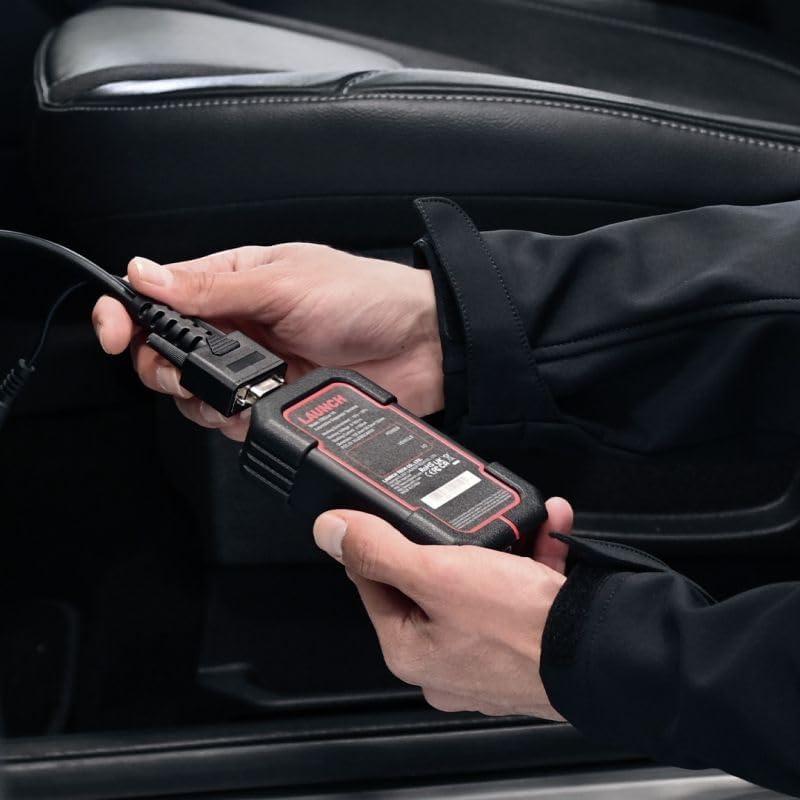
Figure 2.3: Demonstrates connecting the VCI to the vehicle's OBD-II port.
2.4 Күйгүзүү жана баштапкы орнотуу
Press and hold the power button on the tablet to turn it on. Follow the on-screen prompts to complete the initial setup, including language selection (English is supported), Wi-Fi connection, and time zone settings. Ensure the VCI is powered on and connected to the vehicle for communication.
3. Иштөө нускамалары
3.1 Негизги диагностикалык функциялар
The CRP MOT IV provides comprehensive diagnostic capabilities for various vehicle systems. Navigate to the "Diagnose" section on the main menu to access these functions:
- DTCлерди окуңуз: Retrieves Diagnostic Trouble Codes from the vehicle's Electronic Control Units (ECUs).
- DTCлерди тазалоо: Erases stored DTCs from the ECUs. Ensure the underlying issue is resolved before clearing codes.
- Маалымат агымын окуу: Displays real-time data parameters from various sensors and components, providing insights into vehicle performance.
- Иштетүү тести: Allows bidirectional control to test specific components, such as turning on/off relays, injectors, or solenoids, to verify their functionality.
- Кадр дайындарын тоңдуруп коюу: Captures a snapshot of critical parameter values at the moment a DTC is set, aiding in diagnosis.

Figure 3.1: A user operating the LAUNCH CRP MOT IV to perform vehicle diagnostics.
3.2 Кызматтын функциялары
The CRP MOT IV supports over 31 special service functions for various maintenance and reset procedures. Access these functions from the "Service Function" menu. Some key functions include:
- Anti-theft Matching
- Инжектор коддоо
- DPF калыбына келтирүү
- Редукторлорду дал келтирүү
- Tire Reset (TPMS)
- NOx сенсорун баштапкы абалга келтирүү
- AdBlue баштапкы абалга келтирүү
- Жогорку Voltage Battery Detection
- Майды калыбына келтирүү
- Тормозду калыбына келтирүү
- Steering Angle Sensor Calibration
- Дроссель адаптациясы
- Суспензияны калибрлөө
- Люкту инициализациялоо
- Орундук калибрлөө
- Фараларды дал келтирүү
- EGR Adaptation
- Crankshaft Position Sensor Learning
- Жана дагы көптөгөн...

Figure 3.2: A visual representation of the extensive list of 31+ service functions supported by the CRP MOT IV.
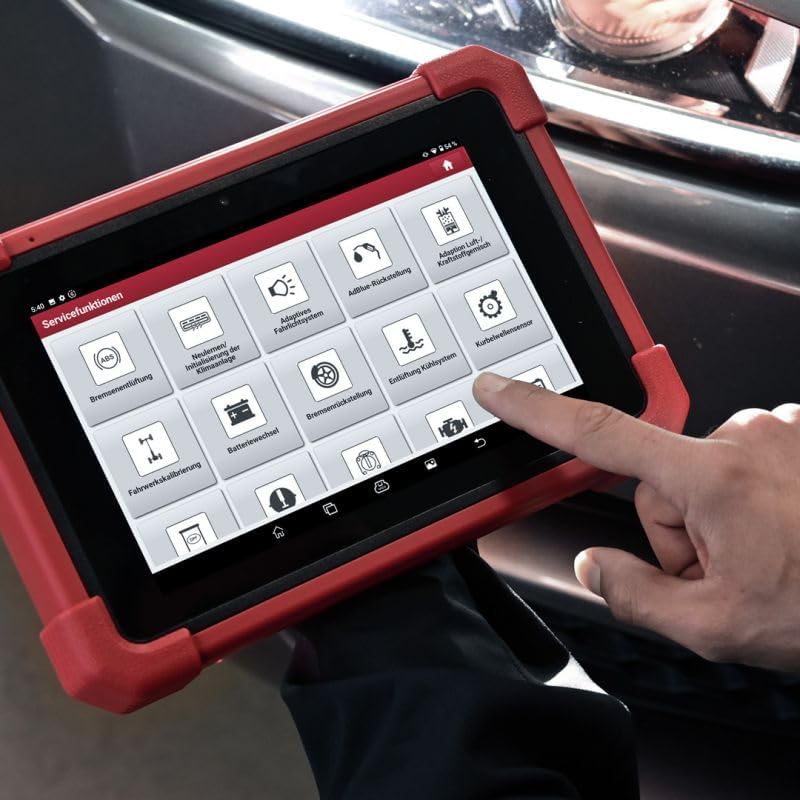
Сүрөт 3.3: Жакын пландан view of the service functions menu on the CRP MOT IV tablet.
3.3 Унааны камтуу жана протоколду колдоо
To determine if the device supports a specific function for a particular vehicle make and model, use the "Vehicle Coverage" feature. This online tool allows you to query supported brands, models, systems, and functions at any time.
The CRP MOT IV supports a wide range of communication protocols, including:
- CAN FD / CAN / SCAN / FCAN
- DoIP (requires additional DoIP cable, sold separately)
- KWP / L-line
- J1850 PWM
- VPW
- Chrysler CCD
- Жана башкалар.

Figure 3.4: The VCI unit being connected to the vehicle's diagnostic port.
4. Техникалык тейлөө
4.1 Программалык камсыздоо жаңыртуулары
Regular software updates are crucial for maintaining optimal performance and expanding vehicle coverage and functions. Connect the CRP MOT IV to a stable Wi-Fi network and navigate to the "Software Update" section on the main menu to check for and install available updates.
4.2 Аспапка кам көрүү
- Түзмөктү жумшак, кургак чүпүрөк менен таза кармаңыз. Абразивдүү тазалоочу каражаттарды же эриткичтерди колдонбоңуз.
- Аппаратты түз күн нурунан жана экстремалдык температурадан алыс салкын, кургак жерде сактаңыз.
- Protect the screen from scratches using a screen protector if desired.
- Ensure all cables and connectors are free from damage before use.
5. Кыйынчылыктарды
5.1 Жалпы маселелер жана чечимдер
- Түзмөк күйбөй жатат: Батарея заряддалганын текшериңиз. Кубат адаптерин туташтырып, кайра аракет кылыңыз. Эгерде көйгөй чечилбесе, колдоо кызматына кайрылыңыз.
- Унаа менен байланыш жок:
- Verify the VCI is securely connected to the vehicle's OBD-II port.
- Check if the vehicle's ignition is in the ON position.
- Ensure the VCI is properly paired with the tablet (for wireless connection).
- Confirm the vehicle's make, model, and year are correctly selected in the software.
- Slow software performance:
- Ensure the device has sufficient free storage space.
- Керексиз фондук тиркемелерди жабыңыз.
- Сизде эң акыркы оптималдаштыруулар бар экенине ынануу үчүн программалык камсыздоону жаңыртыңыз.
5.2 Diagnostic History and Feedback
The "Diagnostic History" function allows users to access detailed records of previously tested vehicles. This enables users to resume operations without starting from scratch.
If you encounter anomalies with models or functions while using the diagnostic software, utilize the "Diag Feedback" function. This allows you to submit detailed reports to LAUNCH for analysis and troubleshooting, helping to improve future software versions.
6. Техникалык шарттар
| Өзгөчөлүк | Спецификация |
|---|---|
| Өндүрүүчү | ИШКЕ АЛУУ |
| Бренд | ИШКЕ АЛУУ |
| Модел | Mot IV |
| Модель номери | LE-MOT4-301190864 |
| Элемент Салмагы | 1 г |
| Продукциянын өлчөмдөрү (L x W x Y) | 27.4 x 19.05 x 4.05 см |
| Батарея | 1 Литий-ион (кошулган) |
| Өзгөчөлүктөр | Touchscreen support |
| Операция системасы | Android 10.0 |
| Screen Size | 8 дюйм |
| Тил | Англисче |
| Power Source | Батарея менен иштейт |
7. Кепилдик жана колдоо
7.1 Official Product and Service
Service and warranty support are exclusively available for original LAUNCH Europe products purchased from our official shop or authorized dealers. Authorized dealers can be identified by their seller number.
7.2 Техникалык колдоо
LAUNCH Europe provides technical support for its products. For assistance, please contact our support team via phone or email. Support is available to help with product operation, troubleshooting, and general inquiries.
For the most up-to-date contact information, please refer to the official LAUNCH Europe webсайт же сатып алуу документтери.


