1. Киришүү
This manual provides comprehensive instructions for the installation, operation, and maintenance of your Aigo Warrior AK700 Max 700W Power Supply. Designed for high-performance desktop computers, this power supply unit (PSU) delivers stable and efficient power to your system components. Please read this manual thoroughly before installation and use to ensure proper functionality and safety.
2. Коопсуздук маалыматы
Always observe the following safety precautions to prevent injury or damage to the product and other components:
- Ensure the power supply is disconnected from the main power outlet before installation or handling.
- Электр жабдыгын ачпаңыз casinг. Жогорку томtages are present inside, even when disconnected, and can cause electric shock.
- Ашыкча ысып кетүүнүн алдын алуу үчүн электр менен камсыздоону жакшы желдетилген жерге орнотуңуз.
- Кубат менен камсыздалган кабелдерди гана колдонуңуз.
- Агрегатты нымдуулукка же экстремалдык температурага дуушар кылуудан алыс болуңуз.
- Бул продукт ички колдонуу үчүн гана иштелип чыккан.
3. Пакеттин мазмуну
Пакетиңизде бардык буюмдар бар экенин текшериңиз:
- Aigo Warrior AK700 Max 700W Power Supply Unit
- AC Power Cord
- Modular Cables (if applicable, otherwise fixed cables)
- Монтаждоо бурамалар
- Колдонуучунун Колдонмосу (бул документ)
4. Продукт бүтүп калдыview
The Aigo Warrior AK700 Max is a 700-watt power supply designed to meet the demands of modern gaming and high-performance computing systems. It features an energy-efficient design with a silent 12cm hydraulic bearing fan for optimal cooling and quiet operation. The unit incorporates a built-in Power Factor Correction (PFC) and a dual magnetic ring magnetic amplifier circuit, along with high-frequency low-resistance filter capacitors, to ensure a pure and stable current output. Multiple protection circuits are integrated to safeguard against overvoltage, ашыкча ток, ашыкча жүктөө, аз жүктөөtage, жана кыска туташуулар.
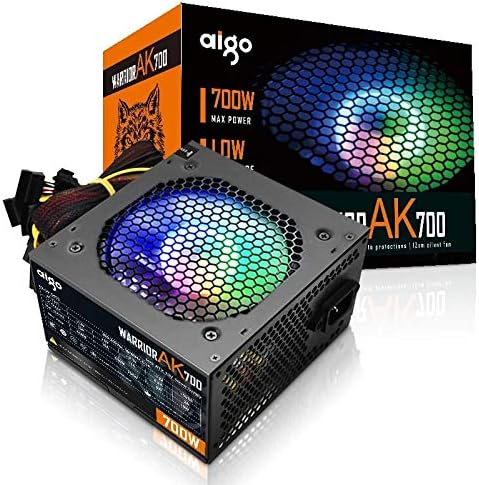
Figure 4.1: The Aigo Warrior AK700 Max 700W Power Supply, showcasing its RGB fan and retail packaging.
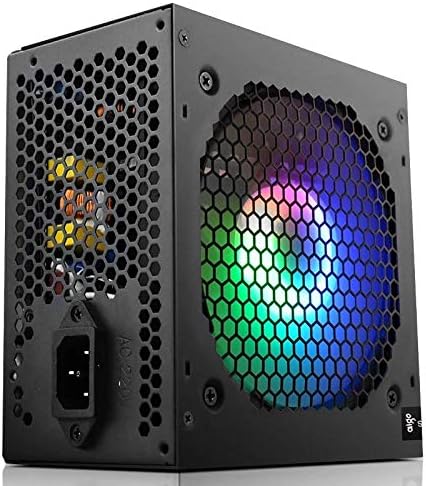
4.2-сүрөт: Каптал view of the power supply, highlighting the 12cm RGB cooling fan and honeycomb grille.

4.3-сүрөт: Арткы view of the power supply, illustrating the exhaust grille and AC power input socket.
5. Орнотуу жана орнотуу
Follow these steps to properly install the Aigo Warrior AK700 Max power supply into your computer system:
- Даярдоо: Компьютериңиз толугу менен өчүрүлгөнүн жана розеткадан суурулганын текшериңиз. Компьютериңиздин корпусун ачыңыз.
- Эски PSUну алып салуу (эгер бар болсо): Эски кубат булагыңыздан бардык кабелдерди ажыратып, анын монтаждоо бурамасын алып салыңыз. Аны кутудан этияттык менен жылдырыңыз.
- Жаңы PSU орнотуу: Gently slide the Aigo Warrior AK700 Max into the power supply bay of your computer case. Ensure the fan is oriented correctly for optimal airflow (usually facing down or up, depending on your case design).
- Коопсуз PSU: Align the screw holes on the power supply with those on your case. Secure the power supply using the provided mounting screws.
- Кабелдерди туташтыруу:
- 24-пин ATX Motherboard Connector: Connect the main 24-pin cable to your motherboard.
- CPU Power Connector (4+4 pin or 8-pin EPS): Connect the CPU power cable to the appropriate socket on your motherboard.
- PCIe Power Connectors (6+2 pin): Connect these to your graphics card(s) if required.
- SATA Power Connectors: Connect to your storage drives (HDDs, SSDs) and optical drives.
- Перифериялык (Molex) туташтыргычтар: Connect to other peripherals as needed.
- Кабелдик башкаруу: Корпусуңуздун ичиндеги аба агымын жана кооздукту жакшыртуу үчүн кабелдерди тыкан өткөрүңүз.
- Ишти жабуу: Бардык туташуулар орнотулуп, текшерилгенден кийин, компьютериңиздин корпусун жабыңыз.
- AC кубатына туташтыруу: AC шнурду кубат булагына, андан кийин розеткага сайыңыз.
6. Иштөө нускамалары
After successful installation, follow these steps to operate your computer system with the Aigo Warrior AK700 Max power supply:
- Күйгүзүү: Ensure the power switch on the back of the PSU is in the 'ON' (I) position. Press the power button on your computer case.
- Системаны жүктөө: Your computer should now power on and begin its boot sequence. The RGB fan on the power supply will illuminate.
- Өчүрүү: To turn off your computer, use the operating system's shutdown function. For a complete power cycle, switch the PSU to the 'OFF' (O) position after shutting down the computer.
The intelligent temperature control design automatically adjusts the fan speed to maintain optimal cooling and extend the lifespan of the unit, ensuring quiet operation under various loads.
7. Техникалык тейлөө
Туура тейлөө сиздин энергия менен камсыздооңуздун узак мөөнөттүү жана оптималдуу иштешин камсыз кылат:
- Чаңды тазалоо: Periodically clean dust from the power supply's fan and vents using compressed air. Ensure the computer is powered off and unplugged before cleaning.
- Аба агымы: Ensure that the power supply's intake and exhaust vents are not obstructed by cables or other components within the computer case.
- Экологиялык шарттар: Operate the power supply in a clean, dry environment with adequate ventilation.
- Бөлүнбөңүз: Never attempt to open the power supply unit. There are no user-serviceable parts inside, and doing so will void your warranty and poses a risk of electric shock.
8. Кыйынчылыктарды
If you encounter issues with your Aigo Warrior AK700 Max power supply, refer to the following common problems and solutions:
| Көйгөй | Мүмкүн себеп | Чечим |
|---|---|---|
| Компьютер күйбөйт. |
|
|
| Система күйөт, бирок дароо өчүрүлөт. |
|
|
| Fan is not spinning or is excessively loud. |
|
|
If the problem persists after attempting these solutions, please contact Aigo customer support for further assistance.
9. Техникалык шарттар
Detailed technical specifications for the Aigo Warrior AK700 Max 700W Power Supply:
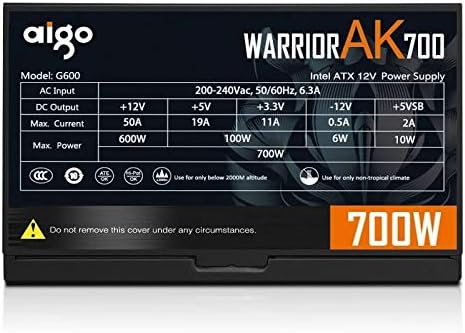
Figure 9.1: The specifications label found on the Aigo Warrior AK700 Max Power Supply.
| Өзгөчөлүк | Деталь |
|---|---|
| Модел | AK700 Max |
| Ватtage | 700 Ватт |
| Форма фактору | ATX, ATX12V |
| Киргизүү көлөмүtage | 220V (Minimum 220V, Maximum 220V) |
| Муздатуу ыкмасы | Аба муздатуу |
| Fan Size | 120 Millimeters (Hydraulic Bearing) |
| Шайкеш түзмөктөр | Персоналдык компьютер |
| Туташтыргыч түрү | SATA, PCIe (6+2 pin), ATX 24-pin, EPS 4+4 pin |
| Коргоо өзгөчөлүктөрү | Overvoltage, Overcurrent, Overload, Undervoltage, Short Circuit, Light Protection |
| Элемент Салмагы | 1.9 килограмм |
| Пакеттин өлчөмдөрү | 5 x 5 x 5 см (болжол менен) |
10. Кепилдик жана колдоо
Кепилдик жөнүндө маалымат жана техникалык колдоо алуу үчүн, расмий Aigo компаниясына кайрылыңыз webсайтына кириңиз же жергиликтүү сатуучуңузга кайрылыңыз. Кепилдик талаптары үчүн сатып алганыңызды тастыктаган документти сактап коюңуз.
Aigo Official Webсайт: www.aigocorp.com (Эскертүү: Бул толтургуч URL as no official website was provided in the product data. Please refer to actual product documentation for correct contact information.)


