Armor3 "Nuchamp" Wireless Game Controller User Manual
Model: M07467-RR
Кош келдиңиз
Сатып алганыңыз үчүн рахматasing the Armor3 "Nuchamp" Wireless Game Controller. This controller is designed to enhance your gaming experience on Nintendo Switch and Nintendo Switch Lite consoles, offering wireless connectivity, motion controls, force feedback, and remappable paddle buttons. Please read this manual carefully before use to ensure proper operation and to maximize your enjoyment of the product.
Негизги өзгөчөлүктөрү
- Үзгүлтүксүз оюндар үчүн зымсыз Bluetooth байланышы.
- Integrated motion controls for immersive gameplay.
- Responsive force feedback (vibration) for enhanced realism.
- Convenient turbo function for rapid button presses.
- Long-lasting rechargeable battery providing 8-10 hours of playtime.
- Two remappable Pro paddle buttons on the back for custom control schemes.
Пакеттин мазмуну
- 1 x Armor3 "Nuchamp" Wireless Game Controller
- 1 x USB заряддоо кабели
- 1 х Колдонуучунун колдонмосу (бул документ)
Жайгашуу
Контроллерди заряддоо
Before first use, fully charge the controller. Connect the included USB charging cable to the USB-C port on the controller and the other end to a USB power source (e.g., Nintendo Switch dock, computer USB port, or USB wall adapter). The indicator lights on the controller will show charging status and turn off when fully charged. A full charge typically takes approximately 2-3 hours.

Сүрөт: алдыңкы view of the Armor3 Nuchamp Wireless Game Controller, illustrating its design and button layout.
Pairing with Nintendo Switch/Lite
- On your Nintendo Switch/Lite, go to the HOME Menu.
- Тандоо "Контроллерлер" > "Тартипти/Тартипти өзгөртүү".
- басып, кармап туруңуз SYNC баскычы on the top of the Armor3 Nuchamp controller for 3-5 seconds until the LED indicators begin to flash rapidly.
- Once the controller is successfully paired, the corresponding player LED(s) on the controller will remain solid.
- Контроллер эми колдонууга даяр.
Иштөө нускамалары
Негизги башкаруу элементтери
The Armor3 Nuchamp controller features standard button layouts for intuitive gameplay:
- Сол аналогдук таякча: Кыймыл жана камера башкаруу.
- Оң аналогдук таякча: Камераны башкаруу жана багыттоо.
- D-Pad: Багыттуу киргизүү.
- A/B/X/Y баскычтары: Аракет баскычтары.
- Сол/Оң баскычтар: Ийин баскычтары.
- ZL/ZR баскычтары: Триггер баскычтары.
- + (плюс) баскычы: Баштоо / Тындыруу.
- - (Минус) баскычы: Тандоо/Меню.
- Үй баскычы: Returns to the Switch HOME Menu.
- Скриншот баскычы: Скриншотторду тартат.
Advanced Features
Motion Controls
The controller supports motion sensing, allowing for interactive gameplay in titles that utilize gyroscope and accelerometer features. Ensure your game supports motion controls for this feature to function.
Force Feedback (Vibration)
The built-in motors provide tactile feedback during gameplay, enhancing immersion. Vibration intensity is typically controlled by the game itself.
Турбо функциясы
The turbo function allows a button to be pressed repeatedly as long as it is held down. To activate turbo for a button, press and hold the Турбо баскычы, then press the desired action button (A, B, X, Y, L, R, ZL, ZR, D-Pad directions). To deactivate, repeat the process. Some games may not support the turbo function.
Remappable Paddle Buttons
The Armor3 Nuchamp controller features two remappable paddle buttons on the back (P1 and P2). These can be assigned to mimic any other button on the controller for quick access and personalized control schemes.
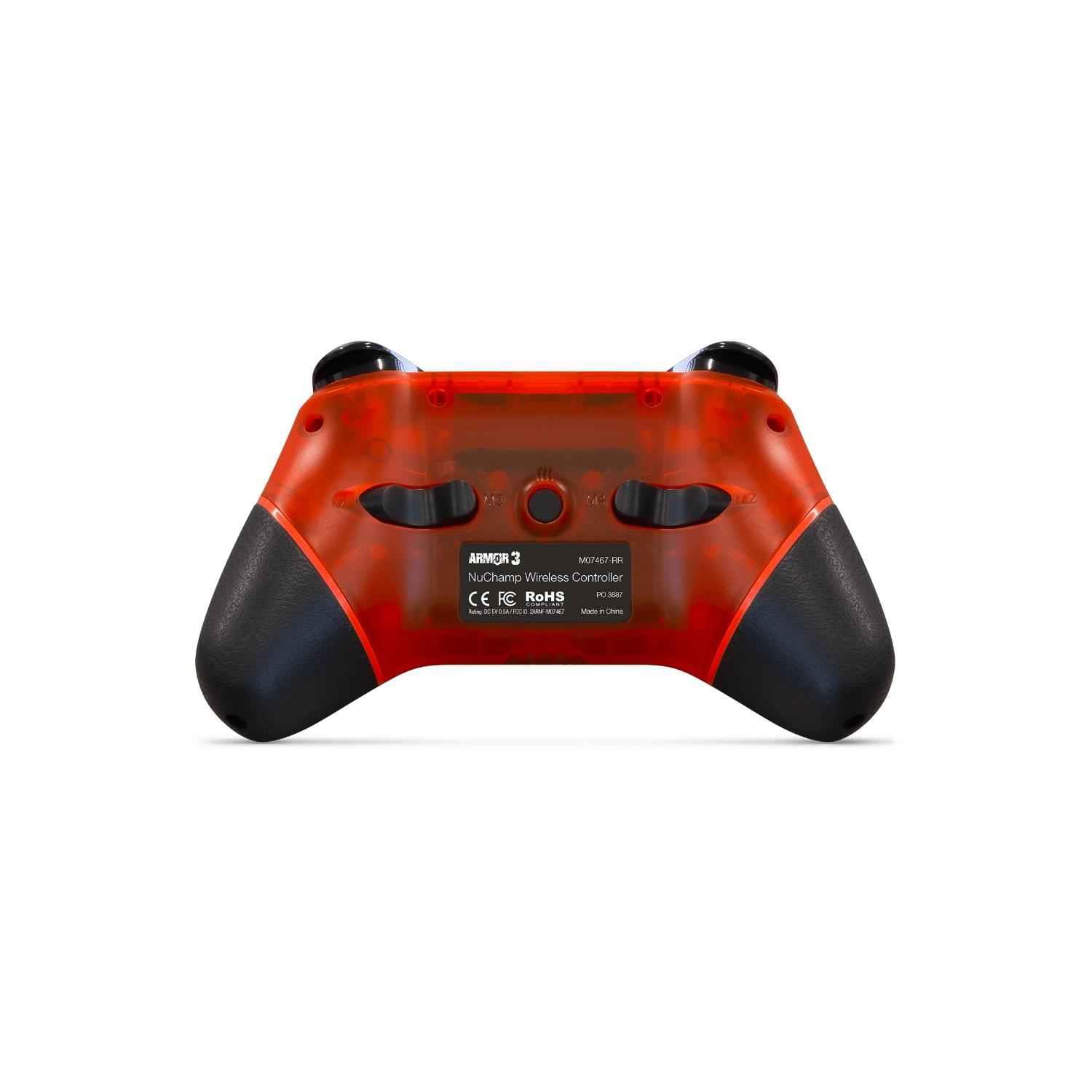
Сүрөт: Арткы view of the Armor3 Nuchamp Wireless Game Controller, highlighting the remappable paddle buttons.
To remap a paddle button:
- басып, кармап туруңуз M баскычы (located between the paddle buttons) until the indicator light starts flashing slowly.
- Press the paddle button (P1 or P2) you wish to remap. The indicator light will flash rapidly.
- Press the button you want to assign to the paddle (e.g., A, B, X, Y, L, R, ZL, ZR, D-Pad).
- басыңыз M баскычы again to confirm and exit remapping mode. The indicator light will stop flashing.
The paddle button is now remapped. Repeat the process for the other paddle if desired.
Техникалык тейлөө
Кам көрүү жана сактоо
- Keep the controller away from extreme temperatures, direct sunlight, and high humidity.
- Көзөмөлдөгүчтү кулап же катуу таасирлерге дуушар кылуудан качыңыз.
- Do not disassemble the controller. Unauthorized disassembly will void the warranty.
Тазалоо
Башкаргычты тазалоо үчүн жумшак, кургак чүпүрөктү колдонуңуз. Өтө кир болсо, бир азamp cloth can be used, but ensure no moisture enters the controller's openings. Do not use chemical cleaners or abrasive materials.
Батареяга кам көрүү
- Батареянын иштөө мөөнөтүн сактоо үчүн, көп колдонулбаса да, контроллерди үзгүлтүксүз кубаттап туруңуз.
- Do not leave the controller uncharged for extended periods.
- If the controller will not be used for a long time, charge it to about 50% before storing.
Проблемаларды чечүү
| Көйгөй | Чечим |
|---|---|
| Controller won't turn on or charge. | Ensure the USB cable is securely connected to both the controller and a working power source. Try a different USB port or cable. Allow the controller to charge for at least 30 minutes before attempting to turn it on. |
| Controller won't pair with Nintendo Switch. | Ensure the Switch is in "Change Grip/Order" mode. Press and hold the SYNC button on the controller for 3-5 seconds. If issues persist, try restarting your Nintendo Switch console. Ensure the controller is sufficiently charged. |
| Input lag or frequent disconnections. | Ensure the controller is within a reasonable range of the Nintendo Switch (typically within 10 meters/30 feet) and there are no major obstructions. Avoid strong electromagnetic interference from other devices. Ensure the controller is fully charged. |
| Motion controls are not working correctly. | Ensure the game you are playing supports motion controls. Try recalibrating the motion controls within the Nintendo Switch system settings if available. |
Техникалык мүнөздөмөлөр
| Өзгөчөлүк | Деталь |
|---|---|
| Модель номери | M07467-RR |
| Байланыш | Зымсыз Bluetooth |
| Батарея түрү | Литий-ион (кошулган) |
| Батареянын иштөө мөөнөтү | Болжол менен 8-10 саат (колдонууга жараша) |
| Заряддоо убактысы | Болжол менен 2-3 саат |
| Өлчөмдөр | 4.45 x 3.5 x 7.01 дюйм |
| Салмагы | 11.2 унция |
| Шайкештик | Nintendo Switch, Nintendo Switch Lite |
Кепилдик маалымат
Armor3 products are manufactured to high-quality standards. This product comes with a limited warranty against defects in materials and workmanship under normal use. The specific terms and duration of the warranty may vary by region. Please retain your proof of purchase for warranty claims. For detailed warranty information, please refer to the official Armor3 webсайтка же кардарларды колдоо менен байланышыңыз.
Кардарларды колдоо
If you encounter any issues or have questions regarding your Armor3 "Nuchamp" Wireless Game Controller that are not covered in this manual, please visit the official Armor3 website for frequently asked questions, troubleshooting guides, and contact information for customer support. You can also reach out to the retailer where you purchased the product for assistance.
© 2024 Armor3. All rights reserved. Nintendo Switch is a trademark of Nintendo.


