Introduction
This manual provides detailed instructions for the installation, operation, and maintenance of your xmartO WB2024-W 2K 3MP WiFi Home Security Camera. This camera is designed as an add-on unit for existing xmartO expandable camera systems or xmartO NVRs. It is important to note that this camera does not function as a standalone device and requires a 5MP xmartO NVR to operate correctly. If your NVR operates at 960p or 1080p resolution, these 3MP cameras may have too high a resolution for compatibility.
The WB2024-W camera features 2K (2304*1296) HD resolution, a built-in microphone for audio capture, IR night vision, and an IP66 weatherproof rating for versatile indoor and outdoor use.
Кутуда эмне бар
- WB2024-W IP camera (2 units)
- 10ft 12V 1A DC power plug (2 units)
Негизги өзгөчөлүктөрү
- 2K 3MP HD Resolution: Delivers clear 2304*1296 resolution video.
- Камтылган микрофон: Captures audio without the need for external microphones.
- RJ45 Ethernet порту: Allows for wired connection to the NVR or router for stable connectivity.
- Оффлайн операциясы: When connected to an xmartO NVR, the system can record and playback videos without internet access.
- IR Түнкү Көрүнүшү: Equipped with 3 professional IR LEDs for clear vision in complete darkness, up to 25 meters.
- IP66 аба ырайы: Узак металл casing suitable for both indoor and outdoor installation.
- Long WiFi Range: Offers extended wireless range when used with xmartO NVRs, up to 1300ft (400m) in open areas.
- Monitor/TV Display: View camera feeds on a monitor or TV via HDMI when connected to an xmartO NVR.
Жайгашуу
1. Камераны кубаттоо
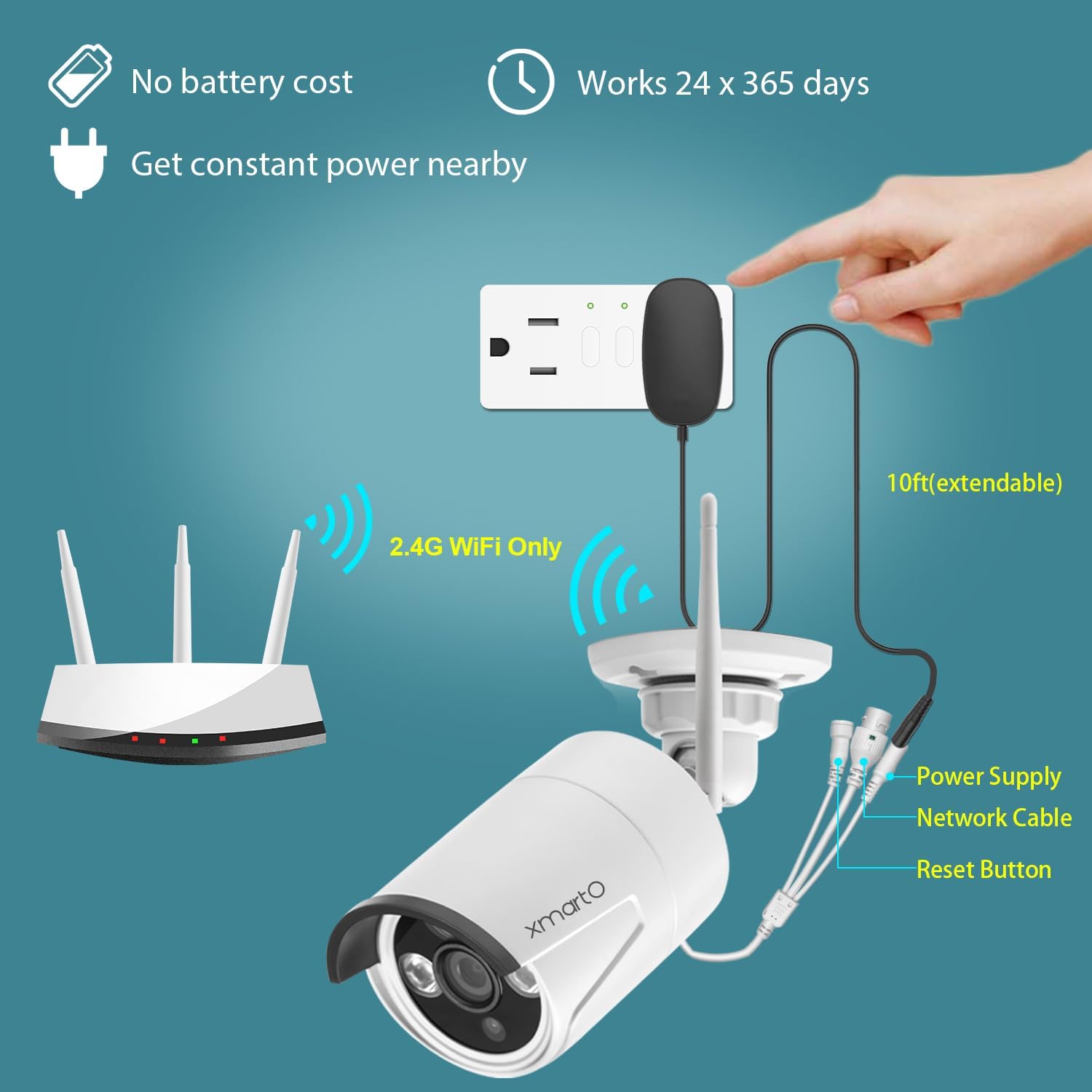
Connect the provided 10ft 12V 1A DC power plug to the camera and then to a power outlet. Ensure a constant power supply for continuous operation.
2. Pairing with xmartO NVR
The WB2024-W is an add-on camera designed to work with xmartO NVRs (Network Video Recorders). It requires a 5MP xmartO NVR for proper functionality.
- Зымсыз жупташтыруу: The camera will automatically attempt to connect to a compatible xmartO NVR within range.
- Wired Pairing (RJ45 Port): If the WiFi signal is weak or for a more stable connection, use a CAT5 Ethernet cable to connect the camera directly to your router. Then, use the 'Add One' tool in the NVR's Camera Management interface to add the camera. Refer to the xmartO website or contact support for detailed instructions on wired pairing.
3. Камераны орнотуу
The camera's IP66 weatherproof rating allows for flexible installation both indoors and outdoors. Choose a location that provides the desired viewing angle and is within range of your NVR's WiFi signal or accessible for a wired connection.


Камераны иштетүү
1. Түз эфир View жана Ойнотуу
Once connected to your xmartO NVR, you can view түз эфирдеги берүүлөр жана ойнотулган тамак-аштарtage directly on a monitor or TV connected to the NVR via HDMI. For remote access, download the xmartO app on your smartphone or tablet, or use the client software on your PC or laptop.

2. Аудио мониторинг
The built-in microphone allows you to hear audio from the camera's vicinity. This feature is accessible through the NVR interface or the remote viewколдонмо.

3. Түнкү көрүнүш
The camera automatically switches to IR night vision in low-light conditions, providing clear black and white footage. The night vision range is up to 25 meters.

4. Motion Detection
The camera supports motion detection, which can trigger recording and send alerts to your connected devices. Configure motion detection settings via your NVR or the xmartO application.

Техникалык тейлөө
Үзгүлтүксүз техникалык тейлөө камераңыздын оптималдуу иштешин жана узак мөөнөттүү иштешин камсыз кылат.
- Тазалоо: Мезгил-мезгили менен камеранын линзасын жана корпусун жумшак, гamp кездеме. Линзаны чийип салуучу абразивдүү тазалагычтардан алыс болуңуз.
- Туташуу текшерүү: Ensure all power and network cables are securely connected and free from damage.
- Программалык камсыздоонун жаңыртуулары: Check the xmartO official website for any available firmware updates for your NVR and cameras. Keeping firmware updated can improve performance and add new features.
- Экологиялык инспекция: For outdoor installations, periodically check the mounting for stability and ensure no obstructions are blocking the camera's view.
Проблемаларды чечүү
Camera Not Connecting to NVR
- NVR шайкештиги: Confirm your NVR is a 5MP xmartO NVR. This camera is not compatible with 960p or 1080p NVRs.
- Электр камсыздоо: Ensure the camera is properly powered on and receiving stable power.
- WiFi сигналы: Check the distance between the camera and the NVR. Obstacles can reduce WiFi range. Consider relocating the camera or using the RJ45 port for a wired connection.
- Камераны баштапкы абалга келтирүү: Use the reset button on the camera (refer to the power and connectivity diagram) to reset it and attempt pairing again.
No Video Feed / Poor Image Quality
- Линзанын тазалыгы: Камера линзасын кирди же тактарды кетирүү үчүн тазалаңыз.
- Жарыктандыруу шарттары: Ensure adequate lighting for optimal daytime performance. For night vision, confirm IR LEDs are functioning.
- Тармактын туруктуулугу: A weak WiFi signal or network interference can affect video quality. Consider a wired connection via the RJ45 port if issues persist.
Аудио жок / Аудио сапаты начар
- Микрофондун тоскоолдуктары: Камтылган микрофондун тоскоол болбогонун текшериңиз.
- Үндүн жөндөөлөрү: Check audio settings on your NVR or viewколдонмо.
- Экологиялык ызы-чуу: Excessive background noise can affect audio clarity.
For further assistance, please visit the xmartO webсайтка же алардын колдоо тобуна кайрылыңыз.
Техникалык шарттар
| Өзгөчөлүк | Спецификация |
|---|---|
| Модел | WB2024-W |
| Видео тартуунун резолюциясы | 2K (2304*1296) 3MP |
| Шайкеш түзмөктөр | Smartphone, xmartO 5MP NVR |
| Power Source | Corded Electric (12V DC, 1A) |
| Connectivity Protocol | Wi-Fi (2.4G), Wired (RJ45 Ethernet) |
| Монтаж түрү | Ceiling Mount, Wall-Mounted |
| Камтылган компоненттер | WB2024-W IP camera, 10ft 12V 1A DC power plug |
| Түнкү көрүү диапазону | 25 метр |
| Материал | Металл |
| Эл аралык коргоо рейтинги | IP66 |
| Элементтин өлчөмдөрү (L x W x Y) | 10 x 10 x 5 дюйм |
| Элемент Салмагы | 2.66 фунт |
| Сунушталган Колдонуулар | Home Security, Night Vision |
| Ички/тышкы колдонуу | Ички, сырткы |
Кепилдик жана колдоо
xmartO is committed to providing reliable products and customer satisfaction.
- 30 күндүк акчаны кайтарып берүү кепилдиги: Эгерде сиз сатып алган товарыңызга канааттанбасаңыз, аны 30 күндүн ичинде кайтарып берип, толук акчаңызды кайтарып алсаңыз болот.
- 1 жылдык Чектелген Кепилдик: The product is covered by a 1-year limited warranty against manufacturing defects.
- 24/7 Онлайн колдоо: For any technical assistance or inquiries, xmartO offers 24/7 online support. Please visit the xmartO Store on Amazon же алардын кызмат адамы webбайланыш маалыматы үчүн сайт.


