JKING H2B Электр скейтбордунун узун бортун колдонуучунун колдонмосу
Model: H2B | Brand: JKING
1. Киришүү
Thank you for choosing the JKING H2B Electric Skateboard Longboard. This manual provides essential information for the safe operation, maintenance, and troubleshooting of your electric skateboard. Please read this manual thoroughly before your first ride to ensure optimal performance and safety.
Image: JKING H2B Electric Skateboard Longboard.
2. Коопсуздук маалыматы
Riding an electric skateboard can be dangerous. Always wear appropriate safety gear, including a helmet, knee pads, and elbow pads. Ride within your skill level and be aware of your surroundings. Do not ride in traffic, on wet surfaces, or at night without proper lighting. Always check your skateboard before each ride for any loose parts or damage.
Ар дайым каска жана коргоочу шаймандарды кийиңиз.
Ичкиликтин же баңгизаттын мас абалында минүүгө болбойт.
Жергиликтүү жол мыйзамдарын жана эрежелерин сактаңыз.
Avoid riding on uneven surfaces, potholes, or obstacles.
Ensure the remote control is fully charged and paired before riding.
Maximum load capacity: 210 lbs.
3. Пакеттин мазмуну
Upon unboxing, please verify that all items listed below are included:
JKING H2B Electric Skateboard Longboard
Зымсыз алыстан башкаруу
Кубат адаптери (заряддагыч)
T-Tool (for maintenance)
User Manual
Image: JKING H2B Electric Skateboard and its accessories.
4. Продукт бүтүп калдыview
Familiarize yourself with the main components of your JKING H2B Electric Skateboard:
Палуба: Constructed from two layers of bamboo and six layers of maple for durability and flexibility.
Hub Motors: Integrated into the rear wheels, providing power and a clean design.
Battery Enclosure: Houses the UL 2272 certified 29.4V 4000mAh lithium battery.
Заряддоо порту: Located on the battery enclosure for recharging.
Кубат баскычы: To turn the skateboard on/off.
туткалары: Integrated into the deck for easy carrying.
Image: Key components of the JKING H2B Electric Skateboard.
5. Орнотуу
5.1. Баштапкы заряддоо
Locate the charging port on the side of the battery enclosure.
Кубат адаптерин заряддоо портуна туташтырыңыз.
Кубат адаптерин стандарттуу электр розеткасына сайыңыз.
The battery indicator lights on the remote control (or skateboard, if available) will show charging progress.
A full charge takes approximately 4 hours. Disconnect the charger once fully charged.
5.2. Алыстан башкаруу жупташтыруу
Your remote control should be pre-paired with the skateboard. If re-pairing is necessary:
Ensure both the skateboard and remote control are turned off.
Turn on the skateboard by pressing and holding its power button for about 1 second.
Turn on the remote control by pressing its power button.
The remote control display should show a connection status. If not, refer to the troubleshooting section.
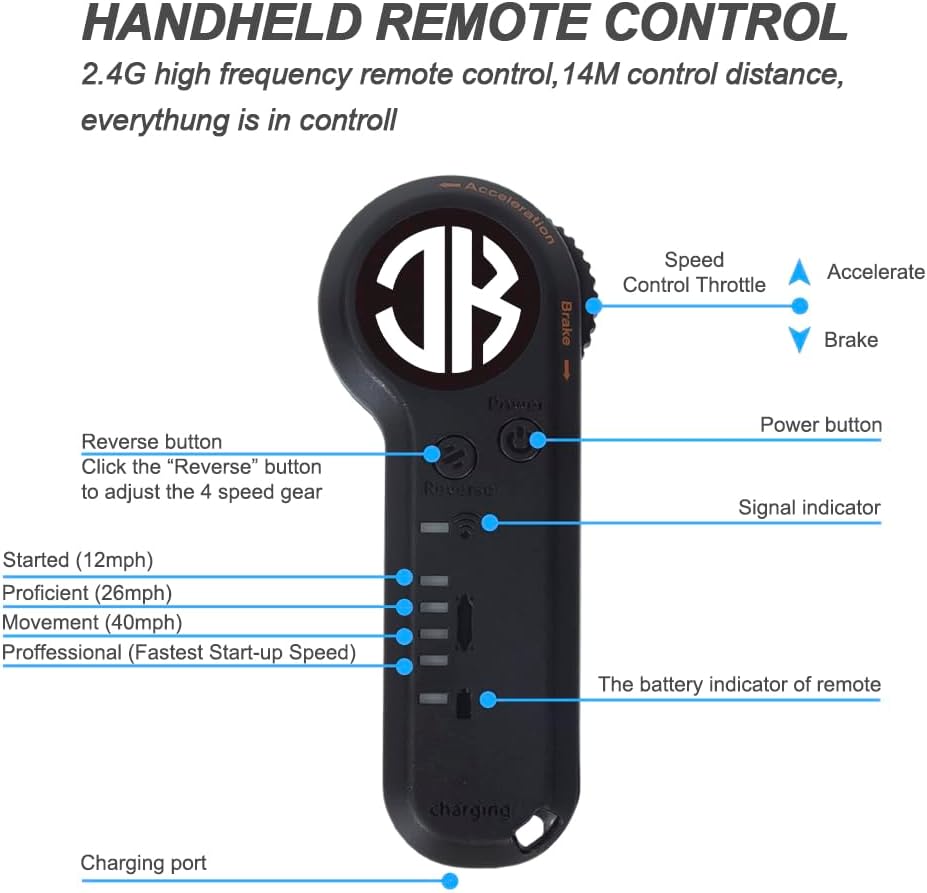
Image: JKING Electric Skateboard Remote Control.
6. Иштөө нускамалары
6.1. Күйгүзүү/өчүрүү
To turn on the skateboard: Press and hold the power button on the battery enclosure for approximately 1 second.
To turn on the remote control: Press its power button.
To turn off the skateboard: Press and hold the power button on the battery enclosure until it powers down.
To turn off the remote control: Press and hold its power button until the display turns off.
6.2. Ылдамдык режимдери
The JKING H2B offers 3 speed modes (Low, Medium, High) for different riding preferences and skill levels. Use the speed adjustment buttons on the remote control to switch between modes.
Төмөн ылдамдык: Ideal for beginners or crowded areas.
Орто ылдамдык: Balanced speed for general cruising.
Жогорку ылдамдык: For experienced riders seeking maximum speed (up to 16.7 MPH).
6.3. Ылдамдануу жана тормоздоо
The remote control features a throttle wheel for precise control:
Ылдамдатуу: Gently push the throttle wheel forward to accelerate.
Тормоздоо: Gently pull the throttle wheel backward to engage the brakes.
Practice accelerating and braking in a safe, open area before riding in public.
6.4. Минүү боюнча кеңештер
Start in Low Speed mode to get accustomed to the board's response.
Буттарыңызды ийиндин кеңдигинде аралыкта кармап, тең салмактуу абалды сактаңыз.
Lean into turns to steer the board.
Be mindful of your speed, especially when turning or on downhill slopes.
Зарыл болсо, ар дайым коопсуз түшүүгө даяр болуңуз.
7. Техникалык тейлөө
Тазалоо: Тактаны жарнама менен сүртүп тазалаңызamp cloth. Avoid direct water spray on electronic components.
Батареяга кам көрүү: Charge the battery regularly, even when not in use, to prolong its lifespan. Do not overcharge or completely drain the battery.
Дөңгөлөктү текшерүү: Regularly check wheels for wear and tear. Replace worn wheels to maintain optimal performance and safety.
Аппаратты бекемдөө: Use the provided T-tool to periodically check and tighten all nuts and bolts, especially on the trucks and wheel axles.
Сактагыч: Store the skateboard in a cool, dry place away from direct sunlight and extreme temperatures.
8. Кыйынчылыктарды
Көйгөй
Мүмкүн себеп
Чечим
Скейтборд күйбөй жатат
Батареянын аздыгы; Кубат баскычы туура басылган жок
Charge the skateboard; Press and hold the power button for 1 second.
Пульт туташпай жатат
Skateboard off; Remote battery low; Pairing issue
Ensure skateboard is on; Charge remote; Re-pair remote (see Section 5.2).
Кыскартылган аралык же ылдамдык
Low battery; Riding uphill; Heavy load; Worn wheels
Fully charge battery; Ride on flatter terrain; Check load capacity; Inspect and replace wheels.
адаттан тыш үндөр
Loose hardware; Debris in wheels/motors
Tighten all bolts; Clean wheels and motor area.
Troubleshooting Video: Remote Connection
Video: Demonstrates how to troubleshoot remote connection issues with the JKING Electric Skateboard.
Палубанын материалы: Two layers of bamboo and six layers of maple
Палубанын узундугу: 31.7 дюйм
Палубанын туурасы: 9.5 дюйм
Элемент Салмагы: 12.3 фунт
Максималдуу жүк: 210 фунт
Дөңгөлөктүн көлөмү: 83мм
Дөңгөлөк материалы: Полиуретан
Альпинизм бурчу: Макс 12°
10. Кепилдик жана колдоо
For warranty information, technical support, or service inquiries, please contact JKING customer service through the retailer where the product was purchased or visit the official JKING webсайт. Кепилдик дооматтары үчүн сатып алганыңыздын далилин сактап коюңуз.
11. Продукт видеолору
JKING Electric Skateboard Longboard Overview
Видео: Кыскачаview of the JKING Electric Skateboard Longboard, highlighting its features and remote control.
JKING H2B Electric Skateboard Features
Видео: Шоуasing the JKING H2B electric skateboard in action and its various features.
Riding the JKING Electric Skateboard
Video: A demonstration of the JKING Electric Skateboard being ridden, highlighting its smooth operation.
Тектеш документтер - H2B
H2B-02 Electric Skateboard User Manual Comprehensive user manual for the H2B-02 Electric Skateboard, covering preparation, parts identification, remote control operation, pairing instructions, technical specifications, charging information, and essential safety guidelines.
Instrukcja obsługi ekspresu do kawy HIBREW H2B 4w1 Poznaj ekspres do kawy HIBREW H2B 4w1. Niniejsza instrukcja obsługi zawiera szczegółowe informacje dotyczące instalacji, obsługi napojów gorących i zimnych, czyszczenia oraz konserwacji dla kapsułek Guspressoazel, K.
CP PLUS CarKam Quick Start Guide - Model CP-AD-H2B-W Quick start guide for the CP PLUS CarKam (Model CP-AD-H2B-W), providing instructions on installation, setup, operation, and troubleshooting for this car dashcam.
CP PLUS CarKam GPS CP-AD-H2B-PW Quick Start Guide A comprehensive quick start guide for the CP PLUS CarKam GPS device, model CP-AD-H2B-PW, covering product appearance, installation, power management, app usage, video storage, recording modes, and warranty information.