1. Киришүү
Сатып алганыңыз үчүн рахматasing the JOYTRIP Auto Tracking Phone Holder, Model T2. This device is designed to enhance your video recording experience by automatically tracking your face or body, providing stable and dynamic footage without the need for manual adjustment or additional applications. It is ideal for video calls, live streaming, vlogging, and other hands-free video activities. Please read this manual thoroughly before use to ensure proper operation and maintenance.
2. Продукт бүтүп калдыview
2.1 Негизги өзгөчөлүктөрү
- Автоматтык түрдө көзөмөлдөө: Recognizes and tracks faces or bodies with 360° rotation.
- No App Required: Features a built-in camera system for intelligent tracking, eliminating the need for external applications.
- Көп функциялуу айлануу: Offers 360° horizontal rotation and adjustable clip for various angles.
- Кайра заряддалуучу батарея: Integrated 2200 mAh lithium battery provides 6-8 hours of continuous operation.
- Tripod шайкештиги: Equipped with a standard 1/4" screw thread for mounting on tripods.
- Портативдик дизайн: Compact and detachable for easy transport.
2.2 Пакеттин мазмуну
Сураныч, пакетте төмөнкү нерселерди текшериңиз:
- JOYTRIP Auto Tracking Phone Holder (Model T2)
- USB Charging Cable (Type-C, inferred)
- Колдонуучунун Колдонмосу (бул документ)

Image 2.1: The JOYTRIP Auto Tracking Phone Holder with a smartphone mounted, showing a family video call. The device is black with a silver band.

Image 2.2: An illustration detailing the key functions of the phone holder, such as 360° rotation, face/body tracking, and tripod compatibility.
3. Орнотуу
3.1 Аппаратты заряддоо
- Locate the charging port on the device (usually at the back or side).
- Connect the provided USB charging cable to the device and a suitable USB power adapter (not included).
- The charging indicator light will illuminate (e.g., red) during charging and turn off or change color (e.g., green) when fully charged.
- A full charge typically takes approximately 3-4 hours and provides 6-8 hours of usage.
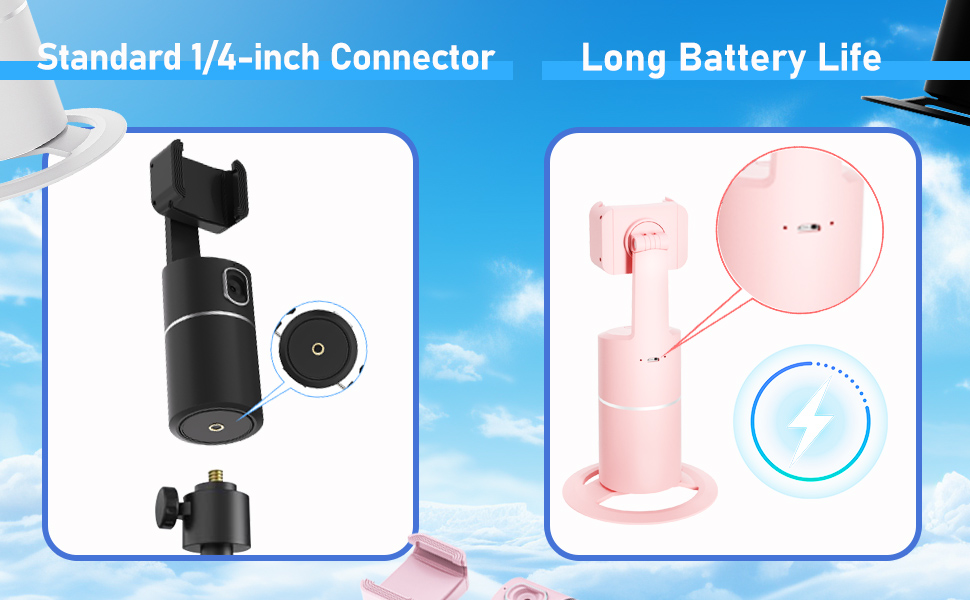
Image 3.1: Detail of the charging port and battery life indicator on the device.
3.2 Смартфонуңузду орнотуу
- Gently pull open the phone clip on the top of the holder.
- Place your smartphone into the clip, ensuring it is securely held. The clip supports phones between 2 to 3.2 inches in width.
- Adjust the phone's position within the clip for optimal balance and camera alignment.

Image 3.2: Dimensions of the phone holder and how to adjust the phone clip.
3.3 Күйгүзүү/өчүрүү
- To power on: Press and hold the power button (usually located on the front or top of the base) for a few seconds until the indicator light illuminates.
- Өчүрүү үчүн: Индикатор жарыгы өчмөйүнчө кубат баскычын кайра басып, кармап туруңуз.
4. Иштөө нускамалары
4.1 Automatic Tracking
- Ensure the device is powered on and your phone is securely mounted.
- Position yourself in front of the device's built-in camera. The device will automatically detect and begin tracking your face or body.
- The holder will rotate 360° horizontally to follow your movements.
- The device operates independently of your phone's camera or any specific app, allowing you to use any application for video calls, streaming, or recording.

Image 4.1: The phone holder automatically tracking a person during an exercise session.
4.2 Switching Between Horizontal and Vertical Modes
The phone holder allows for easy switching between horizontal (landscape) and vertical (portrait) orientations. Simply rotate your phone within the clip to the desired orientation. The device will continue to track.

Image 4.2: Demonstrates the phone holder supporting both horizontal and vertical phone orientations.
4.3 Tripod Mounting
The base of the JOYTRIP Auto Tracking Phone Holder features a standard 1/4-inch screw thread. This allows you to mount the device onto most tripods or stands for increased height and stability.
- Locate the 1/4-inch screw thread at the bottom of the device.
- Screw the device onto your tripod's mounting plate until secure.
- Ensure the device is stable before mounting your phone.

Image 4.3: Detail of the 1/4-inch screw thread for tripod compatibility.
5. Техникалык тейлөө
5.1 Тазалоо
- Аппаратты жумшак, кургак чүпүрөк менен аарчыңыз.
- Абразивдүү тазалоочу каражаттарды, эриткичтерди же күчтүү химиялык заттарды колдонбоңуз, анткени алар бетине же ички компоненттерине зыян келтириши мүмкүн.
- Keep the camera lens clean for optimal tracking performance.
5.2 Батареяга кам көрүү
- Батареянын иштөө мөөнөтүн узартуу үчүн, бат-баттан батарейканы толук зарядсыздандырбаңыз.
- Charge the device regularly, even if not in use for extended periods (e.g., once every 3 months).
- Аппаратты түз күн нурунан жана экстремалдык температурадан алыс салкын, кургак жерде сактаңыз.
6. Кыйынчылыктарды
| Көйгөй | Мүмкүн себеп | Чечим |
|---|---|---|
| Түзмөк күйбөйт. | Батарея аз. | Берилген USB кабелин колдонуу менен аппаратты толугу менен заряддаңыз. |
| Tracking is inconsistent or stops. |
|
|
| Телефон бекем кармалган эмес. | Phone width exceeds clip capacity or is too small. | Ensure your phone's width is between 2 and 3.2 inches. Adjust the phone carefully within the clip. |
| Device does not rotate. | Tracking not activated or device malfunction. | Ensure the device is powered on and a subject is clearly in view of the camera. If the issue persists, contact customer support. |
7. Техникалык шарттар
| Өзгөчөлүк | Деталь |
|---|---|
| Модель номери | T2 |
| Бренд | JOYTRIP |
| Продукциянын өлчөмдөрү | 3.93 x 3.93 x 7.75 дюйм (10 x 10 x 19.7 см) |
| Элемент Салмагы | 6.6 унция (187 грамм) |
| Батарея | 2200 мАч литий-ион (кошулган) |
| Батареянын иштөө мөөнөтү | 6-8 hours (continuous use) |
| Айлануу бурч | 360 горизонталдуу ° |
| талаасы View (Объектив) | 105° |
| Айлануу ылдамдыгы | секундасына 42° |
| Туура келген телефондун кеңдиги | 2 - 3.2 inches (approx. 5 - 8.1 cm) |
| Tripod Thread | Standard 1/4-inch screw thread |
| UPC | 797550711288 |
8. Кепилдик жана колдоо
For information regarding warranty coverage, please refer to the warranty card included with your purchase or contact the retailer where the product was acquired.
If you encounter any issues or have questions about your JOYTRIP Auto Tracking Phone Holder, please contact JOYTRIP customer support through their official webсайты же продуктунун таңгагында берилген байланыш маалыматы.


