Introduction
This manual provides detailed instructions for the installation, operation, maintenance, and troubleshooting of the ADVANTECH PS8-500FATX-GB 80+ Gold Flex ATX Power Supply. This power supply unit (PSU) is designed to deliver stable and efficient power to your system, featuring 500W output with 3.3V, 5V, 12V, and -12V outputs, and RoHS compliance.
Коопсуздук маалыматы
Please read all safety instructions carefully before installing or operating the power supply. Failure to follow these instructions may result in electric shock, fire, or damage to the product and connected equipment.
- Ensure the power supply is disconnected from the AC power source before installation or maintenance.
- Электр жабдыгын ачпаңыз casinг. Жогорку томtagичиндеги компоненттер электр тогуна урунуу коркунучун жаратат.
- Ашыкча ысып кетүүнүн алдын алуу үчүн электр менен камсыздоону жакшы желдетилген жерге орнотуңуз.
- Use only the cables provided or approved by ADVANTECH for this power supply.
- Бул продукт ички колдонуу үчүн гана иштелип чыккан.
Пакеттин мазмуну
Пакетте бардык буюмдар бар экенин текшериңиз:
- ADVANTECH PS8-500FATX-GB Power Supply Unit
- AC Power Cord
- Монтаждоо бурамалар
- Колдонуучунун Колдонмосу (бул документ)
Орнотуу жана орнотуу
Follow these steps to properly install the power supply into your system:
- Системаңызды даярдаңыз: Ensure your computer system is powered off and disconnected from the AC outlet. Open the computer case.
- Эски PSUну алып салуу (эгер бар болсо): Disconnect all cables from the old power supply. Unscrew and remove the old PSU from the chassis.
- Жаңы PSU орнотуу: Carefully place the ADVANTECH PS8-500FATX-GB into the power supply bay of your computer case. Ensure the fan is facing the correct direction for optimal airflow (usually facing down or out of the case). Secure the PSU with the provided mounting screws.
- Негизги электр кабелдерин туташтыруу:
- Connect the 20+4 pin ATX main power connector to the motherboard.
- Connect the 4+4 pin EPS/ATX 12V connector to the motherboard CPU power socket.
- Перифериялык кабелдерди туташтыруу: Connect SATA power connectors to hard drives, SSDs, and optical drives. Connect PCIe power connectors to graphics cards if required. Connect Molex connectors to other peripherals as needed.
- Кабелдик башкаруу: Аба агымын жана эстетиканы жакшыртуу үчүн кабелдерди тыкан өткөрүңүз.
- Корпусту жаап, AC кубатын туташтырыңыз: Close your computer case. Connect the AC power cord to the power supply and then to a wall outlet or surge protector.
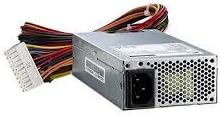
Сүрөт 1: The ADVANTECH PS8-500FATX-GB 500W Flex ATX Power Supply, showing its compact form factor and various power connectors. This image illustrates the physical appearance of the unit and its attached cabling.
Иштөө нускамалары
Once installed, operating the power supply is straightforward:
- Күйгүзүү: After connecting all necessary cables and the AC power cord, press the power button on your computer case. The power supply will automatically provide power to your system.
- Өчүрүү: Shut down your computer through the operating system. The power supply will enter a low-power state. For complete power disconnection, switch off the power supply's main switch (if present) or unplug the AC power cord.
- Мониторинг: Modern motherboards and operating systems often provide tools to monitor power supply voltages. Refer to your motherboard manual for details.
Техникалык тейлөө
Туура тейлөө сиздин энергия менен камсыздооңуздун узак мөөнөттүү жана оптималдуу иштешин камсыз кылат:
- Чаңды тазалоо: Periodically clean the power supply fan and vents to prevent dust buildup, which can impede airflow and cause overheating. Use compressed air for this purpose, ensuring the system is powered off and unplugged.
- Кабелдик текшерүү: Бардык электр зымдарын эскирүүнүн, сүрүлүүнүн же бузулуунун белгилерин үзгүлтүксүз текшерип туруңуз. Бузулган зымдарды дароо алмаштырыңыз.
- Экологиялык шарттар: Operate the power supply within its specified temperature and humidity ranges. Avoid extreme conditions.
Проблемаларды чечүү
Эгерде сиз электр менен камсыздоодо көйгөйлөргө туш болсоңуз, төмөнкү кеңири таралган көйгөйлөрдү жана чечимдерди караңыз:
| Көйгөй | Мүмкүн себеп | Чечим |
|---|---|---|
| Система күйбөйт. |
|
|
| Система күйөт, бирок дароо өчүрүлөт. |
|
|
| Электр кубатынан чыккан адаттан тыш үндөр. |
|
|
If the problem persists after trying these solutions, contact ADVANTECH customer support for further assistance.
Техникалык шарттар
| Өзгөчөлүк | Деталь |
|---|---|
| Модел | PS8-500FATX-GB |
| Бренд | ADVANTECH |
| Форма фактору | Flex ATX |
| Чыгуу Wattage | 500 Ватт |
| Натыйжалуулук рейтинги | 80+ алтын |
| Output Voltages | 3.3V, 5V, 12V, -12V |
| Туташтыргыч түрү | ATX (20+4 pin, 4+4 pin EPS/ATX 12V, SATA, PCIe, Molex) |
| Шайкештик | RoHS |
| Элемент Салмагы | 12.99 фунт |
| Өндүрүүчү | Advantech Co |
| ASIN | B08SMRH5V8 |
| UPC | 040048829683 |
Кепилдик жана колдоо
ADVANTECH products are designed for reliability and performance. For warranty information and technical support, please refer to the official ADVANTECH webсайтка же кардарларды тейлөө бөлүмүнө кайрылыңыз.
- Официалдуу Webсайт: www.railech.com
- Кардарларды колдоо: Аткаминердин "Биз менен байланыш" бөлүмүнө кайрылыңыз webаймактык колдоо чоо-жайы үчүн сайт.
Кепилдик дооматтары үчүн сатып алганыңыздын далилин сактап коюңуз.


