Introduction
This manual provides comprehensive instructions for the safe and effective use of your SelfieShow 61-inch Extendable Selfie Stick Tripod, Model LDP-L05. Please read this manual thoroughly before operating the device and retain it for future reference.
Эмне камтылган
Пакет төмөнкү нерселерди камтыйт:
- 1x Tripod Selfie Stick
- 1x Universal Phone Holder
- 1x GoPro Adapter
- 1x Wireless Remote Shutter
SelfieShow provides a 1-year hassle-free warranty and 24-hour friendly customer service for this product.
Продукт бүттүview
The SelfieShow LDP-L05 is a versatile accessory designed for capturing photos and videos with enhanced stability and flexibility. It functions as both an extendable selfie stick and a stable tripod.

Figure 1: SelfieShow 61-inch Selfie Stick Tripod in various configurations.
Негизги компоненттери жана өзгөчөлүктөрү:
- Selfie Stick Tripod Combo: The device integrates a phone holder and a camera quick release plate. The phone clip is adjustable to accommodate devices between 6.5-10cm. A standard 1/4-inch screw allows for camera mounting.
- Узундугу: The stick extends from 13.2 inches to 61.4 inches, offering a longer reach than standard models for wider shots and group photos.
- Жөнгө салынуучу айлануу: Features a 225° neck rotation and a 360° head rotation, allowing for flexible angle adjustments for optimal shooting.
- Зымсыз алыстан жапкыч: A pocket-sized wireless remote control enables easy photo and video capture from up to 30 feet away. It offers fast response and stable connection, compatible with most smartphones without requiring app downloads.
- Кеңири шайкештик: The universal phone holder fits most smartphones (with or without a case) and is compatible with various iPhone and Android models. The 1/4-inch screw allows mounting of digital cameras, DSLRs, SLRs, action cameras (like GoPro), webcams, and camcorders.

2-сүрөт: Детальдуу view of the tripod's components and features.

Figure 3: The tripod's adjustable height settings.

Figure 4: Illustrates the 360° panoramic shooting feature.

Figure 5: Demonstrates the swivel panning head's range of motion.

Figure 6: The wireless remote control in use.
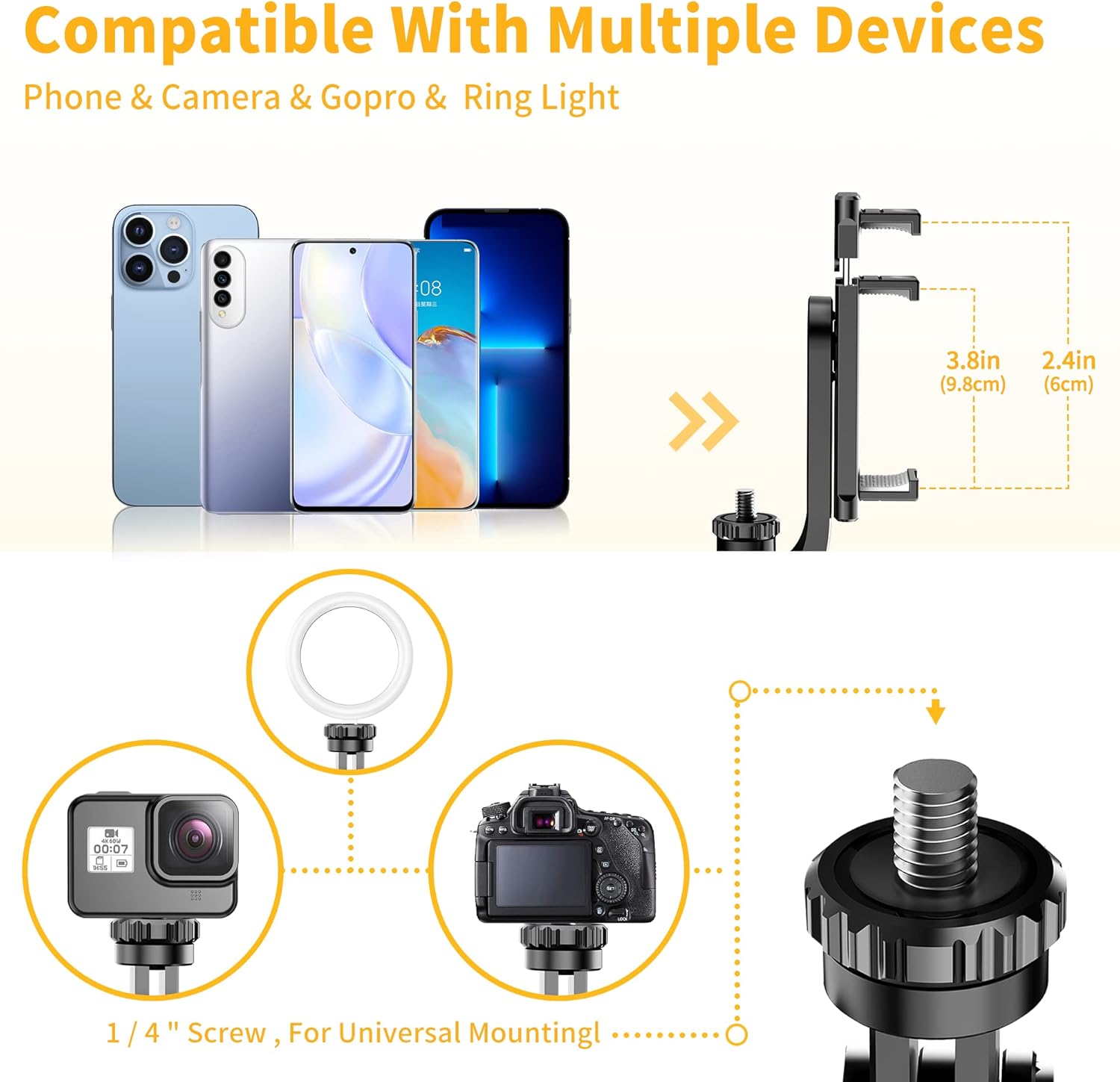
Figure 7: Compatibility with multiple devices.
Орнотуу нускамалары
1. Unfolding the Tripod:
- тутканы бекем кармаңыз.
- Gently pull the bottom part of the handle downwards to release the tripod legs.
- Spread the three legs outwards until they form a stable base.
2. Attaching Your Device:
- Смартфондор үчүн: Extend the universal phone holder to fit your smartphone securely. Ensure the phone is centered and stable within the holder.
- For Cameras/GoPro: If using a camera or GoPro, remove the phone holder (if attached) and screw your device onto the 1/4-inch screw mount. Ensure it is tightened securely.
3. Pairing the Wireless Remote Shutter:
- Locate the wireless remote shutter, typically integrated into the handle. Slide it out to detach.
- Turn on the remote by pressing and holding the power button until an indicator light (usually blue) flashes.
- Смартфонуңуздан Bluetooth жөндөөлөрүнө өтүп, жеткиликтүү түзмөктөрдү издеңиз.
- Select the device named "Selfie" or similar (refer to remote for exact name) to pair. The indicator light will stop flashing once successfully paired.
- The remote is now ready to use for capturing photos and videos.
Video 1: Demonstration of the SelfieShow 61-inch Selfie Stick Tripod's setup and features, including remote pairing and extension.
Иштөө нускамалары
1. Using as a Selfie Stick:
- Штативдин буттары бүктөлгөнүн жана туткага бекитилгенин текшериңиз.
- Extend the aluminum alloy rod to your desired length.
- Adjust the phone holder or camera to the desired angle using the 225° neck rotation and 360° head rotation.
- Сүрөткө тартуу же видео жаздырууну баштоо/токтотуу үчүн зымсыз алыстан башкаруу пультун колдонуңуз.
2. Using as a Tripod:
- Unfold the tripod legs as described in the Setup section, ensuring a stable base on a flat surface.
- Extend the rod to the required height.
- Position your device using the adjustable head for optimal framing.
- Utilize the wireless remote shutter for hands-free operation.

Figure 8: Various usage scenarios for the tripod.
Видео 2: Бүттүview of the SelfieShow Selfie Stick Tripod's features and operational modes.
Техникалык тейлөө
- Аппаратты жумшак, кургак чүпүрөк менен тазалаңыз. Катуу химиялык заттарды же абразивдүү материалдарды колдонуудан алыс болуңуз.
- Штативди салкын, кургак жерде, күн нуру түз тийбеген жана өтө жогорку температурадан алыс сактаңыз.
- Ensure all screws and connections are tightened before each use to maintain stability.
- If the remote control battery needs replacement, refer to the remote's specific instructions for battery type and replacement procedure.
Проблемаларды чечүү
Алыстан башкаруу пульту туташпай жатат:
- Ensure the remote is charged or has a fresh battery.
- Смартфонуңузда Bluetooth иштетилгенин текшериңиз.
- Make sure the remote is within the 30-foot operating range.
- Try unpairing and re-pairing the remote in your phone's Bluetooth settings.
Штативдин туруксуздугу:
- Штативдин буттары толугу менен сунулуп, тегиз, туруктуу бетке бекитилгенин текшериңиз.
- Check that your device is securely mounted and balanced on the holder.
- Avoid extending the rod to its maximum length in windy conditions or on uneven terrain.
Phone Holder Not Gripping Securely:
- Ensure your phone's dimensions are within the specified range (6.5-10cm).
- Check for any obstructions or debris in the phone holder's grip pads.
Техникалык шарттар
| Өзгөчөлүк | Деталь |
|---|---|
| Продукциянын өлчөмдөрү | 2.95 x 1.48 x 13.23 дюйм |
| Элемент Салмагы | 12.5 унция (355 грамм) |
| Модель номери | LDP-L05 |
| Батареялар | 1 Литий Металл батарейкасы талап кылынат (кошулган) |
| Бренд | SelfieShow |
| Түс | Black (with handle) |
| Шайкеш түзмөктөр | Smartphone, Digital Camera, DSLR, SLR, Action Camera, Gopro, Webcam, Camcorder |
| Өзгөчө өзгөчөлүк | Remote Control, Portable |
| Материал | Акрилонитрил бутадиен стиролу (ABS), дат баспас болот |
| Салмагы Limit | 3 килограмм |
| Максималдуу бийиктик | 149 сантиметр (болжол менен 61 дюйм) |
| Tripod баш түрү | Ball Heads |
Кепилдик жана колдоо
Your SelfieShow 61-inch Extendable Selfie Stick Tripod is covered by a 1-year hassle-free warranty. For any inquiries, technical assistance, or warranty claims, please contact SelfieShow customer service. Our team is available 24 hours to provide friendly support.