1. Бүттүview
The Logitech C505/C505e HD Wired Business Webcam is designed to enhance your video communication experience. It provides crisp, smooth, and colorful widescreen HD 720p video with a 60° diagonal field of view. The webcam features fixed focus and automatic light correction, adapting to various lighting conditions. Its single, omnidirectional microphone incorporates noise-reduction technology, supporting clear conversations up to 3 meters away, even in noisy environments. The extra-long USB-A cable and universal clip offer flexible placement options on your computer or up to 7 feet away.
2. Орнотуу нускамалары
Setting up your Logitech C505/C505e webcam is a straightforward plug-and-play process. No additional software installation or charging is required.
- туташтыруу Webкамера: USB-A кабелин туташтырыңыз webcam into an available USB port on your desktop or laptop computer.
- жайгаштырыңыз Webкамера: Use the universal clip to securely mount the webcam on your monitor, laptop screen, or place it on a flat surface. The extra-long cable allows for flexible positioning.
- тандаңыз Webкамера: Сиздин компьютер автоматтык түрдө аныкташы керек webcam. If you have multiple cameras or microphones, you may need to select the "Logitech C505/C505e" in your application's settings (e.g., video conferencing software, recording applications) or your operating system's device settings.

Image: The Logitech C505/C505e webcam easily clips onto a monitor for convenient placement.
3. иштетүү Webcam
Once connected, the Logitech C505/C505e is ready for use with most video conferencing and recording applications.
- Видеонун сапаты: The webcam delivers HD 720p video at 30 frames per second, providing clear visuals for your calls and recordings.
- талаасы View: 60 ° диагоналдуу талаа view ensures you are framed appropriately without capturing excessive background.
- Туруктуу Фокус: The fixed focus lens maintains sharpness for subjects within its optimal range, simplifying operation.
- Автоматтык жарыкты оңдоо: The webcam automatically adjusts to the lighting conditions of your environment, helping to ensure you appear well-lit even in varying light. Optimal lighting conditions will yield the best video quality.
- Микрофон: The integrated omnidirectional microphone with noise-reduction technology is designed to capture your voice clearly from up to 3 meters away, minimizing background distractions.

Image: The Logitech C505/C505e provides HD 720p widescreen video for clear communication.
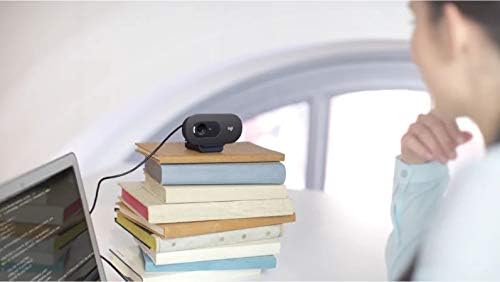
Image: Flexible placement options allow the webcam to be positioned on various surfaces.
4. Техникалык тейлөө
To ensure optimal performance and longevity of your Logitech C505/C505e webкамераны тейлөө үчүн, төмөнкү жөнөкөй көрсөтмөлөрдү аткарыңыз:
- Линзаны тазалоо: Акырын сүртүңүз webкамера линзасын жумшак, түксүз чүпүрөк менен сүртүңүз. Линзаны чийип салышы мүмкүн болгон катуу химиялык заттарды же абразивдүү материалдарды колдонуудан алыс болуңуз.
- Сактагыч: Колдонулбаган учурда, дүкөндү сактаңыз webкамераны таза, кургак жерде, өтө жогорку температурадан жана түз күн нурунан алыс сактаңыз.
- Кабельге кам көрүү: Avoid sharply bending or crimping the USB cable to prevent internal damage.
5. Кыйынчылыктарды
If you encounter issues with your Logitech C505/C505e webкамера, төмөнкү көйгөйлөрдү чечүү кадамдарын колдонуп көрүңүз:
- Видео/аудио жок:
- USB кабелинин экөөнө тең бекем сайылганын текшериңиз webкамера жана компьютериңиз.
- сайып көрүңүз webкамераны башка USB портуна.
- Check your application's settings (e.g., Zoom, Microsoft Teams) to confirm the Logitech C505/C505e is selected as the active camera and microphone.
- Verify your operating system's privacy settings allow applications to access the camera and microphone.
- Видеонун сапаты начар:
- Айлана-чөйрөңүздө жетиштүү жарыктандырууну камсыз кылыңыз. webcam performs best with good illumination.
- тазалаңыз webкамера линзасын жумшак чүпүрөк менен сүртүңүз.
- Линзанын алдындагы тоскоолдуктардын бар-жогун текшериңиз.
- Начар аудио сапаты:
- камсыз кылуу webcam's microphone is selected in your application and system audio settings.
- Айлана-чөйрөңүздөгү фондук ызы-чууну азайтыңыз.
- Ensure you are within the 3-meter optimal range of the microphone.
- Webcam Not Recognized:
- Компьютериңизди өчүрүп күйгүзүңүз.
- Компьютериңиздин Түзмөк Менеджерин (Windows) же Система Маалыматын (macOS) текшерип, текшериңиз. webcam is listed. You may need to update or reinstall drivers, though typically the webcam is plug-and-play.
6. Техникалык шарттар
| Бренд | Logitech |
| Модель номери | Logitech C505/C505e |
| Видео тартуунун резолюциясы | 720p |
| Video Resolution | 720p |
| Байланыш технологиясы | Зымдуу (USB-A) |
| Фокус түрү | Fixed Focus |
| Viewбурч | 60 градус |
| Микрофон | Omnidirectional with Noise-Reduction |
| Операция системасы | Multiple (Windows 8 or later, macOS 10.10 or later, ChromeOS) |
| Камтылган медиа | USB Cable, Universal Clip |
| Өзгөчөлүктөрү | Automatic Light Correction, Low Light Performance |
7. Кепилдик жана колдоо
Кепилдик жана техникалык колдоо боюнча толук маалымат алуу үчүн, расмий Logitech колдоо кызматына кайрылыңыз webсайт. Сиз ошол жерден айдоочуларды, көп берилүүчү суроолорду жана кардарларды тейлөө үчүн байланыш маалыматын таба аласыз.


