1. Киришүү
The TP-Link TL-SG2008 V3 is an 8-Port Gigabit Smart Managed Switch designed for reliable and high-speed network connections. This device integrates seamlessly with the Omada Software Defined Networking (SDN) platform, offering centralized cloud management and a suite of advanced network features. It supports IPv6, static routing, L2/L3/L4 QoS, IGMP snooping, and link aggregation to optimize network performance and security for various applications.
2. Пакеттин мазмуну
Пакетиңизде төмөнкү заттар бар экенин текшериңиз:
- TL-SG2008 Smart Managed Switch
- Кубаттуу адаптер
- Орнотуу боюнча колдонмо
- Резина буттары
3. Физикалык бүтүрүүview

Сүрөт: алдыңкы view of the TL-SG2008 V3 switch, showing the eight Gigabit Ethernet ports and power input.

Сүрөт: Арткы view of the TL-SG2008 V3 switch, highlighting the power input and port numbering.
The TL-SG2008 V3 features eight 10/100/1000 Mbps RJ45 ports for network connections. It includes a power input port (12V/1A DC) and also supports 802.3at/af PoE power on Port 8 for flexible deployment. LED indicators on the front panel provide status information for power and port activity.
4. Орнотуу
4.1 Powering the Switch
The TL-SG2008 V3 can be powered in two ways:
- Using the included Power Adapter: Connect the power adapter to the switch's DC power input and then to a power outlet.
- Using Power over Ethernet (PoE-In): Connect an 802.3at/af compliant PoE source (e.g., a PoE switch or injector) to Port 8 of the TL-SG2008 V3. Note that this device is PoE-In only and does not provide PoE power to other devices.
4.2 Тармактык түзүлүштөрдү туташтыруу
Connect your network devices (e.g., computers, servers, access points) to any of the RJ45 ports (1-8) on the switch using standard Ethernet cables. The switch will automatically detect the speed and duplex mode of the connected devices.
5. Которгучту иштетүү
5.1 Omada SDN Integration and Flexible Management

Image: Omada SDN platform overview, showing integration of JetStream switches, Omada Access Points, and Omada Security Gateways with various controller options.
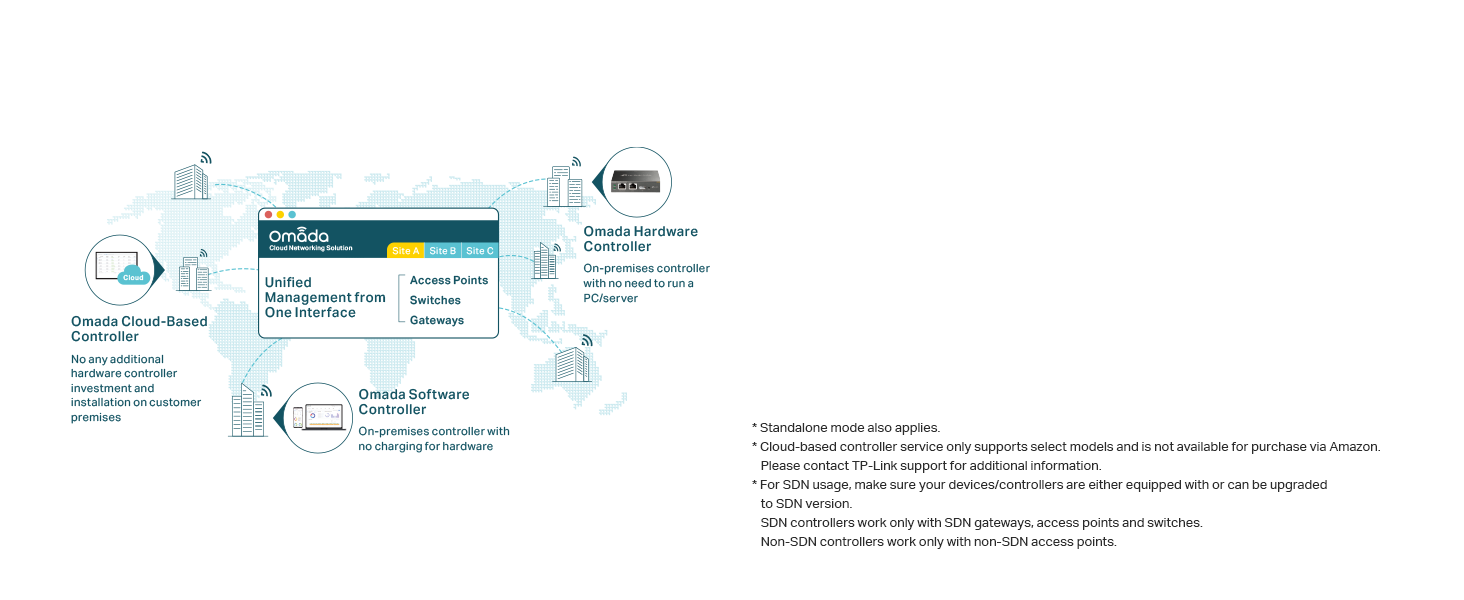
Image: Omada Cloud-Based Controller for unified management from one interface across different sites.
The TL-SG2008 V3 is part of the Omada Software Defined Networking (SDN) platform. This allows for centralized management of your network devices, including switches, access points, and gateways, through a single interface. Management options include:
- Omada аппараттык контроллери: Жергиликтүү башкаруу үчүн атайын аппараттык түзүлүш.
- Omada Software Controller: A software application that can be installed on a PC or server for on-premises management.
- Omada Cloud-based Controller: Provides remote cloud access and management via the Omada app from anywhere, anytime.
The switch can also operate in Standalone Mode without an Omada controller. For SDN compatibility, ensure your devices and controllers are equipped with or upgradable to SDN firmware.
5.2 Өркүндөтүлгөн тармак функциялары

Image: Advanced Network Features diagram, showing VLAN segmentation for guest, office, and surveillance networks, alongside icons for Flow Control, QoS, and IGMP Snooping.
The TL-SG2008 V3 offers several advanced features to optimize network performance and traffic management:
- 802.1Q VLAN: Create virtual local area networks to segment your network, enhancing security and improving performance by isolating traffic.
- L2/L3/L4 QoS (Quality of Service): Prioritize network traffic to ensure high quality for critical data, such as video streaming or voice communications.
- IGMP Snooping: Optimizes multicast traffic delivery, particularly useful for IPTV applications, by forwarding multicast streams only to necessary recipients.
- Шилтемелерди бириктирүү: Өткөрүү жөндөмдүүлүгүн жогорулатуу жана шилтемелердин резервдүүлүгүн камсыз кылуу үчүн бир нече физикалык шилтемелерди бир логикалык шилтемеге бириктириңиз.
- Агымды башкаруу: Manages data flow to prevent packet loss in congested network segments.
5.3 Enhance Network Security

Image: Secure Networking & Static Routing diagram, showing a shield icon for security features and a map icon for routing.
The switch includes robust security features to protect your network:
- IP-MAC-портун байланыштыруу: Уруксатсыз кирүүнүн алдын алуу үчүн түзмөктүн IP дарегин, MAC дарегин жана портун байлайт.
- ACL (Кирүүлөрдү көзөмөлдөө тизмеси): Filters network traffic based on defined rules to control access to network resources.
- Порт коопсуздугу: MAC суу ташкындарынын чабуулдарынын алдын алуу үчүн порттон үйрөнүүгө боло турган MAC даректеринин санын чектейт.
- DoS коргоо: Тейлөөдөн баш тартуу чабуулдарынан коргойт.
- Бороонду көзөмөлдөө: Берүү, көп каналдуу же белгисиз бир каналдуу бороондордон улам тармактын иштешинин начарлашынын алдын алат.
- DHCP Snooping: Ишенимсиз DHCP билдирүүлөрүн чыпкалоо менен тармактын коопсуздугун жакшыртат.
- 802.1X радиусун аутентификациялоо: Портко негизделген тармакка кирүүнү башкарууну камсыз кылат.
- Статикалык багыттоо: A method to manually configure network paths for improved efficiency and control over traffic flow.
6. Техникалык тейлөө
To ensure optimal performance and longevity of your TL-SG2008 V3 switch, consider the following maintenance guidelines:
- Жайгашкан жери: Place the switch on a stable, flat surface or mount it securely. Ensure adequate ventilation around the device to prevent overheating.
- Курчап турган чөйрө: Avoid exposing the switch to extreme temperatures, humidity, or direct sunlight. Keep it away from sources of electromagnetic interference.
- Тазалоо: Которгучтун сыртын тазалоо үчүн жумшак, кургак чүпүрөктү колдонуңуз. Суюктук же аэрозолдук тазалоочу каражаттарды колдонбоңуз.
- Программалык камсыздоонун жаңыртуулары: TP-Linkти дайыма текшерип туруңуз website for firmware updates to ensure your switch has the latest features and security enhancements.
7. Кыйынчылыктарды
If you encounter issues with your TL-SG2008 V3 switch, consider the following basic troubleshooting steps:
- Кубат жок: Ensure the power adapter is securely connected to the switch and a working power outlet, or that a compatible PoE source is connected to Port 8. Check the power LED indicator.
- Шилтеме жок/Аракет: Verify that Ethernet cables are properly connected to both the switch and the connected device. Check the link/activity LEDs on the switch ports. Try a different cable or port.
- Тармактын иштөө маселелери: Check for network loops or excessive broadcast traffic. Review QoS settings if specific traffic types are experiencing issues. For Omada SDN managed networks, consult the Omada controller interface for diagnostics.
- Башкаруу интерфейсине кирүү: If using standalone mode, ensure your computer is on the same subnet as the switch's default IP address. Refer to the installation guide for default IP and login credentials.
- Omada SDN Adoption Issues: Ensure your Omada controller's firmware is up to date. Verify network connectivity between the switch and the controller. Consult TP-Link support for complex VLAN or network segmentation configurations during adoption.
For more detailed troubleshooting or advanced configurations, refer to the comprehensive user manual available on the TP-Link support webсайтка же техникалык колдоо менен байланышыңыз.
8. Техникалык шарттар
| Өзгөчөлүк | Деталь |
|---|---|
| Модель номери | TL-SG2008 |
| Бренд | TP-Link |
| Порттардын саны | 8 |
| Interface Type | RJ45 |
| Маалыматтарды өткөрүү ылдамдыгы | 1000 Mbps (Gigabit) |
| Продукциянын өлчөмдөрү | 8.23"L x 4.96"W x 1.02"H |
| Элемент Салмагы | 0.59 килограмм (1.3 фунт) |
| Тtage | 12 вольт |
| Иштин материалы | Металл |
| Жогорку температура рейтинги | 131 градус Фаренгейт |
| Шайкеш түзмөктөр | Иш такта |
| UPC | 840030702099 |
9. Колдонуу сценарийлери

Image: Multiple Application Scenarios, demonstrating the versatility of the switch in different business and organizational settings.
The TP-Link TL-SG2008 V3 Smart Managed Switch is suitable for a variety of network environments due to its robust features and management capabilities. Common application scenarios include:
- Small to Medium Businesses: Providing reliable and secure network connectivity for office workstations, servers, and other network devices.
- Меймандостук: Managing guest networks and internal operations in hotels or restaurants.
- Билими: Supporting network infrastructure in classrooms or administrative offices.
- Чекене: Connecting point-of-sale systems, security cameras, and inventory management devices.
- Үй кеңселери: For users requiring advanced network control and segmentation beyond basic consumer-grade switches.
10. Кепилдик жана колдоо
The TP-Link TL-SG2008 V3 Smart Managed Switch is backed by an industry-leading 5 жылдык өндүрүүчү кепилдик.
Техникалык колдоо
Акысыз техникалык колдоо дүйшөмбүдөн жумага чейин саат 6дан кечки 6га чейин жеткиликтүү.
For support, you can visit:
- Webсайт: myproducts.tp-link.com/us
- Электрондук почта: support.USA@tp-link.com
- Телефон: (866) 225-8139


