Introduction
This manual provides instructions for the operation and maintenance of your WIITHINK Portable CD Boombox, model WTB771. This device features multiple audio playback options including CD, FM radio, Bluetooth, USB, and AUX input, designed for versatile use.

Сүрөт: алдыңкы view of the WIITHINK Portable CD Boombox WTB771, black color, showing the display, control buttons, speakers, and handle.
Пакеттин мазмуну
- 1 x WIITHINK Portable CD Radio Boombox (WTB771)
- 1 x Кубат кабели
- 1 x AUX линиясы
- 1 x User Manual
- 1 x Алыстан башкаруу
Жайгашуу
Электр камсыздоо
The boombox can be powered by AC power or batteries.
- AC кубаттуулугу: Connect the provided power cable to the AC port on the back of the unit and plug it into a standard wall outlet (AC voltage: 220V / 50Hz, 110V / 60Hz).
- Батарея кубаттуулугу: For portable use, insert 4 C-sized batteries (not included) into the battery compartment located on the bottom of the unit. Ensure correct polarity.
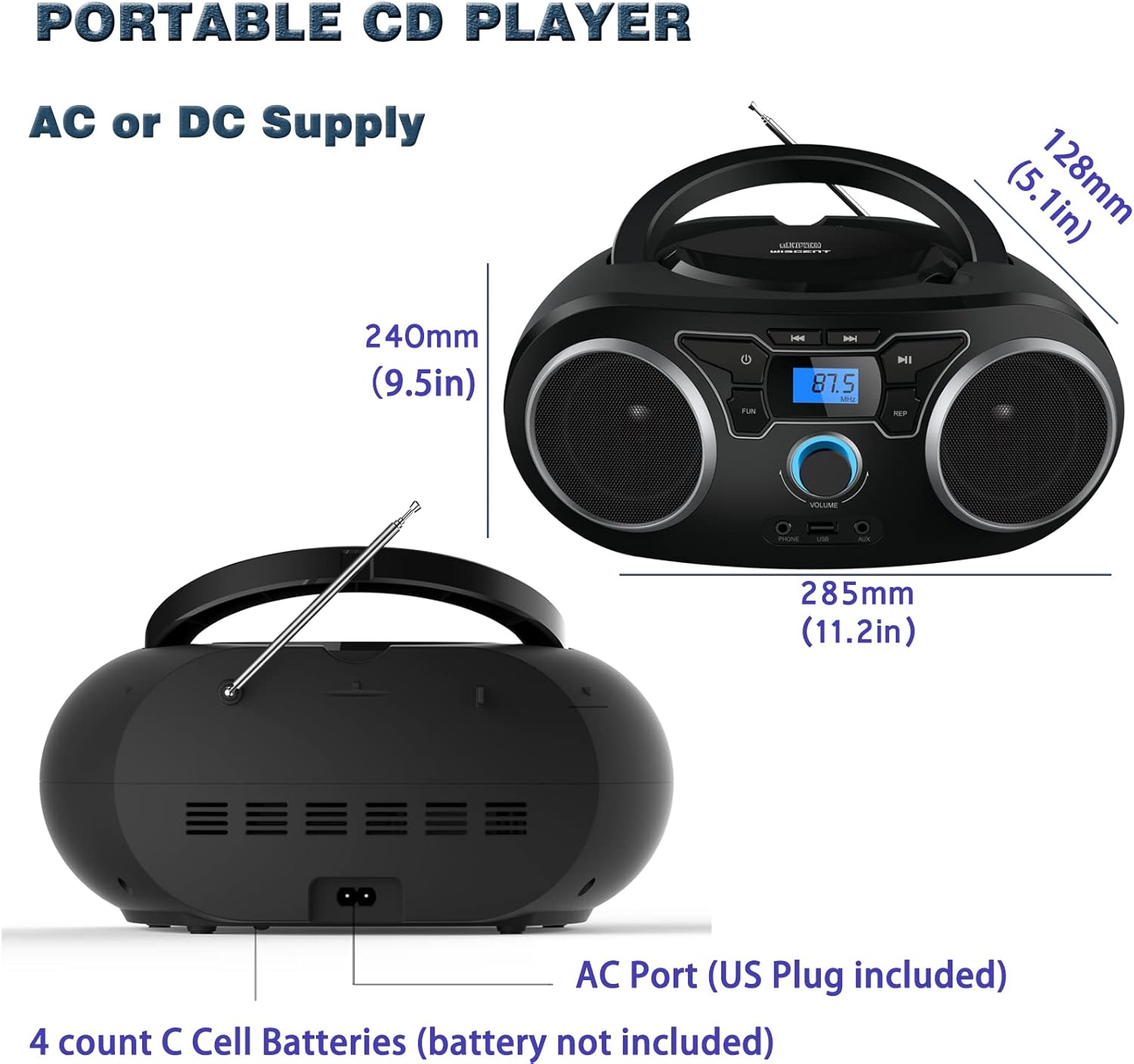
Сүрөт: Арткы view of the boombox, highlighting the AC power port and the battery compartment for 4 C-sized batteries.
Иштөө нускамалары
Жалпы көзөмөл
The unit features a digital LCD screen and various control buttons and knobs. The main volume control is a rotary knob on the front. A remote control is also included for convenient operation.

Сүрөт: жогорудан төмөнгө view of the boombox, showing the CD compartment, control buttons, and volume knob.
1. CD ойнотуу
- Open the CD compartment lid located on the top of the unit.
- Place a CD (CD, CD-R, CD-RW, MP3-CD) onto the spindle with the label side facing up.
- CD бөлүктүн капкагын жабыңыз.
- басыңыз РЕЖИМ баскычын басып, CD режимин тандаңыз.
- басыңыз ОЙНОО/ТЫНЫТТЫРУ ойнотууну баштоо үчүн баскыч.
- колдонуу ӨТКӨРҮҮ / ИЗДӨӨ тректер арасында өтүү үчүн баскычтар.
- The КАЙТАЛОО button allows for repeating a single track or all tracks.
- The ПРОГРАММА function allows you to create a custom playback order for tracks.
The boombox supports MP3 and WMA audio formats on compatible discs.
2. FM радиосунун иштеши
- Оптималдуу кабыл алуу үчүн телескоптук антеннаны узартыңыз.
- басыңыз РЕЖИМ FM радио режимин тандоо үчүн баскыч.
- Станцияларды автоматтык түрдө скандоо жана сактоо үчүн басып, кармап туруңуз SCAN button. The unit will automatically search for and store up to 30 FM stations.
- Кол менен тууралоо үчүн, колдонуңуз TUNING баскычы же ӨТКӨРҮҮ / ИЗДӨӨ buttons to find desired frequencies.
- колдонуу АЛДЫН АЛА Сакталган станцияларды аралап чыгуу үчүн баскычтар.
Video: A user demonstrating the FM radio tuning function on the WIITHINK Portable CD Boombox WTB771, showing the digital display changing frequencies.
3. Bluetooth байланышы
- басыңыз РЕЖИМ button to select Bluetooth mode. The display will indicate "BT" and the unit will enter pairing mode.
- On your Bluetooth-enabled device (e.g., smartphone, tablet), search for available devices and select "WTB771".
- Жупташтырылгандан кийин, сиз түзмөгүңүздөн boomboxко зымсыз аудио агылта аласыз.
Видео: Кыскача алдын ала маалыматview demonstrating Bluetooth connectivity, showing a smartphone wirelessly connected to the boombox.
4. USB ойнотуу
- MP3 камтыган USB флэш-дискти салыңыз files аппараттын алдыңкы жагындагы USB портуна.
- басыңыз РЕЖИМ USB режимин тандоо үчүн баскыч.
- Түзмөк автоматтык түрдө MP3ти аныктап, ойнотууну баштайт files USB дискинен.
- Use the playback controls (PLAY/PAUSE, SKIP/SEARCH) to manage your music.
5. AUX киргизүү
- Connect an external audio device (e.g., MP3 player, laptop) to the AUX input jack on the front of the unit using the provided 3.5mm AUX cable.
- басыңыз РЕЖИМ AUX режимин тандоо үчүн баскычты басыңыз.
- Audio from the connected device will now play through the boombox speakers. Control playback from your external device.
Башкаруу элементтери жана портторview
| Өзгөчөлүк | Description |
|---|---|
| Кубат баскычы | Аппаратты күйгүзөт/өчүрөт. |
| MODE баскычы | Switches between CD, FM, Bluetooth, USB, and AUX modes. |
| Көлөм баскычы | Adjusts the audio output level (up to 32 levels). |
| PLAY/PAUSE баскычы | Starts or pauses playback in CD, USB, and Bluetooth modes. |
| SKIP/SEARCH баскычтары | Navigates tracks in CD/USB mode; tunes frequencies in FM mode. |
| REPEAT баскычы | Repeats current track or all tracks in CD/USB mode. |
| PROGRAM баскычы | Sets a custom playback order for CD/USB tracks. |
| FM антеннасы | FM радиосун кабыл алуу үчүн телескопиялык антенна. |
| USB порту | MP3 ойнотуу үчүн USB флешкаларын туташтырат. |
| AUX киргизүү Jack | тышкы аудио түзмөктөрдү туташтыруу үчүн 3.5 мм киргизүү. |
| Наушник уясы | Жеке угуу үчүн 3.5 мм чыгаруу. |
| Алыстан башкаруу | Provides wireless control over all functions. |

Image: Close-up of the front panel, showing the USB port, AUX input, and headphone jack.
Техникалык тейлөө
- Агрегатты жумшак, кургак чүпүрөк менен тазалаңыз. Абразивдүү тазалагычтарды же эриткичтерди колдонбоңуз.
- CD бөлүмүн таза жана чаңсыз кармаңыз.
- Аппаратты экстремалдык температуранын, нымдуулуктун же тике күн нурунун таасиринен сактаңыз.
- When not in use for extended periods, remove batteries and unplug the AC power cable.
Проблемаларды чечүү
| Көйгөй | Чечим |
|---|---|
| Күч жок |
|
| Үн жок |
|
| CD өткөрүп жиберүүдө/ойнотулбай жатат |
|
| FM кабыл алуу начар |
|
| Bluetooth жупташуу маселелери |
|
Техникалык шарттар
- Модел: WTB771
- Продукциянын өлчөмдөрү: 7 x 10 x 4.8 дюйм (17.8 x 25.4 x 12.2 см)
- Элемент Салмагы: 2.64 фунт (1.2 кг)
- Чыгуу кубаттуулугу: 2 x 2W RMS
- Байланыш: Көмөкчү, Bluetooth, USB
- Динамик түрү: Камтылган
- Электр камсыздоо: AC (220V/50Hz, 110V/60Hz) or 4 x C batteries (not included)
- Колдоого алынган диск түрлөрү: CD, CD-R, CD-RW, MP3-CD
- Колдоого алынган аудио форматтары: MP3, WMA
- FM радиосунун алдын ала орнотуулары: 30 станцияга чейин
Кепилдик жана колдоо
WIITHINK offers an 18-month after-sales service for this product. For any inquiries or technical support, please contact WIITHINK customer service through your purchase platform. Lifetime technical support is provided.
For further assistance, you may refer to the "Your Orders" section on Amazon, locate your order, and contact "WIITHINK Direct".
Image: Graphic illustrating WIITHINK's customer support, including 18-month replacement and lifetime technical support.
