1. Киришүү
Thank you for choosing the Ctronics 5X Optical Zoom WiFi Outdoor Security Camera. This manual provides detailed instructions for the installation, operation, and maintenance of your camera. Please read this manual thoroughly before use to ensure proper functionality and safety. This camera is designed for outdoor surveillance, offering advanced features such as 5X optical zoom, human detection, auto-tracking, color night vision, and two-way audio.

1.1-сүрөт: Ctronics 5X Optical Zoom WiFi Outdoor Security Camera. This image shows the main unit of the camera with its dual antennas and lens array.
2. Коопсуздук маалыматы
Продукциянын бузулушуна же өзүңүзгө жана башкаларга жаракат келтирбөө үчүн төмөнкү коопсуздук чараларын сактаңыз:
- Ensure the power supply is stable and matches the camera's voltagталаптар (12 вольт).
- Камераны иштөө диапазонунан тышкары өтө жогорку температурага же нымдуулукка дуушар кылбаңыз.
- Avoid direct exposure of the lens to strong light sources, which may damage the sensor.
- Камераны ажыратууга же өзгөртүүгө аракет кылбаңыз. Бардык тейлөөлөрдү квалификациялуу кызматкерлерге тапшырыңыз.
- Камераны жана анын аксессуарларын балдар жетпеген жерде сактаңыз.
- Ensure proper mounting to prevent the camera from falling.
3. Пакеттин мазмуну
Please check the package contents upon opening. If any items are missing or damaged, contact your retailer or Ctronics support.
- Ctronics 5X Optical Zoom WiFi Outdoor Security Camera
- Кубаттуу адаптер
- Монтаждоо бурамалар жана дубал сайгычтар
- Тармак кабели үчүн суу өткөрбөй турган комплект (эгер бар болсо)
- Quick Start Guide
4. Орнотуу
4.1 Физикалык орнотуу
- Жайгашкан жерди тандаңыз: Select a suitable outdoor location with a clear view of the area you wish to monitor. Ensure the location has access to a power outlet.
- Монтаждоо: Use the provided mounting template (if included) to mark drill holes on the wall or ceiling. Drill the holes, insert wall plugs, and secure the camera bracket using the screws.
- Кубат туташуу: Кубат адаптерин камеранын кубат киргизүү булагына туташтырып, аны розеткага сайыңыз.
4.2 Тармактык туташуу
The camera supports 2.4GHz Wi-Fi networks.
- Колдонмону жүктөп алыңыз: Download the "Ctronics" app from your smartphone's app store (iOS/Android). For PC users, download the HiP2P software for MAC/Windows.
- Баштапкы орнотуу: Камераңызды кошуу үчүн колдонмодогу көрсөтмөлөрдү аткарыңыз. Бул, адатта, камерадагы QR кодун сканерлөөнү же анын идентификаторун кол менен киргизүүнү камтыйт.
- Wi-Fi конфигурациясы: Connect the camera to your 2.4GHz Wi-Fi network through the app.

4.1-сүрөт: Broad Compatibility. This image illustrates the camera's compatibility with various devices and operating systems, including iOS, Android, Windows, and Mac OS, through the Ctronics Pro app and HiP2P Client software.
4.3 Micro SD картаны орнотуу (милдеттүү эмес)
The camera supports a micro SD card up to 64GB for local storage of recordings.
- Locate the SD card slot on the camera (refer to the camera diagram in the quick start guide).
- Carefully insert the micro SD card into the slot until it clicks into place.
- Format the SD card via the camera's settings in the Ctronics app for optimal performance.
5. Камераны иштетүү
5.1 Панорама, жантайтуу жана чоңойтуу (PTZ)
The camera features motorized pan (355° horizontally) and tilt (90° vertically) functions, along with 5X optical zoom.
- Контролдоо: Use the Ctronics app to remotely control the camera's pan and tilt movements by swiping on the live view экран.
- Оптикалык масштаб: Түз эфирде чымчып чоңойтуңуз view to activate the 5X optical zoom. The camera will auto-focus for clear detailed images.
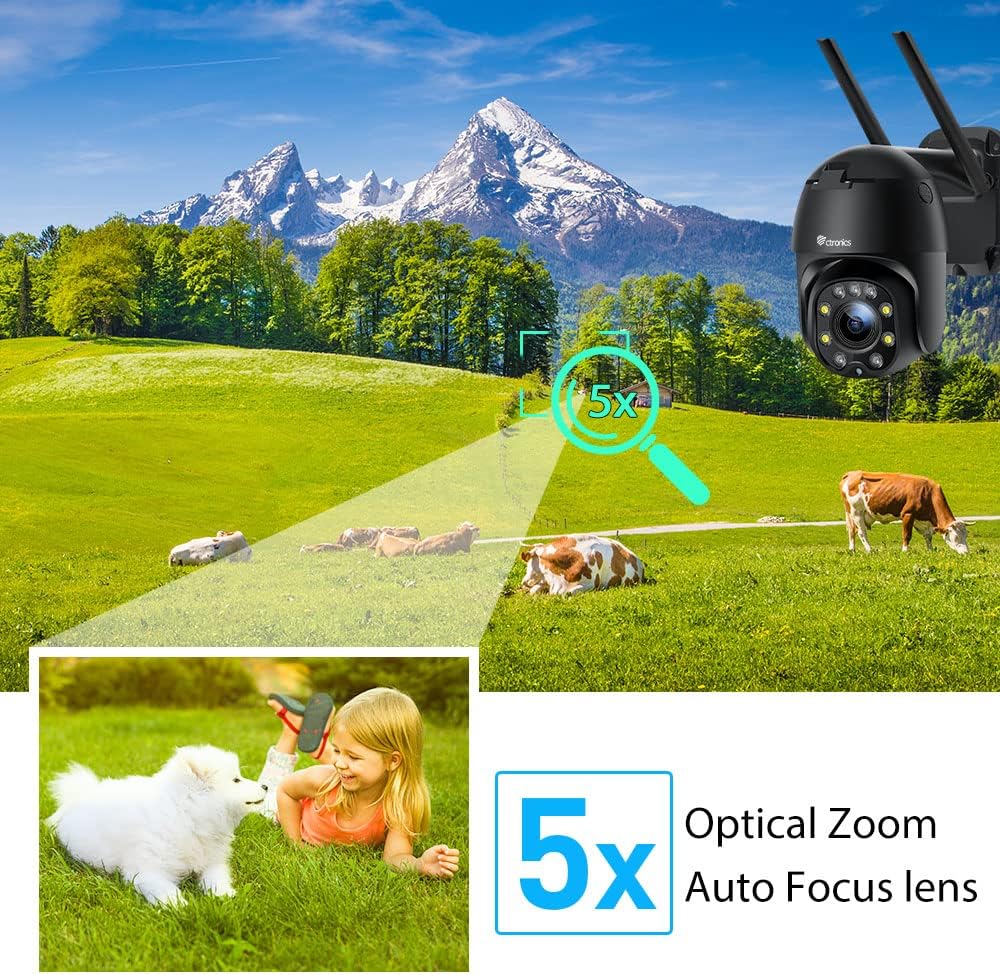
5.1-сүрөт: 5X Optical Zoom. This image demonstrates the camera's 5X optical zoom capability, allowing for detailed viewing of distant objects with auto-focus functionality.
5.2 Human Detection and Auto-Tracking
The camera utilizes AI algorithms to distinguish human movement from other triggers, reducing false alarms by up to 95%.
- Аныктоо: When a human is detected, the camera will automatically track their movement within its field of view.
- Эскертүүлөр: You will receive instant notifications via the app, FTP, or email.
- Жаздыруу: Detected events are recorded to the installed SD card.

5.2-сүрөт: Human Detection. This image illustrates how the camera's human detection feature accurately identifies people while ignoring non-human movements like pets, significantly reducing false alarms.

5.3-сүрөт: Auto Tracking. This image demonstrates the camera's auto-tracking capability, showing how it follows a detected subject's movement within its 355° horizontal and 90° vertical range.
5.3 HD 1080P & Night Vision
The camera provides 1920x1080P resolution for clear images and offers two night vision modes.
- Түнкү көрүнүш: With 4 spotlights and 5 infrared lights, the camera can display vivid color images in total darkness up to 25 meters.
- Инфракызыл түнкү көрүнүш: Standard black and white infrared vision is also available.

5.4-сүрөт: Color Night Vision. This image illustrates the camera's ability to provide full-color video surveillance even in low-light or nighttime conditions.
5.4 Эки тараптуу аудио
Коноктор менен баарлашыңыз же орнотулган микрофонду жана динамикти колдонуп, бузукуларды алдын алыңыз.
- Real-time Conversation: Use the Ctronics app to engage in real-time conversations.
- Ызы-чууну азайтуу: The camera features ambient noise reduction technology for clearer sound quality.

5.5-сүрөт: Two-Way Audio. This image depicts the camera's two-way audio functionality, allowing users to communicate with individuals near the camera via their smartphone.
5.5 Remote Access
View жаша фооtage and recordings from anywhere at any time using the Ctronics app or HiP2P software.
- Ensure your camera is connected to the internet.
- Log in to your Ctronics app or HiP2P software account to access your camera feed.
6. Техникалык тейлөө
Үзгүлтүксүз техникалык тейлөө камераңыздын узак мөөнөттүү иштешин жана оптималдуу иштешин камсыз кылат.
- Тазалоо: Камера линзасын жана корпусун жумшак, d менен акырын сүртүңүзamp кездеме. Катуу химиялык заттарды же абразивдүү тазалагычтарды колдонбоңуз.
- Программалык камсыздоонун жаңыртуулары: Check the Ctronics app periodically for available firmware updates. Keeping the firmware updated ensures you have the latest features and security enhancements.
- Power Cycle: If the camera experiences minor issues, try power cycling it by unplugging and replugging the power adapter.
7. Кыйынчылыктарды
Бул бөлүм сиз кабылышы мүмкүн болгон жалпы көйгөйлөрдү карайт.
| Көйгөй | Мүмкүн себеп | Чечим |
|---|---|---|
| Камера оффлайн | Электр кубаты жок; Wi-Fi өчүрүлгөн; Роутерде көйгөй бар | Check power connection; Reconnect Wi-Fi in app; Restart router |
| Сүрөттүн сапаты начар | Dirty lens; Network bandwidth; Low light | Clean lens; Check internet speed; Ensure sufficient lighting or use night vision |
| Жалган коңгуроо | Sensitivity too high; Non-human movement | Adjust detection sensitivity in app; Ensure human detection is enabled |
| SD карта жаздырылбай жатат | SD card full/corrupted; Not formatted; Incorrect settings | Format SD card in app; Check recording settings; Replace SD card if faulty |
8. Техникалык шарттар
Detailed technical specifications for the Ctronics CTIPC-285C-Z4B camera:
| Өзгөчөлүк | Спецификация |
|---|---|
| Модель номери | CTIPC-285C-Z4B |
| Өлчөмдөрү (L x W x Y) | 11 x 17 x 30 см |
| Салмагы | 940 грамм |
| Материал | Акрилонитрил бутадиен стирол (ABS) |
| Power Type | Электр кабели |
| Тtage | 12 вольт |
| Энергияны керектөө | 6 Ватт |
| Резолюция | 1920x1080P |
| Оптикалык масштаб | 5X |
| Пан колому | 355° |
| Тилтүү диапазону | 90° |
| Түнкү көрүнүш аралык | Болжол менен 25 метр |
| Суу өткөрбөйт рейтинги | IP66 |
| Эстутум картасынын түрү | Микро SD |
| Эс тутумдун максималдуу сыйымдуулугу | 64 ГБ |
| Шайкеш түзмөктөр | Smartphone (iOS/Android), PC (MAC/Windows) |
9. Кепилдик жана колдоо
Ctronics products come with a standard warranty. For specific warranty terms and conditions, please refer to the warranty card included with your product or visit the official Ctronics website. If you encounter any issues not covered in this manual or require further assistance, please contact Ctronics customer support:
- Webсайт: www.ctronics.com
- Электрондук почта: Refer to your product packaging or webколдоо электрондук почта үчүн сайт.
- Телефон: Refer to your product packaging or webколдоо телефонунун номери үчүн сайт.
Please have your model number (CTIPC-285C-Z4B) and purchase information ready when contacting support.


