1. Киришүү
This manual provides essential information for the safe and efficient use of your Ulefone Note 11P smartphone. Please read this manual carefully before using the device to ensure proper operation and to prevent damage.

Сүрөт 1.1: Алдыңкы жана арткы view of the Ulefone Note 11P Smartphone, showcasing анын кооз дизайны жана камера модулу.
2. Түзмөктүн жайгашуусу
Familiarize yourself with the physical components and buttons of your Ulefone Note 11P.

Figure 2.1: Detailed diagram illustrating the location of the 8MP front camera, receiver, light/proximity sensor, rear flash, 48MP main camera, 8MP ultra-wide angle camera, 2MP macro camera, 2MP sub-camera, fingerprint sensor, 3.5mm earphone jack, speaker, microphone, Type-C charging port, volume buttons, and power key.
2.1 Баскычтар жана порттор
- Кубат ачкычы: Press and hold to power on/off or restart. Short press to lock/unlock the screen.
- Үн баскычтары: Медиа үнүн, рингтондун үнүн жана ойготкучтун үнүн тууралаңыз.
- Type-C заряддоо порту: Connect the provided USB cable for charging and data transfer.
- 3.5 мм наушник уячасы: Connect standard 3.5mm headphones.
3. Орнотуу
3.1 Кутуда эмне бар
Verify that all components are present in your product package:
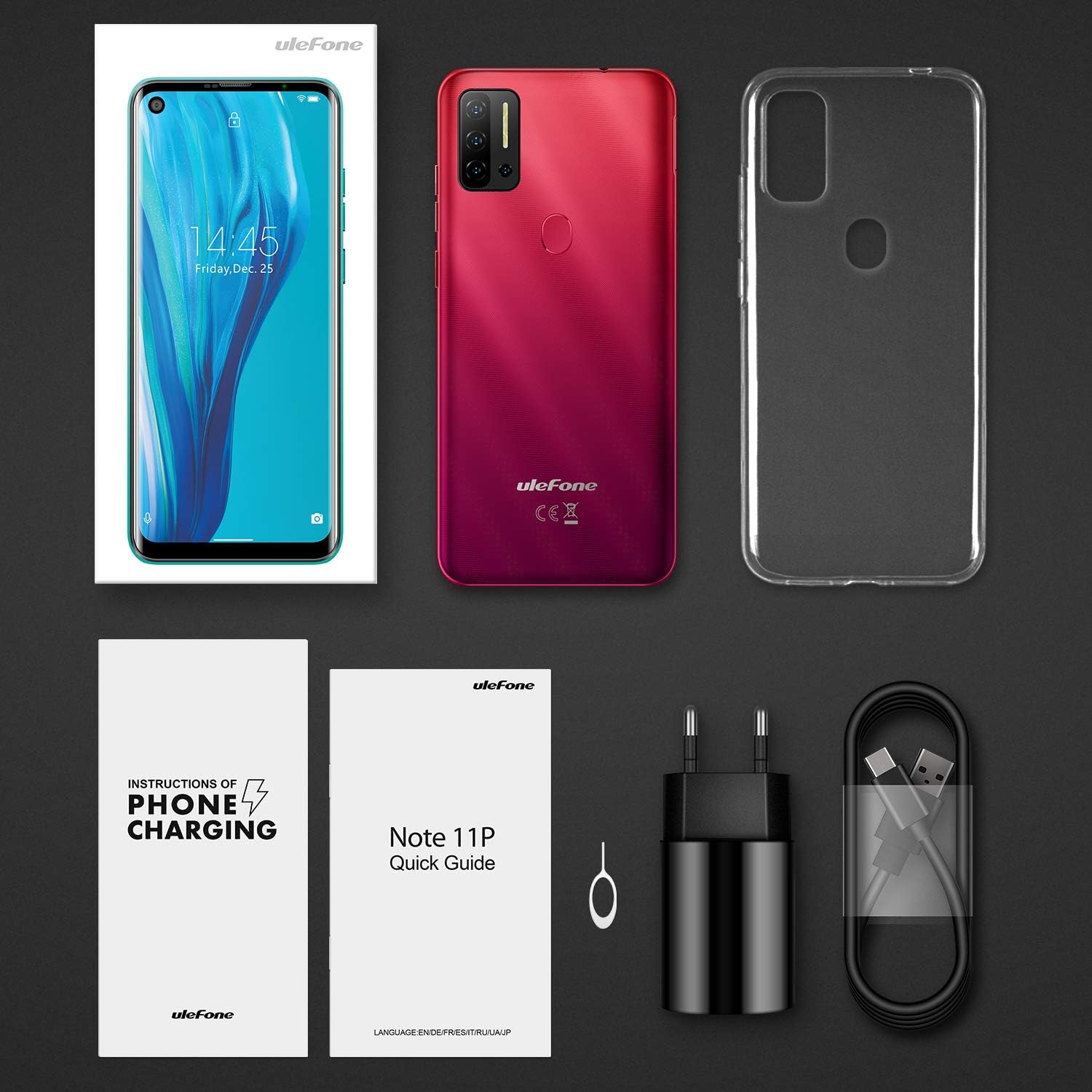
Figure 3.1: Contents of the Ulefone Note 11P package, including the smartphone, AC charger, USB data cable, protective case, pre-applied screen protector, SIM ejector tool, warranty certificate, and user manual.
- Ulefone Note 11P Smartphone (battery included)
- AC Power Charger
- USB Data Cable (100 cm)
- Коргоочу кап
- Экран коргоочу (алдын ала колдонулган)
- SIM Ejector Needle
- Кепилдик күбөлүк
- Колдонуучунун Колдонмосу (бул документ)
3.2 SIM карталарды жана SD картаны салуу
The Ulefone Note 11P supports Dual SIM Dual Standby and a dedicated SD card slot for expanded storage up to 2TB.
- Телефондун капталындагы SIM карта салгычын табыңыз.
- SIM картаны чыгаруучу куралды лотоктун жанындагы кичинекей тешикке салып, ачыңыз.
- лотокту кылдаттык менен сууруп алыңыз.
- Place your Nano-SIM cards and/or a microSD (TF) card into the designated slots on the tray. Ensure the gold contacts face downwards.
- Табаны телефондун ичине акырын түртүңүз, ал чыкылдагыча.
3.3 Алгачкы заряддоо
Биринчи колдонуудан мурун, аппаратыңызды толук заряддоо сунушталат.
- USB Type-C кабелин телефондун ылдый жагындагы заряддоо портуна туташтырыңыз.
- Connect the other end of the USB cable to the AC power charger.
- Plug the AC power charger into a wall outlet.
- Экрандагы батареянын сөлөкөтү заряддоо абалын көрсөтөт.

Figure 3.2: The Ulefone Note 11P displaying its charging status, highlighting the powerful 4400mAh battery designed for extended use.
4. Аппаратыңызды иштетүү
4.1 Күйгүзүү/өчүрүү
- To power on, press and hold the Power Key until the Ulefone logo appears.
- To power off, press and hold the Power Key until the power options menu appears, then select "Power off".
4.2 Android 11 операциялык системасы
Your Ulefone Note 11P runs on the latest Android 11 OS, offering enhanced privacy controls, conversation management, and device connectivity features.

Figure 4.1: Visual representation of the Android 11 operating system interface on the Ulefone Note 11P, emphasizing its privacy protection features.
4.3 Дисплей жана навигация
The 6.55-inch punch-hole display provides an immersive visual experience.

Figure 4.2: Close-up of the Ulefone Note 11P's 6.55-inch punch-hole screen, illustrating its large display and enhanced visual quality.
- Сенсордук экран жаңсоолор: Tap, long press, swipe, pinch-to-zoom for navigation and interaction.
- Эскертмелер панели: Ыкчам жөндөөлөргө жана эскертмелерге жетүү үчүн экрандын өйдө жагынан ылдый сүрүңүз.
- Чабыттоо тилкеси: Колдонмолор менен экрандардын ортосунда жылуу үчүн экрандагы навигация баскычтарын (Артка, Башкы бет, Акыркылар) же жаңсоо навигациясын (эгер иштетилген болсо) колдонуңуз.
4.4 Коопсуздук өзгөчөлүктөрү
The Note 11P offers multiple ways to secure your device.
- Манжа ачуу: Register your fingerprints for quick and secure unlocking. The fingerprint sensor is located on the rear of the device.
- Бетти ачуу: Use the front camera to unlock your phone with your face.
- PIN/Үлгү/Парол: Set up a traditional lock screen method for backup security.
4.5 Камераны колдонуу
Capture high-quality photos and videos with the 48MP AI Quad Camera system.

Figure 4.3: Close-up of the Ulefone Note 11P's 48MP AI Quad Camera setup, featuring ultra-wide angle and macro lenses for diverse photographic capabilities.
- Үй экранынан же колдонмо суурмасынан Камера колдонмосун ачыңыз.
- Switch between main, ultra-wide, and macro lenses as needed.
- Сүрөткө тартуу үчүн жапкычты басыңыз.
- Видеолорду жаздыруу үчүн видео режимине өтүңүз.
5. Техникалык тейлөө
5.1 Аппаратыңызды тазалоо
- Телефондун экранын жана корпусун тазалоо үчүн жумшак, түксүз чүпүрөктү колдонуңуз.
- Катуу химиялык заттарды, абразивдүү тазалагычтарды же аэрозолдук спрейлерди колдонуудан алыс болуңуз.
- Do not expose the phone to excessive dust or moisture.
5.2 Батареяга кам көрүү
- Батареянын иштөө мөөнөтүн узартуу үчүн, өтө жогорку температурадан алыс болуңуз.
- Аспап менен кошо берилген оригиналдуу заряддагычты жана кабелди гана колдонуңуз.
- Батареяны бат-баттан толук түгөтүп коюудан алыс болуңуз.
5.3 Программалык камсыздоо жаңыртуулары
Оптималдуу аткарууну жана коопсуздукту камсыз кылуу үчүн программалык камсыздоо жаңыртууларын дайыма текшерип, орнотуп алыңыз.
- барыңыз Орнотуулар > Система > Системаны жаңыртуу жеткиликтүү жаңыртууларды текшерүү үчүн.
- Ensure your device has sufficient battery and a stable Wi-Fi connection before performing an update.
6. Кыйынчылыктарды
6.1 Жалпы маселелер жана чечимдер
| Көйгөй | Мүмкүн чечим |
|---|---|
| Түзмөк күйбөй жатат | Ensure the battery is charged. Press and hold the Power Key for at least 10 seconds. |
| Колдонмолор бузулуп же катып калууда | Clear app cache/data (Settings > Apps > [App Name] > Storage). Restart the device. |
| Батареянын иштөө мөөнөтү начар | Close background apps. Reduce screen brightness. Disable unnecessary features like GPS or Bluetooth when not in use. |
| Wi-Fi'га туташпай жатат | Restart your Wi-Fi router. Forget the network on your phone and reconnect. Ensure Wi-Fi is enabled on the phone. |
| Манжа изинин сенсору иштебей жатат | Ensure your finger is clean and dry. Re-register your fingerprints in Settings > Security. |
6.2 Заводдук абалга кайтаруу
Эгер көйгөйлөр чечилбесе, баштапкы абалга кайтаруу зарыл болушу мүмкүн. Эскертүү: Бул телефонуңуздагы бардык дайындарды жок кылат. Улантуудан мурун маанилүү маалыматтардын камдык көчүрмөсүн сактаңыз.
- барыңыз Орнотуулар > Система > Параметрлерди баштапкы абалга келтирүү > Бардык дайындарды тазалоо (деск. баштапкы абалга келтирүү).
- Кайра орнотууну ырастоо үчүн экрандагы көрсөтмөлөрдү аткарыңыз.
7. Техникалык шарттар
Key technical specifications of the Ulefone Note 11P smartphone.

Figure 7.1: ашыкview of Ulefone Note 11P's main features including Android 11, 6.55-inch punch-hole screen, Helio P60 Octa-Core Processor, 8GB RAM + 128GB ROM, 48MP Quad Camera, Facial and Fingerprint Identification, 4400mAh Battery, and 3-Card Slot.
| Өзгөчөлүк | Деталь |
|---|---|
| Модель аты | Эскертүү 11P |
| Операция системасы | Android 11.0 |
| Процессор | MediaTek Helio P60 сегиз ядролуу, 2 ГГц |
| RAM | 8 ГБ |
| Ички сактагыч | 128 ГБ (UFS 2.1) |
| Кеңейтүүчү сактагыч | Up to 2 TB via TF card (dedicated slot) |
| Дисплей | 6.55-inch Punch-Hole LCD, 720x1600 resolution, 20:9 aspect ratio |
| Арткы камера | 48MP Main (Samsung sensor) + 8MP Ultra-Wide Angle (120°) + 2MP Macro + 2MP Sub-camera |
| Алдыңкы камера | 8MP |
| Батарея сыйымдуулугу | 4400 мАч (литий-полимер) |
| SIM картаны колдоо | Dual SIM Dual Standby (Nano-SIM) |
| Байланыш | 4G LTE, Wi-Fi, Bluetooth, GPS, GLONASS, Beidou, Type-C, 3.5mm Jack |
| Коопсуздук | Fingerprint ID, Facial Unlock |
| Өлчөмдөр | 16.69 x 7.72 x 0.99 см |
| Салмагы | 209 г |

Figure 7.2: The Ulefone Note 11P highlighting its 8GB RAM and 128GB ROM, with support for up to 1TB TF card expansion, allowing users to store a vast amount of data.
8. Кепилдик жана колдоо
Your Ulefone Note 11P comes with a warranty. Please refer to the included Warranty Certificate for specific terms and conditions.
8.1 Кардарларды колдоо
For technical assistance, troubleshooting beyond this manual, or warranty claims, please contact Ulefone customer support through their official webсайтты же кепилдик документтериңизде көрсөтүлгөн байланыш маалыматын.
You can also visit the official Ulefone store on Amazon for product information and support: Ulefone Amazon Store


