Introduction
The SONICWARE Liven 8bit Warps is a versatile 8-bit waveform memory synthesizer featuring a 4-track looper and a 128-step sequencer. Designed for sound creation ranging from chiptune to ambient music, this portable device offers a unique sonic palette and intuitive controls for both studio and live performance environments. This manual provides essential information for setting up, operating, maintaining, and troubleshooting your Liven 8bit Warps.

Сүрөт: жогорудан төмөнгө view of the SONICWARE Liven 8bit Warps synthesizer, showcasing its control panel, keys, and connectivity ports.
Жайгашуу
Follow these steps to set up your Liven 8bit Warps for first use.
1. Электр камсыздоо
- DC кубаттуулугу: Connect a compatible DC 9V power adapter (not included) to the DC9V input jack on the rear panel.
- Батарея кубаттуулугу: For portable use, insert 6 AA batteries (not included) into the battery compartment on the underside of the unit. Ensure correct polarity.
2. Аудио байланыштары
- Чыгуу: Connect the LINE OUT jack (3.5mm stereo) to your mixer, audio interface, or headphones.
- Катары: Connect external audio sources (e.g., another synthesizer, drum machine) to the LINE IN jack (3.5mm stereo) for processing or looping.
3. MIDI туташуулары
- MIDI ичинде: Use a standard 5-pin MIDI cable to connect the MIDI IN port to a MIDI controller or sequencer for external control.
- MIDI Чыгуу: Connect the MIDI OUT port to other MIDI devices to transmit MIDI data from the Liven 8bit Warps.
4. Sync Connections
- Синхрондоштуруу: Кирүү/Чыгуу Use 3.5mm mini-jack cables to connect the SYNC IN/OUT ports for synchronization with other compatible devices.

Сүрөт: бурчтуу view of the Liven 8bit Warps, highlighting the various input and output ports on the rear panel for power, audio, MIDI, and sync.

Image: The Liven 8bit Warps connected via cables to other synthesizers and music production gear, demonstrating its integration capabilities.
Иштөө нускамалары
This section details the core functions and controls of your Liven 8bit Warps.
1. Synthesizer Engine
The Liven 8bit Warps features an 8-bit waveform memory synth engine with four distinct modes:
- WARP: Cross-fades between two waveforms.
- ЧАБУУЛ: Modulates the attack portion of the sound with a waveform.
- MORPH: Continuously morphs between multiple waveforms.
- FM: Frequency modulation synthesis using 8-bit waveforms.
Adjust parameters like WAVE1/2, LEVEL/DEPTH, LFO RATE/WAV, DETUNE, жана шыпыруу using the dedicated knobs to sculpt your sound. The ALIASES NOISE function adds unique digital artifacts.

Image: The Liven 8bit Warps with an overlay emphasizing its capability to recreate classic video game sounds and explore new 8-bit sonic territories.

Warp Engine

Attack Engine

Morph Engine

FM Engine
2. Filter Section
The unit includes a filter section with Low-Pass Filter (LPF) and High-Pass Filter (HPF) options. Use the КЫСУУ жана RESO (Resonance) knobs to shape the tonal characteristics of your sound.
3. Sequencer
The Liven 8bit Warps features a 128-step sequencer with parameter locking capabilities.
- Step Input: Use the 16 step buttons to input notes and trigger patterns.
- Параметр кулпу: Record knob movements and parameter changes per step by holding down a step button and adjusting a knob.
- Pattern Memory: Store up to 128 patterns. Use the MEM button to save and recall patterns.
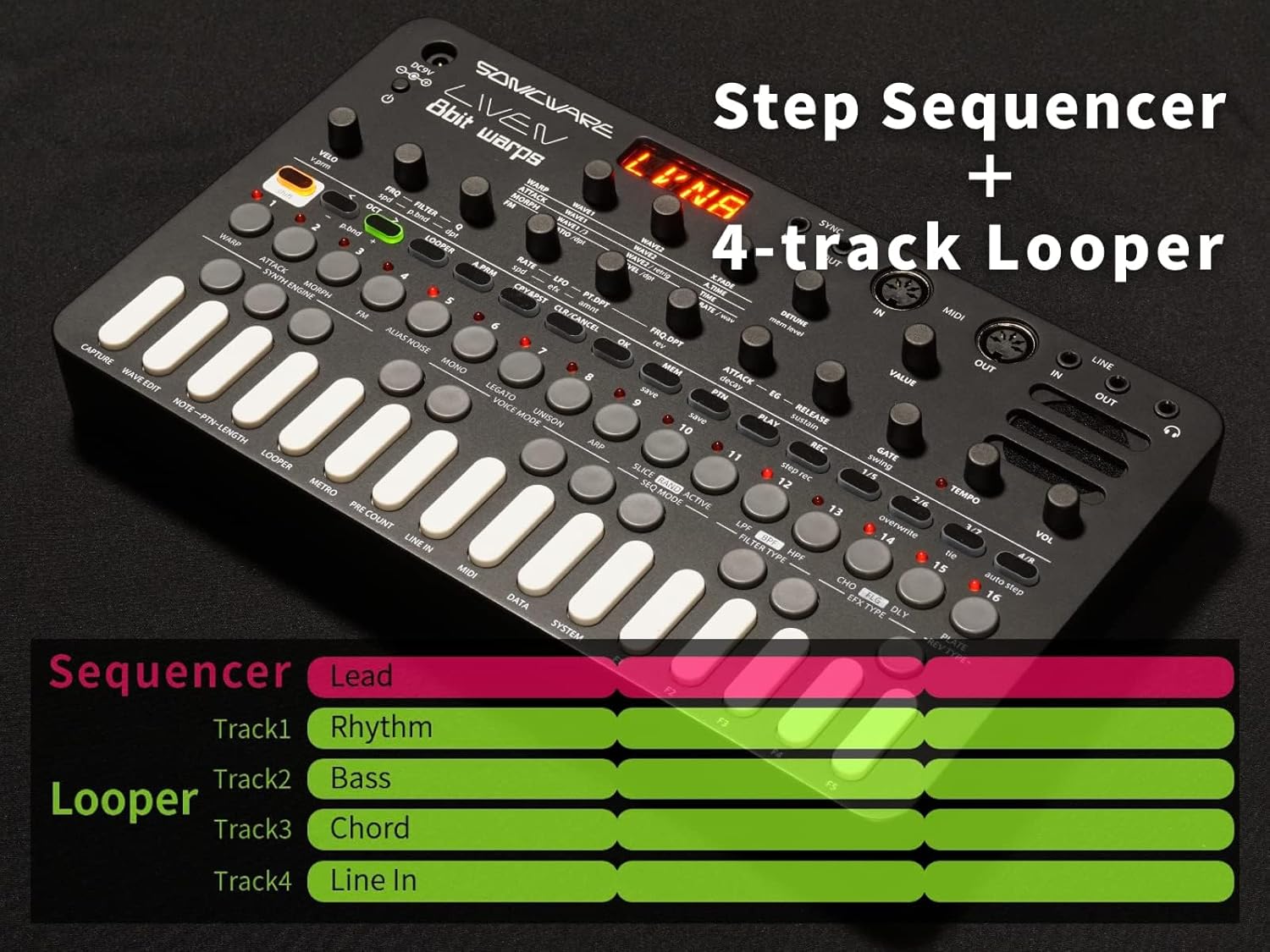
Image: The Liven 8bit Warps control panel with an overlay highlighting its step sequencer and 4-track looper functionalities.

Image: Graphic illustrating the sequencer's capacity for 128 steps and 128 patterns, along with various note divisions for rhythmic programming.

Image: A user's hands demonstrating the adjustment of control knobs on the Liven 8bit Warps, with text indicating the 'Hold & Change Rate' function, likely for parameter locking or real-time modulation.
4. 4-Track Looper
The integrated 4-track looper allows for recording and layering internal audio and external audio from the line input.
- Track Assignment: Tracks can be assigned to different parts of your performance (e.g., Lead, Rhythm, Bass, Chord).
- Тышкы киргизүү: One track is dedicated to looping external audio connected via the LINE IN jack.
- Цикл операциясы: колдонуу LOOPER section buttons to record, overdub, and manage your loops.

Image: A diagram illustrating the relationship between the sequencer and the 4-track looper, showing how different musical parts can be assigned and layered.
5. Эффекттер
The Liven 8bit Warps includes 10 effects and 6 reverbs. The reverb section can also be switched to a Cassette tape simulator for vintage sound textures.
- Эффект тандоо: колдонуу FX жана REVERB buttons to select and activate effects.
- Параметрди тууралоо: Adjust effect parameters using the dedicated knobs in the FX section.
6. Voice Modes
The synthesizer supports various voice modes:
- POLY: Polyphonic mode, allowing multiple notes to play simultaneously.
- МОНО: Monophonic mode, playing one note at a time.
- UNISON: Stacks multiple voices for a thicker sound.

Image: A user's hands actively engaging with the controls of the Liven 8bit Warps, illustrating its design for intuitive operation during jams and live performances.
Техникалык тейлөө
Proper care ensures the longevity and optimal performance of your Liven 8bit Warps.
1. Тазалоо
- Wipe the unit with a soft, dry cloth. Do not use abrasive cleaners, solvents, or waxes.
- Суюктуктарды түз эле аппаратка чачуудан алыс болуңуз.
2. Батареяны алмаштыруу
- When the battery indicator is low, replace all 6 AA batteries with new ones.
- Агып кетүүнүн алдын алуу үчүн бирдик узак убакыт бою колдонулбай турган болсо, батарейкаларды алып салыңыз.
3. Сактоо
- Аппаратты күн нурунан жана экстремалдык температурадан алыс салкын, кургак жерде сактаңыз.
- Агрегаттын үстүнө оор нерселерди коюудан алыс болуңуз.
Проблемаларды чечүү
If you encounter issues with your Liven 8bit Warps, refer to the following common problems and solutions.
| Көйгөй | Мүмкүн себеп | Чечим |
|---|---|---|
| Үн чыгышы жок | Volume too low, incorrect audio connections, no pattern playing. | Check the VOLUME knob. Ensure LINE OUT is connected correctly. Verify a pattern is playing or notes are being triggered. |
| Секвенсер ойнотулбай жатат | PLAY/STOP button not pressed, tempo set to zero, no steps programmed. | Press the PLAY/STOP button. Adjust the TEMPO knob. Program steps into the sequencer. |
| MIDI жооп бербей жатат | Incorrect MIDI channel, loose MIDI cable, MIDI settings incorrect. | Check MIDI IN/OUT connections. Verify MIDI channels match between devices. Consult the manual for MIDI settings. |
| Түзмөк катып калат же туруксуз иштейт | Убактылуу программалык ката. | Turn the unit off, wait a few seconds, then turn it back on. If the issue persists, perform a factory reset (refer to advanced settings in the full manual). |
Техникалык шарттар
Key technical specifications for the SONICWARE Liven 8bit Warps.
- Модель номери: LVN-010
- Synthesizer Engine: 8-bit waveform memory synth (WARP, ATTACK, MORPH, FM)
- Секвендер: 128 steps, 128 patterns, parameter locking
- Лупер: 4-track (3 internal, 1 external LINE IN)
- Эффекттери: 10 effects, 6 reverbs (switchable to Cassette tape simulator)
- Байланыш: MIDI IN/OUT (5-pin DIN), SYNC IN/OUT (3.5mm mini-jack), LINE IN/OUT (3.5mm stereo), DC 9V input
- Күч: 6 AA batteries or DC 9V adapter
- Камтылган динамик: Ооба
- Өлчөмдөрү (L x W x Y): 11.69 x 19.13 x 1.89 дюйм (болжол менен 29.7 x 48.6 x 4.8 см)
- Салмагы: 1.74 фунт (болжол менен 790 грамм)
- Дене материалы: Пластик
Кепилдик жана колдоо
For warranty information and customer support, please refer to the official SONICWARE webсайтка же ыйгарым укуктуу дилериңизге кайрылыңыз. Кепилдик дооматтар үчүн сатып алганыңыздын далилин сактаңыз.
- Онлайн ресурстар: зыярат кылыңыз SONICWARE Store on Amazon for product updates and additional information.
- Колдоо кызматы менен байланышуу: If you require technical assistance or have questions not covered in this manual, please contact SONICWARE customer support through their official channels.


