1. Киришүү
This manual provides detailed instructions for the proper setup, operation, and maintenance of your Skechers SR1123 Casual Digital Watch. Please read this manual thoroughly to understand all features and ensure correct usage.
2. Watch Overview
The Skechers SR1123 is a digital watch designed for everyday use, featuring a durable polyurethane strap and a clear digital display. It includes functions such as time, date, alarm, and stopwatch, with a water resistance rating suitable for swimming.
2.1 Watch компоненттери
Familiarize yourself with the buttons and display areas of your watch:

Сүрөт: каптал view of the Skechers SR1123 Digital Watch, highlighting the 'ST/STP' (Start/Stop) and 'LIGHT' buttons on the right side of the watch case.
- MODE баскычы: Used to cycle through different modes (Time, Alarm, Stopwatch).
- RESET баскычы: Used to reset values or select items.
- ST/STP баскычы: Used to start/stop functions (e.g., stopwatch) or adjust settings.
- ЖАРЫК баскычы: Activates the backlight for illumination.
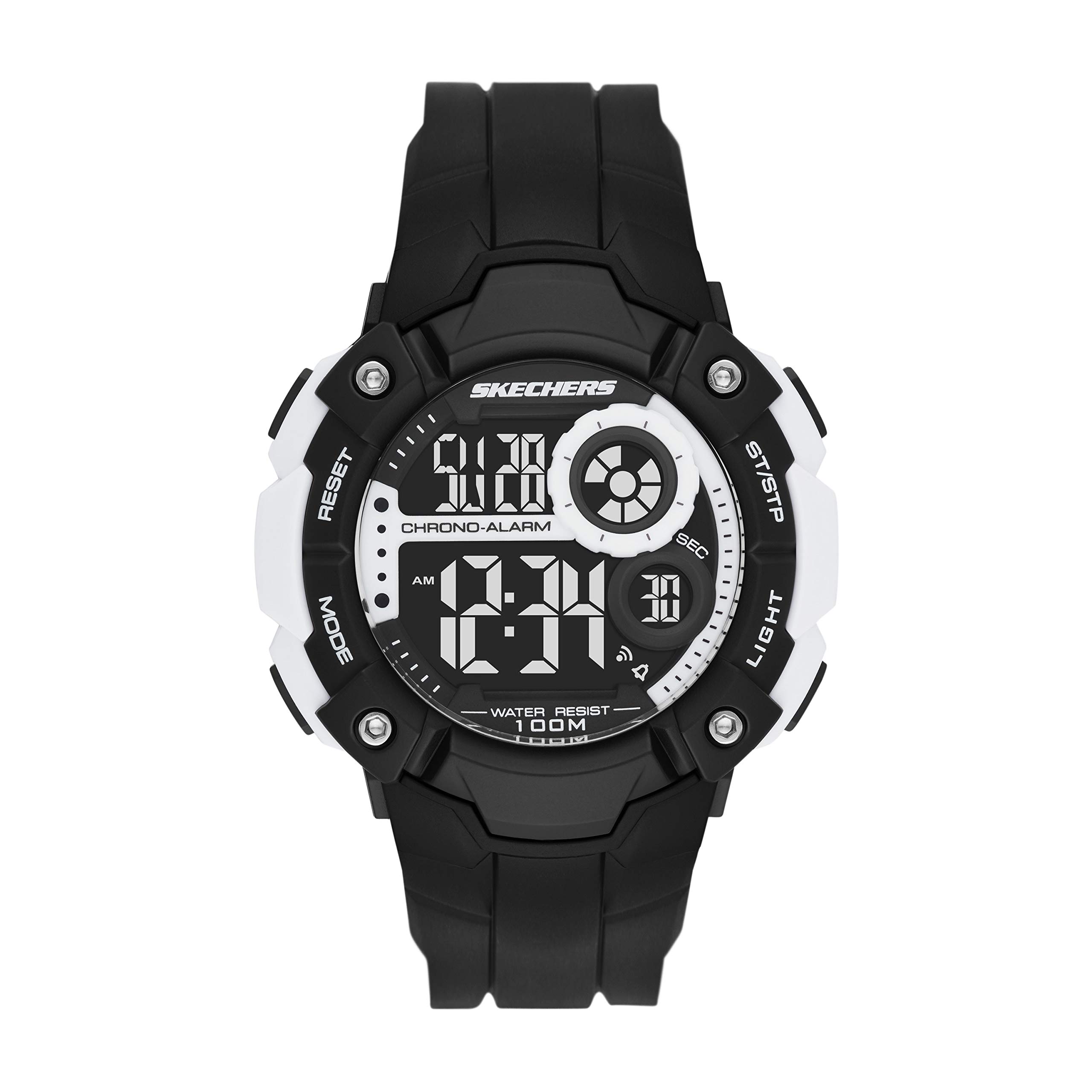
Сүрөт: алдыңкы view of the Skechers SR1123 Digital Watch, showcasing its black case and clear digital display.
3. Баштапкы орнотуу
Upon first use, you may need to set the current time and date.
3.1 Убакытты жана датаны орнотуу
- Убакытты эсепке алуу режиминен баскычты басыңыз РЕЖИМ button repeatedly until the time setting digits begin to flash. This indicates you are in setting mode.
- басыңыз RESET жөндөөлөрдү өзгөртүү үчүн баскычты басыңыз: секунд, саат, мүнөт, ай, күн, жуманын күнү.
- колдонуу ST / STP button to increase the flashing value. Hold the button to rapidly advance the digits.
- Бардык орнотуулар тууралангандан кийин, басыңыз РЕЖИМ орнотуу режиминен чыгуу жана Убакытты эсепке алуу режимине кайтуу үчүн баскыч.

Сүрөт: жакын план view of a digital watch display, illustrating how time and date information is presented.
4. Иштөө нускамалары
4.1 Арткы жарыкты колдонуу
Жарык аз шарттарда дисплейди жарыктандыруу үчүн басыңыз ЖАРЫК баскычы. Арткы жарык бир нече секундага активдүү бойдон калат.
4.2 Ойготкуч функциясы
- Убакытты эсепке алуу режиминен баскычты басыңыз РЕЖИМ жеткенге чейин баскычын Ойготкуч режими. The alarm time will be displayed.
- басыңыз RESET button to select the hour or minute digits for setting.
- колдонуу ST / STP жаркылдап-өчүп турган саатты же мүнөттү тууралоо үчүн баскычты басыңыз.
- Ойготкучту иштетүү же өчүрүү үчүн, баскычын басыңыз ST / STP button while in Ойготкуч режими (without digits flashing). An alarm icon will appear/disappear on the display.
- басыңыз РЕЖИМ Убакыт режимине кайтуу үчүн баскычын басыңыз.
4.3 Секундомер функциясы
- Убакытты эсепке алуу режиминен баскычты басыңыз РЕЖИМ жеткенге чейин баскычын Секундомер режими. The display will show "00:00:00".
- басыңыз ST / STP секундомерди баштоо үчүн баскыч.
- басыңыз ST / STP секундомерди токтотуу үчүн кайра баскычын басыңыз.
- басыңыз RESET button to clear the stopwatch to "00:00:00".
- To record lap times (if available), press RESET секундомер иштеп жатканда. Айлампа убактысы кыска убакытка көрсөтүлөт жана секундомер фондо иштей берет.
- басыңыз РЕЖИМ Убакыт режимине кайтуу үчүн баскычын басыңыз.
5. Сууга туруктуулук
Your Skechers SR1123 watch has a water resistance rating of 100 meters (10 ATM), making it suitable for swimming and showering. However, it is not recommended for diving or high-impact water sports.
- Саат сууга чөмүлүп турганда баскычтарды иштетпеңиз.
- Саатты температуранын кескин өзгөрүшүнө дуушар кылбаңыз (мисалы, ысык душтан кийин муздак сууга түшүңүз).
- Туздуу сууга түшкөндөн кийин, саатты таза суу менен чайкап, жакшылап кургатыңыз.
6. Техникалык тейлөө
6.1 Саатыңызды тазалоо
Wipe the watch case and strap regularly with a soft, dry cloth. For stubborn dirt, use a slightly damp cloth and mild soap, then rinse with fresh water and dry completely.
6.2 Батареяны алмаштыруу
The watch is powered by a button-cell battery. When the display becomes dim or functions become erratic, it may be time to replace the battery. Battery replacement should ideally be performed by a qualified watch technician to ensure proper sealing and maintain water resistance.

Сүрөт: Артка view of the Skechers SR1123 Digital Watch, showing the stainless steel case back and the buckle closure of the polyurethane strap.
7. Кыйынчылыктарды
- Дисплей бош же күңүрт: Батарея аз же түгөнүп калган болушу мүмкүн. Батареяны алмаштырыңыз.
- Баскычтар жооп бербейт: Ensure the watch is not in a locked mode (if applicable, refer to specific model features). If the issue persists, a battery replacement or professional inspection may be needed.
- Убакыт туура эмес: Re-set the time and date following the instructions in Section 3.1. Ensure the correct 12/24-hour format is selected if available.
8. Техникалык шарттар
| Модель номери | SR1123 |
| Дисплей түрү | Санарип |
| Кыймыл түрү | Санарип |
| Power Source | Батарея менен иштейт |
| Иштин материалы | Пластик |
| Топтун материалы | Полиуретан |
| Сууга каршылыктын тереңдиги | 100 метр (10 банкомат) |
| Иштин диаметри | 51 миллиметр |
| Case Thickness | 15 миллиметр |
| Band Width | 26 миллиметр |
| Элемент Салмагы | 57 грамм |
9. Кепилдик жана колдоо
Your Skechers SR1123 watch is covered by a manufacturer's warranty. Please refer to the warranty card included with your purchase for specific terms and conditions. For further assistance or support, please contact Skechers customer service or visit their official webсайт.
9.1 Related Product Video (General Digital Watch Operation)
Video: This video demonstrates general operation for a Skechers digital display watch (model SR1032). While not specific to SR1123, it may provide visual guidance on common digital watch functions such as time display and button interaction.


