1. Киришүү
This manual provides comprehensive instructions for the Technical Pro Dual 21 Band Professional Stereo Equalizer, model EQ7153. This device is engineered to offer precise control over audio frequencies, allowing for detailed sound shaping and enhancement in various audio environments. Please read this manual thoroughly before operating the unit to ensure proper usage and to maximize its performance.
2. Маанилүү коопсуздук нускамалары
- Кубат булагы: Түзмөктү көрсөтүлгөн кубат булагына гана туташтырыңызtage as indicated on the rear panel. Ensure the power switch is set to the correct voltage (110V or 220V) for your region before connecting to power.
- Вентиляция: Ensure adequate ventilation around the unit. Do not block ventilation openings. Avoid placing the unit on carpets or in enclosed spaces that restrict airflow.
- Нымдуулук: Аппаратты жамгырдын, нымдуулуктун, тамчылаган суюктуктун же чачырандынын таасирине дуушар кылбаңыз. Аппараттын үстүнө вазалар сыяктуу суюктук толтурулган буюмдарды койбоңуз.
- Жылуулук: Аппаратты радиаторлор, жылуулук регистрлери, мештер же башка аппараттар (анын ичинде) сыяктуу жылуулук булактарынан алыс кармаңыз. ampкөтөргүчтөр) жылуулукту пайда кылуучу.
- Тазалоо: Disconnect the power cord from the outlet before cleaning. Use only a dry cloth for cleaning.
- Тейлөө: Бул продуктуну өзүңүз тейлөөгө аракет кылбаңыз. Бардык тейлөөлөрдү квалификациялуу тейлөө кызматкерлерине тапшырыңыз. Аппарат кандайдыр бир зыянга учураганда, мисалы, кубат берүүчү шнур же сайгыч бузулганда, суюктук төгүлгөндө же аппараттын ичине нерселер түшүп кеткенде, аппарат жамгырга же нымдуулукка дуушар болгондо, нормалдуу иштебей калганда же кулап түшкөндө тейлөө талап кылынат.
- Объект жана суюк кирүү: Эч качан бул буюмдун ичине тешиктер аркылуу эч кандай түрдөгү нерселерди түртпөңүз, анткени алар коркунучтуу томtagөрткө же электр шокуна алып келиши мүмкүн болгон чекиттер же кыска өчүк бөлүктөр.
3. Пакеттин мазмуну
Таңгактан чыгарганда, төмөнкү буюмдардын бар экенин текшериңиз:
- Technical Pro EQ7153 Dual 21 Band Professional Stereo Equalizer
- Электр кабели
- Removable Rack-Mount Brackets
- Көрсөтмө (бул документ)
4. Продукт бүтүп калдыview
The EQ7153 is a dual 21-band graphic equalizer designed for precise audio frequency adjustment. It features individual LED indicators for each frequency band, a fluorescent spectrum display, and multiple input/output options.
4.1 алдыңкы панели

- Кубат баскычы: Агрегатты күйгүзөт же өчүрөт.
- Киргизүү тандоочулары: Buttons for MP3, DVD, TAPE, TUNER, MP3/AUX, LOW, HIGH, DIRECT, EQ to select the desired audio source or processing mode.
- Dual 21-Band Equalizer Sliders: Individual sliders for Left and Right channels, each with 21 frequency bands for precise audio adjustment. Each slider has an individual LED indicator.
- Fluorescent Spectrum Display: Visual representation of the audio frequency spectrum.
- Bass Booster: Increases low-frequency levels.
- Loudness Booster: Increases both low and high-frequency levels.
- Direct / Equalizer Function: Allows for an unfiltered pass-through of the audio signal or engages the equalizer processing.
4.2 Арткы панель
- RCA аудио киргизүүлөрү: Connect up to four audio sources (DVD, TAPE, TUNER, AUX) using RCA cables. An additional 1/8'' MP3 input is available on the front panel.
- RCA аудио чыгыштары: Сиздин байланышыңыз amplifier or recording device via the RECORD and MAIN RCA outputs.
- Кубат киргизүү: Standard AC power connection with a voltage selector switch (110V/220V).
4.3 Негизги өзгөчөлүктөрү

- Dual 21-Band Equalization: Offers precise control over 21 frequency bands per channel.
- Equalization Points: 32Hz, 63Hz, 100Hz, 120Hz, 150Hz, 200Hz, 275Hz, 350Hz, 500Hz, 1KHz, 1.5KHz, 2KHz, 2.5KHz, 3KHz, 4KHz, 5KHz, 6KHz, 8KHz, 10KHz, 12KHz, 14KHz.
- Жөнгө салуу диапазону: ±12dB for each frequency band.
- Жыштык жообу: 20Гц-20кГц.
- Fluorescent Spectrum Display: Provides real-time visual feedback of audio levels across frequencies.
- Bass Booster & Loudness Booster: Dedicated functions to enhance low and high frequencies.
- Бир нече киргизүү: RCA (4 audio sources) and 1/8'' MP3 input.
- RCA чыгаруулары: For main audio and recording.
- Removable Rack-Mount Brackets: For easy integration into a standard audio rack.
5. Орнотуу нускамалары
5.1 Пакеттен чыгаруу жана жайгаштыруу
- Carefully remove the EQ7153 from its packaging.
- Place the unit on a stable, flat surface or install it into a standard 19-inch audio rack using the provided brackets.
- Ensure there is adequate space around the unit for proper ventilation to prevent overheating.
5.2 Аудио байланыштар
The EQ7153 typically connects between your audio source(s) and your ampкөтөргүч/алуучу.
- Аудио булактарын туташтыруу: Use RCA cables to connect your audio sources (e.g., DVD player, tape deck, tuner, auxiliary device) to the corresponding RCA INPUT jacks on the rear panel (DVD, TAPE, TUNER, AUX). For MP3 players or other portable devices, use a 1/8'' stereo cable to the front panel MP3 input.
- туташуу Ampкөтөргүч/алуучу: Use RCA cables to connect the MAIN OUTPUT jacks on the rear panel of the EQ7153 to an available input on your amplifier or receiver (e.g., AUX IN, CD IN).
- Connect to Recording Device (Optional): If you wish to record the processed audio, connect the REC OUTPUT jacks on the EQ7153 to the input of your recording device.
5.3 Кубат туташтыруу
- Before connecting the power cable, verify that the 110V/220V voltage selector switch on the rear panel is set to match your local power supply.
- Connect the provided power cable to the AC IN socket on the rear panel of the EQ7153.
- Электр кабелинин экинчи учун ылайыктуу AC розеткага сайыңыз.
6. Иштөө нускамалары
6.1 Күйгүзүү/өчүрүү
басыңыз КҮЧ button on the front panel to turn the unit on or off. The fluorescent spectrum display and individual LED indicators will illuminate when the unit is powered on.
6.2 Киргизүүнү тандоо
Press the corresponding input button on the front panel (MP3, DVD, TAPE, TUNER, MP3/AUX) to select the audio source you wish to process. Ensure only one input is selected at a time.
6.3 Эквалайзерди тууралоо
- Engage Equalizer: басыңыз EQ button to activate the equalizer function. If you prefer an unprocessed signal, press the ТҮЗ баскычы.
- Adjust Frequency Bands: Use the individual sliders for the Left and Right channels to boost or cut specific frequency bands. Moving a slider up boosts the frequency, while moving it down cuts the frequency. The range of adjustment is ±12dB.
- Монитор дисплей: Observe the fluorescent spectrum display to visually monitor the frequency distribution of your audio signal as you make adjustments.
6.4 Using Boost Functions
- Bass Booster: басыңыз АЗ button to engage the Bass Booster, which will increase the overall low-frequency levels in your audio.
- Loudness Booster: басыңыз ЖОГОРКУ button to engage the Loudness Booster, which will simultaneously increase both low and high-frequency levels, providing a fuller sound at lower volumes.
7. Техникалык тейлөө
7.1 Тазалоо
To maintain the appearance and longevity of your EQ7153:
- Тазалоодон мурун ар дайым электр кабелин сууруп алыңыз.
- Сырткы беттерди сүртүү үчүн жумшак, кургак чүпүрөктү колдонуңуз.
- Do not use liquid cleaners, aerosol cleaners, or strong chemicals, as they may damage the finish or internal components.
- For dust accumulation around sliders or buttons, use a soft brush or compressed air, being careful not to force dust into the unit.
7.2 Жалпы кам көрүү
- Агрегаттын үстүнө оор нерселерди коюудан алыс болуңуз.
- Protect the unit from extreme temperatures and direct sunlight.
- Ensure all cable connections are secure and free from strain.
8. Кыйынчылыктарды
If you encounter issues with your EQ7153, refer to the following common problems and solutions:
| Көйгөй | Мүмкүн себеп | Чечим |
|---|---|---|
| Түзмөк күйбөйт. | Электр кабели туташкан эмес; Розетка бузулган; Voltage селектор туура эмес. | Ensure power cable is securely connected. Test power outlet with another device. Verify 110V/220V switch matches local voltage. |
| Үн чыгышы жок. | Incorrect input selected; Cables not connected properly; Amplifier input not selected. | Select the correct input source on the EQ7153. Check all RCA cable connections. Ensure your amplifier is set to the correct input connected to the EQ7153. |
| Бурмаланган же начар үн сапаты. | Input signal too high; Equalizer settings extreme; Faulty cables. | Reduce the input level from your source device. Adjust equalizer sliders to a more neutral position. Replace audio cables if suspected faulty. |
| LED indicators are too bright. | This is a characteristic of the product design. | While there is no built-in brightness adjustment, some users have applied light-dimming films or paint to the LEDs for personal preference. This is not officially supported and may void warranty. |
9. Техникалык шарттар

- Модел: TPEQA7153
- Теңдөө тилкелери: Dual 21-band per channel
- Equalization Points: 32Hz, 63Hz, 100Hz, 120Hz, 150Hz, 200Hz, 275Hz, 350Hz, 500Hz, 1KHz, 1.5KHz, 2KHz, 2.5KHz, 3KHz, 4KHz, 5KHz, 6KHz, 8KHz, 10KHz, 12KHz, 14KHz
- Жөнгө салуу диапазону: ±12дБ
- Жыштык жообу: 20Гц-20кГц
- Киргизүүлөр: RCA (4 audio sources), 1/8'' MP3
- Чыгуулары: RCA (Record, Main)
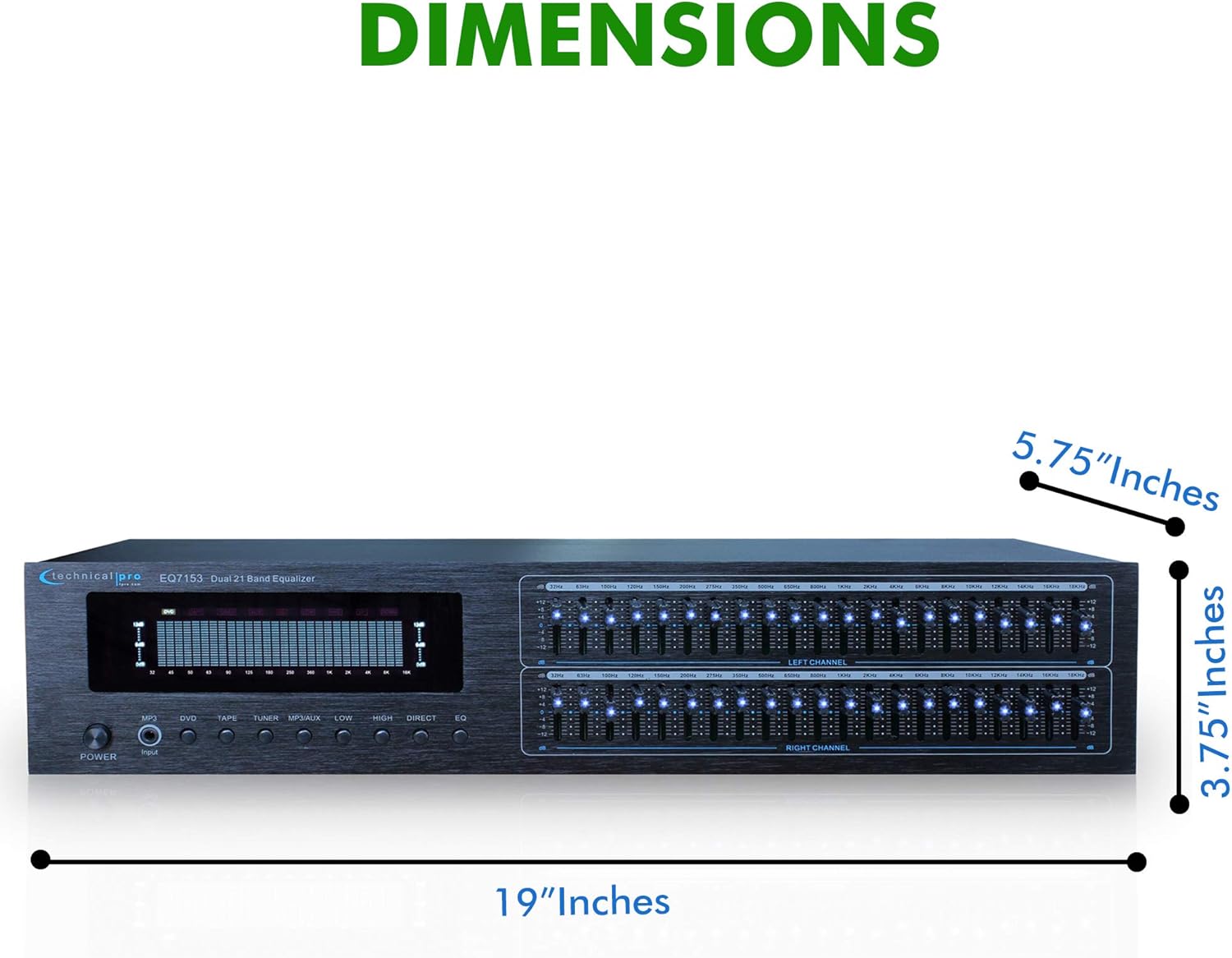
- Продукциянын өлчөмдөрү (W x D x Y): 19 x 5.75 x 3.75 дюйм
- Элемент Салмагы: 4 фунт
- Өндүрүүчү: Technical Pro
10. Кепилдик жана колдоо
For warranty information and technical support, please refer to the documentation provided with your purchase or visit the official Technical Pro webсайт. Ар кандай кепилдик дооматтары үчүн сатып алганыңыздын далилин сактаңыз.


