1. Киришүү
The Waveshare 1.28inch Round LCD Display Module is a compact, high-resolution display designed for various embedded applications. It features a 240x240 pixel resolution with 65K RGB colors, providing a clear and vibrant visual experience. The module utilizes an SPI interface, minimizing the number of required I/O pins for connection to microcontrollers and single-board computers. It is embedded with the GC9A01 driver and is compatible with popular development boards such as Raspberry Pi, Jetson Nano, Arduino, and STM32.
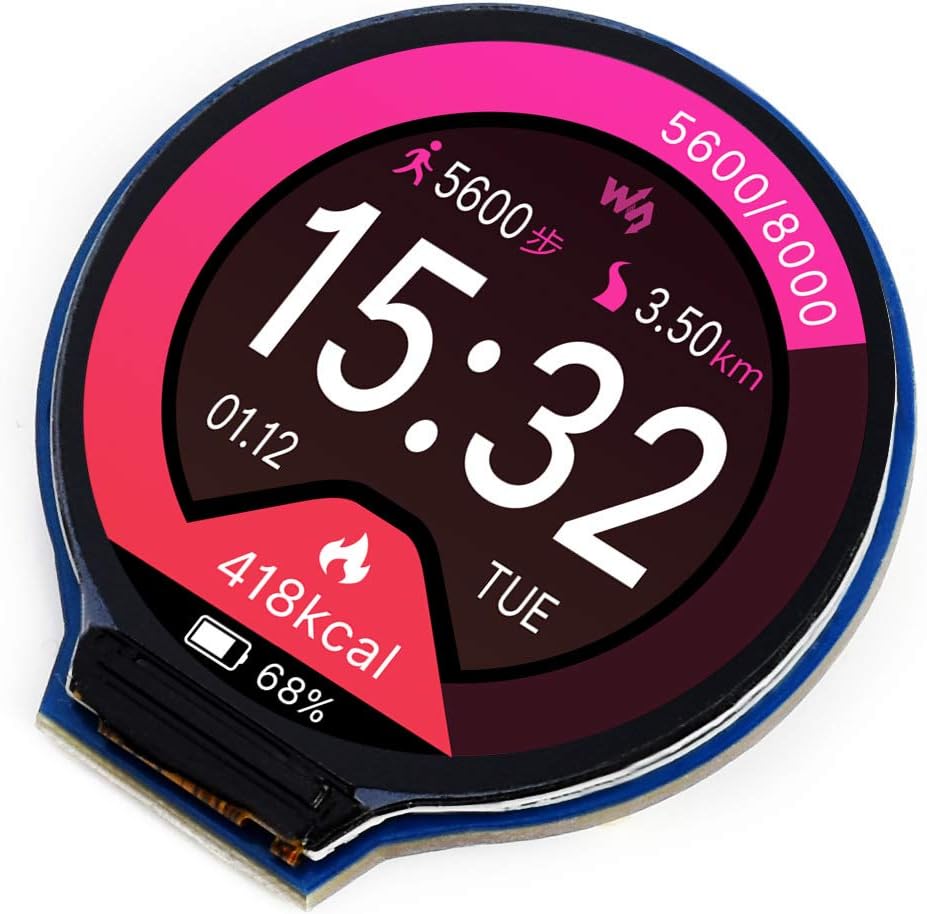
1-сүрөт: Фронт view of the Waveshare 1.28inch Round LCD Display Module displaying a watch face with time, date, steps, distance, and calorie information.
2. Негизги өзгөчөлүктөрү
- Чечим: 240x240 pixels, offering clear and detailed visuals.
- Түс тереңдиги: 65K RGB colors for rich and vibrant display effects.
- Интерфейс: SPI (Serial Peripheral Interface) for efficient data transfer and reduced pin count.
- Айдоочу: Embedded GC9A01 display driver.
- Шайкештик: Supports various controller boards including Raspberry Pi, Jetson Nano, Arduino, and STM32.
- Өнүктүрүү ресурстары: Comes with example code and documentation for Raspberry Pi, Arduino, and STM32.

2-сүрөт: Бүттүview of the 1.28inch Round LCD Display Module highlighting its main features and specifications.
3. Пакеттин мазмуну
Пакетти ачканда, сиз төмөнкү нерселерди табышыңыз керек:
- 1x Waveshare 1.28inch Round LCD Display Module
- 1x PH2.0 8PIN 20cm cable

3-сүрөт: Продукциянын пакетине киргизилген мазмун.
4. Setup and Hardware Connection
This section details the physical connection of the 1.28inch Round LCD Display Module to compatible development boards. The module uses an SPI interface for communication.
4.1 Тирөөчтүн сүрөттөмөсү

4-сүрөт: Артка view of the display module showing the 8-pin connector and pin labels.
| Pin энбелгиси | Description |
|---|---|
| VCC | Power supply (3.3V / 5V input) |
| GND | Жер |
| DIN | SPI data input (MOSI) |
| CLK | SPI clock input (SCK) |
| CS | Чипти тандоо, аз активдүү |
| DC | Берилиштер/Буйрук тандоо (маалымат үчүн жогорку, буйрук үчүн төмөн) |
| RST | Баштапкы абалга келтирүү, активдүү |
| BL | Арткы жарыкты башкаруу |
4.2 Connecting with Raspberry Pi
Follow the diagram below to connect the display module to a Raspberry Pi board. Ensure correct pin mapping for VCC, GND, DIN (MOSI), CLK (SCK), CS, DC, RST, and BL.

5-сүрөт: Hardware connection diagram for Raspberry Pi.
4.3 Connecting with Arduino Board
Refer to the diagram for connecting the display module to an Arduino board. Pay attention to the specific digital and analog pins used for SPI communication and control signals.

6-сүрөт: Hardware connection diagram for Arduino.
For other compatible boards like Jetson Nano or STM32, consult the respective board's documentation and the Waveshare product wiki for specific wiring instructions and example код.
5. Иштетүү жана программалоо
The Waveshare 1.28inch Round LCD Display Module requires programming to display content. Waveshare provides comprehensive development resources, including example code and libraries, for various platforms.
5.1 Программалык камсыздоону орнотуу
- Obtain Resources: Visit the official Waveshare product wiki page for the 1.28inch Round LCD Display Module to download the latest development resources, including drivers, libraries, and example code for Raspberry Pi, Arduino, and STM32.
- Китепканаларды орнотуу: Follow the instructions provided in the downloaded resources to install the necessary libraries for your chosen development environment (e.g., Arduino IDE, Python for Raspberry Pi).
- Жүктөө Example Code: Open and compile the provided example code to verify the display's functionality and understand basic operations.
5.2 Basic Display Control
The display is controlled via the SPI protocol. Key functions typically include:
- Инициализация: Sending a sequence of commands to the GC9A01 driver to configure the display.
- Drawing Pixels/Shapes: Writing pixel data to the display memory.
- Текст дисплей: Using fonts to render text on the screen.
- Сүрөттү көрсөтүү: Loading and displaying bitmap images.
- Жарыкты башкаруу: Adjusting the brightness of the display backlight via the BL pin.
Берилген эксample code for detailed implementation of these functions.
6. Техникалык тейлөө жана кам көрүү
To ensure the longevity and optimal performance of your Waveshare 1.28inch Round LCD Display Module, follow these general maintenance guidelines:
- Колдонуу: Дисплейдин бетине же электрондук компоненттерге тийбеш үчүн модулду четтеринен кармаңыз.
- Тазалоо: Жумшак, түксүз кездемени колдонуңуз, бир аз dampened with water or a mild screen cleaner, to gently wipe the display surface. Avoid abrasive materials or harsh chemicals.
- Сактагыч: Store the module in a dry, dust-free environment, away from direct sunlight and extreme temperatures.
- Электр камсыздоо: электр менен жабдууну камсыз кылуу voltage is within the specified range (3.3V / 5V) to prevent damage.
- Статикалык электр: Take precautions against electrostatic discharge (ESD) when handling the module, as electronic components are sensitive to static.
7. Кыйынчылыктарды
If you encounter issues with your display module, consider the following troubleshooting steps:
- Дисплей/Бош экран жок:
- Verify all connections (VCC, GND, DIN, CLK, CS, DC, RST, BL) are secure and correctly wired according to the diagrams.
- Check the power supply to the module and the host board.
- Ensure the backlight (BL) pin is correctly controlled and receiving power.
- Confirm that the initialization code for the GC9A01 driver is correctly executed in your program.
- Incorrect or Garbled Display:
- Double-check your SPI communication settings (mode, clock speed).
- Ensure the data format and command sequences sent to the GC9A01 driver match the specifications.
- Verify that the display buffer is being updated correctly in your code.
- Жай жаңыртуу ылдамдыгы:
- SPI communication speed can impact refresh rates. Ensure your host board is configured for the fastest stable SPI clock speed.
- Optimize your drawing routines to minimize the amount of data sent over SPI.
- Module Gets Warm:
- Some heat generation is normal, especially with continuous operation. Ensure adequate ventilation.
- Киргизилген томtage is not exceeding 5V.
- Шайкештик маселелери:
- While compatible with many boards, specific libraries or pin mappings might be required. Consult Waveshare's documentation for your exact host board. (Note: Some users reported issues with Teensy 4, while it worked with Arduino Nano/Teensy 3.2/3.5).
8. Техникалык шарттар
| Өзгөчөлүк | Спецификация |
|---|---|
| Дисплей өлчөмү | 1.28 дюйм (тегерек) |
| Резолюция | 240 x 240 пиксель |
| Түс тереңдиги | 65K RGB colors |
| Driver IC | GC9A01 |
| Интерфейс | 4-зымдуу SPI |
| Operating Voltage | 3.3V / 5V |
| Өлчөмдөр | 40.4 x 37.5mm (overall), φ32.4mm (display area) |
| Pixel Size | 0.135 x 0.135 мм |
| Элемент Салмагы | 0.704 унция |
| Өндүрүүчү | Waveshare |

7-сүрөт: Detailed technical specifications and pin descriptions.
9. Колдоо жана ресурстар
For further assistance, detailed documentation, and the latest development resources, please visit the official Waveshare website or product wiki page for this module. You can typically find:
- Detailed tutorials and guides.
- Example code for various programming languages and platforms.
- Datasheets for the GC9A01 driver IC.
- Community forums or contact information for technical support.
Өндүрүүчү: Waveshare
Официалдуу Webсайт: www.waveshare.com
For specific product support, search for "1.28inch Round LCD Display Module" on the Waveshare wiki.


