1. Продукт бүтүп калдыview
The MeatStick BBQ & Kitchen Set provides a revolutionary wireless solution for monitoring meat temperatures during cooking. This set includes both The MeatStick and The MeatStick Mini, along with their respective charging bases, offering unparalleled convenience and precision for various cooking methods, from grilling and smoking to oven roasting and sous vide.

Figure 1.1: The MeatStick BBQ & Kitchen Set components and app interface.
Негизги өзгөчөлүктөрү:
- Чыныгы зымсыз дизайн: Insert the thermometer into the meat and leave it during the entire cooking process.
- Кеңейтилген диапазон: The MiniX Charger acts as an Xtender, providing a Bluetooth range of up to 260 ft outdoors and 100 ft indoors.
- App-Controlled Monitoring: Utilize The MeatStick App on iOS/Android devices for real-time temperature tracking, customizable alerts, and a guided cook list.
- Жогорку туруктуулук: Both MeatStick models are dishwasher-safe, deep-fryer proof, and suitable for various cooking environments including oven, grill, smoker, and sous vide.
- Кош температура сенсорлору: The MeatStick features an internal sensor (up to 212°F/100°C) and an ambient sensor (up to 572°F/300°C). The MeatStick Mini has one internal sensor (up to 185°F/85°C).
2. Эмнелер камтылган
Your MeatStick BBQ & Kitchen Set package contains the following items:
- 1 x The MeatStick (Red)
- 1 x The MeatStick Mini (Black)
- 1 x MS Charger (for The MeatStick)
- 1 x MiniX Charger (for The MeatStick Mini, also functions as an Xtender)
- 1 х Коргоочу баштык

Figure 2.1: All components included in the MeatStick BBQ & Kitchen Set.
3. Product Components and Specifications
3.1 The MeatStick
The MeatStick is designed for larger cuts of meat and features two sensors:
- Ички температура сенсору: Measures the internal temperature of the meat, with a maximum heat resistance of 212°F (100°C).
- Айлана-чөйрөнүн температурасы сенсору: Measures the surrounding cooking temperature, with a maximum heat resistance of 572°F (300°C).
3.2 The MeatStick Mini
The MeatStick Mini is ideal for smaller cuts and features one sensor:
- Ички температура сенсору: Measures the internal temperature of the meat, with a maximum heat resistance of 185°F (85°C). Note: The MeatStick Mini does not have an ambient sensor.

Figure 3.1: Temperature sensor details and dimensions for MeatStick and MeatStick Mini.
3.3 Заряддагычтар
- MS Charger: Charges The MeatStick.
- MiniX Charger: Charges The MeatStick Mini and functions as a Bluetooth Xtender to extend the range of both thermometers.
4. Орнотуу колдонмосу
4.1 Алгачкы заряддоо
- Before first use, fully charge both The MeatStick and The MeatStick Mini by placing them into their respective chargers.
- Ensure the chargers are powered (e.g., via USB for the MiniX Charger, or batteries for the MS Charger if applicable).
- A full charge typically provides 24+ hours of battery life for The MeatStick and 8+ hours for The MeatStick Mini.
4.2 Колдонмону орнотуу жана жупташтыруу
- Download "The MeatStick App" from the Apple App Store (for iOS devices) or Google Play Store (for Android devices).
- Open the app and follow the on-screen instructions to pair your MeatStick thermometers. Ensure Bluetooth is enabled on your smartphone or tablet.
- The app will guide you through the initial setup, allowing you to connect to your devices.
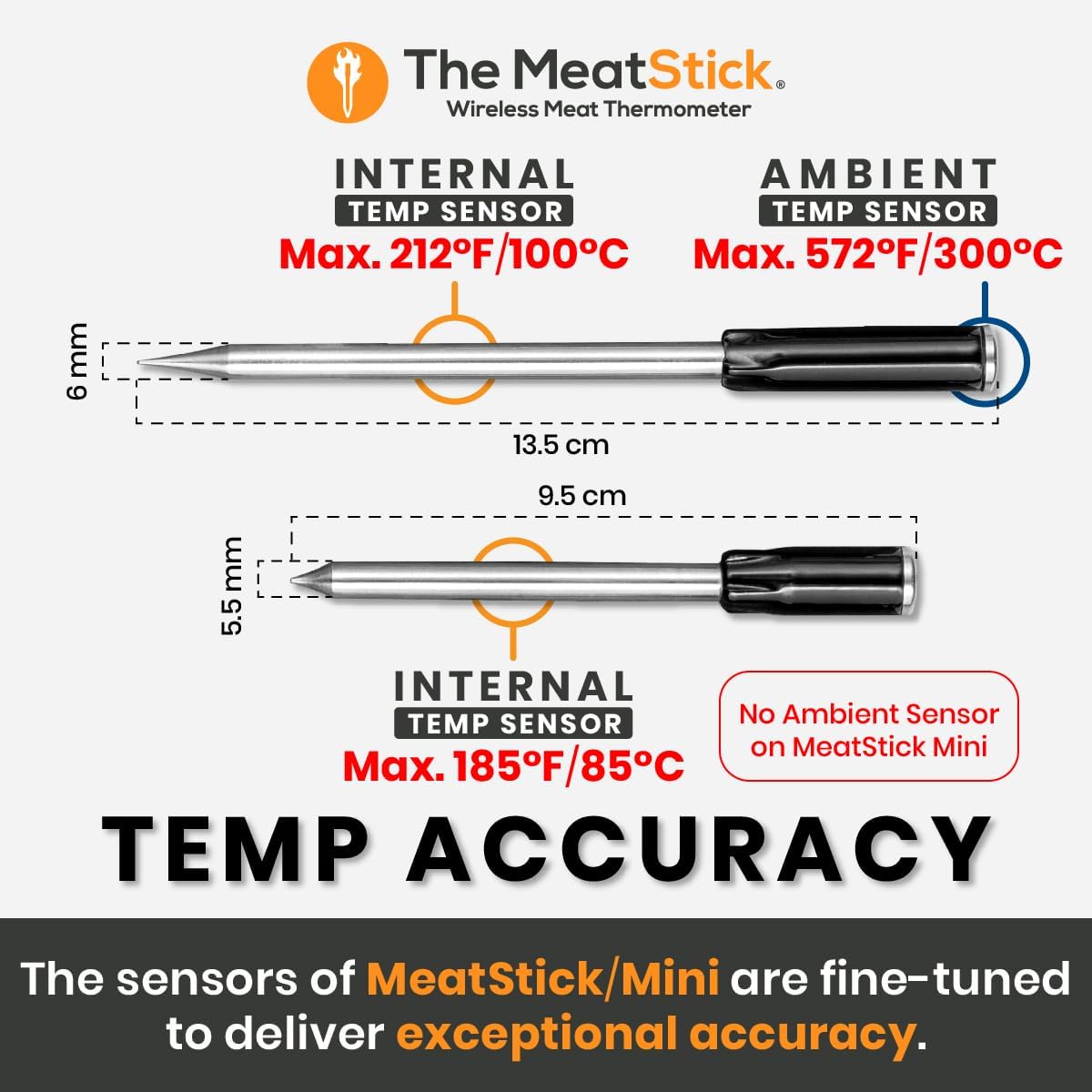
Figure 4.1: The MeatStick App interface for monitoring cooking progress.
5. Иштөө нускамалары
5.1 Inserting the Thermometer
- Carefully insert the MeatStick or MeatStick Mini into the thickest part of the meat, avoiding bones.
- Ensure the entire metal probe is inside the meat, with only the ceramic handle exposed. For The MeatStick, ensure both internal and ambient sensors are correctly positioned.

Figure 5.1: Proper insertion of The MeatStick into meat for wireless monitoring.
5.2 Monitoring with The MeatStick App
- Once inserted, open The MeatStick App. It will automatically connect to the thermometer(s).
- Select your desired meat type and doneness from the guided cook list, or set custom target temperatures.
- The app displays real-time internal and ambient temperatures, estimated cooking time, and sends alerts when your meat is ready.
5.3 Maximizing Wireless Range
- The MiniX Charger acts as a Bluetooth Xtender. For optimal range, place the MiniX Charger within 6 feet of the MeatStick(s) during cooking.
- The extended range allows monitoring from up to 260 feet outdoors (line of sight) and 100 feet indoors.

Figure 5.2: The MiniX Charger's role in extending wireless range.

Figure 5.3: Detailed range capabilities with the MiniX Charger.
5.4 Compatible Cooking Methods
The MeatStick thermometers are designed to withstand various cooking environments:
- Меш: Safe for use in conventional ovens.
- Аба Фритер: Suitable for air frying.
- Тамеки тартуучу: Ideal for low and slow smoking.
- Гриль: Can be used on grills.
- Меш: Applicable for stove-top cooking.
- Deep Fryer: Deep-fryer proof.
- Sous Vide: Fully waterproof for sous vide cooking.

Figure 5.4: Versatility across different cooking methods.
6. Техникалык тейлөө жана кам көрүү
6.1 Тазалоо
- Both The MeatStick and The MeatStick Mini are dishwasher-safe.
- For manual cleaning, wash with warm soapy water and a soft cloth. Ensure all food residue is removed.
- Wipe the chargers clean with a damp cloth. Do not immerse chargers in water.
6.2 Сактоо
- Store the thermometers and chargers in the provided protective carrying case when not in use.
- Күн нурунан жана экстремалдык температурадан алыс салкын, кургак жерде сактаңыз.

Figure 6.1: Durability features including dishwasher safety.
7. Кыйынчылыктарды
If you encounter issues with your MeatStick BBQ & Kitchen Set, please refer to the following common solutions:
| Көйгөй | Мүмкүн себеп | Чечим |
|---|---|---|
| Thermometer not connecting to app / Frequent disconnections |
|
|
| Температураны туура эмес көрсөткүчтөр |
|
|
| Thermometer not charging |
|
|
8. Техникалык шарттар
| Спецификация | Деталь |
|---|---|
| Бренд | The MeatStick |
| Модель аты | MeatStick BBQ & Kitchen Set |
| Элемент моделинин номери | SLC068X |
| Байланыш технологиясы | Bluetooth |
| Зымсыз байланыш (сырткы) | Up to 260 ft (with MiniX Xtender) |
| Зымсыз байланыш диапазону (үй ичинде) | Up to 100 ft (with MiniX Xtender) |
| MeatStick Internal Temp Sensor Max | 212°F (100°C) |
| MeatStick Ambient Temp Sensor Max | 572°F (300°C) |
| MeatStick Mini Internal Temp Sensor Max | 185°F (85°C) |
| Battery Life (MeatStick) | 24 XNUMX+ саат |
| Battery Life (MeatStick Mini) | 8 XNUMX+ саат |
| Идиш жуугучта коопсуз | Yes (Thermometers only) |
| Deep-Fryer Proof | Yes (Thermometers only) |
| Материал | Plastic (Chargers), Stainless Steel/Ceramic (Thermometers) |
| Элемент Салмагы | 2.01 фунт (жалпы пакет) |
9. Кепилдик жана колдоо
9.1 Кепилдик маалыматы
The MeatStick products are manufactured with high-quality materials and undergo rigorous testing. For specific warranty terms and conditions, please refer to the warranty card included in your product packaging or visit The MeatStick official webсайт.
9.2 Кардарларды колдоо
Should you require assistance, have questions, or need to report an issue, please contact The MeatStick customer support team. Contact details can typically be found on the official website or within The MeatStick App's help section.
- Онлайн колдоо: Visit The MeatStick Support Page (мисampле шилтеме, чыныгы шилтеме ар кандай болушу мүмкүн).
- Электрондук почта колдоо: Колдоо кызматынын электрондук почта дарегин алуу үчүн продуктуңуздун документтерин караңыз.


