Introduction
This manual provides comprehensive instructions for the N-Gear Sing Mic S20L Bluetooth Vocal Microphone. It covers product features, setup, operation, maintenance, troubleshooting, and technical specifications. Please read this manual thoroughly before using the device to ensure proper function and longevity.
Коопсуздук маалыматы
- Аппаратты сууга же ашыкча нымдуулукка дуушар кылбаңыз.
- Аппаратты түшүрүүдөн же катуу таасирлерден сактаныңыз.
- Балдар жетпеген жерде сактаңыз.
- Белгиленген кубаттоо кабелин жана кубат адаптерин гана колдонуңуз.
- Аппаратты өз алдынча бөлүүгө же оңдоого аракет кылбаңыз. Квалификациялуу тейлөө кызматкерлерине кайрылыңыз.
- Батареяны жергиликтүү эрежелерге ылайык жок кылыңыз.
Пакеттин мазмуну
The N-Gear Sing Mic S20L package typically includes:
- N-Gear Sing Mic S20L Microphone
- USB заряддоо кабели
- Колдонуучунун Колдонмосу (бул документ)
Продукт бүттүview
Familiarize yourself with the components and controls of your N-Gear Sing Mic S20L.
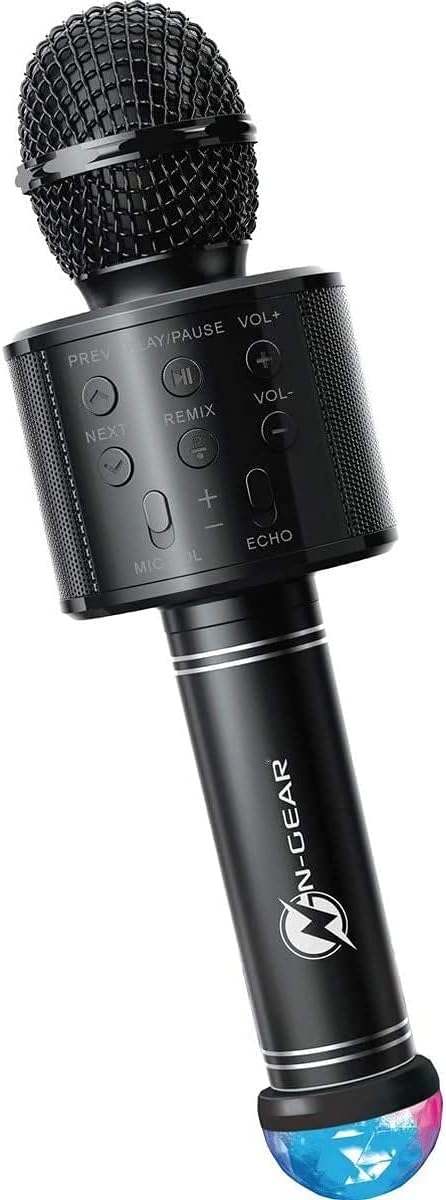
Figure 1: N-Gear Sing Mic S20L Bluetooth Microphone. This image shows the overall design of the microphone, including the mesh head, control panel, handle, and the detachable disco ball at the base.
Controls and Ports Diagram

Figure 2: Detailed diagram of the N-Gear Sing Mic S20L showing the control panel buttons, top-mounted ports (DC 5V, TF, AUX OUT, USB), and the Disco Ball USB port at the bottom.
Башкаруу панелинин функциялары
- АЛДЫНДА: Мурунку трекке кыска басыңыз.
- ОЙНОО/ТЫНДЫРУУ: Short press to play or pause music. Long press for power On/Off.
- КИЙИНКИ: Кийинки тректи көрүү үчүн кыскача басыңыз.
- VOL+: Музыканын үнүн жогорулатуу.
- VOL-: Музыканын үнүн азайтыңыз.
- РЕМИКС: Activates or deactivates the remix sound effect.
- MIC ҮНҮ (+/-): Микрофондун киргизүү үнүн жөндөңүз.
- ECHO (+/-): Adjust the level of the echo effect on your voice.
Жеткиликтүү порттор
- DC 5V: Micro USB port for charging the microphone's internal battery.
- TF: Slot for a Micro SD (TF) card to play MP3 audio fileтүздөн-түз с.
- AUX OUT: 3.5mm audio output jack to connect to external speakers or headphones.
- USB: Standard USB-A port for playing MP3 audio fileUSB флешкасынан.
- DISCO BALL USB: Dedicated USB-A port at the bottom of the handle for connecting the included disco light accessory.
Жайгашуу
Микрофонду заряддоо
- Connect the provided USB charging cable to the DC 5V port on the microphone.
- Connect the other end of the USB cable to a standard 5V USB power adapter (not included) or a computer USB port.
- The charging indicator (if present) will illuminate during charging and turn off when fully charged.
- A full charge typically takes approximately 2-3 hours and provides up to 4 hours of playing time.
Attaching the Disco Ball
The disco ball is a separate attachment that connects via USB.
- Locate the USB connector on the disco ball.
- Insert the disco ball's USB connector into the DISCO BALL USB port at the bottom of the microphone handle.
- The disco light will activate automatically when connected and the microphone is powered on.
Иштөө нускамалары
Күйгүзүү/өчүрүү
- To power on, press and hold the power button (usually integrated with Play/Pause or a separate button, refer to specific product markings if available).
- Өчүрүү үчүн кубат баскычын кайра басып, кармап туруңуз.
Bluetooth туташуу
- Ensure the microphone is powered on. It will automatically enter Bluetooth pairing mode.
- Смартфонуңузда, планшетиңизде же башка Bluetooth иштетилген түзмөгүңүздө Bluetooth'ту иштетип, жеткиликтүү түзмөктөрдү издеңиз.
- Select "N-Gear Sing Mic S20L" from the list of devices.
- Once paired, you will hear a confirmation tone, and the microphone is ready for wireless audio streaming.
Music Playback (Bluetooth/USB/SD Card)
- Bluetooth: Жупташкан түзмөгүңүздөн музыка ойнотуңуз. Колдонуңуз ПРЕВ, ОЙНОО/ТЫНЫТТЫРУ, жана КИЙИНКИ buttons on the microphone to control playback. Adjust music volume with VOL+ жана VOL-.
- USB/SD карта: USB дискти салыңыз USB портуна же Micro SD картага TF slot. The microphone will automatically detect and play MP3 files. Use the playback controls as described for Bluetooth.
Using the Microphone for Vocals
- Once music is playing, speak or sing into the microphone.
- Adjust your vocal volume using the МИКРОФОНДУН ҮНҮ (+/-) баскычтар.
- колдонуп, жаңырык эффектин колдонуңуз ECHO (+/-) buttons to enhance your singing.
- басыңыз РЕМИКС button to activate or deactivate the special remix effect.
Жазуу функциясы
The microphone supports a listen/record function. Specific instructions for activating recording may vary. Typically, this involves a dedicated record button or a long press of the Play/Pause button in certain modes. Refer to the device's on-screen prompts or additional quick start guides if available for precise recording steps.
Using AUX OUT
Connect an audio cable (not included) from the AUX OUT port to an external speaker or audio system to output the microphone's sound.
Техникалык тейлөө
- Тазалоо: Микрофонду жумшак, кургак чүпүрөк менен сүртүңүз. Абразивдүү тазалоочу каражаттарды же эриткичтерди колдонбоңуз.
- Сактагыч: Аппаратты түз күн нурунан жана экстремалдык температурадан алыс салкын, кургак жерде сактаңыз.
- Батареяга кам көрүү: Батареянын оптималдуу иштөө мөөнөтү үчүн, аппаратты тез-тез колдонбосо дагы, дайыма заряддаңыз. Батареяны узак убакытка толук зарядсыздандырбаңыз.
Проблемаларды чечүү
| Көйгөй | Мүмкүн чечим |
|---|---|
| Микрофон күйбөйт. | Батарея заряддалганын текшериңиз. Кубат булагына туташып, кайра аракет кылыңыз. |
| Динамиктен үн чыкпайт. | Check music volume (VOL+) and microphone volume (MIC VOL+). Ensure Bluetooth is connected or media is playing from USB/SD. |
| Bluetooth аркылуу туташуу мүмкүн эмес. | Ensure Bluetooth is enabled on your device and the microphone is in pairing mode. Forget previous pairings on your device and try again. Move closer to the microphone. |
| Disco light is not working. | Ensure the disco ball is securely plugged into the DISCO BALL USB port and the microphone is powered on. |
| Poor sound quality / static. | Ensure there are no obstructions between the microphone and the paired device. Reduce distance. Check for interference from other electronic devices. |
Техникалык шарттар
- Бренд: N-Gear
- Модель аты: Sing Mic S20L
- Модель номери: 9420071
- Байланыш технологиясы: Bluetooth
- Кубат булагы: Батарея менен иштейт
- Аудио сезгичтиги: 115 децибел
- Элементтин өлчөмдөрү (L x W x Y): 9.5 x 9.5 x 28 сантиметр
- Каналдардын саны: 1
- Сунушталган колдонуулар: Караоке
- Туташтыргыч түрү: USB (for charging and media playback)
- Полярдык үлгү: Көп багыттуу
- Түсү: Кара
Кепилдик жана колдоо
Information regarding specific warranty terms and support contact details is not available in the provided product data. Please refer to the product packaging or the manufacturer's official website for the most up-to-date warranty information and customer support options.


