Introduction
Сатып алганыңыз үчүн рахматasing the Bytech True Wireless Bluetooth Boost Link True Speaker. This manual provides essential information for setting up, operating, and maintaining your new speakers. Please read this manual thoroughly before use to ensure proper operation and to maximize your listening experience. These speakers feature True Wireless Stereo (TWS) functionality, Bluetooth connectivity, FM Radio, and Bass Boost for rich audio.
Коопсуздук маалыматы
- Динамиктерге экстремалдык температурага, нымдуулукка же тике күн нуруна жол бербеңиз.
- Динамиктерди түшүрүүдөн же катуу таасирлерге дуушар кылуудан качыңыз.
- Do not disassemble, repair, or modify the speakers yourself. Refer all servicing to qualified personnel.
- Динамиктерди суудан жана башка суюктуктардан алыс кармаңыз.
- Белгиленген кубаттоо кабелин жана кубат адаптерин гана колдонуңуз.
- Динамиктерди жумшак, кургак чүпүрөк менен тазалаңыз. Абразивдүү тазалагычтарды же эриткичтерди колдонбоңуз.
- Listen at moderate volume levels to avoid hearing damage.
Пакеттин мазмуну

Image: The Bytech Boost Link True Wireless Speakers shown in their retail packaging, highlighting the two speakers and the Bluetooth connectivity feature.
Сураныч, бардык буюмдар бар экенин жана жакшы абалда экендигин текшериңиз:
- 2 x Bytech Boost Link True Wireless Speakers
- 1 x заряддоо кабели (USB)
- 1 х Колдонуучунун колдонмосу (бул документ)
Продукт бүттүview

Сүрөт: Жакын пландагы фронт view of the two Bytech Boost Link True Wireless Speakers, showing the speaker grilles and control buttons at the bottom.
Динамиктин компоненттери жана башкаруу элементтери менен таанышып алыңыз:
- Динамик тор: Динамик драйверин коргойт.
- Башкаруу баскычтары:
- Кубат баскычы: Power On/Off, Play/Pause.
- Режим баскычы: Switch between Bluetooth, FM Radio, etc.
- Мурунку трек/үндүн үнүн төмөндөтүү баскычы: Мурунку трек үчүн кыска басыңыз, үнүн азайтуу үчүн көпкө басыңыз.
- Кийинки трек/үндү жогорулатуу баскычы: Кийинки трекке кыска басыңыз, үнүн жогорулатуу үчүн узакка басыңыз.
- Заряддоо порту: USB заряддоо кабелин туташтыруу үчүн.
- LED көрсөткүчү: Shows power status, charging status, and pairing status.
Жайгашуу
Динамиктерди заряддоо
Before first use, fully charge both speakers. Connect the supplied USB charging cable to the charging port on each speaker and plug the other end into a USB power adapter (not included) or a computer's USB port. The LED indicator will show charging status and turn off or change color when fully charged.
Күйгүзүү/өчүрүү
- Күйгүзүү үчүн: Press and hold the Power button on each speaker until the LED indicator lights up and you hear a power-on prompt.
- Өчүрүү үчүн: Press and hold the Power button on each speaker until the LED indicator turns off and you hear a power-off prompt.
Иштөө нускамалары
Bluetooth Pairing (Single Speaker Mode)
- Ensure the speaker is powered on and in Bluetooth pairing mode (LED indicator will flash).
- Түзмөгүңүздө (смартфон, планшет, ноутбук) Bluetooth иштетиңиз жана жеткиликтүү түзмөктөрдү издеңиз.
- Select "BYTECH BOOST LINK" (or similar name) from the list.
- Жупташтырылгандан кийин, LED индикатору күйүп-өчүүнү токтотуп, туруктуу бойдон калат, жана сиз ырастоо үнүн угасыз.
True Wireless Stereo (TWS) Pairing (Two Speakers)
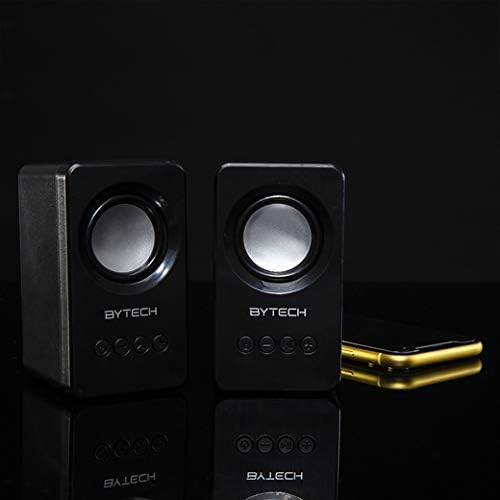
Image: The two Bytech Boost Link True Wireless Speakers positioned next to a smartphone, symbolizing their ability to connect wirelessly to each other and a device for stereo sound.
For a true stereo sound experience, you can pair both speakers together:
- Power on both Bytech Boost Link speakers. Do not connect them to your Bluetooth device yet.
- The speakers will automatically attempt to pair with each other. You will hear a confirmation sound when they are successfully linked for TWS. One speaker will become the master (left channel) and the other the slave (right channel).
- Once TWS paired, the master speaker will enter Bluetooth pairing mode (LED flashing).
- On your device, enable Bluetooth and search for "BYTECH BOOST LINK". Connect to this single entry.
- Both speakers will now play audio in stereo.
- Эскертүү: If the speakers do not automatically pair, try double-pressing the Mode button on one of the speakers to initiate TWS pairing.
FM радиосунун иштеши
- Power on the speaker(s).
- басыңыз Mode button repeatedly until you hear the FM radio prompt.
- Станцияларды автоматтык түрдө скандоо жана сактоо үчүн басып, кармап туруңуз Ойнотуу/Тыныгуу баскычы. Динамик жеткиликтүү FM станцияларын сканерлейт жана сактайт.
- колдонуу Мурунку трек жана Кийинки трек баскычтар сакталган станциялардын ортосунда чабыттоо.
Audio Playback and Volume Control
- Ойнотуу/тындыруу: Кубат баскычын кыска басыңыз.
- Кийинки трек: Short press the Next Track/Volume Up button.
- Мурунку трек: Short press the Previous Track/Volume Down button.
- Көлөмү: Long press the Next Track/Volume Up button.
- Үнүн азайтуу: Long press the Previous Track/Volume Down button.
Техникалык тейлөө
- Тазалоо: Use a soft, dry, lint-free cloth to clean the surface of the speakers. Do not use liquid cleaners, aerosols, or solvents.
- Сактагыч: Узак мөөнөткө колдонулбаганда, динамиктерди күндүн тике тийген нурунан жана өтө температурадан алыс, салкын, кургак жерде сактаңыз.
- Батареяга кам көрүү: To prolong battery life, avoid fully discharging the battery frequently. Charge the speakers regularly, even if not in use.
Проблемаларды чечүү
| Көйгөй | Мүмкүн себеп | Чечим |
|---|---|---|
| Динамик күйбөйт. | Батарея аз. | Динамикти толук заряддаңыз. |
| Bluetooth аркылуу жупташтыруу мүмкүн эмес. | Динамик жупташтыруу режиминде эмес; Түзмөктүн Bluetooth функциясы өчүк; Түзмөктөн өтө алыс. | Ensure speaker LED is flashing; Turn on Bluetooth on your device; Move speaker closer to device (within 10 meters). |
| Үн жок. | Volume too low; Speaker not connected; Incorrect mode. | Increase volume on speaker and device; Re-pair Bluetooth; Ensure correct mode (Bluetooth/FM). |
| TWS жупташтыруу ишке ашпай калды. | Динамиктер түзмөккө мурунтан эле туташып турат; Динамиктер бири-биринен өтө алыс жайгашкан. | Disconnect speakers from any device; Power off and on both speakers, then try TWS pairing again; Ensure speakers are close to each other. |
| FM радиосун кабыл алуу начар. | Алсыз сигнал; Интерференция. | Relocate the speaker to an area with better reception; Extend the charging cable (can act as an antenna). |
Техникалык шарттар
- Модел: BY-AU-BS-152-BK
- Бренд: Bytech
- Байланыш технологиясы: Зымсыз (Bluetooth)
- Аудио чыгаруу режими: Курчап
- Динамик түрү: Surround Sound
- Өзгөчөлүктөр: Wireless Bluetooth, Bass Boost, FM Radio, True Wireless Stereo (TWS)
- Сунушталган колдонуулар: Музыкалык оюнчулар үчүн
- Шайкеш түзмөктөр: Ноутбук, планшет, смартфон
- Контроллердин түрү: Түзмөктөгү баскычтар
- Пакеттин өлчөмдөрү: 20.7 x 16 x 9 см
- Салмагы: 560 г
Кепилдик жана колдоо
Bytech products are designed and manufactured to the highest quality standards. For information regarding warranty coverage, technical support, or service inquiries, please refer to the warranty card included with your purchase or visit the official Bytech webсайт. Кепилдик дооматтары үчүн сатып алганыңыздын далилин сактап коюңуз.
For further assistance, please contact Bytech customer support.


