1. Киришүү
This manual provides detailed instructions for the setup, operation, and maintenance of your AULA H512 Wired Gaming Mouse. Please read this manual thoroughly before using the product to ensure optimal performance and longevity.

Figure 1: AULA H512 Wired Gaming Mouse
2. Пакеттин мазмуну
- AULA H512 Wired Gaming Mouse
- Колдонуучунун Колдонмосу (бул документ)
- 3 x 4g adjustable weights (pre-installed or included separately)

Figure 2: AULA H512 Wired Gaming Mouse and its packaging.
3. Орнотуу нускамалары
- Чычканды туташтыруу: Plug the USB connector of the AULA H512 mouse into an available USB port on your computer.
- Драйверди орнотуу: The mouse is typically plug-and-play. Your operating system (Windows 7/8/10/Vista/XP or Mac) should automatically detect and install the necessary drivers.
- Программалык камсыздоону орнотуу (кошумча): For advanced customization, including macro programming and detailed DPI settings, download and install the official AULA H512 software from the manufacturer's website. Refer to the customization section for more details.
4. Иштөө нускамалары
4.1 Баскыч функциялары
The AULA H512 mouse features 12 programmable buttons for enhanced control. Refer to the diagram below for button identification.

Figure 3: AULA H512 Button Layout and Functions.
- 1 - Left Button: Стандарттык сол чыкылдатуу функциясы.
- 2 - Right Button: Стандарттык оң баскычты чыкылдатуу функциясы.
- 3 - Scroll Wheel: Scrolls content up/down. Can also be pressed for middle-click.
- 4 - DPI+: DPI сезгичтигин жогорулатат.
- 5 - DPI-: DPI сезгичтигин төмөндөтөт.
- 6 - Double Click Button: Performs a double-click action.
- 7 - Forward Button: Алга карай жылдырат web браузерлер же file изилдөөчүлөр.
- 8 - Backward Button: Артка карай багыт алат web браузерлер же file изилдөөчүлөр.
- 9-12 - Numeric/Macro Keys: These side buttons are programmable and can be assigned various functions, including specific gun keys (e.g., M416, AK47, M16) or other macros via software.
4.2 DPI сезгичтигин тууралоо
The mouse features 6 adjustable DPI levels: 400, 800, 1600, 2400, 3200, and 5000 DPI. Use the DPI+ (4) and DPI- (5) buttons to cycle through these settings. Each DPI level may correspond to a different LED lighting color for quick identification.
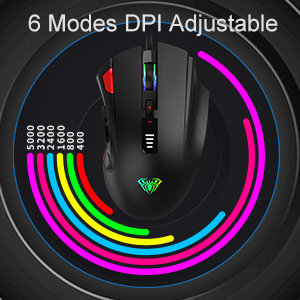
Figure 4: DPI Adjustment Modes.
4.3 RGB жарык эффекттери
The AULA H512 mouse includes 6 RGB lighting effects. These effects can be changed or turned off/on using the dedicated software or specific button combinations as detailed in the software interface. The lighting often changes with DPI settings.

Figure 5: RGB Breathing Lighting Effect.
5. Customization via Software
The AULA H512 mouse supports advanced customization through its dedicated software. This software allows you to:
- Program all 12 buttons with custom functions or macros.
- DPI жөндөөлөрүн так башкаруу менен тууралаңыз.
- RGB жарык эффекттерин жана түстөрүн өзгөчөлөштүрүү.
- Бир нече профессионал түзүңүз жана сактаңызfileар кандай оюндар же тиркемелер үчүн.
Please visit the official AULA website to download the latest version of the H512 customization software.
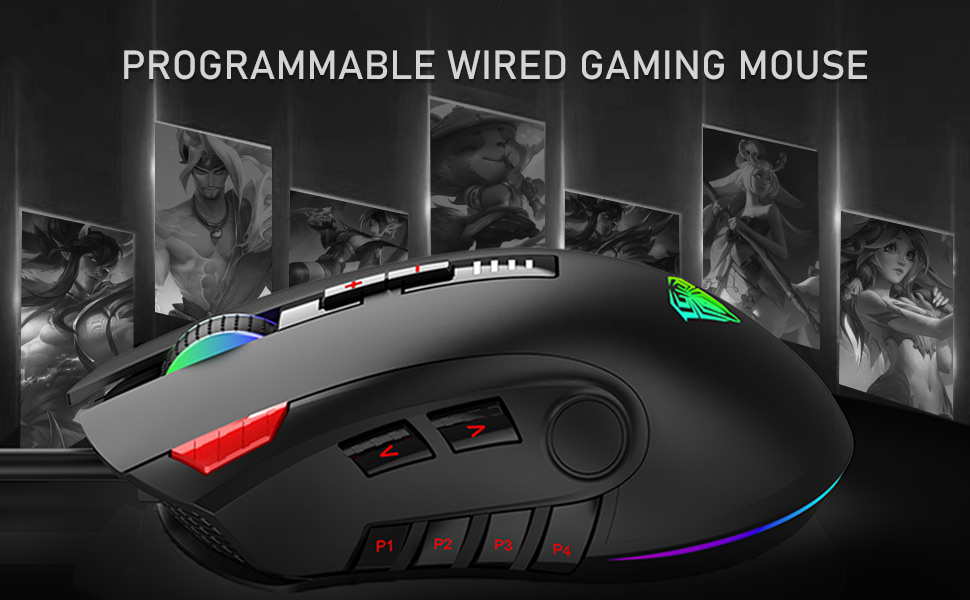
Figure 6: Software Interface for Customization.
6. Техникалык тейлөө
- Тазалоо: Чычкандын бетин тазалоо үчүн жумшак, кургак чүпүрөктү колдонуңуз. өжөр кир үчүн, бир аз гamp cloth can be used, ensuring no liquid enters the mouse. Avoid harsh chemicals or abrasive cleaners.
- Сенсорго кам көрүү: Так көз салууну камсыз кылуу үчүн чычкандын астыңкы жагындагы оптикалык сенсорду чаңдан же таштандыдан таза кармаңыз.
- Кабелдик башкаруу: Зыяндын алдын алуу үчүн USB кабелин курч ийилүүдөн же ашыкча тартуудан алыс болуңуз.
7. Кыйынчылыктарды
| Көйгөй | Мүмкүн чечим |
|---|---|
| Чычкан жооп бербей жатат |
|
| Так эмес көз салуу же курсордун артта калуусу |
|
| Баскычтар күтүлгөндөй иштебей жатат |
|
| RGB жарыктандыруу иштебейт |
|
8. Техникалык шарттар
| Өзгөчөлүк | Деталь |
|---|---|
| Модел | H512 |
| Байланыш | Зымдуу USB |
| баскычтардын саны | 12 (Программалануучу) |
| DPI деңгээли | 400 / 800 / 1600 / 2400 / 3200 / 5000 DPI |
| Сенсор түрү | Оптикалык |
| Жарыктандыруу | RGB Backlit (6 effects) |
| Кабелдин узундугу | 1.6 метр (болжол менен 5.25 фут) |
| Өлчөмдөрү (LxWxH) | 12.4 x 7.9 x 4.4 см (4.88 x 3.11 x 1.73 дюйм) |
| Салмагы | 147 g (Adjustable with 3x4g weights) |
| Колдоого алынган операциялык системалар | Windows 7/8/10/Vista/XP, Mac |

7-сүрөт: Продукциянын өлчөмдөрү жана параметрлери.
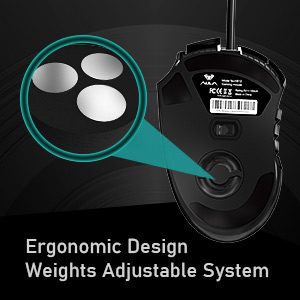
Figure 8: Adjustable Weight System.
9. Кепилдик жана колдоо
The AULA H512 Wired Gaming Mouse comes with a standard warranty. For specific warranty terms and conditions, please refer to the warranty information provided at the time of purchase or contact AULA customer support.
Өндүрүүчүнүн байланышы:
- Компания: Dongguan Suoai Electronics Co., Ltd.
- Электрондук почта: info@aulapro.in
- Импорттоочу (Индия): Odio Zone Private Limited, S-4/63, 2nd Floor, Agasthya Complex, Shettihalli Main Road, Jalahalli West, Bengaluru 560015, Karnataka, India. Email: support@odiozone.com
For further assistance or technical support, please contact the manufacturer or your local distributor.


