1. Киришүү
Welcome to the Lumos Ultra Smart Bike Helmet instruction manual. The Lumos Ultra is designed to enhance your cycling safety and visibility with integrated smart lighting features. This helmet combines advanced protection with innovative technology to provide a superior riding experience for adults, including men and women, whether for road cycling or daily commutes.
Lumos was founded with the mission to improve cyclist safety, ensuring riders are seen by motorists from all angles, especially at night. This manual will guide you through the features, setup, operation, and maintenance of your new Lumos Ultra helmet.
2. Коопсуздук маалыматы
Your safety is paramount. The Lumos Ultra Smart Bike Helmet is equipped with advanced safety features and complies with rigorous standards.
- MIPS Head Protection: MIPS (Multi-Directional Impact Protection System) is an additional layer of protection designed to reduce rotational forces that can result from certain impacts. This system allows the helmet to absorb rotational impact force, providing enhanced safety for your head.
- Шайкештик: This helmet complies with the U.S. CPSC Safety Standard for Bicycle Helmets for Persons Age 5 and Older.
- Always ensure the helmet is properly fitted and securely fastened before every ride.
- Туулгаңыздын бузулуу белгилерин дайыма текшерип туруңуз. Эгерде туулга тийип калса, ал тургай, көзгө көрүнгөн зыяны жок болсо да, аны алмаштыруу керек.
3. Продукт бүтүп калдыview
The Lumos Ultra helmet integrates cutting-edge technology into a sleek design. Key components include:
- Шлем кабыгы: Constructed from durable Polycarbonate (PC) outer material with Expanded Polystyrene (EPS) inner material for impact absorption.
- Интегралдык LED жарыктары: Bright front and rear LED lights for 360-degree visibility.
- Зымсыз пульт: A handlebar-mounted remote for controlling turn signals.
- Жөнгө салуу системасы: Ensures a snug and comfortable fit for various head sizes.
- USB Type-C заряддоо порту: Ыңгайлуу кайра заряддоо үчүн.

Figure 3.1: Lumos Ultra Smart Bike Helmet with included remote and smartphone app interface.
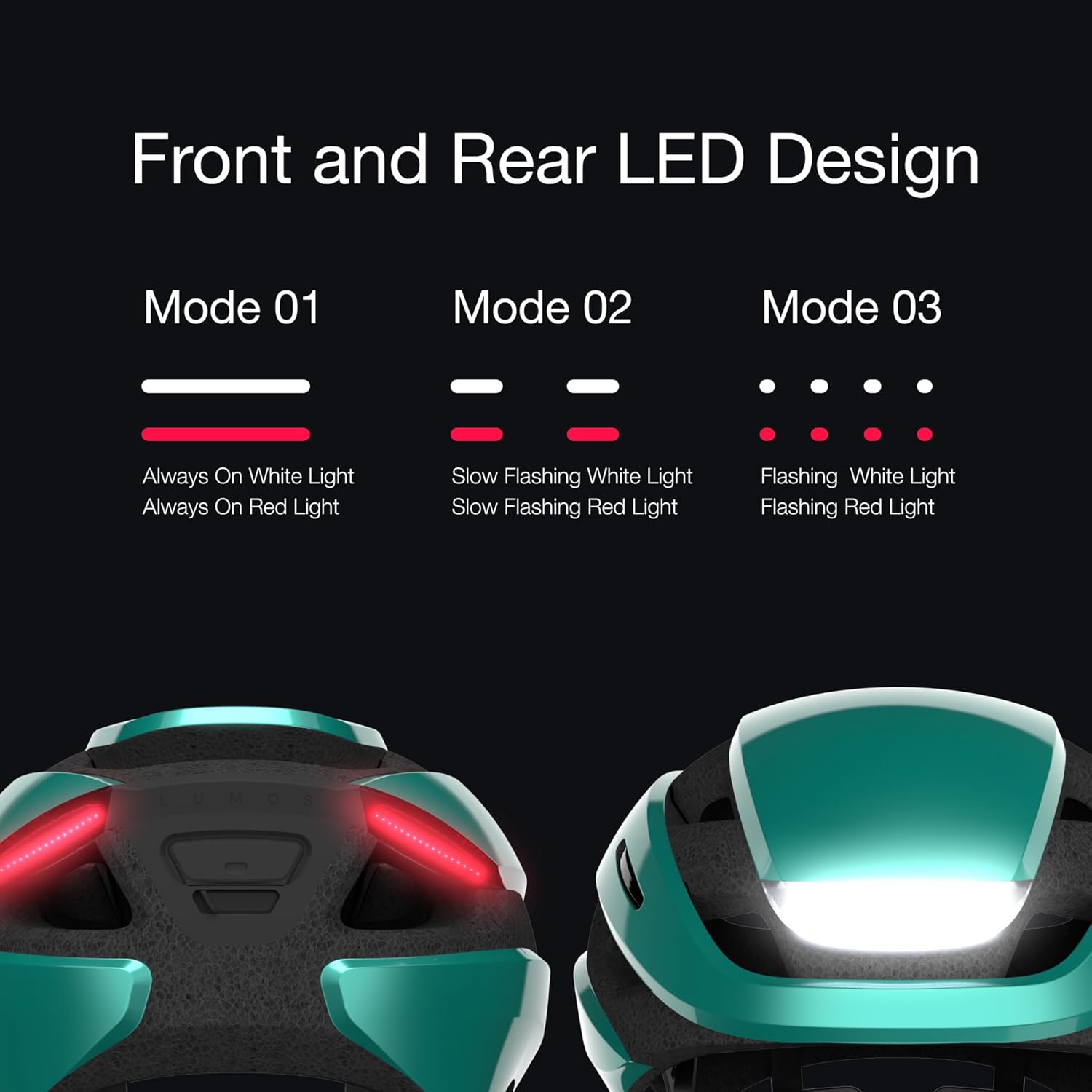
Figure 3.2: Front and Rear LED Light Design Modes.
4. Орнотуу
4.1 Алгачкы заряддоо
Before first use, fully charge your Lumos Ultra helmet. The helmet uses a Universal USB Type-C charging cable.
- Connect the provided USB Type-C cable to the charging port on the helmet.
- Connect the other end to a USB power source (e.g., computer, wall adapter).
- A full charge takes approximately 2 hours. The battery can last up to 10 hours depending on usage.
4.2 Fitting Your Helmet
Proper fit is crucial for safety and comfort. The Lumos Ultra features an adjustable dial fit system.
- Туулганы башыңызга кийиңиз, ал тегиз жайгашып, чекеңизди жаап турганын текшериңиз.
- Adjust the rear dial until the helmet feels snug but comfortable, without excessive pressure points.
- Fasten the chin strap, ensuring it is tight enough so the helmet does not move freely, but not so tight as to cause discomfort.

Figure 4.1: Lumos Ultra Helmet Size Guide.
4.3 Smartphone App Connection
Download the Lumos App from your device's app store to customize settings and track rides.
- Издөө "Lumos App" on the Apple App Store or Google Play Store.
- Install the app and follow the on-screen instructions to pair your helmet via Bluetooth.
- Through the app, you can customize LED patterns, adjust brightness, and synchronize lights with other helmets using the Team Sync feature.

Figure 4.2: Lumos App Interface for Customization and Battery Check.
5. Иштөө нускамалары
5.1 LED жарыктын иштеши
The helmet features bright front and rear LED lights for enhanced visibility.
- Press the power button on the helmet to turn the lights on/off and cycle through different light modes (e.g., Always On, Slow Flashing, Flashing).
- Adjust light patterns and brightness via the Lumos smartphone app.
5.2 Бурулуш сигналдары
The integrated turn signals are controlled by the wireless handlebar-mounted remote.
- Mount the wireless remote securely on your handlebar.
- Press the left button on the remote to activate the left turn signal.
- Press the right button on the remote to activate the right turn signal.
- The turn signals will automatically deactivate after a short period or can be manually turned off by pressing the corresponding button again.

Figure 5.1: Wirelessly Activated Turn Signals.
5.3 Аба ырайынын таасирине туруктуу дизайн
The Lumos Ultra helmet is designed to withstand various weather conditions.
- The helmet is fully sealed and weatherproof, with a PX6 rating, allowing you to ride confidently in rain or shine.

Figure 5.2: Key Features of the Lumos Ultra Helmet.
Видео 5.1: Расмий продукт көргөзмөсүasing the Lumos Ultra Smart Bike Helmet's features and use.
6. Техникалык тейлөө
To ensure the longevity and optimal performance of your Lumos Ultra helmet, follow these maintenance guidelines:
- Тазалоо: жумшак колдонуу, damp cloth and mild soap to clean the helmet shell and straps. Avoid harsh chemicals or abrasive materials.
- Сактагыч: Туулганы күн нурунан жана экстремалдык температурадан алыс салкын, кургак жерде сактаңыз.
- Батареяга кам көрүү: For optimal battery life, avoid fully discharging the helmet frequently. Charge it regularly, especially if storing for extended periods.
- Текшерүү: Periodically check all components, including straps, buckles, and the fit system, for wear or damage.
7. Кыйынчылыктарды
If you encounter issues with your Lumos Ultra helmet, try the following solutions:
| Көйгөй | Мүмкүн себеп | Чечим |
|---|---|---|
| Жарыктар күйбөй/өчпөйт | Low battery; Malfunction | Charge the helmet fully; Try resetting by holding the power button for 10 seconds. |
| Turn signals not working | Remote not paired; Remote battery low | Ensure remote is paired via the app; Replace remote battery (CR2032). |
| Helmet not connecting to app | Bluetooth off; App issue; Helmet off | Ensure Bluetooth is enabled on your device; Restart the app and helmet; Try re-pairing. |
| Батареянын иштөө мөөнөтү кыска | Frequent use of high brightness; Old battery | Reduce brightness settings; Contact support for battery replacement options. |
8. Техникалык шарттар
Detailed technical specifications for the Lumos Ultra Smart Bike Helmet:
| Өзгөчөлүк | Деталь |
|---|---|
| Бренд | Lumos |
| Модель аты | Ultra |
| Модель номери | 220012021 |
| Түс | Aquamarine with MIPS |
| Жаш аралыгы | бойго жеткен |
| Өлчөмү | XL (24"-25-1/2" / 61 to 65cm) |
| Сырткы материал | Поликарбонат (PC) |
| Ички материал | Кеңейтилген полистирол |
| Элемент Салмагы | 380 грамм |
| Өзгөчө өзгөчөлүк | Зарядкалуу |
| Батареянын иштөө мөөнөтү | 10 саатка чейин |
| Заряддоо убактысы | Болжол менен 2 саат |
| Суу каршылык | PX6 Rating (Weatherproof) |
| UPC | 810059473164 |
| Дата биринчи жеткиликтүү | 14-март, 2023-жыл |

Figure 8.1: Lumos Ultra Helmet Detailed Specifications.
9. Кепилдик жана колдоо
9.1 Lumos Accident Replacement Policy
Lumos offers an Accident Replacement Policy for helmets purchased directly from Lumos. If your helmet is involved in a road accident that causes any impact, Lumos offers a 30% discount to repurchase a new helmet.
To get your helmet replaced in 3 steps:
- Contact Lumos customer support team.
- Share what happened (requires five proofs of damaged helmet).
- Use the code to repurchase the helmet.

Figure 9.1: Lumos Accident Replacement Policy.
9.2 Кардарларды колдоо
For further assistance, technical support, or warranty inquiries, please contact Lumos customer support:
- Электрондук почта: support@lumoshelmet.co
- Lumos App: Download the Ride Lumos APP via iOS/Android Store for free for updates and support.


