1. Киришүү
Thank you for choosing the MARVO G941 Gaming Mouse. This manual provides detailed instructions for setting up, operating, and maintaining your new gaming mouse. Please read this manual carefully before use to ensure optimal performance and longevity of your device.
2. Продукциянын өзгөчөлүктөрү
- High-precision 12,000 DPI optical sensor for accurate tracking.
- Ambidextrous ergonomic design suitable for both left and right-handed users.
- 9 programmable buttons for customized control and enhanced gaming experience.
- 16.8 million color palette with 10 distinct lighting modes for personalized aesthetics.
- Up to 1000Hz polling rate ensures smooth and responsive movement.

2.1-сүрөт: Алдыңкы үстүнкү бөлүгү view of the MARVO G941 Gaming Mouse, showcasing the scroll wheel, DPI button, lighting button, and the MARVO logo with RGB illumination.
3. Пакеттин мазмуну
Сураныч, пакетте төмөнкү нерселерди текшериңиз:
- MARVO G941 Gaming Mouse
- Колдонуучунун Колдонмосу (бул документ)
4. Орнотуу колдонмосу
- Чычканды туташтыруу: Plug the USB connector of the MARVO G941 Gaming Mouse into an available USB port on your computer.
- Драйверди орнотуу: The mouse is typically plug-and-play. Your operating system (Windows XP, Linux, etc.) should automatically detect and install the necessary drivers.
- Программалык камсыздоону орнотуу (кошумча): To utilize the 9 programmable buttons and customize RGB lighting, download and install the dedicated MARVO G941 software from the official MARVO webсайт. Орнотуу үчүн экрандагы нускамаларды аткарыңыз.
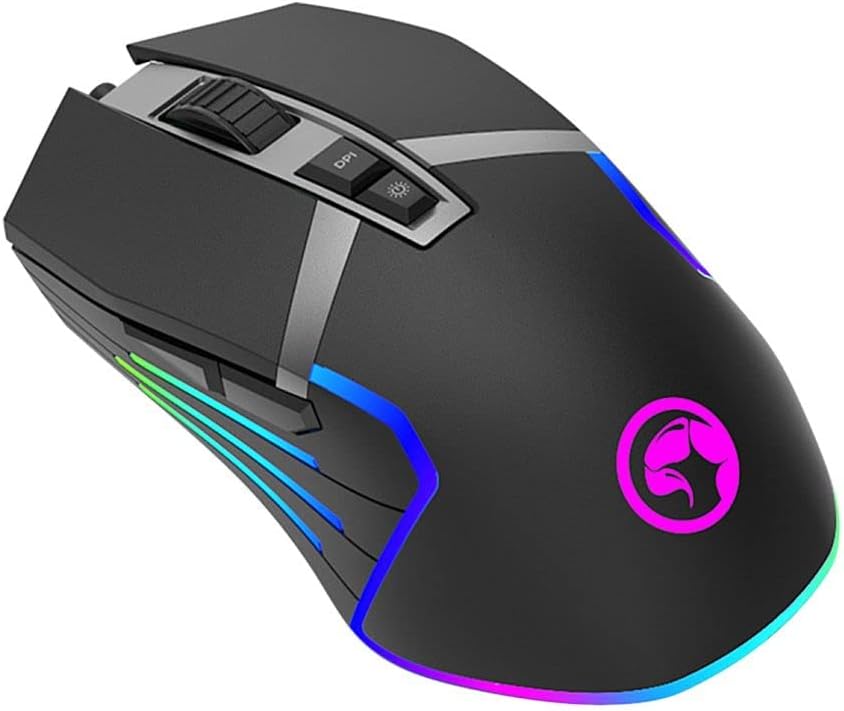
4.1-сүрөт: Бурчтуу view of the MARVO G941 Gaming Mouse, showing side buttons and RGB lighting.
5. Иштөө нускамалары
5.1 Баскыч функциялары
The MARVO G941 features 9 buttons, including the standard left/right click, scroll wheel, DPI adjustment, lighting mode, and additional programmable side buttons.
- Сол/оң чыкылдатуу: Стандарттык чычкан функциялары.
- Жылдыруу дөңгөлөгү: Өйдө/төмөн сыдырыңыз жана орто чыкылдатуу функциясы үчүн чыкылдатыңыз.
- DPI баскычы: Cycles through preset DPI levels (e.g., 800, 1600, 2400, 3200, 4800, 12000 DPI). Each level may correspond to a different LED color for quick identification.
- Жарыктандыруу баскычы: Cycles through 10 different RGB lighting modes. Press and hold to turn off/on the lighting.
- Программалануучу каптал баскычтары: These buttons can be assigned custom functions, macros, or key binds using the MARVO G941 software.

5.1-сүрөт: Каптал view of the MARVO G941 Gaming Mouse, highlighting programmable side buttons.
5.2 Ыңгайлаштыруу программасы
For advanced customization of DPI settings, button assignments, macro creation, and RGB lighting effects, please use the dedicated MARVO G941 software. The software allows you to:
- Adjust DPI levels and sensitivity.
- Remap all 9 buttons to various functions.
- Татаал макросторду түзүңүз жана дайындаңыз.
- Select from 16.8 million colors and 10 lighting modes.
- Бир нече профессионалды сактаңызfileар кандай оюндар же тиркемелер үчүн.
6. Техникалык тейлөө
To ensure the longevity and optimal performance of your MARVO G941 Gaming Mouse, follow these maintenance guidelines:
- Тазалоо: Чычкандын бетин сүртүү үчүн жумшак, кургак чүпүрөктү колдонуңуз. өжөр кир үчүн, бир аз гampчүпүрөктү суу же жумшак тазалоо эритмеси менен жууп салыңыз. Катуу химиялык заттардан алыс болуңуз.
- Сенсорго кам көрүү: Keep the optical sensor on the underside of the mouse clean and free from dust or debris. Use a cotton swab if necessary.
- Сактагыч: Колдонбогондо чычканды күн нурунан жана экстремалдык температурадан алыс салкын, кургак жерде сактаңыз.
- Кабелдик башкаруу: Зыяндын алдын алуу үчүн USB кабелин курч ийилүүдөн же ашыкча тартуудан алыс болуңуз.
7. Кыйынчылыктарды
If you encounter issues with your MARVO G941 Gaming Mouse, refer to the following common problems and solutions:
- Чычкан жооп бербейт:
- USB кабели компьютериңиздеги иштеген USB портуна бекем сайылганын текшериңиз.
- Чычканды башка USB портуна сайып көрүңүз.
- Компьютериңизди өчүрүп күйгүзүңүз.
- Курсордун туруксуз кыймылы:
- Чычкандын астындагы оптикалык сенсорду тазалаңыз.
- Ensure you are using the mouse on a clean, non-reflective, and uniform surface (e.g., a mouse pad).
- Adjust DPI settings using the DPI button or software.
- RGB жарыктандыруу иштебейт:
- Press the lighting button to cycle through modes or turn the lighting on.
- Check the lighting settings in the MARVO G941 software.
- Программалануучу баскычтар иштебей жатат:
- Ensure the MARVO G941 software is installed and running.
- Программанын ичиндеги баскычтарды дайындоону текшериңиз.
- Check if any game or application is overriding mouse button functions.
8. Техникалык шарттар
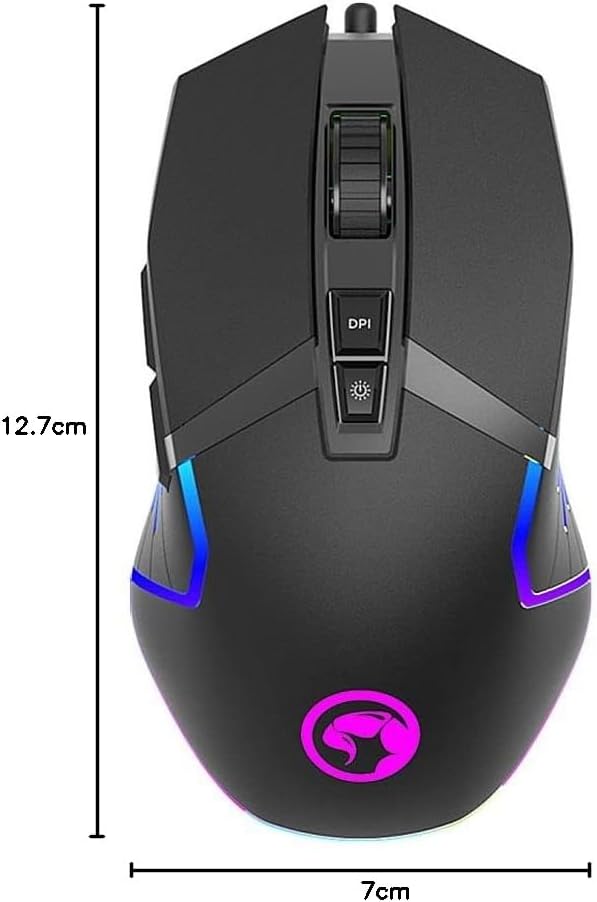
Figure 8.1: Dimensions of the MARVO G941 Gaming Mouse.
| Өзгөчөлүк | Description |
|---|---|
| Модел | G941 |
| Бренд | MARVO |
| Сенсор түрү | Оптикалык |
| DPI (Дюйм үчүн чекиттер) | 12,000 XNUMX DPI чейин |
| баскычтардын саны | 9 (Программалануучу) |
| Добуш берүү көрсөткүчү | 1000 Гц чейин |
| Жарыктандыруу | RGB (16.8 миллион түс, 10 режим) |
| Колдун багыты | Эки тараптуу |
| Байланыш | Corded USB |
| Шайкеш OS | Windows XP, Linux, Personal Computer, Laptop |
| Продукциянын өлчөмдөрү | 12.7 x 7 x 4 см |
| Салмагы | 300 г |
9. Кепилдик жана колдоо
MARVO products are designed for reliability and performance. This product comes with a standard manufacturer's warranty. For specific warranty terms and conditions, please refer to the warranty card included with your purchase or visit the official MARVO webсайт.
For technical support, troubleshooting assistance, or further inquiries, please contact MARVO customer service through their official webсайт же продукт документациясында берилген байланыш маалыматы.


