1. Киришүү
This manual provides instructions for the Sharp Digital Alarm Clock, Model SPC547AJAMZ. This device features an easy-to-read LED display, a high-speed USB charging port, and essential alarm functions. Please read this manual thoroughly before use to ensure proper operation and to maximize the product's lifespan.

Figure 1: Sharp Digital Alarm Clock (Model SPC547AJAMZ) front view.
2. Продукциянын өзгөчөлүктөрү
The Sharp Digital Alarm Clock offers the following key features:
- Окууга оңой дисплей: Large, clear green LED digits for visibility from a distance.
- High-Speed USB Charging Port: A 2 AMP USB port for rapid charging of compatible devices such as smartphones and tablets.
- Жөнгө салынуучу ойготкучтун үнү: Select between high and low alarm volume settings.
- Жөнөкөй операция: Intuitive button controls for setting time and alarm.
- Батареянын камдык көчүрмөсү: Электр энергиясы өчүрүлгөн учурда убакытты жана ойготкуч жөндөөлөрүн сактайтtages (requires 2 AAA batteries, not included). The display will be blank during battery backup mode, but the internal clock will continue to run, and the alarm will sound at the set time.

Figure 2: Alarm clock with a smartphone connected to the USB charging port.
3. Пакеттин мазмуну
Пакетте бардык буюмдар бар экенин текшериңиз:
- Sharp Digital Alarm Clock (Model SPC547AJAMZ)
- AC кубат адаптери
- Колдонуучунун Колдонмосу (бул документ)
Note: 2 AAA batteries for backup are not included and must be purchased separately.
4. Коопсуздук маалыматы
Сураныч, төмөнкү коопсуздук чараларын сактаңыз:
- Агрегатты сууга же ашыкча нымдуулукка дуушар кылбаңыз.
- Аппаратты жылуулук булактарынын жанына же тике күн нуруна коюудан алыс болуңуз.
- Берилген AC кубат адаптерин гана колдонуңуз.
- Агрегатты ажыратууга же өзгөртүүгө аракет кылбаңыз.
- Балдар жетпеген жерде сактаңыз.
- Агрегаттын айланасын туура желдетүүнү камсыз кылыңыз.
5. Орнотуу
5.1 Кубат туташтыруу
- Plug the AC power adapter into the DC IN jack located on the back of the alarm clock.
- Plug the other end of the AC power adapter into a standard wall outlet (120V AC, 60Hz).
- The display will illuminate, and the clock will be ready for time setting.
5.2 Батареянын резервдик көчүрмөсүн орнотуу
To ensure time and alarm settings are retained during a power outage:
- Аппараттын астындагы батарея отсегин табыңыз.
- Батарея уясынын капкагын ачыңыз.
- Insert two (2) new AAA batteries, observing the correct polarity (+ and -) as indicated inside the compartment.
- Батарея уясынын капкагын бекем жабыңыз.
Note: Batteries are for backup only. The clock display will not be lit during a power outage when operating on battery backup, but the internal clock will continue to run, and the alarm will sound at the set time.
6. Иштөө нускамалары
Familiarize yourself with the control buttons located on the top of the unit:
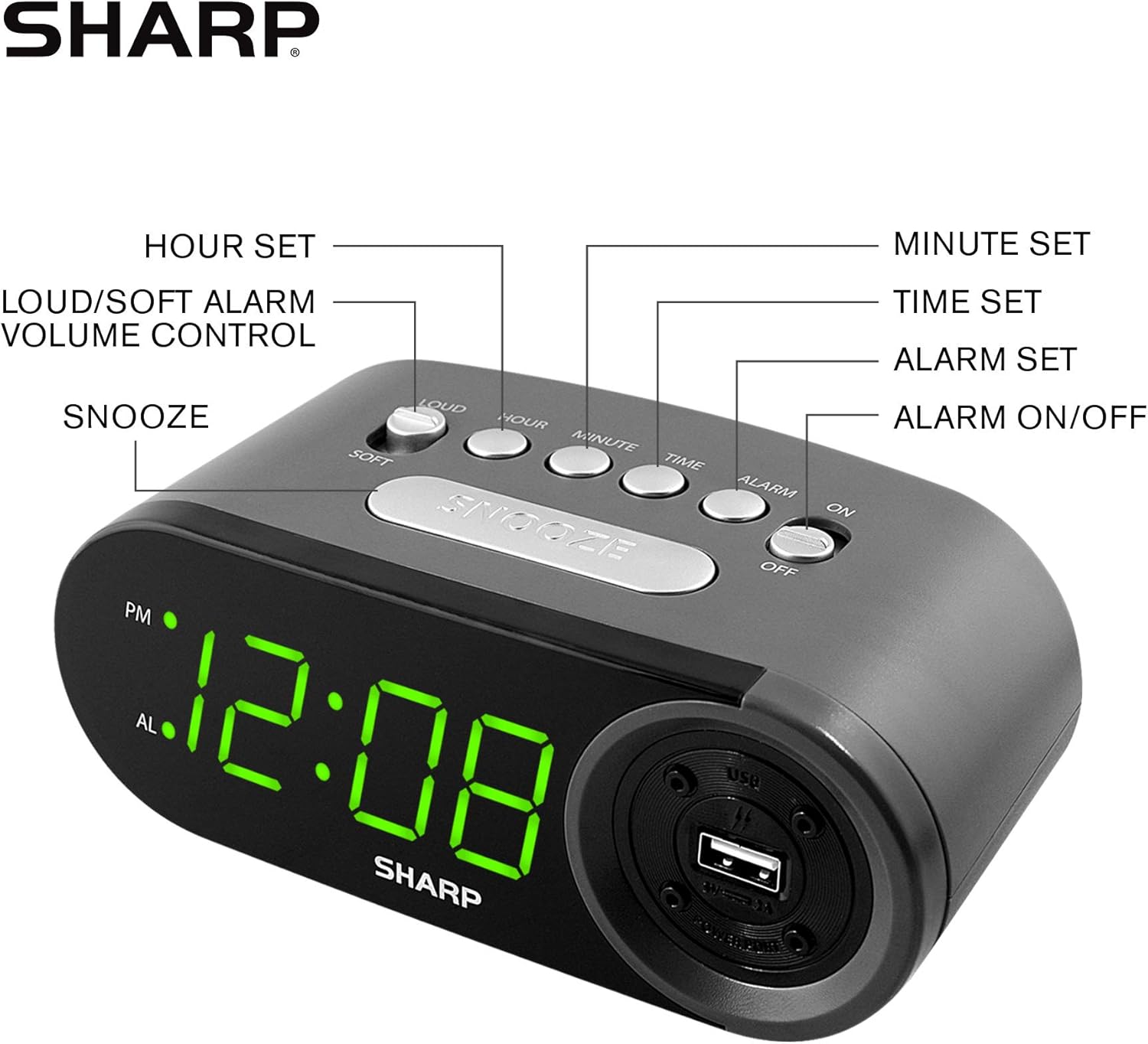
Figure 3: Top panel controls and their functions.
6.1 Учурдагы убакытты орнотуу
- басып, кармап туруңуз TIME button until the display begins to flash.
- басыңыз HOUR button repeatedly to set the hour. Observe the PM indicator for afternoon hours.
- басыңыз MINUTE button repeatedly to set the minutes.
- Каалаган убакыт коюлгандан кийин, басыңыз TIME ырастоо жана убакыт орнотуу режиминен чыгуу үчүн кайра баскычын басыңыз.
6.2 Ойготкуч убактысын коюу
- басып, кармап туруңуз АЛАРМ button until the alarm time display begins to flash. The "AL" indicator will also flash.
- басыңыз HOUR button repeatedly to set the alarm hour. Observe the PM indicator.
- басыңыз MINUTE button repeatedly to set the alarm minutes.
- Каалаган ойготкуч убактысы коюлгандан кийин, баскычын басыңыз АЛАРМ ойготкучту орнотуу режимин ырастоо жана чыгуу үчүн баскычты кайра басыңыз.
6.3 Ойготкучту иштетүү/өчүрүү
- Ойготкучту буруш үчүн ON, жылдырыңыз КҮЙГҮЗҮҮ / КҮЧҮРҮҮ switch to the "ON" position. The "AL" indicator will appear on the display.
- Ойготкучту буруш үчүн ӨЧҮРҮҮ, жылдырыңыз КҮЙГҮЗҮҮ / КҮЧҮРҮҮ switch to the "OFF" position. The "AL" indicator will disappear.
6.4 Тындыруу функциясы
Сигнал чыкканда чоң баскычты басыңыз СОЮЗ button. The alarm will temporarily stop and sound again after approximately 9 minutes.
6.5 Ойготкучту токтотуу
To stop the alarm completely after it sounds (without using snooze), slide the КҮЙГҮЗҮҮ / КҮЧҮРҮҮ switch to the "OFF" position. The alarm will reset for the next day if the switch is moved back to "ON".
6.6 Ойготкучтун үнүн тууралоо
басыңыз LOUD/SOFT button to toggle between high and low alarm volume settings.
6.7 USB заряддоо портун колдонуу
2 AMP USB charging port is located on the right side of the unit.
- Connect your device's USB charging cable (not included) to the USB port on the alarm clock.
- Connect the other end of the cable to your smartphone, tablet, or other compatible USB-powered device.
- Ensure the alarm clock is connected to AC power for the USB port to function.
Note: Charging speed may vary depending on your device and cable.
7. Техникалык тейлөө
To keep your alarm clock in optimal condition:
- Тазалоо: Агрегатты жумшак, кургак чүпүрөк менен сүртүңүз. Абразивдүү тазалагычтарды же эриткичтерди колдонбоңуз.
- Батареяны алмаштыруу: Replace AAA backup batteries annually or when the battery low indicator (if present) appears, to ensure reliable backup functionality.
- Сактагыч: Эгерде түзмөктү узак убакытка сактап койсоңуз, агып кетүүнүн алдын алуу үчүн камдык батареяларды алып салыңыз.
8. Кыйынчылыктарды
| Көйгөй | Мүмкүн себеп | Чечим |
|---|---|---|
| Сааттын дисплейи бош. | No AC power; power outage; unit unplugged. | Ensure AC adapter is securely plugged into the unit and a working wall outlet. Check for power outages. |
| Ойготкуч угулбайт. | Alarm is not activated; alarm time is incorrect; volume is too low. | Slide ALARM ON/OFF switch to "ON". Verify alarm time is set correctly. Adjust alarm volume using the LOUD/SOFT button. |
| USB заряддоо порту иштебей жатат. | Clock not connected to AC power; device not compatible; faulty cable. | Ensure the clock is plugged into AC power. Try a different USB cable or device to confirm compatibility. |
| Time/Alarm settings lost after power outage. | Камдык батареялар өлүп калган же орнотулган эмес. | Install two fresh AAA batteries in the battery compartment, ensuring correct polarity. |
9. Техникалык шарттар
- Бренд: Sharp
- Модел: SPC547AJAMZ
- Дисплей түрү: Digital LED (Green)
- Кубат булагы: Corded Electric (AC 120V, 60Hz)
- Батареянын камдык көчүрмөсү: 2 x AAA батарейкалар (киргизилген эмес)
- USB кубаттоо порту: 2 AMP (5V)
- Продукциянын өлчөмдөрү: Approximately 6.2" W x 2.3" H x 3.25" D
- Элемент Салмагы: Болжол менен 9.6 унция
- Материал: Пластик
- UPC: 049353006000

Сүрөт 4: Продукциянын өлчөмдөрү.
10. Кепилдик жана колдоо
10.1 Кепилдик маалыматы
This Sharp product is covered by a limited manufacturer's warranty. For specific warranty terms and conditions, please refer to the warranty card included with your purchase or visit the official Sharp webсайт. Сатып алганыңыздын далили катары сатып алуу дүмүрчөгүңүздү сактаңыз.
10.2 Кардарларды колдоо
If you have any questions, require assistance, or need to report an issue with your Sharp Digital Alarm Clock, please contact Sharp customer support. Contact details can typically be found on the official Sharp webсайтында же продуктунун таңгагында.
Көбүрөөк маалымат алуу үчүн, киргиле Amazon'догу Sharp дүкөнү.


