1. Киришүү
This manual provides essential instructions for the proper use and maintenance of your ZTE MF971R LTE CAT6/4G Portable Wi-Fi Hotspot. Please read this manual thoroughly before operating the device to ensure optimal performance and to prevent damage.
The ZTE MF971R is a mobile Wi-Fi device designed to provide high-speed internet access on the go, supporting up to 32 connected devices simultaneously.
2. Пакеттин мазмуну
Продукцияңыздын таңгагында бардык элементтер бар экенин текшериңиз:
- 1 x ZTE MF971R Portable Wi-Fi Hotspot (Black)
- 1 x USB заряддоо кабели
- 1 x Quick Start Guide
3. Түзмөк бүттүview
Familiarize yourself with the physical components and indicators of your ZTE MF971R hotspot.
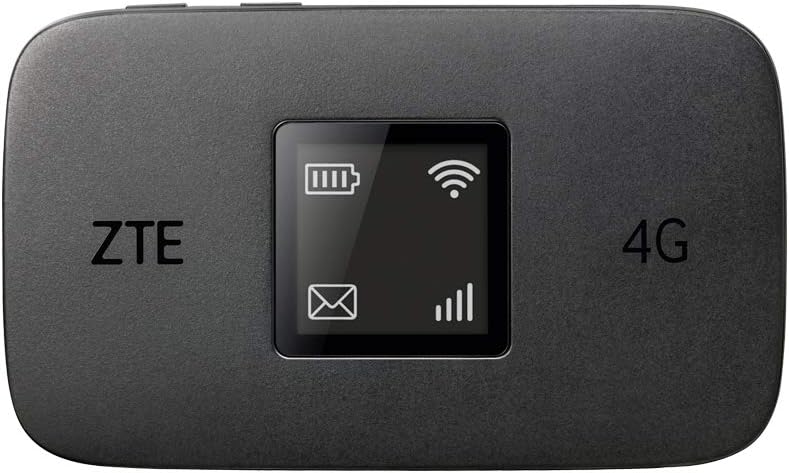
3.1-сүрөт: Фронт view of the ZTE MF971R hotspot, showing the screen with battery, Wi-Fi, and signal indicators.

3.2-сүрөт: Арткы view of the ZTE MF971R hotspot, displaying model information and certifications.
The device features a compact design for portability.

3.3-сүрөт: The ZTE MF971R hotspot held in a hand, illustrating its compact and portable design.
4. Орнотуу
4.1. SIM картаны салуу
- Аппараттын өчүрүлгөнүн текшериңиз.
- Locate the SIM card slot, typically under the battery cover.
- Insert a data-enabled SIM card into the slot with the gold contacts facing down and the notched corner aligned correctly.
- Батареянын капкагын бекем жабыңыз.
Эскертүү: The MF971R is unlocked and compatible with any network's SIM card.
4.2. Аппаратты заряддоо
Before first use, fully charge the device. Connect the supplied USB charging cable to the device's charging port and to a compatible USB power adapter or computer USB port.
4.3. Күйгүзүү / Өчүрүү
- Күйгүзүү үчүн: Экран жарык болгонго чейин Кубат баскычын басып, кармап туруңуз.
- Өчүрүү үчүн: Түзмөк өчүрүлгөнгө чейин Кубат баскычын басып, кармап туруңуз.
5. Иштөө нускамалары
5.1. Түзмөктөрдү хотспотко туташтыруу
The ZTE MF971R can connect up to 32 Wi-Fi enabled devices.
- Ensure your MF971R hotspot is powered on and has an active internet connection (indicated by the signal strength icon on the screen).
- On your Wi-Fi enabled device (e.g., smartphone, laptop, tablet), open the Wi-Fi settings.
- Жеткиликтүү Wi-Fi тармактарын издөө.
- Select the network name (SSID) displayed on your MF971R's screen.
- Enter the Wi-Fi password (Key) also displayed on the MF971R's screen when prompted.
- Түзмөгүңүз интернетке хотспот аркылуу туташып турушу керек.

5.1-сүрөт: The ZTE MF971R hotspot placed on a desk next to a laptop, demonstrating its use in connecting multiple devices.
5.2. Managing Wi-Fi Settings
Advanced Wi-Fi settings, such as changing the SSID or password, can typically be accessed through the device's web interface. Refer to the Quick Start Guide for instructions on accessing the web interface and default login credentials.
6. Техникалык тейлөө
6.1. Батареяга кам көрүү
The MF971R is equipped with a 2000 mAh rechargeable Lithium-ion battery, providing approximately 7 hours of working time.

6.1-сүрөт: A graphic representation of the device's battery, highlighting its 2000 mAh capacity and 7 hours of operating time.
- Аппаратты экстремалдык температурага тийгизүүдөн сактаңыз.
- Батареяны тешпеңиз, бөлүктөргө бөлбөңүз же өзгөртпөңүз.
- Use only the supplied charging cable or a compatible charger.
- Эгерде аппарат узак убакыт бою колдонулбаса, аны 50%га чейин кубаттап, салкын, кургак жерде сактаңыз.
6.2. Тазалоо
Wipe the device with a soft, dry cloth. Avoid using liquid cleaners or aerosols.
7. Кыйынчылыктарды
If you encounter issues with your ZTE MF971R, refer to the following common solutions:
- Интернет байланышы жок:
- SIM карта туура салынганын жана активдүү экенин текшериңиз.
- Check if you have an active data plan with your service provider.
- Verify network coverage in your current location.
- Restart the hotspot and the connected device.
- Жай туташуу ылдамдыгы:
- Туташкан түзмөктөрдүн санын азайтыңыз.
- Move to an area with better network signal.
- Туташкан түзмөктөрдө фондук тиркемелердин ашыкча өткөрүү жөндөмдүүлүгүн талап кылбай турганын текшериңиз.
- Түзмөк күйбөй жатат:
- Батарея заряддалганын текшериңиз. Түзмөктү кубат булагына туташтырыңыз.
- If the battery is completely drained, it may take a few minutes for the charging indicator to appear.
- Wi-Fi'га туташуу мүмкүн эмес:
- Wi-Fi сырсөзүн эки жолу текшериңиз.
- Ensure the hotspot's Wi-Fi is enabled.
- Хотспотту да, кардар түзмөгүн да өчүрүп күйгүзүңүз.
For further assistance, consult the Quick Start Guide or contact customer support.
8. Техникалык шарттар
| Өзгөчөлүк | Description |
|---|---|
| Бренд | ZTE |
| Модель аты | MF971R |
| Түс | Кара |
| Операция системасы | RouterOS |
| Байланыш технологиясы | Wi-Fi |
| Өзгөчөлүктөр | Dual-band frequency, Portable design, Long battery life |
| Шайкеш түзмөктөр | Personal computer, Laptop, Smartphone, Tablet |
| Батарея түрү | Литий-ион (кайра заряддалуучу) |
| Батарея сыйымдуулугу | 2000 мАч |
| Жумуш убактысы | 7 саатка чейин |
| Өлчөмдөрү (L x W x Y) | 109 x 65 x 14.05 мм |
| Зымсыз стандарт | 802.11ac, 802.11b, 802.11g, 802.11n |
| Frequency Band | Dual band |
| Жүктөө ылдамдыгы | 300 Мбит/сек чейин |
| Жүктөө ылдамдыгы | 50 Мбит/сек чейин |
| Максималдуу туташкан түзмөктөр | 32 |
| Колдоого алынган топтор | LTE FDD B1, 3, 5, 7, 8, 20, 28 - TDD B38, B40, B41 - UMTS B1, 2,5, 8 - GSM quad-band |
9. Кепилдик жана колдоо
The ZTE MF971R comes with a 2-year warranty. For warranty claims or technical support, please refer to the contact information provided in your Quick Start Guide or the retailer's support channels.

9.1-сүрөт: Graphic showing icons for "Secure Transaction" and "Technical Support," along with text indicating a "2 year full UK warranty."


