MOUNTUP MU0034 Single Monitor Desk Mount Instruction Manual
Бренд: MOUNTUP | Модел: MU0034
1. Киришүү
This manual provides detailed instructions for the installation, operation, and maintenance of your MOUNTUP MU0034 Single Monitor Desk Mount. Please read this manual thoroughly before installation to ensure correct setup and safe operation. This monitor mount is designed to enhance your workspace ergonomics by providing adjustable positioning for a single monitor.
2. Коопсуздук маалыматы
- Орнотуудан мурун бардык компоненттер бар экенин жана бузулбаганын текшериңиз. Эгерде кандайдыр бир бөлүктөрү жок же туура эмес болсо, колдонбоңуз.
- This product is intended for monitors weighing up to 17.6 lbs (8 kg) and screen sizes from 17 to 32 inches. Do not exceed the maximum weight capacity.
- Compatible VESA patterns are 75x75mm and 100x100mm. Verify your monitor's VESA pattern before proceeding.
- Ensure the desk surface is stable and strong enough to support the combined weight of the mount and monitor.
- Бардык бурамаларды бекем тартыңыз, бирок жиптерди чечип албаш үчүн же тетиктерге зыян келтирбеш үчүн ашыкча тартпаңыз.
- Орнотуу учурунда балдарды жана үй жаныбарларын алыс кармаңыз.
- If you have any doubts about the installation process, consult a qualified professional.
3. Пакеттин мазмуну
Сураныч, бардык бөлүктөрү пакетиңизге камтылганын текшериңиз:
- Монитор курал ассамблеясы
- Desk Clamp База
- Grommet Негизги компоненттери
- VESA плитасы
- Hardware Kit (screws, washers, Allen keys)
- Instruction Manual
4. Техникалык шарттар
| Өзгөчөлүк | Спецификация |
|---|---|
| Модель номери | MU0034 |
| Материал | Жылтыратылган алюминий |
| Экрандын өлчөмүнүн шайкештиги | 17" to 32" (flat or curved) |
| Салмак сыйымдуулугу | 17.6 фунтка чейин (8 кг) |
| VESA шайкештиги | 75x75мм, 100x100мм |
| Бийиктигин тууралоо | Up to 11" (16.3" total height adjustment range) |
| Тилтүү диапазону | +45°тан -45°ка чейин |
| Айналма тоо | 360° (arm), 180° (monitor plate) |
| Айлануу | 360° (landscape to portrait) |
| Максималдуу стол калыңдыгы (C-cl)amp) | 3.35" |
| Grommet тешик диаметри | 0.39" - 3.1" |
5. Орнотуу жана орнотуу
The MOUNTUP MU0034 offers two installation options: C-clamp mounting and Grommet mounting. Choose the method suitable for your desk.
5.1. C-Clamp Монтаждоо
This method is for desks without existing grommet holes, or if you prefer clamping to the edge of your desk. Ensure your desk thickness is no more than 3.35 inches.
- C-cl тиркеңизamp: Assemble the C-clamp components to the base of the monitor arm. Position the base on the edge of your desk and tighten the clamp screw until it is secure.
- Монитор үчүн VESA пластинкасын тиркөө: Secure the VESA plate to the back of your monitor using the appropriate screws from the hardware kit. Ensure the screws are tightened securely.
- Slide Monitor onto Arm: Carefully slide the monitor (with the attached VESA plate) onto the monitor arm's VESA head. Ensure it clicks into place or is secured with the provided locking mechanism.
- Чыңалууну тууралоо: Refer to Section 6.1 for adjusting the gas spring tension to match your monitor's weight.

Figure 1: Illustration of C-clamp and Grommet mounting options. The C-clamp is shown securing the mount to the desk edge, while the grommet mount uses a desk hole.
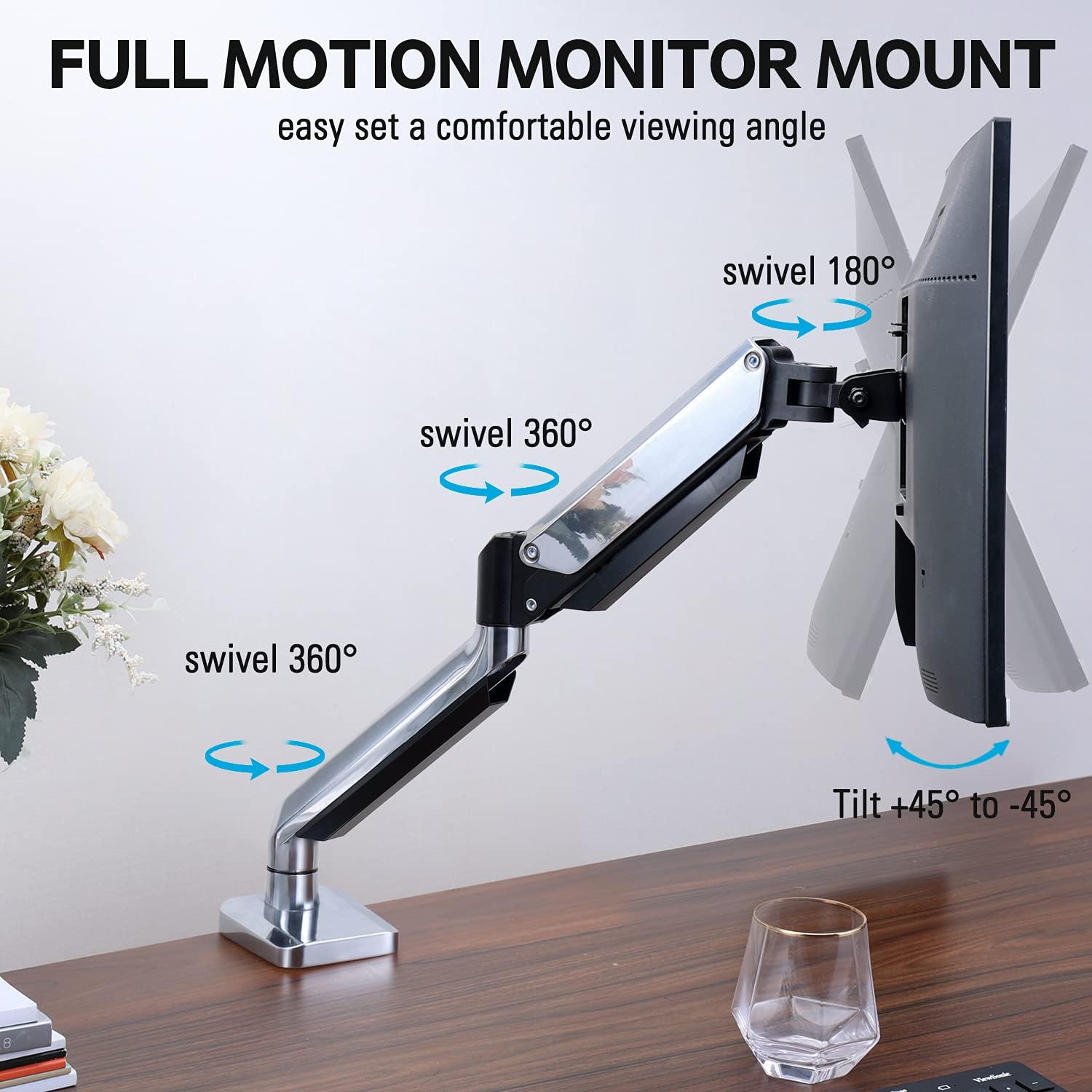
Figure 2: The removable VESA plate being attached to the back of a monitor, then sliding onto the monitor arm for easier installation.
5.2. Громмет орнотуу
This method utilizes an existing hole in your desk. Ensure your desk thickness is no more than 3.35 inches and the grommet hole diameter is between 0.39 and 3.1 inches.
- Assemble Grommet Base: Insert the grommet base components through the desk hole and secure them from underneath the desk using the provided plate and nut.
- Монитор үчүн VESA пластинкасын тиркөө: Secure the VESA plate to the back of your monitor using the appropriate screws from the hardware kit. Ensure the screws are tightened securely.
- Slide Monitor onto Arm: Carefully slide the monitor (with the attached VESA plate) onto the monitor arm's VESA head. Ensure it clicks into place or is secured with the provided locking mechanism.
- Чыңалууну тууралоо: Refer to Section 6.1 for adjusting the gas spring tension to match your monitor's weight.
6. Иштөө жана тууралоо
The MOUNTUP MU0034 monitor arm offers various adjustments for optimal viewсооронуч.
6.1. Газ булагы чыңалуусун жөндөө
The gas spring tension needs to be adjusted to match the weight of your monitor. This ensures the monitor stays in position once adjusted.
- If the monitor drifts down, turn the adjustment screw (usually located on the arm joint) clockwise ("+") to increase tension.
- If the monitor floats up, turn the adjustment screw counter-clockwise ("-") to decrease tension.
- Adjust gradually until the monitor remains stable at any height.
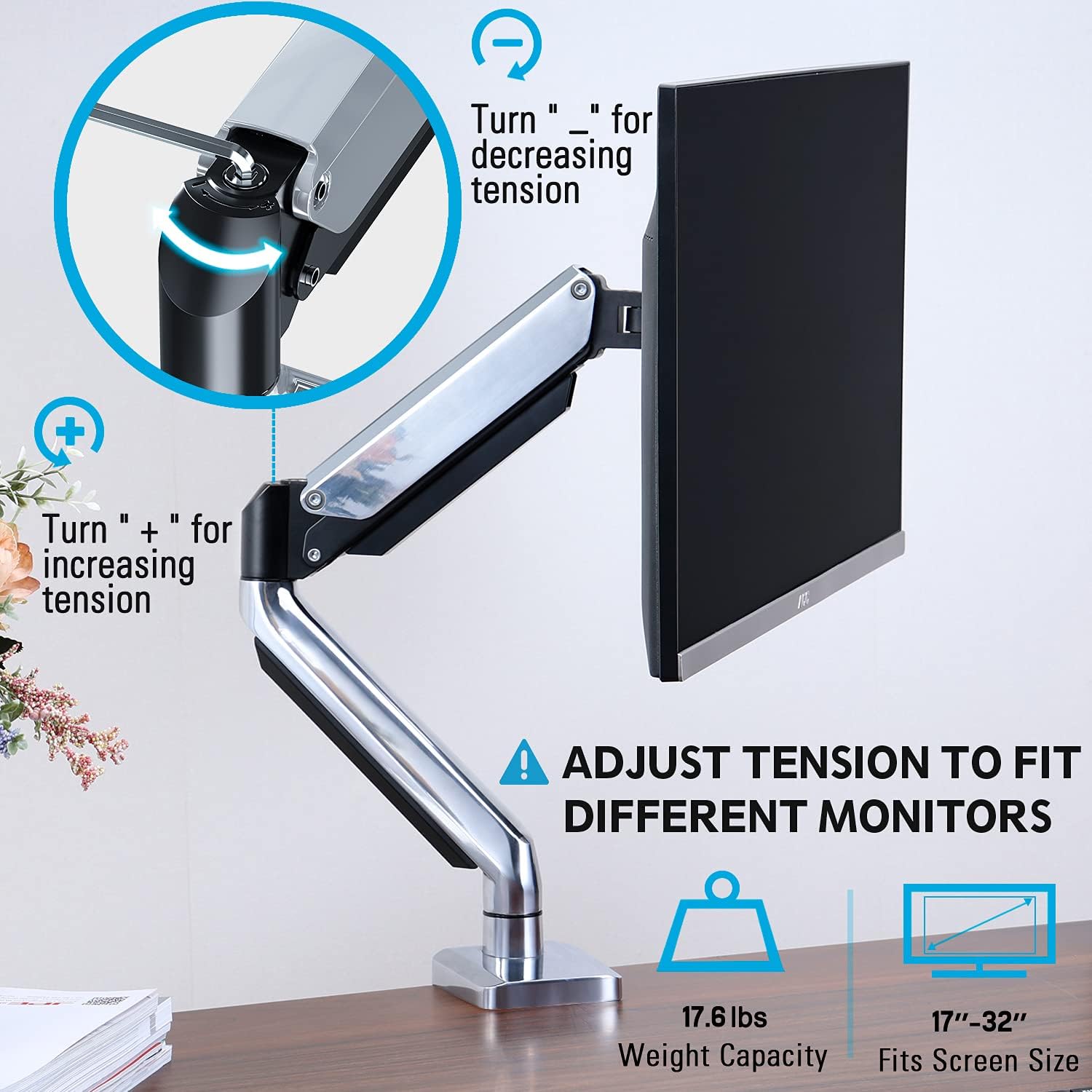
Figure 3: Instructions for adjusting the gas spring tension using an Allen key. Turning clockwise increases tension, counter-clockwise decreases it.
6.2. Бийиктигин тууралоо
Once the gas spring tension is correctly set, you can easily raise or lower your monitor to your desired ergonomic height. The arm allows for up to 11 inches of vertical adjustment.

Figure 4: Diagram illustrating the maximum height adjustment of 11 inches and maximum extension of 17.5 inches.
6.3. Tilt, Swivel, and Rotation
The monitor arm provides full motion capabilities:
- Россия: Adjust the monitor screen +45° to -45° to reduce glare or find a comfortable viewбурч.
- Айлануучу: The arm can swivel 360° at the base and 360° at the middle joint. The monitor plate itself can swivel 180°. This allows for easy screen sharing or repositioning.
- Айлануу: Пейзаждык жана тигинен багыттардын ортосунда которулуу үчүн мониторду 360° буруңуз.

Figure 5: Visual representation of the monitor arm's full motion capabilities, including 360° swivel, 180° swivel at the monitor plate, and +45° to -45° tilt.

Figure 6: An image demonstrating the monitor's ability to rotate 360 degrees, allowing for both landscape and portrait viewрежимдери.
7. Кабелдик башкаруу
The MOUNTUP MU0034 features integrated cable management to keep your workspace tidy.
- Монитор кабелдериңизди (кубат, видео ж.б.) колдун астыңкы бети боюнча өткөрүңүз.
- Use the provided cable clips or covers to secure the cables within the arm channels.
- Ensure cables have enough slack to allow for full range of motion without tension.

Figure 7: Illustration of how cables are routed and organized through the integrated channels on the monitor arm, keeping the desk clear.
8. Техникалык тейлөө
- Бардык бурамалар менен байланыштарды дайыма текшерип, алар бекем бойдон калууда.
- Орноткучту жумшак, d менен тазалаңызamp кездеме. Абразивдүү тазалагычтардан же эриткичтерден качыңыз.
- Газ пружинанын механизмин майлабагыла.
9. Кыйынчылыктарды
| Көйгөй | Мүмкүн себеп | Чечим |
|---|---|---|
| Monitor sags or won't stay up | Монитордун салмагы үчүн газ пружинанын чыңалуусу өтө төмөн. | Increase gas spring tension by turning the adjustment screw clockwise ("+"). |
| Monitor floats up or is hard to push down | Монитордун салмагы үчүн газ пружинасы өтө жогору. | Decrease gas spring tension by turning the adjustment screw counter-clockwise ("-"). |
| Monitor is wobbly | Орнотуу столго бекем бекитилген эмес же VESA пластинасы бекем бекитилген эмес. | Бардык жабдыктарды текшерип, бекемдеңизamp/grommet screws and VESA plate screws. |
| Difficulty rotating/tilting monitor | Муундар өтө катуу. | Loosen the corresponding joint screws slightly (do not remove). |
10. Кепилдик жана колдоо
The MOUNTUP MU0034 Single Monitor Desk Mount is backed by a 3-year support period. For technical assistance, missing parts, or warranty claims, please contact MOUNTUP customer support through their official channels or the retailer where the product was purchased.
Сураныч, кепилдик максаттары үчүн сатып алганыңыздын далилин сактап коюңуз.


